
ultramock · Launch Video Breakdown: Hook, Pacing & Motion Design
A major update to the mobile version of ultramock, the drag-and-drop mockup tool, with a focus on details.
Scene-by-scene timeline & spoken transcript
The Hook
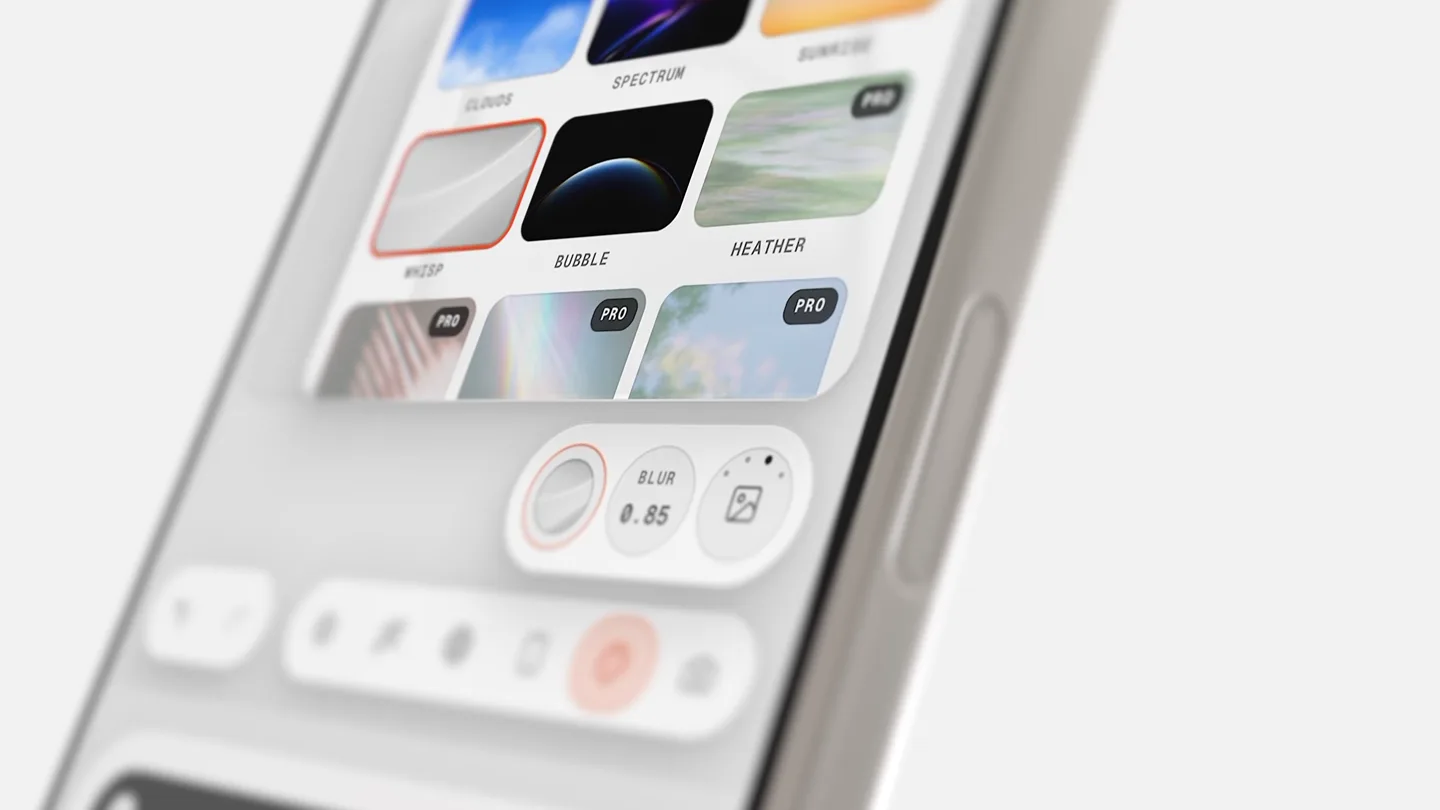
Precision Controls & Scene Selection
“(No spoken dialogue — ambient visual with subtle UI clicks implied by motion.)”
- On screen
- FOV 26° SCENE BLUR 0.85 CLOUDS SPECTRUM SUNRISE WHISP BUBBLE HEATHER PRO PRO PRO
- Camera
- Close-up, slightly angled shot of a smartphone screen, with a subtle, slow pan and zoom to highlight UI elements.
- Motion
- Smooth UI element reveals, subtle scaling and opacity changes on button presses, and a gentle camera drift.
Feature Teaser
Advanced Visual Effects & Sharpening
“(No spoken dialogue — ambient visual with subtle UI clicks implied by motion.)”
- On screen
- PIXEL GRID CHROMATIC ABB. BLOOM SCREEN FADE DEPTH GHOST [SHARPEN] 30 0 25 50 75 SHARP 53
- Camera
- Maintains a close-up, slightly angled perspective, with a focus shift and subtle vertical pan to reveal new menu options.
- Motion
- Scrolling menu animation, slider interaction with real-time value updates, and a soft focus transition.
Product Reveal
Refined UI Interactions
“(No spoken dialogue — ambient visual with subtle UI clicks implied by motion.)”
- On screen
- SHARP 53 REFL 99 SETTINGS
- Camera
- Slight pull-back and re-center, maintaining the angled view, to show a broader set of bottom navigation icons.
- Motion
- Icon highlight and selection animation, subtle button press feedback, and a clean transition between UI states.
Call to Action
Accessibility & Customization
“(No spoken dialogue — ambient visual with subtle UI clicks implied by motion.)”
- On screen
- SETTINGS LEFT HANDED
- Camera
- Static close-up, angled shot, focusing on the bottom navigation bar as UI elements shift.
- Motion
- Horizontal UI element reordering animation, button highlight, and a clear visual indication of a setting change.
Motion design primitives
Synthesizable in Remotion · key components of the ultramock-ui-showcase template.
FloatingUIReveal
UI elements (buttons, sliders, menus) appear and expand from a central point or slide in with a soft, spring-like motion, often accompanied by a subtle background blur or depth-of-field shift.
+ Code construction recipe
Utilize Remotion's <AbsoluteFill> for layering. Animate opacity, scale, and position using `spring()` for a natural bounce. Implement `interpolate()` for blur effects on background elements based on UI visibility.
InteractiveSliderFeedback
A numerical value updates in real-time as a slider thumb moves, with the slider track visually filling or changing color to indicate progress. The associated text label also animates its value.
+ Code construction recipe
Create a custom component with `useCurrentFrame()` and `interpolate()` to map slider position to numerical values. Use `spring()` for the slider thumb's movement and `measureText()` for dynamic text resizing or positioning.
DynamicToolbarReorder
A row of interactive icons or buttons smoothly reorders itself horizontally, with elements sliding into new positions to accommodate a layout change (e.g., left-handed mode).
+ Code construction recipe
Manage component positions using `x` and `y` coordinates. Animate these coordinates with `spring()` or `tween()` for smooth transitions. Use `layoutEffect()` to recalculate positions based on new order.
Style DNA & aesthetic system
Visual aesthetic
Typography
Motion
Special effects
Pacing & rhythm
Conceptual story rhythm
- 1
Initial Interaction Focus
Purpose. Introduce the core interaction model and highlight a key feature's granular control.
Execution. Close-up on a specific UI control (FOV slider), demonstrating its functionality with precise numerical feedback.
- 2
Feature Exploration
Purpose. Showcase the breadth of customization options and visual effects available.
Execution. Scrolling through a menu of scene presets and then adjusting a 'Sharpen' slider, revealing the impact on the visual output.
- 3
Navigation & Settings
Purpose. Demonstrate the intuitive navigation and access to deeper settings.
Execution. Highlighting the bottom navigation bar and selecting the 'Settings' icon, followed by a menu reveal.
- 4
Personalization Highlight
Purpose. Emphasize user-centric design and accessibility features.
Execution. Activating 'Left Handed' mode, showing the UI elements dynamically reordering to adapt.
Remix in Animatiq Studio
Master remix prompt · agent-ready
Sample remix
Objective
A user wants to quickly adjust their smart home lighting and activate a 'Movie Night' routine.How the recipe adapts
The FloatingUIReveal primitive would be used when a user taps a room, revealing individual light controls as cards. InteractiveSliderFeedback would animate the light dimming slider, showing real-time brightness percentages. DynamicToolbarReorder would be applied to the 'Routines' section, allowing users to drag and drop routine icons to prioritize them, with the 'Movie Night' routine sliding into the top position.Remix blueprint · ultramock-ui-showcase
Scene durations (4 scenes, 14.1s)
Key Remotion components
Related Creative Tools Product Launches
Explore all Creative Tools launches →
Anthropic Labs launches Claude Design, which turns conversation into prototypes, slides and one-pagers, powered by Claude Opus 4.7.

A vibe design partner with an AI-native canvas for turning ideas into UI.

Meet our new browser—ChatGPT Atlas. Available today on macOS: