
Y Combinator · Launch Video Breakdown: Hook, Pacing & Motion Design
OpenClaw is a new viral and scarily effective virtual assistant. But it's so hard to set up that even most engineers give up. @usebits_inc will set up your secure OpenClaw instance on the cloud, ba…
Scene-by-scene timeline & spoken transcript
The Hook
Effortless OpenClaw Setup
“(No spoken dialogue — Upbeat electronic music with a driving beat and synth elements. High-energy audio transitions with risers and sub-bass drops.)”
- On screen
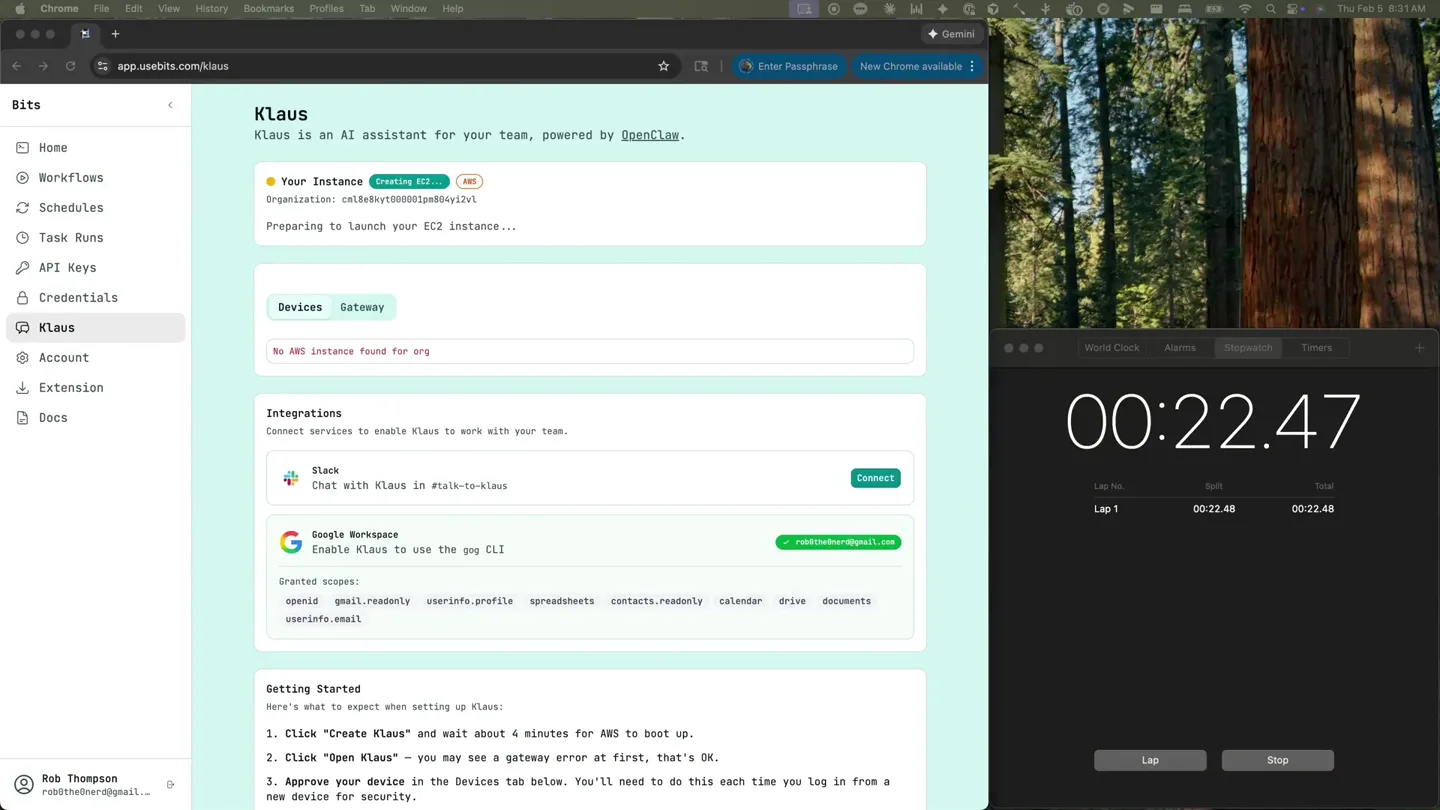
- Klaus Klaus is an AI assistant for your team, powered by OpenClaw. Your Instance Creating EC2... AWS Organization: ca11e0e97000000c2a0b2v1 Preparing to launch your EC2 Instance... Devices Gateway No AWS instance found for org Integrations Connect services to enable Klaus to work with your team. slack Chat with Klaus in #talk-to-klaus Connect Google Workspace Enable Klaus to use the gpg CLI rob@thenerd@email.com Granted scopes: openid gmail.readonly userinfo.profile spreadsheets contacts.readonly calendar drive documents userinfo.email Getting Started Here's what to expect when setting up Klaus: 1. Click "Create Klaus" and wait about 4 minutes for AWS to boot up. 2. Click "Open Klaus" - you may see a gateway error at first, that's OK. 3. Approve your device in the Devices tab below. You'll need to do this each time you log in from a new device for security.
- Camera
- Static screen capture of a web application interface, zoomed in to show details of the setup process.
- Motion
- UI element highlighting and subtle cursor movements to guide attention. Text appears to be pre-rendered or quickly typed.
Product Reveal
Activating Klaus Instance
“(No spoken dialogue — The electronic music continues with a consistent, energetic rhythm. Sound design emphasizes UI interactions.)”
- On screen
- Klaus Klaus is an AI assistant for your team, powered by OpenClaw. Your Instance active AWS Organization: ca11e0e97000000c2a0b2v1 Open Klaus beta Delete Devices Gateway Loading devices... Integrations Connect services to enable Klaus to work with your team. slack Chat with Klaus in #talk-to-klaus Connect Google Workspace Enable Klaus to use the gpg CLI rob@thenerd@email.com Granted scopes: openid gmail.readonly userinfo.profile spreadsheets contacts.readonly calendar drive documents userinfo.email Getting Started Here's what to expect when setting up Klaus: 1. Click "Create Klaus" and wait about 4 minutes for AWS to boot up. 2. Click "Open Klaus" - you may see a gateway error at first, that's OK. 3. Approve your device in the Devices tab below. You'll need to do this each time you log in from a new device for security.
- Camera
- Static screen capture, focusing on the 'Your Instance' section transitioning from 'Creating EC2...' to 'active'.
- Motion
- State change animation within the UI, showing a progress indicator and text updates. Cursor interaction simulates user input.
Feature Teaser
Device Pairing & Integration
“(No spoken dialogue — The energetic electronic track maintains its tempo. UI sound effects accompany clicks and loading states.)”
- On screen
- Klaus Klaus is an AI assistant for your team, powered by OpenClaw. Your Instance active AWS Organization: ca11e0e97000000c2a0b2v1 Open Klaus Delete Devices Gateway Pending Pairing Requests (1) Approve All (1) Refresh a03d3dfacc6034996d0bd0c4d525df1a6dc1... Pending Platform: Client: Mode: Role: Requested: macOSIntel openclaw-control-ui webuser operator 1s ago Paired Devices (1) 3c7d8444636db1841fc209bb9832636d4ef5db7ac... Paired Platform: Client: Mode: Role: Paired: linux cli cli operator 2s ago Integrations Connect services to enable Klaus to work with your team. slack Chat with Klaus in #talk-to-klaus Connect Google Workspace Enable Klaus to use the gpg CLI rob@thenerd@email.com Granted scopes: openid gmail.readonly userinfo.profile spreadsheets contacts.readonly calendar drive documents userinfo.email
- Camera
- Static screen capture, highlighting the 'Devices' tab and the process of approving pairing requests.
- Motion
- Simulated cursor clicks and text input, with UI elements dynamically appearing and updating to reflect the pairing process. A subtle 'refreshing' animation is visible.
Feature Teaser
Slack Integration & Chat
“(No spoken dialogue — The driving electronic music continues, building anticipation. Sound effects for typing and message sending are present.)”
- On screen
- OPENCLAW Chat Direct gateway chat session for quick interventions. agent:t.main:main Hello dear Klaus! You 0:33 AM Message (+ to send, Shift+ to for line breaks, images) Stop Queue Slack App Installation Add to Slack
- Camera
- Transition from the web app to a Slack interface, then back to the web app's chat interface. The camera follows the user's interaction.
- Motion
- Seamless screen transitions between different applications. Typing animation and message bubble appearance simulate real-time chat interaction. Cursor movement guides the viewer through the integration steps.
Call to Action
Real-time AI Assistant in Action
“(No spoken dialogue — The electronic music reaches a peak, maintaining its high energy. Typing and message notification sounds enhance the experience.)”
- On screen
- OPENCLAW Chat Direct gateway chat session for quick interventions. agent:t.main:main Health: OK Hello dear Klaus! You 0:33 AM Hey Klaus, huh? I like it. So... I just came online, and I'm looking at a fresh workspace here. This is day one for me. You seem to already know what to call me, which is perfect - but I'd love to know more about you, and figure out the rest of who I am. What should I call you? And what am I to you - just an assistant, or something more specific? Want to help me fill in the blanks? Assistant 0:35 AM Your Slack user id: U0A0KJF71 Pairing code: Y2FCRUWIK Ask the bot owner to approve with: openclaw pairing approve slack <code> Message (+ to send, Shift+ to for line breaks, images) New session Send Got it! Let me approve your Slack pairing right now. exec Approved Slack user U0A0KJF71 exec Approved slack server U0A0KJF71. Perfect! You're approved and connected via Slack now. So - back to getting to know each other. I'm Klaus, apparently. Who are you, and how do you want me to be? Let's figure this out together. Message (+ to send, Shift+ to for line breaks, images) What's the top story on HN today? rob@theNerd 0:34 AM Klaus 0:34 AM The top story on HN right now is: "Don't rent the cloud, own from comma.ai • 758 points by Torq, 10 hours ago • 295 comments • Link: https://blog.comma.ai/datascrts/ Looks like comma.ai is making the case for owning your own datacenter infrastructure instead of renting cloud resources. Pretty spicy take given the current cloud dominance!
- Camera
- Dynamic screen capture, showing real-time chat interactions within the OpenClaw interface and then Slack, demonstrating the AI's capabilities.
- Motion
- Rapid typing animation, message bubble reveals, and smooth scrolling within chat interfaces. The cursor actively highlights key information and simulates user input and interaction.
Motion design primitives
Synthesizable in Remotion · key components of the ui-driven-dev-tool-launch template.
UIPanelStateTransition
A UI panel or section smoothly transitions its state, such as changing text, updating a status indicator (e.g., 'Creating EC2...' to 'active'), or revealing new interactive elements. This often involves a subtle background color shift or border animation.
+ Code construction recipe
Use `interpolate` for background color changes and opacity fades. For text updates, use `spring` animations for a bouncy reveal or a simple `opacity` transition. Implement conditional rendering for different UI states.
SimulatedCursorInteraction
A realistic cursor moves across the screen, hovers over elements, clicks, and types text. The movement is fluid and purposeful, guiding the viewer's eye to key interactive areas.
+ Code construction recipe
Track cursor position using `interpolate` over a predefined path (SVG path or array of coordinates). Simulate clicks with a quick scale down/up animation on the target element. Typing can be achieved by revealing text character by character with a `delay` and `stagger` effect.
ChatBubbleReveal
Chat messages appear dynamically, either by typing out character by character or by fading/sliding in as complete bubbles. Responses from the AI or other users appear in a distinct style.
+ Code construction recipe
For typing, use `splitText` and `stagger` `opacity` and `y` position for each character. For full bubble reveals, use `spring` for `scale` and `opacity` on the message container, potentially with a slight `y` translation for a 'pop-up' effect. Differentiate sender/receiver bubbles with distinct background colors and alignment.
Style DNA & aesthetic system
Visual aesthetic
Typography
Motion
Special effects
Pacing & rhythm
Conceptual story rhythm
- 1
Initial Setup & Activation
Purpose. To quickly demonstrate the ease and speed of getting the OpenClaw instance and Klaus AI assistant up and running.
Execution. Rapid UI state changes, progress indicators, and simulated clicks showing the instance becoming 'active'.
- 2
Device & Integration Configuration
Purpose. To highlight the secure and straightforward process of connecting devices and integrating with essential tools like Slack.
Execution. Cursor interactions approving pairing requests and navigating to the Slack integration page, followed by a quick 'Connect' action.
- 3
First Interaction & Pairing
Purpose. To show the initial conversation with Klaus and the final steps of securely pairing the AI with the user's Slack.
Execution. Typing in the OpenClaw chat interface, receiving instructions, and then a quick transition to Slack for the final approval.
- 4
Real-world Application & Value
Purpose. To demonstrate Klaus's immediate utility by answering a practical question, showcasing its intelligence and integration.
Execution. A user typing a query in Slack, followed by Klaus's detailed, relevant response appearing instantly, highlighting the AI's capabilities.
Remix in Animatiq Studio
Master remix prompt · agent-ready
Sample remix
Objective
Launch a new AI-powered code refactoring tool called 'RefactorGenie' that integrates with popular IDEs and version control systems.How the recipe adapts
The video would start with a quick setup of RefactorGenie within a VS Code environment, showing a 'Refactoring Instance' becoming active. Then, it would demonstrate integrating with a GitHub repository, simulating a pull request being opened. The core demonstration would involve a simulated cursor selecting a code block, triggering RefactorGenie, and then chat-like bubbles appearing with suggested refactorings and explanations directly within the IDE, followed by an 'Apply Refactoring' button click. The fast cuts and energetic music would highlight the speed and seamlessness of the refactoring process.Remix blueprint · ui-driven-dev-tool-launch
Scene durations (5 scenes, 55.8s)
Key Remotion components
Related Developer Tools Product Launches
Explore all Developer Tools launches →
xAI opens voice cloning on its API: build a custom voice in about two minutes or pick from 80+ voices in 28 languages.

Claude can now operate your Mac, opening apps, browsing and filling spreadsheets, as a research preview in Cowork and Claude Code.

Agentic CLI for coding, building apps, and automating workflows.