
Mona Biasia · Launch Video Breakdown: Hook, Pacing & Motion Design
A public skill for voxel icons, plus img2threejs to turn them into real 3D you can play with.
Scene-by-scene timeline & spoken transcript
The Hook
Interactive Voxel Icon Showcase
“(No spoken dialogue — Silent video with ambient visual rhythm.)”
- On screen
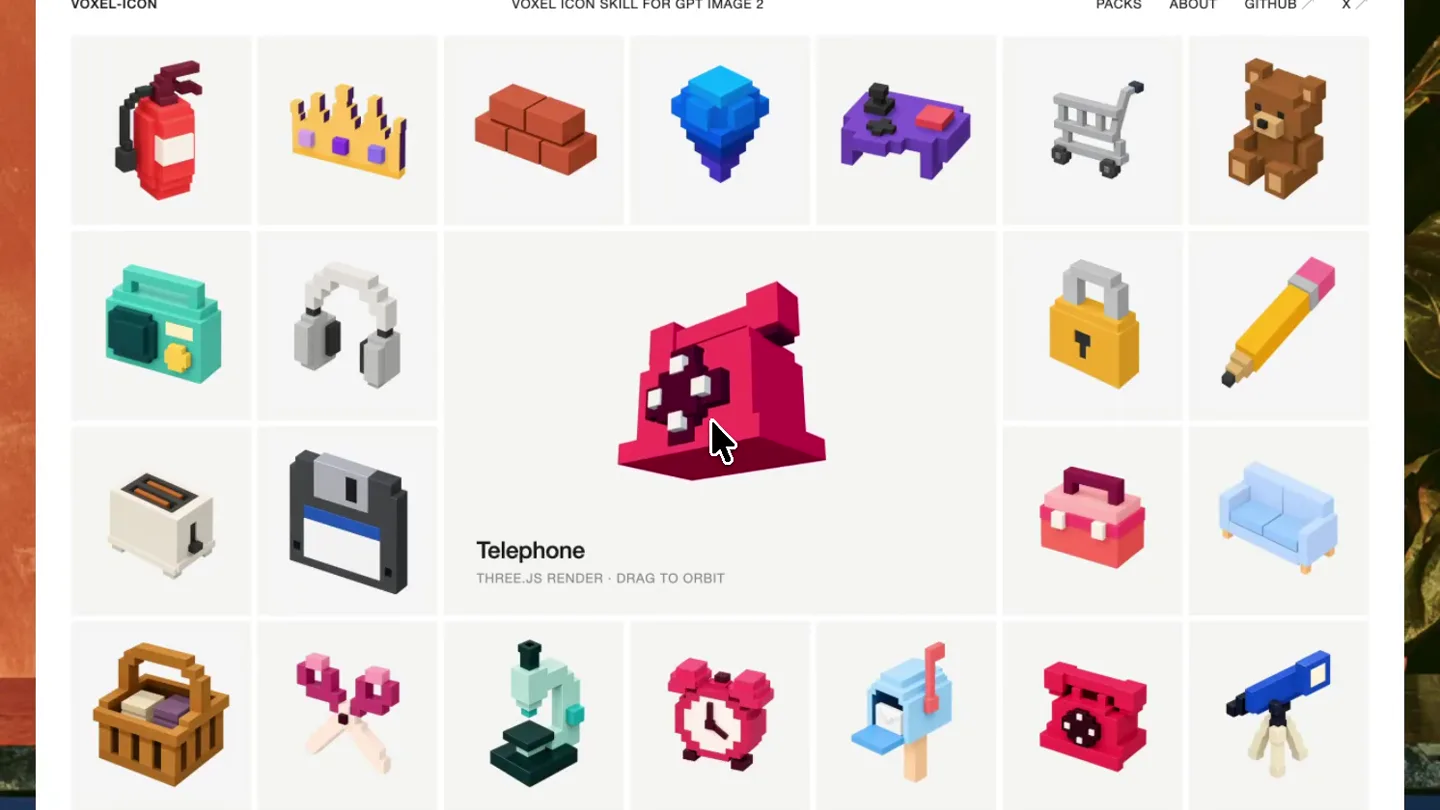
- voxel-icon.vercel.app voxel-icon VOXEL ICON SKILL FOR GPT IMAGE 2 PACKS ABOUT GITHUB Telephone THREE.JS RENDER | DRAG TO ORBIT npx skills add BIAsia/voxel-icon NATIVE 3D 30 FREE | 580 IN PACK
- Camera
- Static, wide shot of a browser window displaying a grid of voxel icons. A mouse cursor interacts with the icons.
- Motion
- Mouse cursor interaction, hover states revealing icon names and descriptions, and 3D rotation of selected voxel icons.
Feature Teaser
Exploring Icon Details and Interaction
“(No spoken dialogue — Silent video with ambient visual rhythm.)”
- On screen
- voxel-icon.vercel.app voxel-icon VOXEL ICON SKILL FOR GPT IMAGE 2 PACKS ABOUT GITHUB Alarm Clock THREE.JS RENDER | DRAG TO ORBIT npx skills add BIAsia/voxel-icon NATIVE 3D 30 FREE | 580 IN PACK
- Camera
- Static, wide shot of the browser window. The mouse cursor continues to interact with different voxel icons.
- Motion
- Sequential hover and click interactions, demonstrating the 3D render and drag-to-orbit functionality for various icons.
Product Reveal
Highlighting Icon Variety and Core Value
“(No spoken dialogue — Silent video with ambient visual rhythm.)”
- On screen
- voxel-icon.vercel.app voxel-icon VOXEL ICON SKILL FOR GPT IMAGE 2 PACKS ABOUT GITHUB Fire Extinguisher THREE.JS RENDER | DRAG TO ORBIT Teddy Bear THREE.JS RENDER | DRAG TO ORBIT voxel-icon An agent skill for GPT Image 2. Objects, emoji, and concepts rebuilt as macro-voxel acrylic icons - one coarse module grid, one palette family per shape. The pool keeps growing on its own. npx skills add BIAsia/voxel-icon NATIVE 3D 30 FREE | 580 IN PACK
- Camera
- Static, wide shot of the browser window. The mouse cursor continues to interact, then a central text overlay appears.
- Motion
- Mouse cursor interaction, followed by a smooth fade-in and scale-up animation for the central product description text.
Call to Action
Showcasing GIF Export and Further Interaction
“(No spoken dialogue — Silent video with ambient visual rhythm.)”
- On screen
- voxel-icon.vercel.app voxel-icon VOXEL ICON SKILL FOR GPT IMAGE 2 PACKS ABOUT GITHUB Telephone GIF LOOP Alarm Clock GIF LOOP Fire Extinguisher GIF LOOP npx skills add BIAsia/voxel-icon NATIVE GIF 30 FREE | 580 IN PACK
- Camera
- Static, wide shot of the browser window. The mouse cursor interacts with the 'GIF' toggle and then with icons.
- Motion
- Mouse cursor interaction, demonstrating the 'GIF' toggle, and then displaying looping GIF animations of the voxel icons.
Motion design primitives
Synthesizable in Remotion · key components of the interactive-grid-showcase template.
VoxelIconHover3D
When a mouse cursor hovers over a voxel icon, the icon smoothly scales up slightly, its name and description appear below, and it becomes rotatable in 3D space via mouse drag.
+ Code construction recipe
Utilize `useCurrentFrame` and `interpolate` for scale and opacity changes on hover. Implement a `useRef` for the 3D model and `react-three-fiber` for rendering, with `OrbitControls` for drag-to-orbit functionality. Trigger text visibility with `spring` animations.
CentralTextOverlayFade
A block of descriptive text appears in the center of the screen, fading in and slightly scaling up from its initial position.
+ Code construction recipe
Employ `spring` for opacity and `scale` transformations. Use `AbsoluteFill` to center the text, and `interpolate` for a subtle `translateY` effect during the fade-in to give it a 'rise' feel.
ToggleStateIconLoop
A UI toggle switches a display mode, causing selected voxel icons to animate as looping GIFs, demonstrating their dynamic potential.
+ Code construction recipe
Manage state with `useState` for the toggle. When 'GIF' mode is active, render a `Sequence` of pre-rendered GIF frames or use a `Loop` component for a `Video` or `Image` sequence. Apply `spring` for the toggle button's visual feedback.
Style DNA & aesthetic system
Visual aesthetic
Typography
Motion
Special effects
Pacing & rhythm
Conceptual story rhythm
- 1
Interactive Discovery
Purpose. Immediately engage the viewer by demonstrating the interactive nature of the voxel icons and the platform.
Execution. Mouse cursor actively hovers and clicks on various icons, triggering 3D rotations and revealing descriptive text.
- 2
Feature Exploration
Purpose. Showcase the depth of interaction and the variety of icons available, highlighting the 'drag to orbit' feature.
Execution. Different icons are selected and rotated, emphasizing the 3D rendering capability and the breadth of the icon library.
- 3
Core Value Proposition
Purpose. Clearly articulate what the product is and its unique technological breakthrough.
Execution. A central text overlay appears, explaining 'voxel-icon' as an agent skill for GPT Image 2, detailing its creation and growth.
- 4
Dynamic Application & CTA
Purpose. Illustrate a practical application (GIF export) and provide a clear call to action for developers.
Execution. The 'GIF' toggle is activated, showing icons animating in a loop, followed by the 'npx skills add BIAsia/voxel-icon' command.
Remix in Animatiq Studio
Master remix prompt · agent-ready
Sample remix
Objective
Launch a new web-based procedural music generation tool called 'SynthFlow AI'.How the recipe adapts
The browser UI remains, but the grid now displays 'sound modules' like 'Bassline Generator', 'Drum Sequencer', 'Ambient Pad'. Hovering over 'Bassline Generator' plays a short bass loop and shows 'Tempo: 120 BPM, Key: C Minor'. Clicking a module opens a mini-editor. The central text explains 'SynthFlow AI: AI-powered procedural music generation for creators'. The 'GIF' button becomes 'Loop', and clicking it makes the waveform within the module animate. The final call to action is 'npm install synthflow-ai'.Remix blueprint · interactive-grid-showcase
Scene durations (4 scenes, 17.6s)
Key Remotion components
Related Creative Tools Product Launches
Explore all Creative Tools launches →
Anthropic Labs launches Claude Design, which turns conversation into prototypes, slides and one-pagers, powered by Claude Opus 4.7.

A vibe design partner with an AI-native canvas for turning ideas into UI.

Your work tools in Claude are now available on mobile. Explore Figma designs, create Canva slides, check Amplitude dashboards, all from your phone. Give it a try: