
Warp · Launch Video Breakdown: Hook, Pacing & Motion Design
No extra CLI on the remote machine. Run `! ssh` and work alongside the agent over SSH.
Scene-by-scene timeline & spoken transcript
The Hook
Seamless Remote SSH Connection
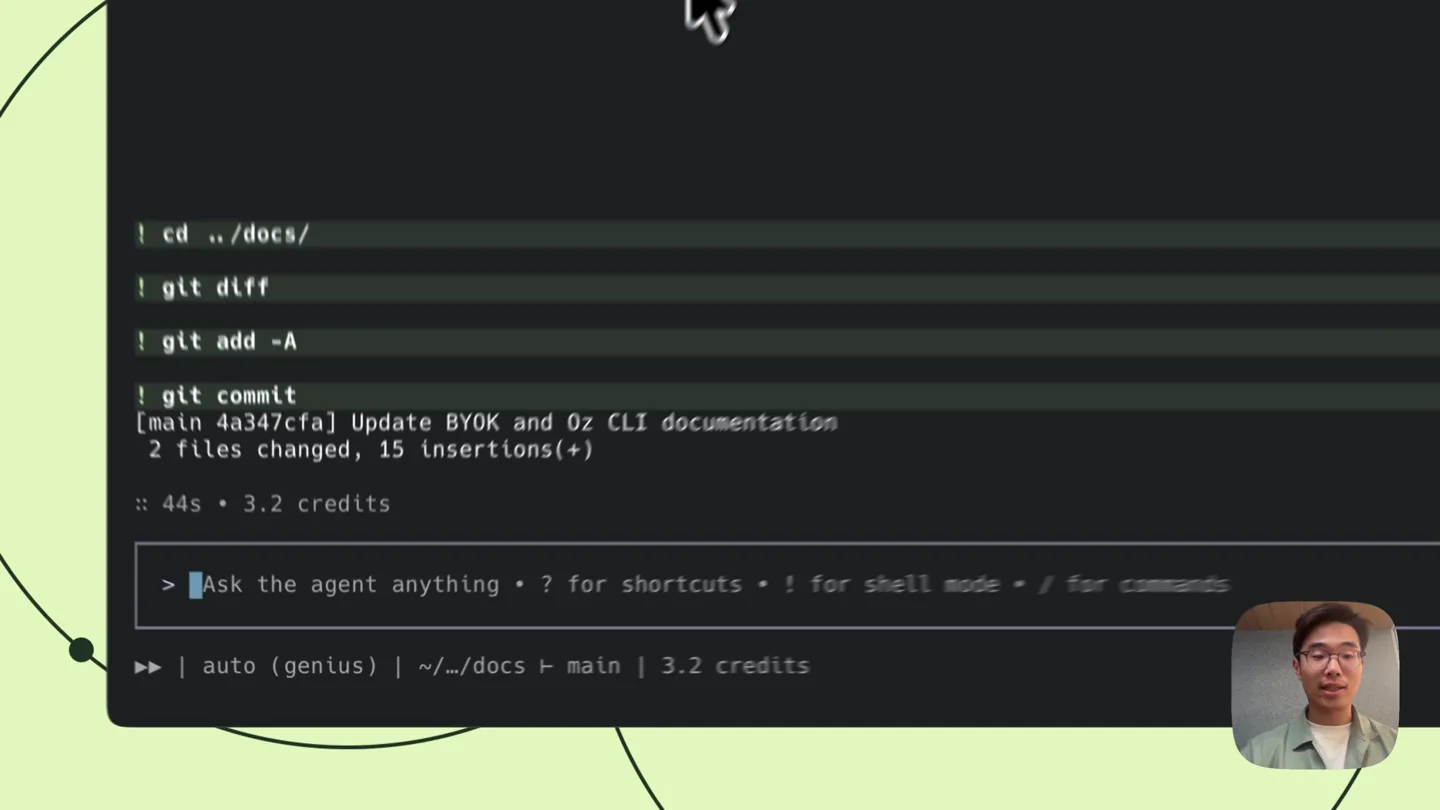
“So here I am in my local Warp terminal. I'm going to run a git commit. And now I want to work on a remote machine. So I'm going to run ! ssh kevin-test.devbox.namespace. And now I'm connected to my remote machine.”
- On screen
- ! cd ../docs/ ! git diff ! git add -A ! git commit [main 4a347cfa] Update BYOK and Oz CLI documentation 2 files changed, 15 insertions(+) :: 44s • 3.2 credits > Ask the agent anything • ? for shortcuts • ! for shell mode • / for commands ! auto (genius) | ~/docs | main | 3.2 credits ! ssh Shell mode ~/docs | main ! ssh kevin-test ! ssh kevin-test.devbox.namespace :: Instance status: pending Ctrl + Shift + ⏎ to use agent :: Instance status: running Connecting to rgsqq52bg0toe ... Warning: Permanently added 'kevin-test.devbox.namespace' (RSA) to the list of known hosts. :: 44s • 3.2 credits ! ls Shell mode /workspaces
- Camera
- Static medium shot of the presenter in the bottom right corner, with the terminal UI occupying the majority of the screen. The terminal UI is static, showing command line input and output.
- Motion
- Direct screen recording with live typing and command execution. Minimal UI animation, primarily text appearing as typed or outputted.
Product Reveal
AI-Powered Agent for Documentation Edits
“I'm going to run ls to see what's in this directory. I'm going to cd into docs. And now I want to ask the agent to make a change to the documentation. So I'm going to say, 'Hey, can you add 'built by Warp' at the start of our agent CLI documentation?'”
- On screen
- ! ls docs gitbook go linux warp warp-internal warp-scratch warp-server ! cd docs :: 44s • 3.2 credits > Ask the agent anything • ? for shortcuts • ! for shell mode • / for commands ! auto (genius) | /workspaces/docs | 3.2 credits > Hey can you add "built by warp" > Hey can you add "built by warp" at the start of our agent cli documentation :: Warping... (3s) ✓ Found 11 files matching *agent*cli*, *cli*agent* :: Warping... (1s) > Ask the agent anything • ? for shortcuts • ! for shell mode • / for commands ! auto (genius) | /workspaces/docs | 7.9 credits Generating command... :: Warping... (6s) ✓ Ran python3 -c '<PY>' from pathlib import Path for p in sorted(Path('/workspaces/docs/src/content/agent-platform/cli-agents').glob('*.mdx')): print(f'--- {p.relative_to(Path('/workspaces/docs'))} ---') print('\n'.join(p.read_text().splitlines()[:30])) <PY> The cli-agents folder documents third-party CLI agents (Claude Code, Codex, etc.) running inside Warp - not Warp's own agent CLI. Let me check the reference/cli/agent-profiles.mdx and search more broadly for Warp's own agent CLI docs. ✓ Grepped for agent cli, warp agent, headless in /workspaces/docs/src/content/docs, 11 matching files ✓ Found 11 files matching *.mdx ✓ Ran `sed -n '1,60p' /workspaces/docs/src/content/reference/cli/index.mdx` ✓ Ran `grep -n "" /workspaces/docs/src/content/docs/reference/cli/index.mdx | sed -n '1,12p'` I found the file: src/content/docs/reference/cli/index.mdx, the "Oz CLI reference" - Warp's agent CLI documentation. I'll add "Built by Warp" at the top of the rendered content. ✓ Ran `cd /workspaces/docs && python3 -c '<PY>' import re p = Path('/src/content/docs/reference/cli/index.mdx') text = open(p).read() marker = "import { Tabs, TabItem } from '@astrojs/starlight/components';\n\n" assert marker in text text = text.replace(marker, marker + "**Built by Warp**\n\n", 1) open(p, 'w').write(text) print("done") <PY> sed -n '1,12p' src/content/docs/reference/cli/index.mdx' Added 'Built by Warp' at the top of src/content/docs/reference/cli/index.mdx (the Oz CLI reference doc), right before the intro paragraph. :: 56s • 15 credits ! git diff diff --git a/src/content/docs/reference/cli/index.mdx b/src/content/docs/reference/cli/index.mdx index 2c9f5a3..4b0ff16 100644 --- a/src/content/docs/reference/cli/index.mdx +++ b/src/content/docs/reference/cli/index.mdx @@ -0,0 +1,8 @@ description: import { Tabs, TabItem } from '@astrojs/starlight/components'; **Built by Warp** The Oz CLI is the command-line tool for running and managing Warp's cloud agents from any terminal, script, or CI pipeline. Use it to start agents locally or in the cloud, connect KCP servers, configure integrations, and authenticate without requiring the Warp desktop app. ::note
- Camera
- Static medium shot of the presenter, with the terminal UI showing the AI agent processing the request and displaying the executed commands and file changes.
- Motion
- Live typing and command output, with a 'Warping...' loading animation. The terminal content scrolls to reveal the agent's actions and the resulting diff.
Feature Teaser
Verifying Changes with Git Diff
“And now I can run a git diff to confirm that the agent made the change that I asked for. And you can see that it added 'built by Warp' at the top of the documentation. So that's how you can use Warp to work alongside an agent over SSH. No extra CLI on the remote machine. Run ! ssh and work alongside the agent over SSH.”
- On screen
- diff --git a/src/content/docs/reference/cli/index.mdx b/src/content/docs/reference/cli/index.mdx index 2c9f5a3..4b0ff16 100644 --- a/src/content/docs/reference/cli/index.mdx +++ b/src/content/docs/reference/cli/index.mdx @@ -0,0 +1,8 @@ description: import { Tabs, TabItem } from '@astrojs/starlight/components'; **Built by Warp** The Oz CLI is the command-line tool for running and managing Warp's cloud agents from any terminal, script, or CI pipeline. Use it to start agents locally or in the cloud, connect KCP servers, configure integrations, and authenticate without requiring the Warp desktop app. ::note > Ask the agent anything • ? for shortcuts • ! for shell mode • / for commands ! auto (genius) | /workspaces/docs | 18.2 credits
- Camera
- Static medium shot of the presenter, with the terminal UI displaying the git diff output, highlighting the changes made by the AI agent.
- Motion
- Terminal output scrolling, highlighting the specific lines of code changed. The focus remains on the clarity of the command line interface and the agent's output.
Motion design primitives
Synthesizable in Remotion · key components of the developer-tool-showcase-terminal-agent template.
TerminalTypewriterEffect
Text appears character by character as if being typed in a terminal, simulating real-time command input and output. This is often accompanied by a blinking cursor.
+ Code construction recipe
Use Remotion's `Sequence` and `spring` or `interpolate` for character opacity and position. A `useCurrentFrame` hook can control the typing speed. A `Cursor` component with `blink` animation can be overlaid.
TerminalScrollReveal
New lines of terminal output smoothly scroll into view from the bottom, pushing older content upwards, mimicking a live terminal session.
+ Code construction recipe
Implement a `ScrollView` or `FlatList` component. Use `interpolate` on the `translateY` property of new lines as they enter the viewport, triggered by `useCurrentFrame` or `AbsoluteFill`'s `frame` prop.
CodeDiffHighlight
Specific lines of code within a terminal diff output are highlighted with distinct background colors (e.g., green for additions, red for deletions) to draw attention to changes.
+ Code construction recipe
Render code lines as individual `Text` components. Apply conditional `backgroundColor` styles based on line content (e.g., starts with '+' or '-'). Animate the background color or opacity using `spring` or `interpolate` for a subtle reveal.
Style DNA & aesthetic system
Visual aesthetic
Typography
Motion
Special effects
Pacing & rhythm
Conceptual story rhythm
- 1
Initial Setup & Local Workflow
Purpose. Establishes the familiar developer environment and a common task (git commit) before introducing the product's core functionality.
Execution. Presenter in a corner, terminal UI showing standard git commands, typing animation.
- 2
Remote Connection & Product Introduction
Purpose. Demonstrates the seamless connection to a remote machine using the product's unique command, highlighting its simplicity.
Execution. Terminal showing '! ssh' command, connection status updates, then 'ls' and 'cd' on the remote machine.
- 3
AI Agent Interaction & Problem Solving
Purpose. Showcases the product's advanced AI capabilities by having it perform a complex task (modifying documentation) with a natural language prompt.
Execution. Presenter asking the agent a question, 'Warping...' animation, agent outputting commands and file changes.
- 4
Verification & Core Value Proposition
Purpose. Confirms the AI agent's successful execution and reiterates the product's key benefit: working with an agent over SSH without extra CLI.
Execution. Terminal displaying 'git diff' with highlighted changes, presenter summarizing the product's advantage.
Remix in Animatiq Studio
Master remix prompt · agent-ready
Sample remix
Objective
A new cloud-native debugging tool that allows developers to inspect live application states across distributed services.How the recipe adapts
The video would open with a developer running a local test, then use a custom command like '! debug-cloud' to connect to a remote service. The terminal would show real-time log streaming and variable inspection, with the AI agent suggesting breakpoints or fixes. Code diff highlighting would be adapted to show changes in application state or suggested code modifications. The background pattern would shift to a subtle blue-green gradient, maintaining the organic feel.Remix blueprint · developer-tool-showcase-terminal-agent
Scene durations (3 scenes, 84.4s)
Key Remotion components
Related Developer Tools Product Launches
Explore all Developer Tools launches →
xAI opens voice cloning on its API: build a custom voice in about two minutes or pick from 80+ voices in 28 languages.

Claude can now operate your Mac, opening apps, browsing and filling spreadsheets, as a research preview in Cowork and Claude Code.

Agentic CLI for coding, building apps, and automating workflows.