
Wonder · Launch Video Breakdown: Hook, Pacing & Motion Design
Wonder's GitHub integration — stop rebuilding what's already in your codebase.
Scene-by-scene timeline & spoken transcript
The Hook
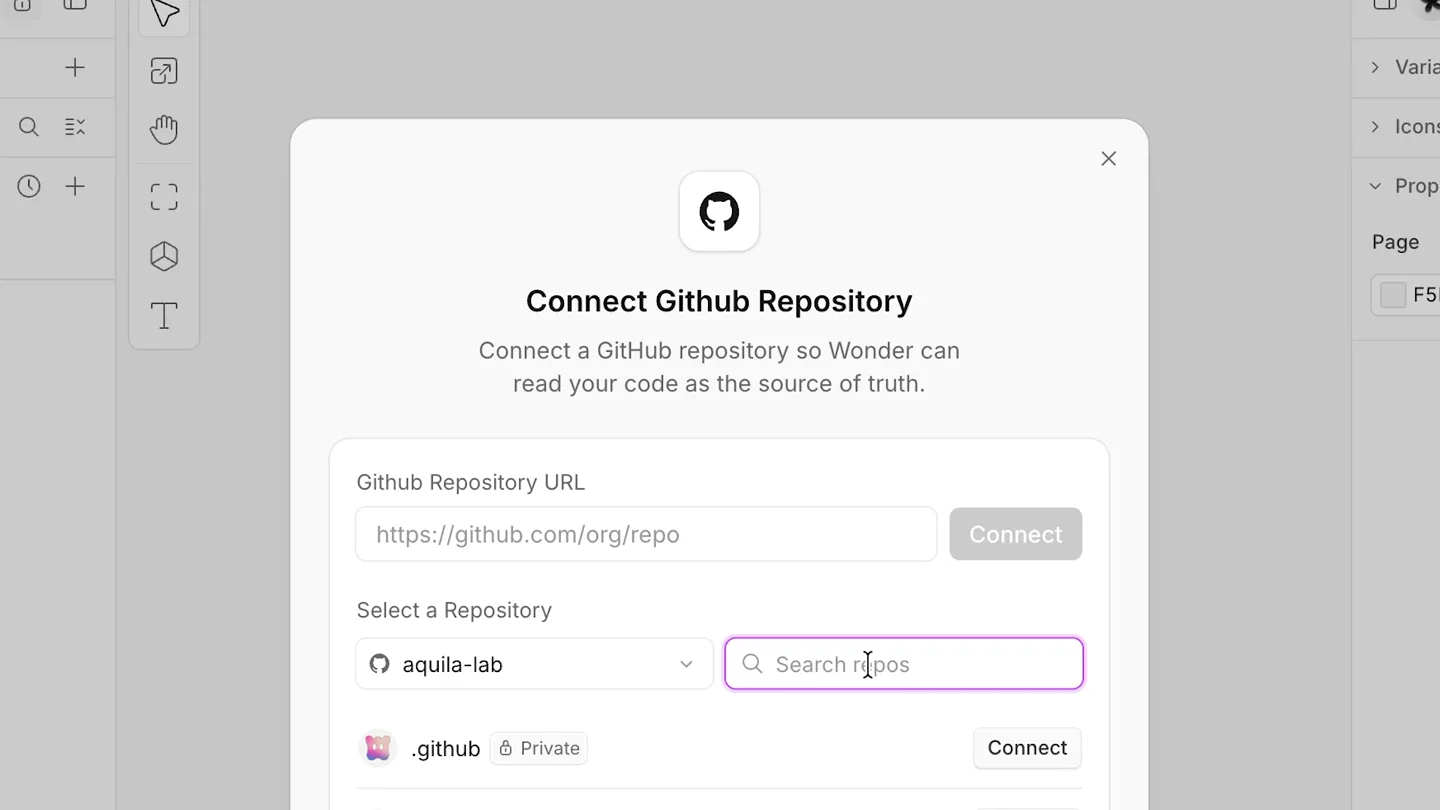
Seamless GitHub Integration & AI-Powered Asset Import
“(No spoken dialogue — The audio track features a consistent, driving beat with a prominent sub-bass line and percussive synth elements, building anticipation.)”
- On screen
- MCP, Share, Variables, Icons, Properties, Connect Github Repository, Connect a GitHub repository so Wonder can read your code as the source of truth., Github Repository URL, https://github.com/org/repo, Connect, Select a Repository, aquila-lab, wonder-client, Private, Import all, Import All Color Varia..., Import all my color variables and icons, Planning next steps · 5.3s, Wondering..., Color Variables, All color tokens from aquila-lab/wonder-client, grouped by role. Each swatch shows its token name and hex value., Core & Brand, Base values and brand identity colors, color/black, #000000, color/white, #ffffff, color/transparent, #00000000, color/brand/primary, #d262ff, color/brand/primary-hover, #c33af7, color/brand/secondary, #290938, color/brand/beige, #f4f0e9, Semantic & Status, Surfaces, overlays and status foreground/background pairs
- Camera
- Close-up on UI elements, then a smooth zoom out to reveal the full application window. The camera pans across the UI as new elements appear.
- Motion
- UI element reveals with subtle scaling and opacity transitions. Text typing animation. Rapid content scrolling and dynamic layout changes. A quick, energetic zoom-out at the end of the segment.
Problem Agitation
AI-Assisted UI Generation & Iteration
“(No spoken dialogue — A high-energy audio transition and riser at 0:08, followed by a sub-bass drop/impact, signaling a new segment. The driving beat continues.)”
- On screen
- Copy/Paste a Figma design into Wonder., Implement Usage Settings Screen, Integrate File Screen onto Canvas, Import Variables and Icons from GitHub, Can you please bring in the full usage settings screen from the repo. including top bar. For avatar images use the attached placeholder image., Make sure to use variables and the icons from the repo (are both already imported). You can, Auto, Wondering..., Northwind Labs, Overview, Files, Settings, Northwind Labs, Pro, Overview, Plan & Billing, Usage, Members, client@Master:, src/app/features/settings/{UsageSection, Set tingsShell, SettingsSidebar}.svelte, src/app/features/sidebar/{OrgBar, SidebarOrg Header, OrgTabs, SidebarNavItem}.svelte, src/app/features/billing/{UsageBreakdown, Us ageSummaryTable, UsageRecordsTable}.svelte, src/app/shared/components/{SettingsCard, Use rIdentityCell}.svelte, src/app/primitives/{Button, SegmentedControl }.svelte, Want me to also bring in the members or Plan & Billing settings screens so the section is complete, or add the on-demand CTA edge- state as a variant?, 1 node selected, Paste or drop an image to attach it..., Yes, please add the on-demand CTA, Usage, Your credit balance and current usage., You don't have on-demand usage enabled, Go beyond your plan's included spending limit with on-demand usage., Enable on-demand usage, Total spend, $20, Included in plan, $20, On-demand, $0, Usage breakdown, Usage by model, Model, Requests, Tokens, Cost, claude-sonnet-4, 1,284, 4.2M, $12.40, gpt-4o, 642, 1.8M, $6.10, gemini-2.5-pro, 318, 812.0K, $2.25, Total, 2,244, 6.8M, $20.75, Recent activity, Date, Member, Model, Tokens, Cost, Feb 12, 2025, Feb 12, 2025, Feb 11, 2025, Feb 11, 2025, Feb 10, 2025, Showing 1-5 of 128
- Camera
- The camera maintains a consistent, slightly zoomed-in perspective on the UI, following user interactions. It pans and zooms subtly to highlight specific areas of the application.
- Motion
- Interactive UI elements highlight with purple outlines. Text typing animation. Smooth transitions between different UI states and content updates. Content appears to 'snap' into place with a slight bounce.
Product Reveal
Real-time Code Generation & Pull Request Creation
“(No spoken dialogue — A distinct high-energy audio transition and riser at 0:27, followed by a sub-bass drop/impact. The driving beat continues with more pizzicato synth elements.)”
- On screen
- You currently don't have on-demand usage enabled, Go beyond your plan's included spending limit with on-demand usage., Total spend, $20, Included in plan, $20, On-demand, $0, Usage breakdown, Usage by model, Model, Requests, Tokens, Cost, claude-sonnet-4, 1,284, 4.2M, $12.40, gpt-4o, 642, 1.8M, $6.10, gemini-2.5-pro, 318, 812.0K, $2.25, Total, 2,244, 6.8M, $20.75, Recent activity, Date, Member, Model, Tokens, Cost, Feb 12, 2025, Feb 12, 2025, Feb 11, 2025, Feb 11, 2025, Feb 10, 2025, Showing 1-5 of 128, 130px / 120px widths, so their right edges and header labels align across the "Usage by model" and "Recent activity" tables. The Member column stays flexible and the Date/Model columns remain as-is (those are unique to each table), which is the closest sensible match given one table has 5 columns and the other 4., This was applied to the On-Demand CTA variant (.sam.cet) you referenced. The original "Usage Settings Screen" artboard still has the old 110/100 widths — want me to mirror the same alignment there so both artboards stay consistent?, 1 node selected, can we create a PR for the copy changes that I did on this us, on-demand usage." (drops "spending"), The button label and all styling are unchanged, so nothing else is touched., Plan to write (pending your approval):, Base branch: master (#752997 — current head; the repo's tracked/default branch), New branch: wonder/usage-cta-copy, Commits: 2 (one per copy line) to UsageSection.svelte, PR title: Update on-demand usage CTA copy, Nothing has been written yet. Shall I go ahead and create the branch, commit, and open the PR?, Sounds
- Camera
- The camera focuses on the chat interface, then smoothly transitions to show the generated code and PR details. It uses subtle zooms and pans to guide the viewer's eye.
- Motion
- Text typing animation. Dynamic content generation and display. Smooth scrolling and expansion of information panels. The Wonder logo appears with a subtle, organic pulse.
Call to Action
Wonder: Stop Rebuilding, Start Building
“(No spoken dialogue — A final high-energy audio transition and riser at 0:44, followed by a sub-bass drop/impact. The music swells to a conclusion with the main beat and synth elements.)”
- On screen
- Wonder, Stop rebuilding what's already in your codebase., Get started with Wonder, wonder.com
- Camera
- A wide shot of the Wonder logo, then a slow zoom out to reveal the tagline and call to action. The camera remains static on the final CTA screen.
- Motion
- The Wonder logo animates with a soft, organic pulse. Text appears with a gentle fade-in and subtle scale. The final call to action is presented clearly with minimal motion.
Motion design primitives
Synthesizable in Remotion · key components of the synapse-ai-integration-flow template.
UITypingReveal
Text appears as if being typed character by character, often followed by a quick 'thought process' animation or a generated response. This mimics real-time user input and AI processing.
+ Code construction recipe
Use `Sequence` and `spring` for character-by-character opacity and slight Y-offset animation. Implement a `delay` for the 'thinking' ellipsis. For generated responses, use `interpolate` for a smooth fade-in and scale from 0.95 to 1.
DynamicContentSnap
New UI elements, data tables, or code blocks appear and 'snap' into their final positions with a slight overshoot and bounce, indicating a quick and responsive system.
+ Code construction recipe
Utilize `spring` with a high damping ratio for the overshoot effect on `transform` properties (scale, translateY). Combine with `interpolate` for opacity changes. Ensure `layout` animations are handled for smooth container resizing.
InteractiveHighlightPulse
Key UI elements (buttons, input fields, selected items) are highlighted with a vibrant purple outline or a subtle glow, often accompanied by a quick, soft pulse effect.
+ Code construction recipe
Apply an SVG `filter` for the glow or a CSS `box-shadow` with a purple color. Animate the `stroke-width` or `box-shadow` spread using `spring` or `loop` with `interpolate` for the pulsing effect. Use `delay` to synchronize with user interaction cues.
Style DNA & aesthetic system
Visual aesthetic
Typography
Motion
Special effects
Pacing & rhythm
Conceptual story rhythm
- 1
Connect & Import
Purpose. Introduce the core integration capability and ease of bringing existing assets into Wonder.
Execution. Show a user connecting GitHub, then typing a command to import color variables and icons, which instantly populate the UI.
- 2
Iterate & Generate
Purpose. Demonstrate Wonder's AI-powered ability to generate and modify UI components based on natural language prompts.
Execution. Show a user requesting a settings screen, then asking for modifications (like adding a CTA), with the UI updating in real-time.
- 3
Review & Commit
Purpose. Highlight the seamless workflow from design iteration to code generation and pull request creation.
Execution. Show the AI generating a plan for a PR, including branch, commits, and title, then confirming the action.
- 4
The Wonder Advantage
Purpose. Conclude with the overarching benefit of Wonder: accelerating development by leveraging existing codebases.
Execution. A clean reveal of the Wonder logo and tagline, followed by a clear call to action.
Remix in Animatiq Studio
Master remix prompt · agent-ready
Sample remix
Objective
A developer wants to integrate a new payment gateway API into their existing e-commerce platform using Synapse AI.How the recipe adapts
The video would open with a developer typing 'Integrate Stripe API for payments' into Synapse AI's chat interface. The UI would then dynamically display a list of required endpoints and data models, snapping into place with a slight bounce. A purple highlight would pulse around the 'Generate Code' button. Upon clicking, a code editor would rapidly populate with generated integration code, followed by a prompt to create a pull request, mirroring the Wonder workflow. The background would retain the subtle grain and gradient, and the overall pacing would be quick and energetic, driven by a similar electronic soundtrack.Remix blueprint · synapse-ai-integration-flow
Scene durations (4 scenes, 56s)
Key Remotion components
Related Developer Tools Product Launches
Explore all Developer Tools launches →
xAI opens voice cloning on its API: build a custom voice in about two minutes or pick from 80+ voices in 28 languages.

Claude can now operate your Mac, opening apps, browsing and filling spreadsheets, as a research preview in Cowork and Claude Code.

Agentic CLI for coding, building apps, and automating workflows.