
Y Combinator · Launch Video Breakdown: Hook, Pacing & Motion Design
Zenbu (@zenbu_labs) is an extensible IDE for coding agents. Run agents in parallel, manage their work, customize with plugins.
Scene-by-scene timeline & spoken transcript
The Hook
Introducing Zenbu: Coding Agent IDE
“for the Pi coding agent. features into the app like in agent, just to help with will visualize the context It'll try to modify how the app I just made like in literally less on $0.497”
- On screen
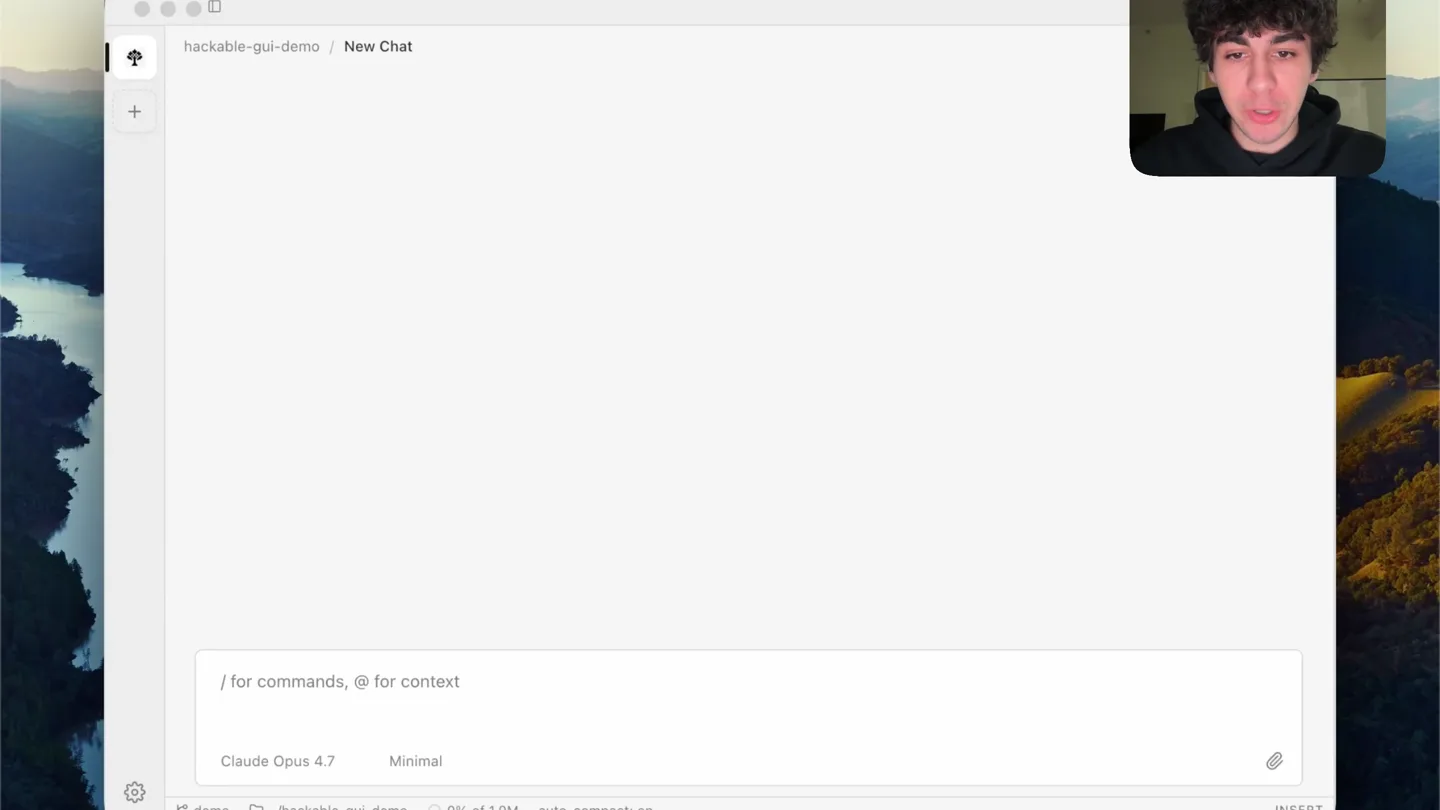
- hackable-gui-demo | New Chat / for commands, @ for context Claude Opus 4.7 Minimal demo -/hackable-gui-demo 0% of 1.0M auto-compact: on INSERT Make a "/context" command that visualizes my current context history 0s, 17 Tokens Thought Created File zenbu.plugin.ts +9 Created File package.json +21 Created File tsconfig.json +18 Created File events.ts +5 Created File context-gauge.ts +87 Created File composer-advice.tsx +142 Read zenbu.plugins.jsonc Read zenbu.config.ts Bash(cd ~/hackable-gui-demo && pnpm install 2>&1 | tail -5 && cd plugins/context-gau . pnpm:devPreinstall: Done Lockfile is up to date, resolution step is skipped Already up to date Done in 695ms using pnpm v10.33.0 New /context command — try typing it in the composer. It swaps the input for an inline window usage (green/yellow/red as it climbs), plus running session cost. x dismisses it. $0.497 55,456 / 1,000,000 5.5%
- Camera
- Static wide shot of the IDE interface with a picture-in-picture of the presenter in the top right.
- Motion
- Real-time screen recording with live text input and dynamic UI updates, overlaid with presenter's video feed.
Product Reveal
Agent-Driven Feature Creation & Context Visualization
“been using every single day. between the session history make a tree slash command? messages and tool calls, and I Pi has this functionality, but because anytime you hit couple of minutes later. I needed a way to isolate feature? Now it works exactly”
- On screen
- main Bump Pi Coding Agent version Update plan plugin casing Zenbu.js hackable desktop apps ... Change onboarding to say open f... demo clever-traffic-lights traffic light component synced wi... zenbujs-location-change enable-disable-plugins Undo recent edit tool changes Why am I only seeing this now Update plugin installer to avoid ty... onboarding-revamp different-input New Chat dock-yay Thought Adding traces everywhere relevant -- main-side injection lifecycle, prelude codegen, renderer-side registry. All behind ZENBU_HMR_TRACE=1 so normal runs stay quiet. Edited advice-config.ts +44-2 Instrument the prelude codegen so we see what is generated each time. Edited vite-plugins.ts +10-1 Now instrument the renderer-side prelude (it gets baked into the generated JavaScript) and the renderer-side registerInjection. The renderer logs go to DevTools. Edited vite-plugins.ts +12-2 Now log the renderer-side registerInjection / unregister: Edited react.ts +15 Finally, log the renderer-side useInjections subscription so we can see whether the title-bar component is actually subscribed and re- rendering: Bash(grep -n "useInjections[b]|export function useInjections" ~/zenbu-worktrees/zenbu-enable-disable-plugins/packages/core/src/react.... / for commands, @ for context Claude Opus 4.7 High enable-disable-plugins -/hackable-gui-enable-disable-plugins +/-/zenbu/plugins/zenbu 38% of 1.0M auto-compact: on 961,724 Summarize branch? No summary Summarize Summarize with custom prompt back to tree
- Camera
- Static wide shot of the IDE interface, occasionally zooming slightly to highlight specific UI elements.
- Motion
- Live screen recording with dynamic UI interactions, including dropdown menus and file modifications, demonstrating agent capabilities.
Feature Teaser
Work-Tree Management & Branch Isolation
“I can pick which to branch It's visualizing my sidebar. consequence of this also the factory for the zenbu.dev.”
- On screen
- New worktree Branch name optimize-perf Branch from main Advanced Creating... Cancel main Bump Pi Coding Agent version Update plan plugin casing Zenbu.js hackable desktop apps ... Change onboarding to say open f... demo clever-traffic-lights traffic light component synced wi... zenbujs-location-change enable-disable-plugins Undo recent edit tool changes Why am I only seeing this now Update plugin installer to avoid ty... onboarding-revamp different-input New Chat dock-yay optimize-perf New Chat / for commands, @ for context Claude Opus 4.8 Minimal optimize-perf -/hackable-gui-optimize-perf 0% of 1.0M auto-compact: on
- Camera
- Static wide shot of the IDE, with a modal dialog appearing and interacting with the sidebar.
- Motion
- Interactive UI demonstration, showing modal pop-ups, branch creation, and sidebar updates in real-time.
Call to Action
Zenbu: The Future of Agent-Driven Development
“(No spoken dialogue — The ambient electronic score continues, maintaining a calm and focused atmosphere. Subtle, high-frequency synth elements shimmer occasionally. No distinct percussive elements, sub-bass drops, risers, or sweeps. The music serves as a background texture, maintaining a calm and focused atmosphere without drawing attention away from the spoken content. The perceived tempo is derived from the subtle rhythmic pulse within the ambient pad, which is very understated.)”
- On screen
- (No on-screen text)
- Camera
- The video continues with the static wide shot of the IDE, demonstrating further features and interactions, maintaining the same framing as previous scenes.
- Motion
- Continued real-time screen recording and UI interaction, showcasing the product's capabilities without further spoken narration.
Motion design primitives
Synthesizable in Remotion · key components of the developer-tool-showcase template.
LiveTerminalTypewriter
Text appears as if being typed in real-time within a terminal-like interface, followed by dynamic output and file creation logs. This simulates a live coding session.
+ Code construction recipe
Use Remotion's <Sequence> and <AbsoluteFill> components. Implement a character-by-character text reveal using `interpolate` for `opacity` and `width` on a `<span>` or `<Text>` element. For file creation logs, animate `opacity` and `y-translation` for each line item using `spring` for a subtle bounce effect. Use `delay` props to sequence the typing and subsequent log entries.
DynamicContextGauge
A visual representation of context window usage, depicted as a series of colored circles (green, yellow, red) that dynamically fill up, accompanied by a real-time cost display.
+ Code construction recipe
Create a grid of SVG circles. Use `map` to render each circle. Animate the `fill` color of individual circles based on a calculated `progress` value using `interpolate` from 0 to 1, transitioning through green, yellow, and red hex codes. The cost display can be a simple `<Text>` component with its `children` prop updated via `useCurrentFrame` and `interpolate` to show a counting animation.
InteractiveModalBranching
A modal dialog appears from the center of the screen, allowing user input for branch names and selection from a dropdown, followed by a 'Creating...' animation.
+ Code construction recipe
Implement the modal as a `<AbsoluteFill>` with a semi-transparent background and a centered `<div />` for the modal content. Animate the modal's `opacity` from 0 to 1 and `scale` from 0.8 to 1 using `spring` for a smooth entrance. The 'Creating...' text can use a simple `opacity` fade-in/out or a subtle `pulse` animation using `loop` and `spring`.
Style DNA & aesthetic system
Visual aesthetic
Typography
Motion
Special effects
Pacing & rhythm
Conceptual story rhythm
- 1
Agent Introduction & Core Value
Purpose. Introduce the product (Zenbu) and its primary function: coding agents that create and modify features.
Execution. Initial screen recording showing a command being typed and the agent immediately generating files and code, demonstrating real-time impact.
- 2
Problem/Solution: Context & Session Management
Purpose. Highlight the challenge of managing context and session history in development, then show how Zenbu solves it with visual tools.
Execution. Demonstration of the '/context' command, showing the dynamic context gauge and the ability to navigate session history within the IDE.
- 3
Advanced Workflow: Work-Tree & Branching
Purpose. Showcase Zenbu's advanced capabilities for isolating features and managing branches efficiently.
Execution. Interaction with a 'New worktree' modal, creating a new branch, and demonstrating how the agent operates within isolated environments.
- 4
Seamless Integration & Developer Empowerment
Purpose. Convey the overall benefit of Zenbu as an intuitive, powerful tool that streamlines the developer workflow.
Execution. Continuous, fluid demonstration of various UI interactions and agent responses, emphasizing the product's responsiveness and comprehensive nature.
Remix in Animatiq Studio
Master remix prompt · agent-ready
Sample remix
Objective
A new AI-powered data analytics platform that automates report generation and visualization.How the recipe adapts
The recipe adapts by replacing the coding IDE with the data analytics platform's interface. LiveTerminalTypewriter becomes LiveQueryInput, showing a user typing natural language queries that instantly generate complex SQL or data transformations. DynamicContextGauge transforms into DynamicReportProgress, visualizing the real-time status of data processing and report generation with color-coded progress indicators. InteractiveModalBranching becomes InteractiveDashboardCustomization, where a modal allows users to select data sources, chart types, and apply filters, with immediate updates to the dashboard. The presenter would explain the data insights rather than coding features, maintaining the informative tone.Remix blueprint · developer-tool-showcase
Scene durations (4 scenes, 115s)
Key Remotion components
Related Developer Tools Product Launches
Explore all Developer Tools launches →
xAI opens voice cloning on its API: build a custom voice in about two minutes or pick from 80+ voices in 28 languages.

Claude can now operate your Mac, opening apps, browsing and filling spreadsheets, as a research preview in Cowork and Claude Code.

Agentic CLI for coding, building apps, and automating workflows.