
1k Papers (by Hassan El Mghari) · Launch Video Breakdown: Hook, Pacing & Motion Design
The top 1,000 research papers of the last year, summarized and visualized. All 1,000 summaries cost $4 with DeepSeek V4 Flash.
Scene-by-scene timeline & spoken transcript
The Hook
Overview of AI Research Landscape
“(No spoken dialogue — ambient visual with mouse clicks and scrolls)”
- On screen
- THE YEAR IN AI PAPERS 1,000+ papers mapping AI research from 2025-2026. EXPLORE BY RESEARCH LAB VIEW ALL LABS → OpenAI Anthropic Moonshot AI DeepSeek MiniMax ZAI / GLM BROWSE BY TOPICS 01 Reasoning 177 02 Agents 279 03 Multimodal 144 04 Video 164 05 Systems 143 06 Robotics 59 VIEW ALL TOPICS → 01 TRENDING THIS YEAR The papers that moved AI forward Selected for citation impact, official-code-adoption, recency, and field-wide significance. VIEW ALL TOP PAPERS → DINOv3 SAM 3 GLM 5 MOST CITED 01 Qwen3-VL Technical Report Nov 2025 1802 02 DINOv3 Aug 2025 1216 03 InternVL3.5: Advancing Open-Source Multimodal Models in Complex Reasoning, and... Aug 2025 1212 View top 100 → EXPLORE THE YEAR VIEW ALL MONTHS → JUL 2025 AUG 2025 SEP 2025 OCT 2025 NOV 2025 DEC 2025 JAN 2025 FEB 2025 MAR 2025 APR 2025 MAY 2025 JUN 2025 JUL 2025 AUG 2025 SEP 2025 OCT 2025 1,000+ papers well summarized THIS PAPER WAS PICKED JUST FOR YOU META AI / AUG 2025 DINOv3 DINOv3 is a self-supervised vision foundation model that scales to 7B parameters, trained on a curated dataset of 1.6B billion images (LVD-16B9M) from Instagram, combined with ImageNet-1k. The model uses a ViT architecture with RoPE embeddings and constant... READ THE PAPER →
- Camera
- Static overhead shot of a web application interface. The camera is fixed, showing the full browser window.
- Motion
- Subtle mouse cursor movements and scroll animations within the web UI, highlighting interactive elements and content flow.
Product Reveal
Deep Dive into a Research Paper
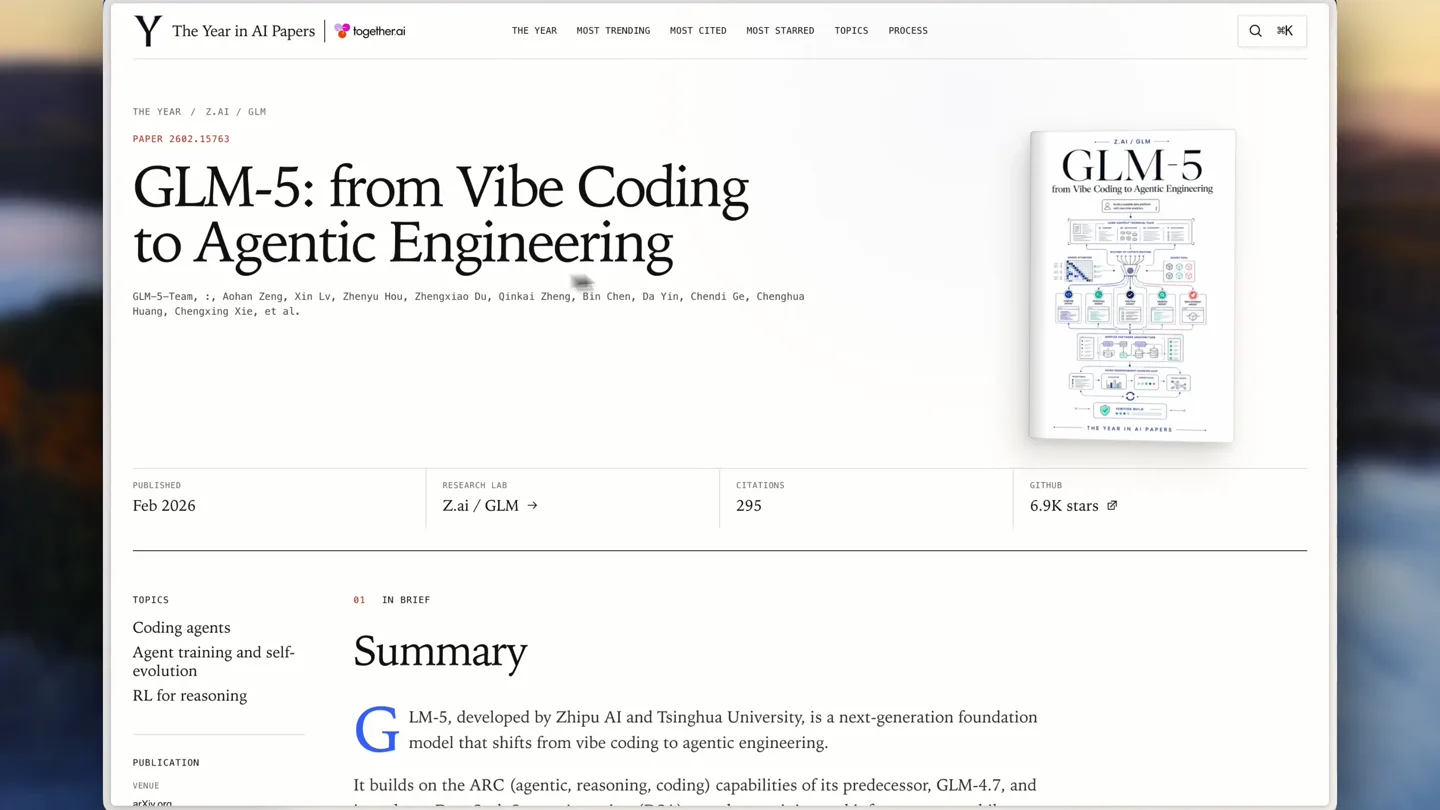
“(No spoken dialogue — ambient visual with mouse clicks and scrolls)”
- On screen
- THE YEAR / Z.AI / GLM PAPER 2082.15763 GLM-5: from Vibe Coding to Agentic Engineering Z.AI / GLM GLM-5 from Vibe Coding to Agentic Engineering GLM-5-Team, J. Anhan Zeng, Xin Lu, Zhengyu Hou, Zhengxiao Du, Qinkai Zheng, Bin Chen, Da Yin, Chendi Ge, Chenghua Huang, Chengxing Xie, et al. PUBLISHED Feb 2026 RESEARCH LAB Z.ai / GLM → CITATIONS 295 GITHUB 6.9K stars TOPICS Coding agents Agent training and self-evolution RL for reasoning 01 IN BRIEF Summary GLM-5, developed by Zhipu AI and Tsinghua University, is a next-generation foundation model that shifts from vibe coding to agentic engineering. It builds on the ARC (agentic, reasoning, coding) capabilities of its predecessor, GLM-4.7, and introduces DeepSeek Sparse Attention (DSA) to reduce training and inference costs while maintaining long-context fidelity. The model scales to 744B total parameters (40B active) and is trained on 28.5T tokens. A new asynchronous reinforcement learning infrastructure decouples generation from training, improving post-training efficiency, and novel asynchronous agent RL algorithms enhance learning from long-horizon interactions. GLM-5 achieves state-of-the-art performance on benchmarks like SWE-bench Verified (77.8), BrowseComp (75.9 with context management), and scores 50 on the Artificial Analysis Intelligence Index v4.0, the first open-weights model to do so. It also demonstrates strong long-horizon task performance, e.g., $4,432 on Vending-Bench 2. The model is full-stack adapted to Chinese GPU ecosystems, including Huawei Ascend and Moore Threads. GLM-5 is released open-source, with code and models available at https://github.com/zai- org/GLM-5. 02 FROM THE PAPER Abstract Large language models have made significant progress in mathematical reasoning, which PUBLICATION VENUE arXiv.org PAGES 40 DOI 10.48550/arXiv.2602.15763 LICENSE Creative Commons Attribution 4.0 International Read original View code Project page
- Camera
- Smooth, controlled zoom-in and pan-down on the web page, focusing on specific sections of the research paper summary.
- Motion
- Zoom and pan with easing, simulating a user's focused interaction. Content scrolls into view as the camera pans.
Feature Teaser
Exploring Trending Papers and Categories
“(No spoken dialogue — ambient visual with mouse clicks and scrolls)”
- On screen
- THE YEAR IN AI PAPERS 1,000+ papers mapping AI research from 2025-2026. EXPLORE BY RESEARCH LAB VIEW ALL LABS → OpenAI Anthropic Moonshot AI DeepSeek MiniMax ZAI / GLM BROWSE BY TOPICS 01 Reasoning 177 02 Agents 279 03 Multimodal 144 04 Video 164 05 Systems 143 06 Robotics 59 VIEW ALL TOPICS → 01 TRENDING THIS YEAR The papers that moved AI forward. Selected for citation impact, official-code-adoption, recency, and field-wide significance. VIEW ALL TOP PAPERS → DeepSeek-V3.2 Kimi K2.5 Qwen3-VL DINOv3 SAM 3 GLM-5 DeepSeek-OCR Kimi K3 Why Language Models Hallucinate SELECTED PAPERS 9 #VERSION One year METHOD Editorial DeepSeek-V3.2: Pushing the Frontier of Open Large Language Models PUBLISHED Dec 2025 CITATIONS 671 CODE Not linked Read summary MOONSHOT AI Kimi K2.5: Visual Agentic Intelligence PUBLISHED Feb 2026 CITATIONS 313 CODE 2.3K stars Read summary ALIBABA / QWEN Qwen3-VL Technical Report PUBLISHED Nov 2025 CITATIONS 1.8K CODE 20K stars Read summary META AI DINOv3 PUBLISHED Aug 2025 CITATIONS 1.2K CODE 11K stars Read summary META AI SAM 3: Segment Anything with Concepts PUBLISHED Nov 2025 CITATIONS 711 CODE 11K stars Read summary Z.AI / GLM GLM-5: from Vibe Coding to Agentic Engineering PUBLISHED Feb 2026 CITATIONS 295 CODE 6.9K stars Read summary DEEPSEEK DeepSeek-OCR: Contexts Optical Compression MOONSHOT AI Kimi K3: Open OPENAI Why Language Models Hallucinate
- Camera
- Rapid horizontal pan across a grid of research paper cards, simulating a quick browse through trending content.
- Motion
- Fast horizontal scroll with a slight bounce, creating a dynamic and engaging content preview.
Feature Teaser
Interactive Search and Filtering
“(No spoken dialogue — ambient visual with mouse clicks and scrolls)”
- On screen
- HK SEARCH THE YEAR IN AI ESC q deep 01 RESEARCH PAPER GrandCode: Achieving Grandmaster Level in Competitive Programming vi... 02 DEEPSEEK FIPO: Eliciting Deep Reasoning with Future-KL Influence Policy Optimiza... 03 mHC: Manifold-Constrained Hyper-Connections 04 DEEPSEEK DeepSeek-V3.2: Pushing the Frontier of Open Large Language Models 05 GOOGLE DEEPMIND PanerBanana: Automating Academic Illustration for AI Scientists Navigate Open Exit | Close K q deepseek 01 DEEPSEEK mHC: Manifold-Constrained Hyper-Connections 02 DEEPSEEK DeepSeek-V3.2: Pushing the Frontier of Open Large Language Models 03 DEEPSEEK DeepSeekMath-V2: Towards Self-Verifiable Mathematical Reasoning 04 DEEPSEEK DeepSeek-OCR: Contexts Optical Compression 05 RESEARCH PAPER SLAI T-Res: Full-Parameter Post-training of the DeepSeek-V4 Family on As... Navigate Open Exit | Close DeepSeekMath-V2: Towards Self-Verifiable Mathematical Reasoning Zhihong Shan, Yuanxiang Luo, Chengba Lu, Z. Z. Ren, Jianwen Ma, Tian Ye, Zhubin Gou, Shirong Ma, Xiaokang Zhang PUBLISHED Nov 2025 RESEARCH LAB DeepSeek → CITATIONS 60 GITHUB 1.6K stars TOPICS RL for reasoning Reasoning methods Safety and alignment 01 IN BRIEF Summary DeepSeekMath-V2 is a large language model for natural-language theorem proving, built on DeepSeek-V3.2-Exp-Base, that achieves self-verifiable mathematical reasoning. The authors argue that final-answer rewards are insufficient because correct answers do not guarantee correct reasoning and are inapplicable to theorem proving. They train a verifier using reinforcement learning with expert-annotated proof scores and introduce meta-verification to reduce hallucinated issues. A proof generator is then trained using the verifier as a reward model, incentivizing it to identify and resolve issues in its own proofs. The verifier and generator are iteratively improved in a synergistic cycle, with scaled verification compute enabling automated labeling of new proofs. DeepSeekMath-V2 outperforms GPT-5-Thinking-High and Gemini 2.5-Pro on CNML-level problems, and with scaled test-time compute achieves gold-level scores on IMO 2025 and CMO 2024, and 118/120 on Putnam 2024, surpassing the highest human score of 90. On IMO-ProofBench, it outperforms DeepMind's DeepThink (IMO Gold) on the basic set and remains competitive on the advanced set. 02 FROM THE PAPER Abstract Large language models have made significant progress in mathematical reasoning, which PUBLICATION VENUE arXiv.org PAGES 19 DOI 10.48550/arXiv.2511.22570 LICENSE DeepSeek Perpetual, non-exclusive license Read original View code Project page
- Camera
- Focus on a search bar interaction, with a simulated keyboard input and dropdown results, followed by a smooth transition to a detailed paper view.
- Motion
- Typing animation, dropdown menu reveal, and a quick page transition with a subtle zoom-out/zoom-in effect.
Call to Action
Browse by Topic Areas
“(No spoken dialogue — ambient visual with mouse clicks and scrolls)”
- On screen
- THE YEAR IN AI Papers THE RESEARCH ATLAS Browse the ideas that shaped the year. 24 collections across 8 topic areas, covering 1,018 papers from reasoning systems to scientific discovery. 01 TOPIC AREA Reasoning 2 collections PAPERS 177 LABS 7 CODE 113 Explore topic → 02 TOPIC AREA Agents 5 collections PAPERS 275 LABS 10 CODE 214 Explore topic → 03 TOPIC AREA Multimodal 4 collections PAPERS 144 LABS 9 CODE 109 Explore topic → 04 TOPIC AREA Video and spatial AI 3 collections PAPERS 164 LABS 4 CODE 135 Explore topic → 05 TOPIC AREA Systems and efficiency 5 collections PAPERS 143 LABS 10 CODE 80 Explore topic → 06 TOPIC AREA Robotics and embodied AI 1 collection PAPERS 59 LABS 2 CODE 45 Explore topic → 07 TOPIC AREA Science and medicine 2 collections PAPERS 21 LABS 2 CODE 19 Explore topic → 08 TOPIC AREA Safety and analysis 2 collections PAPERS 35 LABS 3 CODE 15 Explore topic →
- Camera
- Vertical scroll through a grid of topic cards, revealing more content as the user navigates down the page.
- Motion
- Smooth vertical scroll with a slight ease-out, mimicking natural web browsing behavior.
Motion design primitives
Synthesizable in Remotion · key components of the quantum-patent-atlas template.
UIZoomPanFocus
A smooth camera movement that zooms into a specific UI element (e.g., a text block or image) and then pans to reveal more content within that focused area.
+ Code construction recipe
Use Remotion's `interpolate` and `spring` for camera `transform` properties (scale, translateX, translateY). Define keyframes for zoom level and pan coordinates. Apply `ease-in-out` for smooth transitions.
HorizontalCardCarousel
A rapid horizontal scrolling animation that showcases multiple content cards (e.g., research paper summaries) in quick succession, often with a slight overshoot and bounce effect.
+ Code construction recipe
Implement a `translateX` animation on a container holding the cards. Use `spring` for the `translateX` value to achieve the bounce effect. Control the speed and damping for a snappy feel.
TypingSearchReveal
Simulates a user typing into a search bar, with characters appearing sequentially, followed by a dropdown menu revealing search results, and then a transition to the selected item's detail page.
+ Code construction recipe
For typing, use `sequence` and `delay` to reveal characters in a text input. Animate the `opacity` and `scale` of the dropdown menu for a reveal effect. Transition to the detail page using a `fade` and `zoom` effect on the new content.
Style DNA & aesthetic system
Visual aesthetic
Typography
Motion
Special effects
Pacing & rhythm
Conceptual story rhythm
- 1
Initial Discovery
Purpose. Introduce the breadth of the platform and its core value proposition: summarizing AI research.
Execution. Overhead view of the main dashboard, showcasing the vast number of papers and categories, with subtle mouse movements hinting at interactivity.
- 2
Deep Dive & Detail
Purpose. Demonstrate the depth of information available for each paper and the quality of the summaries.
Execution. Zoom-in and pan to a specific paper's detailed summary page, highlighting key sections and data points.
- 3
Exploration & Navigation
Purpose. Showcase the various ways users can explore and filter content, emphasizing ease of use.
Execution. Fast horizontal scroll through trending papers, followed by a simulated search interaction and a transition to a filtered result.
- 4
Categorization & Organization
Purpose. Highlight the structured organization of research by topic, reinforcing the platform's utility.
Execution. Vertical scroll through a grid of topic areas, each with an illustrative icon and summary statistics.





