Aave · Launch Video Breakdown: Hook, Pacing & Motion Design
Aave V3 got a brand new look. The DeFi protocol refreshes its interface while keeping the same lending and borrowing core.
Scene-by-scene timeline & spoken transcript
The Hook
Brand & Version Reveal
“(No spoken dialogue — High-energy audio riser leading into a sub-bass drop/impact at 0:01, establishing a futuristic, rhythmic pulse.)”
- On screen
- aave v3 Got a brand new look...
- Camera
- Static, centered framing on text elements.
- Motion
- Text appears with a subtle, quick fade-in and scale-up animation. The 'v3' badge slides in from the right. 'Got a brand new look...' fades in below.
Product Reveal
Interface Overview & Feature Highlight
“(No spoken dialogue — Clean, futuristic electronic score with a driving rhythmic pulse. A significant sub-bass impact occurs at 0:05.)”
- On screen
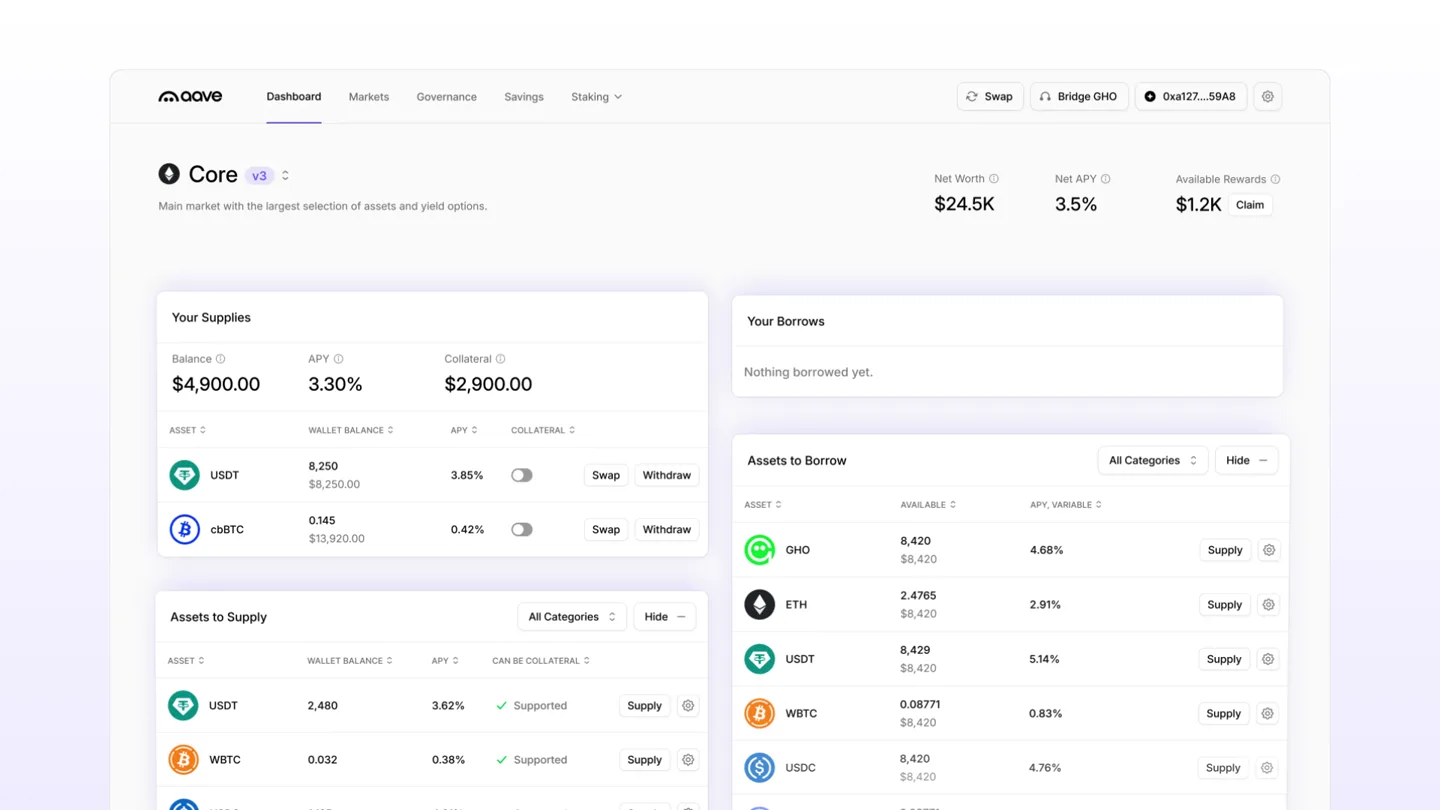
- aave Dashboard Markets Governance Savings Staking More ... Aave V4 Bridge GHO Swap 0x56...2c26 Core Instance v3 Main Ethereum market with the largest selection of assets and yield options Net worth $0 Net APY Available rewards $0 CLAIM VIEW TRANSACTIONS Your supplies Nothing supplied yet Your borrows E-Mode DISABLED Nothing borrowed yet Assets to supply All Categories Hide — Show assets with 0 balance Asset USDT Wallet balance 0 APY 3.41% Can be collateral Supply Assets to Borrow All Categories Hide — To borrow you need to supply any asset to be used as collateral. Asset GHO Available 0 APY, variable 4.08% Borrow Details Core v3 Net Worth $24.5K Net APY 3.5% Available Rewards $1.2K Claim Balance $4,900.00 APY 3.30% Collateral $2,900.00 ASSET USDT WALLET BALANCE 8,250 $8,250.00 APY 3.85% COLLATERAL Swap Withdraw cbBTC 0.145 $13,920.00 0.42% Swap Withdraw USDC 1,125 4.21% Supported Supply cbBTC 0.018 0.42% Supported Supply
- Camera
- The camera pans and zooms across the Aave V3 interface, highlighting different sections and data points.
- Motion
- Smooth, controlled camera movements (pans and zooms) reveal UI elements. Data points animate in, and interactive elements like toggles and buttons are briefly highlighted with subtle glows or state changes.
Feature Teaser
Interactive Workflow Demonstration
“(No spoken dialogue — The electronic score continues, maintaining its rhythmic drive.)”
- On screen
- aave Dashboard Markets Governance Savings Staking Bridge GHO Swap 0x127...59A8 Back USD Coin USDC Asset on Core Reserve size $1.94B Available liquidity $36.88M Utilization rate 98.10% Oracle price $1.00 Supply 77% Total Supplied $2.06M of $2.50M APY 3.36% 10.73M of 100M USDC Your Position Available to supply 0.004932 USDC Supply $10.00 Available to borrow 10 USDC Borrow $10.00 Max LTV 75% Liquidation threshold 78% Liquidation penalty 4.5% Borrow 84% Total Borrowed $1.90M of $2.25M Borrow Cap $2.25B APY 4.08% 10.73M of 100M USDC Supply USDC Amount 0 USDC Available to supply: 10,000 % Max $0.00 Supply APY 1.50% Collateralization Enabled Network fee $0.00 Supply 900 USDC $900.00 Network fee $0.14 Supplied Successfully You supplied 200 USDC Transition date October 9, 2023, 2:39PM Network fee $0.14 Block 12345 Review Transaction Done
- Camera
- The camera focuses on specific UI interactions, simulating a user workflow. It zooms into a modal window and tracks the input and confirmation process.
- Motion
- UI elements animate in response to simulated user input. A modal window slides in, text fields populate with a typing effect, and a success message appears with a checkmark animation, followed by a quick fade-out of the entire UI.
Feature Teaser
Impactful Metric Display
“(No spoken dialogue — The electronic score builds slightly in intensity, emphasizing the reveal of large numbers.)”
- On screen
- $29,800,000,000 Total Deposits on aave v3 $1,444,170,899 Total Deposits on aave v3 $12,200,000,000 Total Borrowed on aave v3
- Camera
- Static, centered framing on large numerical text.
- Motion
- Large numbers animate with a rapid, glitchy, and bouncy counter effect, emphasizing their magnitude. The text 'Total Deposits/Borrowed on Aave V3' fades in below.
Call to Action
Final Call to Action & Brand Outro
“(No spoken dialogue — The electronic score resolves with a final flourish, ending cleanly.)”
- On screen
- Try it today. app.aave.com aave v3
- Camera
- Static, centered framing on text and brand mascot.
- Motion
- Call to action text fades in, accompanied by the Aave ghost mascot animating with a subtle bounce. The final frame shows the Aave logo and V3 badge with the ghost mascot, fading out to a clean background.
Motion design primitives
Synthesizable in Remotion · key components of the aave-v3-defi-launch template.
TextFadeScale
Text elements appear with a quick, smooth fade-in combined with a subtle scale-up effect, giving them a dynamic yet clean introduction.
+ Code construction recipe
Use `interpolate` for opacity and `scale` transform. Apply an `easeOutCubic` or `spring` function for a snappy, natural feel. Combine `opacity: interpolate(frame, [start, end], [0, 1])` and `transform: scale(interpolate(frame, [start, end], [0.9, 1]))`.
UIDataCounter
Large numerical data animates with a rapid, glitchy, and bouncy counting effect, drawing attention to significant metrics.
+ Code construction recipe
Implement a custom `NumberCounter` component. For the glitch effect, use `interpolate` on `transform: translateY` and `opacity` with a `stagger` effect for individual digits, combined with a `spring` for the final bounce. Randomize small `translateX` values for a subtle glitch. For the counting, use `interpolate` to animate the number itself.
ModalSlideFade
Modal windows or pop-up elements slide in from the bottom or side while simultaneously fading into view, creating a smooth and interactive UI experience.
+ Code construction recipe
Utilize `interpolate` for `transform: translateY` (e.g., from `20px` to `0px`) and `opacity` (from `0` to `1`). Apply an `easeOutQuad` or `spring` curve for a fluid, responsive feel. Ensure the background dims with a separate `Fade` component.
Style DNA & aesthetic system
Visual aesthetic
Typography
Motion
Special effects
Pacing & rhythm
Conceptual story rhythm
- 1
Introduction & Brand Statement
Purpose. To quickly establish the brand and announce the new version with a clear, concise message.
Execution. Aave logo and 'v3' appear, followed by the tagline 'Got a brand new look...' with clean text animations.
- 2
Product Exploration
Purpose. To showcase the refreshed interface and highlight key functionalities and data points.
Execution. Dynamic camera pans and zooms across the UI, revealing different sections, data, and interactive elements.
- 3
User Interaction & Value Proposition
Purpose. To demonstrate a core user workflow and emphasize the product's ease of use and impact.
Execution. Simulated user interaction with a modal, input fields, and a successful transaction confirmation, followed by impactful numerical data reveals.
- 4
Call to Action & Brand Reinforcement
Purpose. To prompt user engagement and leave a lasting brand impression.
Execution. Clear call to action text and URL, accompanied by the brand mascot, concluding with the Aave logo.