
Agentphone Launch (by Y Combinator) · Launch Video Breakdown: Hook, Pacing & Motion Design
The $2T telecom industry was built for humans. @AgentPhoneHQ is rebuilding it for agents. One API gives every AI agent its own phone number and a trusted identity to reach the real world. Congrats on the launch, @themeetmodi & @manav2modi! https://www.ycombinator.com/launches/QNE-agentphone-phone-numbers-for-ai-agents
Scene-by-scene timeline & spoken transcript
The Hook
Introducing Agent Phone: AI Agents Get Phone Numbers
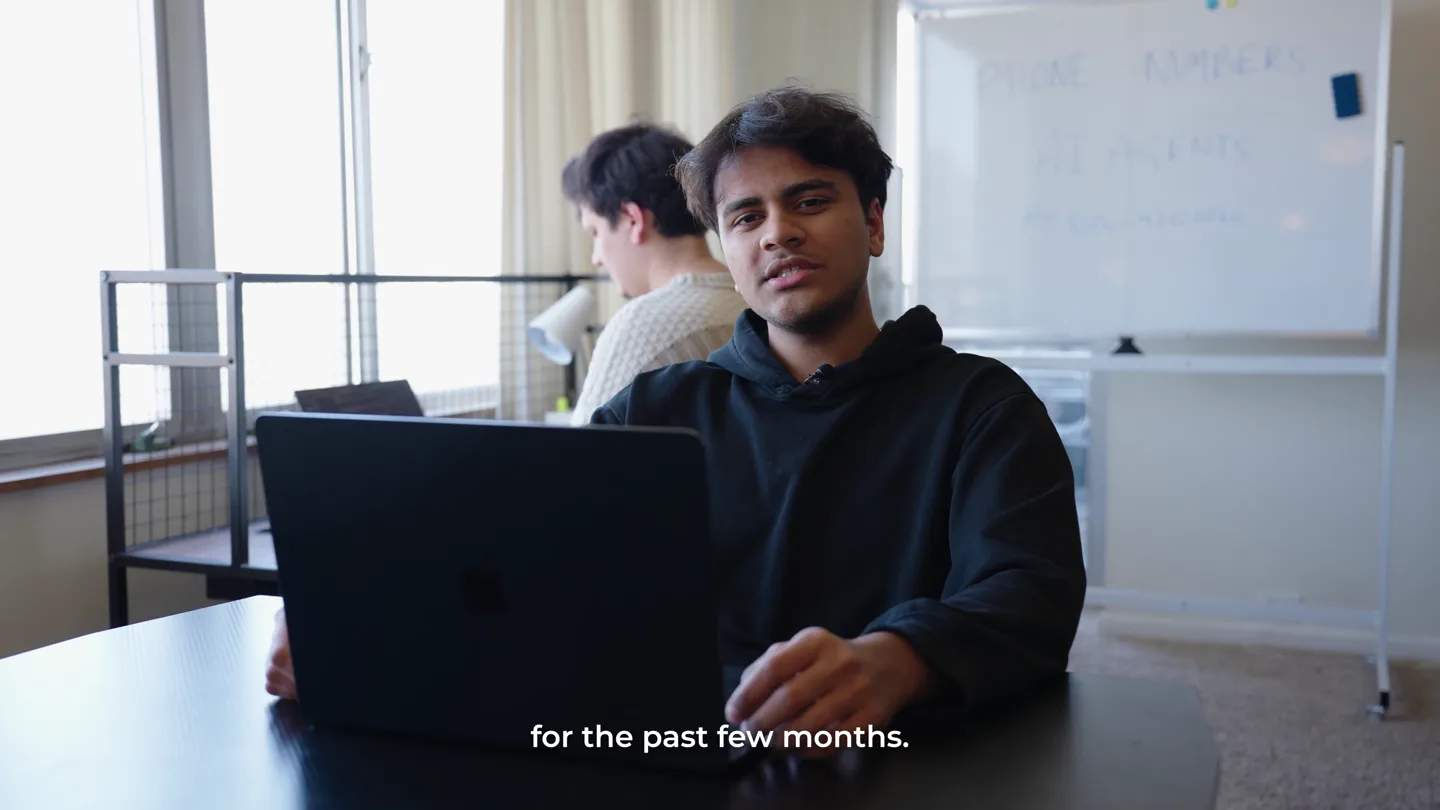
“Hey everyone, we've been working on something for the past few months. The $2 trillion telecom industry was built for humans. But what if you want an AI agent to reach someone like a person? It's because the world operates on phone numbers, and AI agents don't have them. So we're trying to fix that. We're giving every AI agent a phone number so it can call people, receive calls, and actually get things done. We're calling it Agent Phone. And we're giving every AI agent a phone number.”
- On screen
- PHONE NUMBERS AI AGENTS for the past few months. to reach someone like a person It's because the world operates we're trying to fix that. so it can call people, to actually get things done. AI agent a phone number.
- Camera
- Medium close-up on founder speaking directly to camera, occasionally cutting to a wider shot showing the workspace. Some shots feature a slight push-in or pull-out.
- Motion
- Direct address, founder-led narrative, subtle camera movements to maintain engagement, on-screen captions for dialogue.
Product Reveal
Agent Phone: Seamless AI Communication Demo
“This is super easy. So I'm going to ask my AI agent to get itself a phone number and make a reservation for my birthday dinner. It will now very soon call the restaurant and make a reservation for me, everything all on its own. And that's how easy it is. It all just works.”
- On screen
- Backed by Y Combinator Phone numbers for AI Agents AgentPhone gives your AI its own phone number. Handle voice and messages through one unified webhook. npm install agentphone Copied Mom Hi, did you make the reservation for Meet's birthday! Oh wait, I forgot I had to set up What should we work on in Documents? Get yourself a phone number and call me. Follow https://agentphone.ai/skills.md and make a resy/ Auto-review 5.5 Extra High Documents Connect messaging Catch up on engineering threads Connect GitHub Review PRs, code, and CI checks Connect Linear Track bugs and implementation Connect email Monitor build alerts it will now very soon This is super easy. everything all on its own. And that's how easy it is. It all just works. reservation is ready as well.
- Camera
- Dynamic cuts between founder speaking and screen recordings of the product in action. The screen recordings feature close-ups on UI elements and text input.
- Motion
- Screen capture with UI highlights, text input animation, simulated messaging app interactions, picture-in-picture of founder reacting, quick cuts synchronized with audio impacts.
Feature Teaser
AI Agent Makes a Phone Call
“Hey Manav, I escaped the text box. Nice to meet you. Hi, your birthday dinner reservation is confirmed for 3 people at 7pm! And that's how easy it is. It all just works. So now you can go and get your AI Agent”
- On screen
- Hey Manav, I escaped the text box. Nice to meet you. +1 (415) 483-0478 Hi, your birthday dinner reservation is confirmed for 3 people at 7pm! and get your AI Agent
- Camera
- Founder holding a phone, showing a simulated phone call. Cuts to a screen recording of a text message confirmation. Returns to founder speaking.
- Motion
- Simulated phone call UI, text message notification animation, founder interaction with physical device, seamless transitions between live-action and screen capture.
Call to Action
Agent Phone: Get Started Today
“(No spoken dialogue — A phone call sound effect transitions into a clean, modern, and energetic music track with pizzicato synths, driving sub-bass, and subtle 808-like percussion. The music builds in intensity towards the end.)”
- On screen
- agent phone
- Camera
- Blurry background with a clear product logo in the foreground. The background subtly shifts color and pattern.
- Motion
- Product logo reveal with a subtle background animation, soft focus, and clean typography. The animation is simple yet impactful, emphasizing the brand.
Motion design primitives
Synthesizable in Remotion · key components of the founder-api-launch-template template.
FounderPIPOverlay
A small, rounded-rectangle picture-in-picture (PIP) video of the founder speaking or reacting, positioned in the top-left corner of a screen recording. The PIP has a subtle border and shadow.
+ Code construction recipe
Use Remotion's <AbsoluteFill> for the main screen recording. Overlay a <Video> component for the founder, styled with `borderRadius`, `border`, and `boxShadow`. Use `spring()` for smooth entry/exit animations of the PIP.
DynamicTextEntry
Text appears as if being typed into an input field, character by character, followed by a simulated cursor blink. This is often combined with a 'send' or 'submit' button animation.
+ Code construction recipe
Implement with `interpolate()` to reveal text characters over time. A blinking cursor can be achieved with a `spring()` or `loop()` animation on its opacity. Use `measureText()` for accurate text layout.
UIElementHighlight
Specific UI elements (e.g., buttons, text messages, notifications) are highlighted or animated to draw attention, often with a subtle glow, scale, or pop effect.
+ Code construction recipe
Apply `scale()` and `opacity()` animations using `spring()` for a bouncy highlight effect. For glows, use CSS `box-shadow` with `rgba` colors and animate the spread. Can be combined with a `delay()` for sequential highlights.
Style DNA & aesthetic system
Visual aesthetic
Typography
Motion
Special effects
Pacing & rhythm
Conceptual story rhythm
Motion Recipe Analysis Queued
This launch has been indexed into the catalog. Creative archetype, code motion primitives, and master remix recipe will populate upon batch analysis.





