
Ai Influencer Studio Launch (by Javi Loureiro) · Launch Video Breakdown: Hook, Pacing & Motion Design
We're launching on Product Hunt on December 31st! Our AI influencer studio is up and running. See how it works https://t.co/xanLm4gbiR
Scene-by-scene timeline & spoken transcript
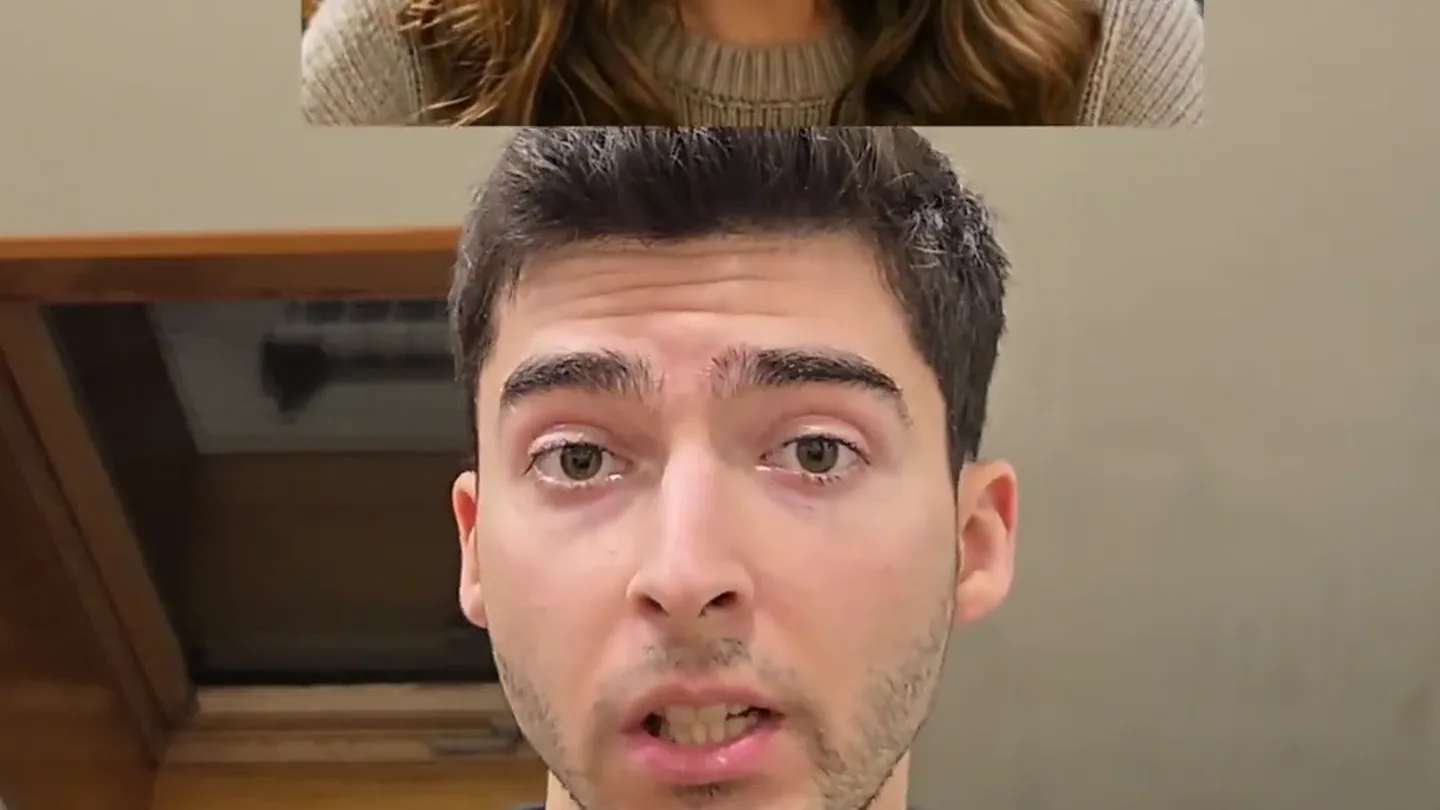
The Hook
AI Influencer Creation Intro
“this is how to create an AI influencer in 3 steps”
- On screen
- this is how to create an AI influencer in 3 steps
- Camera
- Split screen with presenter at bottom, AI influencer at top. Static framing.
- Motion
- Static split-screen, rapid AI influencer image swap.
Product Reveal
Step-by-Step AI Influencer Setup
“first up go to this website then hit Create Influencer and add a name for him and a prompt you can describe them as whatever you want let's say for example a Spaniard woman so now third step select your influencer and add a prompt on whatever you want them to do it could be anything just prompt an exact dialogue or whatever you want now he generate and wait for a minute or two”
- On screen
- UGC Creator Studio AI-Powered Influencer Videos Create Your Influencers Select an influencer to create videos with Create Influencer (50%) Add a new AI persona Create New Influencer Influencer Name María Description Prompt (This will be used for image generation and added to video prompts) A spaniard woman with light skin, Brown hair and Hazel eyes Cancel Creating... AI-Powered UGC Generation Create Content with Virtual Influencer Generate Video Create UGC content with your influencer María A spaniard woman with light skin, Brown hair and Hazel eyes Video Prompt Describe what the influencer should be doing... e.g., 'presenting a n enthusiasm in a modern office setting' The influencer's image will be used as the starting frame for your video Aspect Ratio 9:16 Portrait Resolution 720p (High) Duration 8 sec Fixed Lens Enable to keep the camera view static and stable. Disable for dynamic camera Your Videos 2 videos generated Waiting to start... Pending 9:16 12s Make this character walk around Coruscant, the planet from Star Wars while she says the following dialog with her phon...
- Camera
- Close-up screen recording of the web application UI. Slight zoom and pan to highlight interactive elements.
- Motion
- UI walkthrough with cursor interaction, text input, and button clicks. Smooth, subtle camera movements to guide attention.
Feature Teaser
AI Influencer in Action
“and there it is you can win prizes by predicting football results completely free at dinogoal you can choose the outcome of a match and earn coins to exchange for jerseys gift cards and other prizes”
- On screen
- and there it is you can win prizes by predicting football results completely free at dinogoal you can choose the outcome of a match and earn coins to exchange for jerseys gift cards and other prizes
- Camera
- Medium shot of the AI influencer walking and talking, holding a phone. Slight forward tracking shot.
- Motion
- Seamless transition from UI to generated video. AI influencer animation with natural head and hand movements, lip-syncing.
Call to Action
Product Hunt Launch & Branding
“(No spoken dialogue — High-energy audio transition with riser and sweep, followed by a sub-bass drop/impact. Upbeat, rhythmic electronic track with consistent tempo.)”
- On screen
- Javi Loureiro We're launching on Product Hunt on December 31st! Our AI influencer studio is up and running. See how it works https://t.co/xanLm4gbiR
- Camera
- Dynamic text animations and logo reveals. Static background with animated text overlays.
- Motion
- Text reveals with scale and fade, accompanied by a strong audio impact. Branding elements animate in with a clean, modern aesthetic.
Motion design primitives
Synthesizable in Remotion · key components of the ai-influencer-launch-breakdown template.
SplitScreenPresenter
A vertical split-screen layout where the bottom half features a live-action presenter and the top half displays a dynamically changing AI-generated influencer image.
+ Code construction recipe
Use Remotion's <AbsoluteFill> and <Sequence> components. Position two <Video> or <Img> components with `top: '50%'` and `height: '50%'` for the bottom, and `top: '0%'` and `height: '50%'` for the top. Animate the `src` prop of the top <Img> for rapid image swaps using `interpolate` or `spring` for a subtle transition.
UIGuidedWalkthrough
A screen recording of a web application UI, featuring a visible cursor interacting with elements, text input, and button clicks, with subtle camera movements to highlight specific areas.
+ Code construction recipe
Render a screen recording video. Overlay a custom animated cursor using an SVG or image, controlled by `interpolate` for its `x` and `y` positions. Implement subtle `scale` and `translate` animations on the main video container to simulate camera zooms and pans, using `spring` for smooth easing.
DynamicTextImpact
Text elements appear with a strong, impactful animation, often involving scaling, fading, and a slight bounce, synchronized with a powerful audio cue.
+ Code construction recipe
Utilize Remotion's `spring` function for `scale` and `opacity` properties of text components. Synchronize the animation's start time with an audio event marker. Apply a `filter: 'blur()'` that animates out as the text scales in for added impact.
Style DNA & aesthetic system
Visual aesthetic
Typography
Motion
Special effects
Pacing & rhythm
Conceptual story rhythm
- 1
The Direct Hook
Purpose. Immediately grabs attention by stating the core value proposition and demonstrating the product's output.
Execution. Split-screen with founder and AI influencer, direct address to camera, rapid AI image swaps.
- 2
The How-To Unveiling
Purpose. Educates the viewer on the product's functionality through a clear, step-by-step demonstration.
Execution. Detailed UI screen recording with cursor interaction, text input, and guided navigation.
- 3
The Proof in the Pudding
Purpose. Showcases the tangible result of using the product, validating its capabilities.
Execution. Full-screen display of the generated AI influencer video, demonstrating its realism and utility.
- 4
The Brand & Call
Purpose. Reinforces brand identity and directs viewers to the next action, leveraging high-energy audio.
Execution. Dynamic text animations revealing launch details and website, synchronized with a powerful audio transition.





