
Arzuleai (by Y Combinator) · Launch Video Breakdown: Hook, Pacing & Motion Design
.@ArzuleAI builds AI agents that help B2B SaaS companies identify which partnerships will drive revenue, prioritize them, and track ROI so partnerships become a more automated and predictable growt…
Scene-by-scene timeline & spoken transcript
The Hook
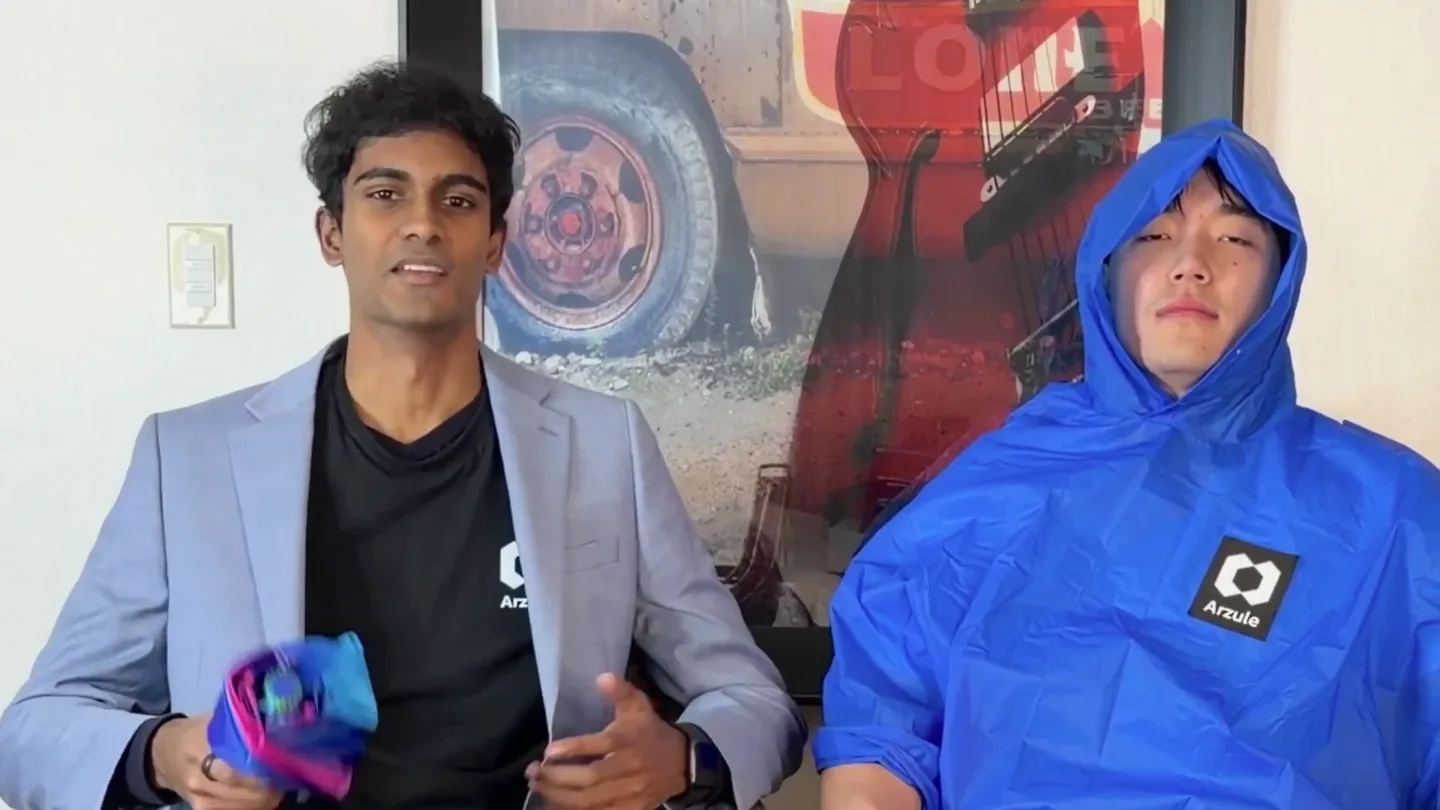
Founders Introduce Themselves and the Problem
“Hey, I'm Nikhil, CEO of Arzule. And I'm Jeffrey, CTO of Arzule. We help B2B SaaS companies identify which partnerships will drive revenue, prioritize them, and track ROI so partnerships become a more automated and predictable growth channel.”
- On screen
- Jeffrey Lin CTO @Arzule Nikhil Reddy CEO @Arzule
- Camera
- Static medium shot of two founders seated, facing the camera. Slight zoom out at the beginning, then static.
- Motion
- Subtle zoom out, lower-third title cards animate in with a smooth slide-up and fade-in effect.
Problem Agitation
Visualizing the Core Problem
“(No spoken dialogue — High-energy audio transition with a riser and sub-bass drop, followed by a modern synth melody.)”
- On screen
- (No on-screen text)
- Camera
- Static shot of the Arzule logo centered on a grid background.
- Motion
- Logo appears with a subtle glow and expanding ripple effect, then quickly transitions back to the founders.
Product Reveal
Arzule Product Demonstration
“We built Arzule to help you identify your ideal partners. Our AI agents analyze your existing customer base, product, and market to recommend the best partnership types and companies. We then prioritize these partners based on their potential to drive revenue and provide you with a detailed breakdown of why each partner is a good fit. Arzule also helps you manage your partnerships, from application to attribution. Our platform tracks every touchpoint, from initial outreach to closed-won deals, giving you a clear picture of your partnership ROI. We also provide insights into optimal touchpoint sequences and help you automate your partnership workflows. Finally, Arzule helps you optimize your marketplace listings and track their performance, ensuring your partnerships are always driving maximum revenue.”
- On screen
- Who is your ideal partner? Enhance query B2B SaaS companies and digital agencies that serve non-technical founders, entrepreneurs, or SMB teams who need to build and launch digital products quickly. Ideal referral partners have an existing customer base of idea-stage builders, startup founders, or business owners who regularly seek no-code or low-code solu Describe the ideal company to research (industry, size, pains, tools they use, etc) Partnership Goal What type of partnership are you looking for? Target Companies: 50 10 50 WeAreNoCode wearenocode.com 83 Referral Partner Gr4vy Financial Services 82 Referral / Affiliate Userlist Email Marketing Automation 82 Referral + Agency Partner Spreedly Payment Orchestration 78 Referral Partner 2-10 Ghaziabad TaxJar Software Development 78 Referral | Portfolio Tool Rec 11-50 Brussels WeAreNoCode wearenocode.com 82 Referral / Affiliate 2-10 Los Angeles, California, United States Website Dismiss Add as Prospect DESCRIPTION WeAreNoCode is an online education institute based in Los Angeles, California, founded in 2019. It serves non-technical entrepreneurs and founders by teaching them how to build and launch businesses using no-code tools. Their platform provides skills, community connections, and support for idea-stage builders looking to create products without writing code. Show less SCORE BREAKDOWN ICP Overlap 81 Complementarity 80 Market Adjacency 84 Stage Alignment 66 Ecosystem Maturity 62 Model Scores: GPT: 80 Claude: 85 AI REASONING WeAreNoCode represents a strong strategic fit as a referral partner, with both assessments in clear agreement that their audience of non-technical founders and idea-stage builders aligns almost perfectly with Lovable's ideal customer profile. Their education and community model RELEVANT CONTACTS (2) Name Title Score Links Christian Peverelli Co-Founder 0.95 Chad Nachtigal Chief Operating Offic 0.95 ENRICHMENT DATA Headcount 3 Growth (6m) -40% Growth (12m) -25% Founded 2019 HQ Los Angeles, California, United States Funding Estimated Revenue Lower Usd 500000 Monthly Visits 19346 Estimated Revenue Upper Usd 1000000 Recent News From Zero to AI App in 48 Hours! (This is INSANE!) 2024-11-10 Geeky Gadgets Vertical Presentation 14 events $42,500 attributed All event types All team members Last 12 months FEBRUARY 2026 Monthly check-in — cohort 14 referral pipeline update Feb 18, 2026 8:30 AM Email Referral: PetPal Technologies (Jordan Williams) Feb 1, 2026 9:00 AM Referral Received Commission payment processed — $4,250 total Feb 1, 2026 4:00 AM Note JANUARY 2026 — $24,000 Touchpoint Detail TYPE COUNT ATTRIBUTED REVENUE REV / TOUCHPOINT CONVERSION RATE Email 3 $49,444 $16,481 0.0% Call 3 $49,444 $16,481 0.0% Referral Received 2 $37,222 $18,611 0.0% In-Person Meeting 2 $24,448 $12,224 0.0% Event 1 $12,222 $12,222 0.0% Product Session 1 $12,222 $12,222 0.0% Optimal Touchpoint Sequences Playbook #1 Email Call In-Person Meeting Deal Closed Conversion 42% Avg Revenue $85,000 #2 Event Email Product Session Deal Closed Conversion 35% Avg Revenue $62,000 #3 Referral Received Call Deal Closed Conversion 58% Avg Revenue $120,000 Partner Management Partner Applications Review and process partner applications Search applications... All Status COMPANY APPLICANT TYPE Emerald Cloud Solutions emeraldcloud.ie Liam O'Brien liam@emeraldcloud.ie Co Sell NexBridge Japan nexbridge.jp Yuki Tanaka yuki@nexbridge.jp Reseller DataForge AI dataforge.ai Priya Sharma priya@dataforge.ai Co Sell Intelligence Arzule Perks Intelligence Monitor marketplace listings, track staleness, and optimize revenue. TOTAL REVENUE $20,250 BEST LISTING $7,800 AVG ROI 71.9% TRACKING CODES 7 NEEDS ATTENTION 4 TOTAL REVIEWS 265 Add Listing Rho Customer Perks & Rewards | U... https://www.rho.co/solutions/rewards stale 72 Lovable for Salesforce Free migration assistance for AppExchange installs https://appexchange.salesforce.com/appli... stale 68 Lovable — HubSpot Integration 10% off annual plan for HubSpot users https://ecosystem.hubspot.com/marketplac... active 25 FRESH $0 $0 4.2 (18) $0 Lovable — Product Hunt Launch 3 months free for Product Hunt upvoters https://www.producthunt.com/posts/lovabl... stale 55 AGING Lovable on G2 20% off first year for G2 reviewers https://www.g2.com/products/lovable/revi... active 15 FRESH Lovable on Capterra 15% off annual plan via Capterra exclusive link https://www.capterra.com/reviews/lovable/ active 30 AGING $0 $0 4.6 (47) $0 Lovable — AWS Partner Netw... $500 AWS credits for new customers https://partners.amazonaws.com/partners/... needs update 82 CRITICAL $0 4.5 (5)
- Camera
- Close-up screen recordings of the Arzule product UI. The camera pans and zooms across different sections of the interface, highlighting key features.
- Motion
- Smooth, controlled camera pans and zooms across the UI. Elements within the UI animate in, such as text appearing, sliders moving, and lists populating, simulating real-time interaction. Subtle glow effects on interactive elements.
Call to Action
Concluding Remarks and Call to Action
“So if you're a B2B SaaS company looking to unlock the full potential of partnerships, visit arzule.com to learn more. Arzule: Built for partnership intelligence.”
- On screen
- arzule.com Built for partnership intelligence.
- Camera
- Returns to the static medium shot of the two founders. Ends with a static shot of the Arzule logo and website.
- Motion
- Founders speak directly to the camera. Final logo and text animate in with a clean fade and scale effect, accompanied by a final sub-bass impact.
Motion design primitives
Synthesizable in Remotion · key components of the founder-led-saas-ui-showcase template.
LowerThirdTitleCard
A rectangular title card with a logo and text slides up from the bottom of the screen and fades in, then slides down and fades out.
+ Code construction recipe
Use `spring()` for smooth slide-up/down and `interpolate()` for opacity. Combine a `div` for the background, `img` for the logo, and `p` tags for text. Apply `transform: translateY` and `opacity` CSS properties.
UIPanZoomHighlight
The camera smoothly pans and zooms across a software user interface, highlighting specific elements or sections as they are discussed.
+ Code construction recipe
Implement `interpolate()` for `transform: translateX`, `translateY`, and `scale` properties on a parent container holding the UI screenshot. Use `spring()` for subtle easing on pan/zoom transitions. Overlay with `div` elements that have `box-shadow` and `border-radius` for highlight effects.
LogoRippleReveal
A central logo appears with a subtle glow, followed by an expanding, fading ripple effect emanating outwards, suggesting activation or impact.
+ Code construction recipe
Animate `opacity` and `scale` for the logo using `spring()`. For the ripple, use multiple `div` elements with `border-radius: 50%`, animating their `scale` and `opacity` with `interpolate()` and `delay()` to create the expanding wave effect. Apply `box-shadow` for the glow.
Style DNA & aesthetic system
Visual aesthetic
Typography
Motion
Special effects
Pacing & rhythm
Conceptual story rhythm
- 1
The Human Connection
Purpose. Establish credibility and introduce the problem from a founder's perspective.
Execution. Founders directly address the camera, using lower-third titles for identification.
- 2
The AI Solution
Purpose. Introduce the product as the answer to the identified problem.
Execution. Transition to a clean, animated logo reveal, symbolizing the product's core identity.
- 3
Deep Dive into Functionality
Purpose. Showcase the product's features and benefits through a detailed demonstration.
Execution. Dynamic screen recordings with guided pans, zooms, and animated UI elements, illustrating key workflows.
- 4
Reinforce Value & Call to Action
Purpose. Summarize the product's impact and guide viewers to the next step.
Execution. Return to founders for a concluding statement, followed by a clear, branded call-to-action screen.





