
Atonomi · Launch Video Breakdown: Hook, Pacing & Motion Design
Atonomi Agents is a marketplace for renting agents that acquire customers on autopilot: they find leads and mail a physical postcard with a render of the finished product.
Scene-by-scene timeline & spoken transcript
The Hook
Product Name Reveal
“(No spoken dialogue — A sustained, evolving synth pad creates an atmospheric mood. A gentle, percussive 'click' sound is introduced at 0:00, followed by a soft 'whoosh' at 0:01.)”
- On screen
- INTRODUCING Atonomi Agents
- Camera
- Static, centered text reveal.
- Motion
- Subtle text fade-in and color change for emphasis.
Product Reveal
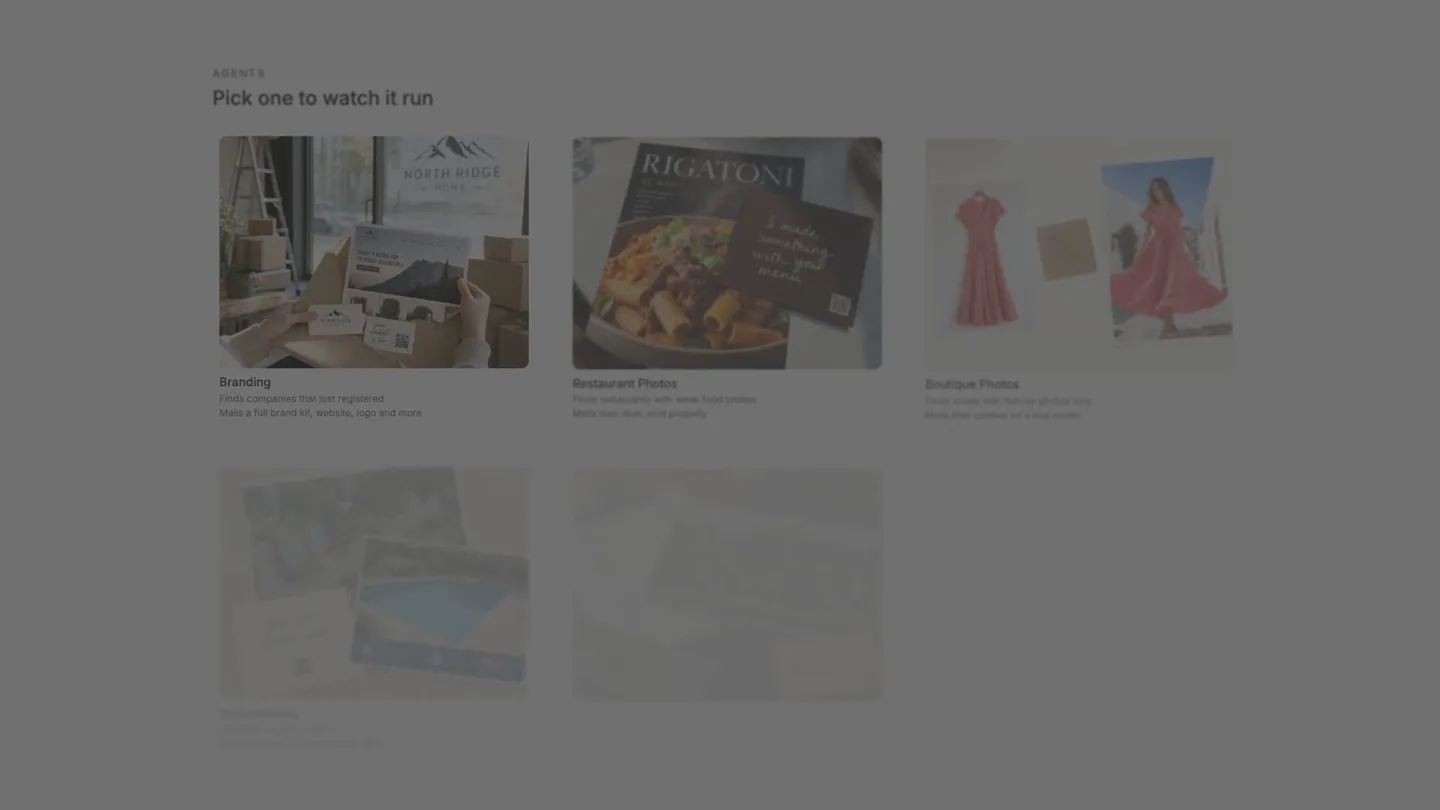
Agent Marketplace Overview
“(No spoken dialogue — The ambient synth continues. A distinct, high-frequency 'click' or 'snap' sound occurs at 0:04.)”
- On screen
- AGENTS Pick one to watch it run Branding Finds companies that just registered Mails a full brand kit, website, logo and more Restaurant Photos Finds restaurants with weak food photos Mails their dish, shot properly Boutique Photos Finds shops with flat-lay photos only Mails their clothes on a real model Pool Cleaning Finds homes with a pool Mails that pool with a cleaning offer Roofing Finds roofs worth a look Mails that roof, made new Landscaping Finds just-sold homes with bare yards
- Camera
- Zoom out from a blurred state to reveal a grid of product examples.
- Motion
- Gaussian blur transition with a quick zoom-out and fade-in of grid elements.
Feature Teaser
Landscaping Agent in Action
“(No spoken dialogue — The ambient synth continues. A distinct, high-frequency 'click' or 'snap' sound occurs at 0:04 and 0:06. A prominent, sharp 'click' sound is heard at 0:11.)”
- On screen
- Landscaping Mailing landscapers in Tampa Finding homes that just sold in Tampa 306 Floral Drive, sold last week Rendering the yard, planted Mailing landscapers, in your name Bayshore Landscaping THIS YARD SOLD LAST WEEK. We Mailed Them This. Bayshore Landscaping, in your name Bayshore Landscaping signed up Now running for them, mailing new homeowners
- Camera
- Focus on a single product card, then a series of text and image updates within that card.
- Motion
- Card zoom-in, progressive text reveals with checkmark animations, and image transformation (yard rendering).
Feature Teaser
Pool Cleaning Agent in Action
“(No spoken dialogue — The ambient synth continues. A prominent, sharp 'click' sound is heard at 0:13.)”
- On screen
- Pool Cleaning Mailing pool companies in Austin Finding homes with a pool in Austin 2000 Paramount Ave Rendering the pool, cleaned Mailing pool companies, in your name Lakeline Pool Service THIS POOL OWNER GOT A CARD. We Mailed Them This. Lakeline Pool Service, in your name Lakeline Pool Service signed up Now running for them, mailing pool owners
- Camera
- Return to grid, then focus on another product card with similar progressive updates.
- Motion
- Card zoom-in, progressive text reveals with checkmark animations, and image transformation (pool cleaning).
Call to Action
Deploy Your First Agent
“(No spoken dialogue — The ambient synth fades out slightly, maintaining its atmospheric quality.)”
- On screen
- Deploy your first lead-gen agent. agents.atonomi.ai
- Camera
- Static, centered text reveal with a subtle underline animation.
- Motion
- Text fade-in with a progressive underline animation for the URL.
Motion design primitives
Synthesizable in Remotion · key components of the ai-agent-marketplace-demo template.
ProgressiveCardReveal
A blurred grid of cards sharpens and zooms out to reveal multiple product examples. Individual cards then zoom in, displaying a sequence of text updates and image transformations.
+ Code construction recipe
Use `interpolate` for blur and scale transitions. Implement `spring` for card zoom-in/out. Text reveals can use `Sequence` and `AbsoluteFill` with `spring` for opacity and position. Image transformations (like yard/pool rendering) can be achieved with `Image` components and `interpolate` on `clipPath` or `opacity` for a dissolve effect.
CheckmarkTextReveal
Text lines appear sequentially, often accompanied by a green checkmark icon, indicating completion or status updates. Some lines transition from a '...' loading state to a final checked state.
+ Code construction recipe
Utilize `Sequence` for staggered text appearance. Each text line can be a `Text` component with `spring` for opacity and `x` position. The checkmark icon can be an `Svg` component with `spring` for scale and opacity, appearing after the text. The '...' loading state can be a simple `Text` component that `interpolate`s to the final text.
UnderlineCallToAction
A final call-to-action text appears, followed by a URL that progressively underlines from left to right.
+ Code construction recipe
The main text uses `spring` for opacity and `y` position. The URL can be a `Text` component. The underline is an `AbsoluteFill` `View` with `height` and `backgroundColor`, using `interpolate` on its `width` property to animate from 0 to 100%.
Style DNA & aesthetic system
Visual aesthetic
Typography
Motion
Special effects
Pacing & rhythm
Conceptual story rhythm
- 1
Introduction & Product Identity
Purpose. To quickly introduce the product name and its core offering.
Execution. Simple text reveal on a dark background, establishing brand identity.
- 2
Marketplace Overview
Purpose. To showcase the breadth of available AI agents and their applications.
Execution. A grid of product cards appears, each representing a different agent type, giving a high-level view.
- 3
Agent Demonstration (Deep Dive)
Purpose. To illustrate the step-by-step process and tangible results of an AI agent.
Execution. Zooming into a specific agent card, showing progressive status updates, image transformations, and success metrics.
- 4
Call to Action
Purpose. To prompt the viewer to engage with the product.
Execution. A clear, concise call-to-action text and URL on a dark background.





