
Ava Studio · Launch Video Breakdown: Hook, Pacing & Motion Design
Drop in your website, and it researches, scripts, and produces on-brand videos you can edit or ship.
Scene-by-scene timeline & spoken transcript
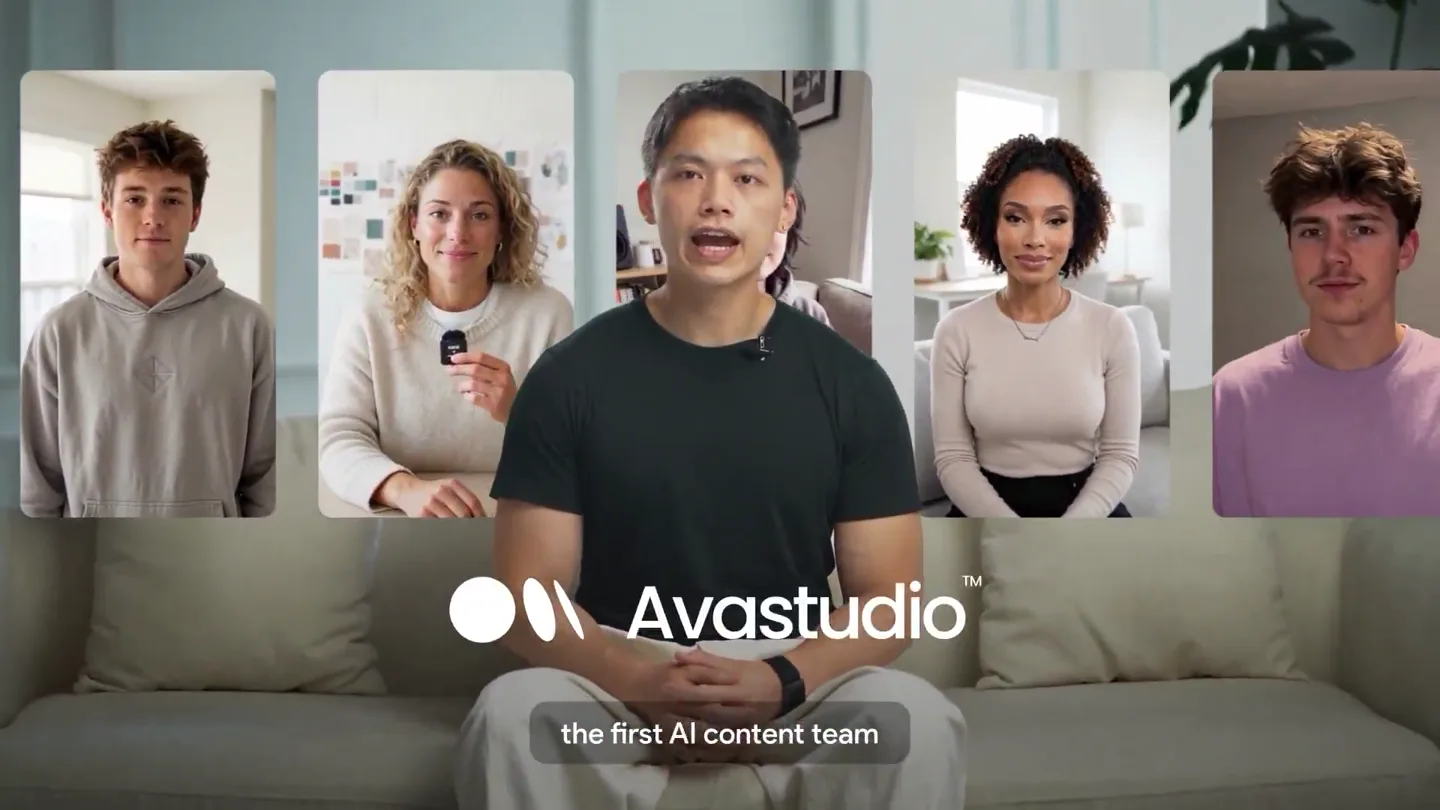
The Hook
Introducing Ava Studio: AI Content Team
“Introducing Ava Studio, your AI content team that researches what's winning and produces.”
- On screen
- Avastudio Introducing Ava Studio Market Signals Views 42% 18.4s 8.2% 3.1% 5.0% RESEARCH CEO of Ava Studio Tong Pow PRODUCTION
- Camera
- Static medium shot of the founder, with UI elements and video clips composited around him. The camera then zooms out slightly to reveal more UI.
- Motion
- Layered UI elements with subtle parallax and scaling animations. Video clips appear and disappear with quick fades and wipes. Text reveals with a soft upward slide.
Product Reveal
AI-Powered Content Generation Workflow
“Whether you're a founder who needs a UGC angle that converts, or a brand that needs fresh ads, Ava starts by learning your brand, product, audience, voice, and past content. Then it studies market signals, competitor content, and your existing winners to generate new concepts every week.”
- On screen
- Founder Create native UGC angles for this product Ad CPL CTR Hook Skin Reaction $3.58 3.5% 25% Launched Sep 05 Daily Routine $3.65 3.9% 3.9% Launched Sep 04 Ava starts by learning your brand. Product Logo Your Brand avastudio.com Audience Extracting images VOI CREATIVE FOUNDER Ava's Run 1 Sep 14 Inprogress 4 References 0 Concepts Scanning Your Niche No Own-brand Ads Found In The Ad Library — Offers/claims Ground In The Choosing Angles Researching What Works Drafting Competitor Content 123 References Scanned Ads Excluded Ads Library Emphasize Speed & Ease of use Top Example Brands Why it matters 193 Days Live 2 HeyGen (193 days running) and LTX Studio LTX Studio 193 Days Research View thesis Sep 3 - 9 Research complete This week's 8 concepts All(15) Today Monday Draft More + Quene All Fresh Angles New hooks and formats sourced from current market signals, competitor creative and your existing winners. Video Video Video Video Things that changed your work, creative flow, life. Preview - AVA-C001 Preview - AVA-C002 Preview - AVA-C003 Preview - AVA-C004 Proof / Results Trend with a Price / Value Tutorial with a Social Proof Trend with a Talking Head with an identity direct hook contrarian hook direct hook hook + Quene + Quene + Quene + Quene Video Video Video Video
- Camera
- Dynamic camera movements, including pans, zooms, and quick cuts between different UI views. The perspective shifts from a product shot to a data dashboard, then to a brand input screen, and finally to a concept generation interface.
- Motion
- Rapid scene cuts synchronized with audio impacts. UI elements animate in with quick, clean transitions, often sliding or fading. Data points and text highlight with subtle glows and color changes. The overall effect is fast-paced and informative.
Feature Teaser
Editable AI-Generated Content
“And Ava produces it using leading image, video, and voice models. Make the changes yourself, or go back to Studio and tell Ava what you want changed.”
- On screen
- Black Forest Labs ByteDance Google OpenAI KlingAI Wan ElevenLabs Access Leading Models From STOP BOOKING ACTORS FOR EVERY AD THE OLD WAY DOESN'T SCALE. TEST MORE. WAIT LESS. EDITABLE OUT Nobody Should Sti Elevator 2:32 Depthcaller 2:11 Left Chess 0:30 Music Studio Editor Scene 01 Scene 02 Scene 03 Scene 04 Gen Time: 6-8 Min Generating...
- Camera
- Close-up on UI elements, then a wider shot showing multiple video outputs. The camera then focuses on a toggle switch and a generation progress bar.
- Motion
- Split-screen effects showcasing multiple AI-generated videos. UI elements like buttons and toggles animate with satisfying click feedback. Progress bars fill with a smooth, linear animation. Text highlights and bounding boxes appear with quick, sharp animations.
Call to Action
Autopilot Content Team & Brand Logo
“Ava learns from the results and uses what worked to generate next week's concepts. Your content team, on autopilot.”
- On screen
- TikTok Creative Center Inspiration Trends Creative Tools English Log in Landing Page https://www.avastudio.com/ Ad caption Stop hiring an actor every time you need a new ad. Ad performance Likes Comments Shares 255K 3K 2K CTR Budget Top 22% High Interactive CTR CVR Clicks Conversion Remain "Highlight frames" are time frames in the video that performed well in specific metrics, indicating high value, and are recommen... CVR Top 99% of the industry average 100 2s 10s 20s 30s Next week's concepts Based on your top performer Video Video Video Video PAID FREE Myth-bust Comparison with a Social Proof Trend with a Origin Trend with a direct hook Proof / Results Trend with a contrarian hook direct hook direct hook + Quene + Quene + Quene + Quene 419K 24.7K 1.9K Views this week Likes Cmts LEARN REAL RESULTS AUTOPILOT CONTENT TEAM NEW CREATIVE IMPROVE Organic Organic Grow Audience Sep Avastudio
- Camera
- A wide shot of a performance dashboard, then a split screen showing a user and a cyclical diagram. The video ends with a static shot of the brand logo.
- Motion
- Data visualization with animated graphs and metrics. A cyclical diagram animates with arrows and text to illustrate a feedback loop. The final logo reveal is a clean, simple fade-in.
Motion design primitives
Synthesizable in Remotion · key components of the ai-agent-launch-dark-mode template.
LayeredUIPopup
UI cards and elements appear with a slight scale-up and fade-in, often accompanied by a subtle upward or lateral slide. This creates a sense of depth and responsiveness.
+ Code construction recipe
Use `spring` for `scale` and `opacity` properties. Combine with `interpolate` for `translateY` or `translateX` to achieve the sliding effect. Ensure z-index management for layered depth.
DataHighlightPulse
Key data points or text elements briefly glow or change color, often with a bounding box animation, to draw attention to specific information on a dashboard or UI.
+ Code construction recipe
Implement with `interpolate` for `backgroundColor` or `boxShadow` properties, transitioning between a subtle highlight color and the default. Use `spring` for `borderWidth` and `borderColor` for the bounding box effect.
CyclicalFlowDiagram
Arrows and text labels animate along a circular or elliptical path, illustrating a continuous process or feedback loop. Elements appear sequentially to guide the viewer.
+ Code construction recipe
Utilize SVG paths for the arrows and `stroke-dashoffset` animation for drawing them. Position text elements along the path using `transform` properties and `interpolate` for opacity and scale to reveal them in sequence.
Style DNA & aesthetic system
Visual aesthetic
Typography
Motion
Special effects
Pacing & rhythm
Conceptual story rhythm
- 1
The AI Introduction
Purpose. Introduce the core product and its primary function as an AI content team.
Execution. Founder speaking directly to the camera, surrounded by dynamic UI elements showcasing the AI's research and production capabilities.
- 2
The Workflow Deep Dive
Purpose. Detail the step-by-step process of how the AI learns, analyzes, and generates content.
Execution. Rapid cuts between various UI screens demonstrating brand input, market signal analysis, competitor content review, and concept generation.
- 3
The Editability & Iteration
Purpose. Highlight the user's control over AI-generated content and the continuous improvement loop.
Execution. Split-screen views of AI-generated videos, interactive editing interfaces, and a visual representation of the feedback loop (learn, improve, new creative).
- 4
The Autopilot Promise
Purpose. Reinforce the value proposition of an autonomous, high-performing content team.
Execution. A clear, concise diagram illustrating the 'Autopilot Content Team' cycle, culminating in the brand logo reveal.





