
Bridge Launch (by Caleb Barclay) · Launch Video Breakdown: Hook, Pacing & Motion Design
We're launching Bridge today 🌉 An AI engine that builds virtual homes. Blueprint in, walkable home out. Every plan, every option, structural changes included. What took 3D artists months now takes days. Homebuilders can finally show buyers every home they sell. https://t.co/LLuoxZphlm
Scene-by-scene timeline & spoken transcript
The Hook
Blueprint to Virtual Home: AI Detection
“(No spoken dialogue — Driving electronic beat with sub-bass drop at 0:01, rhythmic industrial percussion, high-energy riser from 0:08 to 0:09 culminating in another sub-bass impact.)”
- On screen
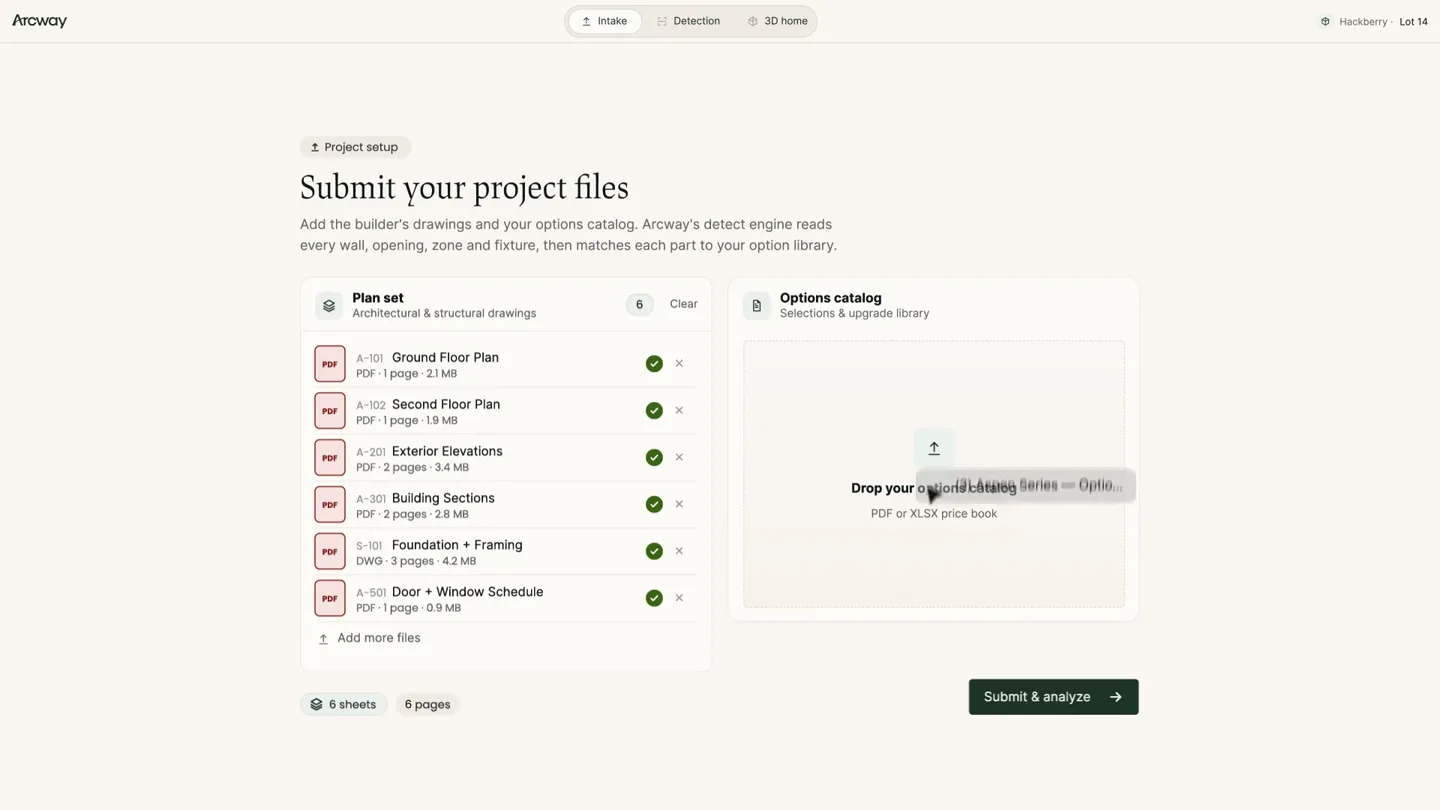
- Arcway Intake Detection 3D home Hackberry Lot 14 Project setup Submit your project files Add the builder's drawings and your options catalog. Arcway's detect engine reads every wall, opening, zone and fixture, then matches each part to your option library. Plan set Architectural & structural drawings 6 Clear Options catalog Selections & upgrade library 3 Clear A-101 Ground Floor Plan PDF 1 page 2.1 MB Aspen Series - Options Catalog PDF 64 pages 19.5 MB A-102 Second Floor Plan PDF 1 page 1.9 MB Standard Selections XLXS 3 tabs 0.4 MB A-201 Exterior Elevations PDF 2 pages 3.4 MB Upgrade Pricing 2026 PDF 12 pages 2.2 MB A-301 Building Sections PDF 2 pages 2.8 MB Add more files A-101 Foundation + Framing DWG 3 pages 4.2 MB Submit & analyze A-501 Door + Window Schedule PDF 1 page 0.9 MB Add more files 6 sheets 9 pages 3 catalog files Detection 1 of 9 Detecting - Reading Sheets... Option Library ML-matched Walls Windows Doors Room zones Floors Ceilings Roof Appliances Fixtures 1/16" = 1'-0" Output: detect.engine arcway detect --plan hackberry load: Detecting Detection 2 of 9 Detecting - Tracing Walls... Option Library ML-matched Walls 142 segments Modern Farmhouse White oak matte black shaker Windows Doors Coastal Light woods shiplap airy blues Room zones Floors Ceilings Roof Appliances Fixtures 1/16" = 1'-0" Output: detect.engine arcway detect --plan hackberry loaded plan set 6 pdf 2 levels rasterizing vector geometry ...... ok tracing walls 142 segments 28 junc Detecting
- Camera
- Static overhead shot of a web application interface, then a slight zoom into the blueprint area, followed by a subtle pan and zoom as the detection process highlights different elements.
- Motion
- UI animation, data visualization, highlighting, progress indicators, subtle camera movements to guide focus.
Product Reveal
Interactive 3D Home Walkthrough
“(No spoken dialogue — Sub-bass impact at 0:09, consistent energetic electronic beat, riser from 0:15 to 0:16 leading to another impact.)”
- On screen
- Arcway Intake Detection 3D home Hackberry Lot 14 Live 3D - Hackberry Assembled Hackberry 3,398 sq ft 14 rooms 2 levels 96% match SPACES 1 2 Garage 440 sf 3 options Foyer 165 sf 2 options Powder 78 sf 3 options Mudroom 62 sf 1 option Kitchen 360 sf 2 options Dining 393 sf 3 options Living Room 780 sf 3 options DELIVERY Publish to community Post to the builder feed. Tour the home like a buyer Step through the buyer view. Launch in Plans Gallery Publish to your plan catalog. Johnson Residence Hackberry | 3 bed, 2.5 baths Tap any space to begin EXTERIOR 1ST FLOOR 2ND FLOOR Estimates $723,999 Hackberry Buyer preview - live walkthrough Exit walkthrough Customer Link Video Renders
- Camera
- Smooth, immersive first-person camera movement through a 3D rendered home, mimicking a virtual tour. Pans and zooms to highlight interactive elements.
- Motion
- 3D camera path animation, UI overlays, interactive element highlighting, smooth transitions between rooms.
Feature Teaser
Customization & Sharing
“(No spoken dialogue — Consistent energetic electronic beat, significant riser from 0:31 to 0:32 leading to a powerful sub-bass drop.)”
- On screen
- Safari File Edit View History Bookmarks Window Help Tue Nov 10 9:41 AM Share with customer Send a private 3D link for buyers to tour. PRIVATE LINK Hackberry - Johnson Residence 3 bed, 2.5 baths, 3,398 sq ft Open: No login, No ads. THEY CAN View only View + Design arcway.io/Hackberry/Lot-14 Copy SEND BY EMAIL Cancel Send to customer 10 TV Music App Store Messages Mail FaceTime Maps Photos Calendar Contacts Reminders Notes Stocks Books App Store System Settings Johnson Residence Hackberry | 3 bed, 2.5 baths Tap any space to begin EXTERIOR 1ST FLOOR 2ND FLOOR Estimates $723,999 Hackberry Buyer preview - live walkthrough Exit walkthrough Customer Link Video Renders Bathroom Wall color Select the look you want Card Room Green Farrow & Ball Estate Eggshell Low-VOC Washable Apply to all bathrooms More in the bathroom Vanity 5 options Countertop 6 options Faucet 4 options Flooring 5 options Shower & tub 3 options Estimates $723,999 Bathroom Faucet Select this look you want Trinsic single-handle Delta Bathroom faucet WaterSense Spot-resistant Apply to all bathrooms Choose a style More in the bathroom Vanity 5 options Countertop 6 options Estimates $737,350 Hackberry Buyer preview - live walkthrough Exit walkthrough Customer Link Video Renders 4:00 PM
- Camera
- Close-up shots of UI elements demonstrating customization options (e.g., changing wall color, faucet style) within the 3D environment. A shot of a laptop screen showing the sharing interface.
- Motion
- UI interaction animation, object property changes, screen capture with overlay, smooth camera transitions between UI and 3D elements.
Call to Action
Arcway Bridge: The Future of Homebuilding
“(No spoken dialogue — Powerful sub-bass drop at 0:32, consistent energetic electronic beat, final sustained sub-bass drop at 0:49.)”
- On screen
- Turn any floorplan into a virtual home Arcway Arcway Bridge
- Camera
- Abstract, stylized camera movement across a gradient background with horizontal line patterns. Text elements animate into view.
- Motion
- Abstract motion graphics, text animation (fade-in, scale), gradient transitions, line-based visual effects.
Motion design primitives
Synthesizable in Remotion · key components of the ai-design-platform-launch template.
UIDetectionHighlight
Elements within a UI (like blueprint sections or list items) are dynamically highlighted with a colored outline or fill, often accompanied by a checkmark or progress indicator, simulating an AI detection process.
+ Code construction recipe
Use `interpolate` for color changes and opacity. Apply `spring` for subtle bounce on checkmark appearance. SVG filters for glow effects on highlighted areas. Coordinate with `Sequence` for timed, sequential highlighting.
Immersive3DWalkthrough
A smooth, first-person camera navigates through a detailed 3D architectural rendering, showcasing different rooms and interactive elements like changing wall colors or fixtures.
+ Code construction recipe
Implement a `Camera` component with `useCurrentFrame` to animate `position` and `rotation` along a predefined path. Use `AbsoluteFill` for UI overlays. Leverage `WebGL` or `Three.js` for rendering the 3D scene and `interpolate` for smooth camera easing.
AbstractLineReveal
Text or logos appear over a background composed of horizontal lines that subtly shift, fade, or change color, creating a modern, tech-forward aesthetic.
+ Code construction recipe
Create a `Canvas` component or use `AbsoluteFill` with `linear-gradient` and `mask-image` for the line patterns. Animate `opacity` and `transform` (scale, translateY) for text using `spring` or `interpolate` with custom easing curves. Use `Sequence` for staggered text reveals.
Style DNA & aesthetic system
Visual aesthetic
Typography
Motion
Special effects
Pacing & rhythm
Conceptual story rhythm
- 1
Input & Processing
Purpose. To demonstrate the ease and power of the AI engine in converting complex blueprints into digital data.
Execution. Screen capture of a web app, showing file uploads and an AI detection process highlighting elements on a blueprint.
- 2
Output & Experience
Purpose. To showcase the immediate, high-fidelity result of the AI processing: a fully interactive 3D virtual home.
Execution. Immersive first-person walkthroughs inside a beautifully rendered virtual home, highlighting key spaces.
- 3
Customization & Collaboration
Purpose. To illustrate the flexibility and shareability of the virtual home, empowering users to customize and share with clients.
Execution. UI interactions demonstrating real-time changes to finishes and fixtures, followed by a screen showing sharing options.
- 4
Brand & Vision
Purpose. To reinforce the brand identity and articulate the core value proposition of the product.
Execution. Abstract motion graphics with brand messaging and logo reveal, emphasizing the product's transformative impact.





