
Capx · Launch Video Breakdown: Hook, Pacing & Motion Design
Capx Casa is the control plane for agent-run companies. It turns company context into an operating plan, routes work to specialists, and keeps the company brain current under human control.
Scene-by-scene timeline & spoken transcript
The Hook
The Solitary CEO
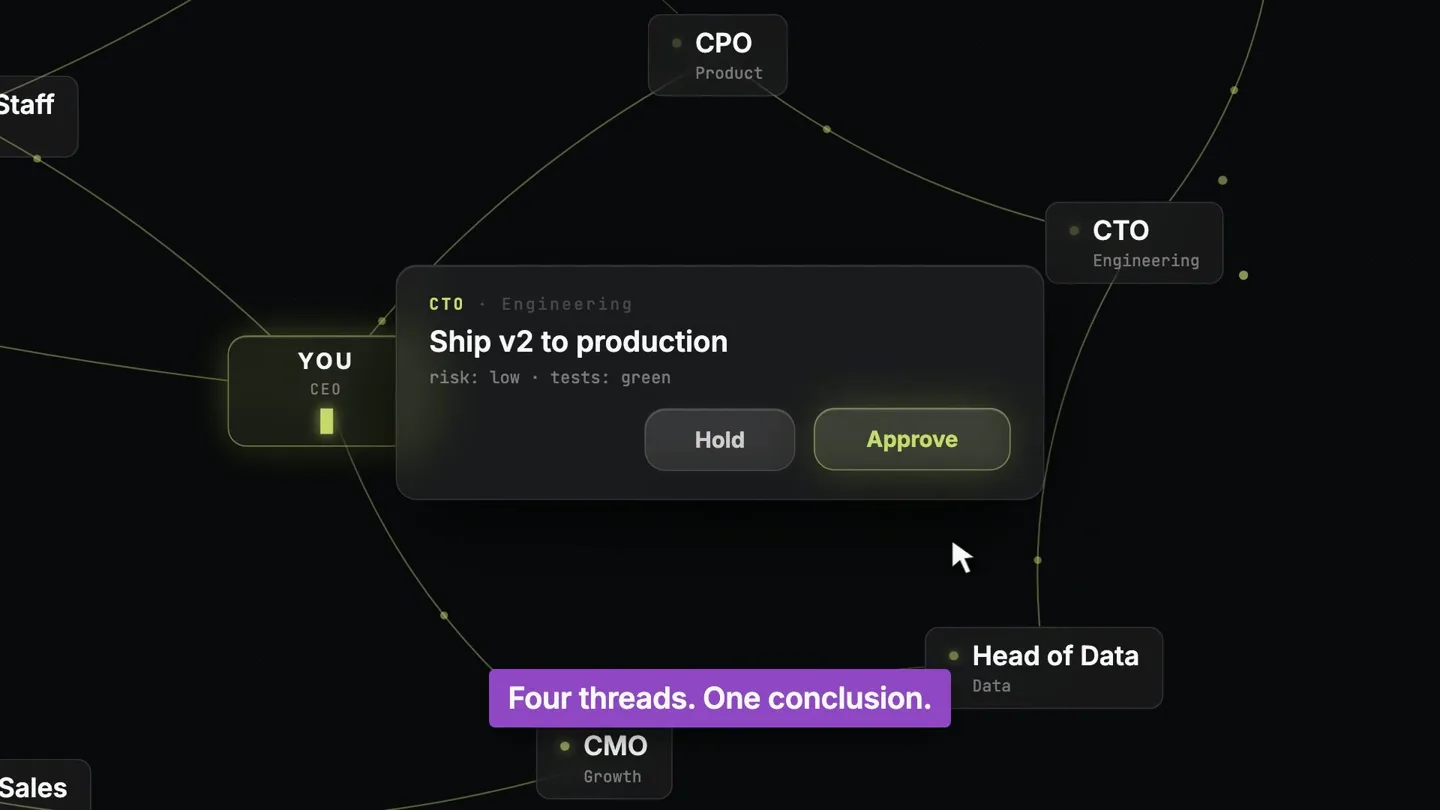
“This is your company. You're the only human in it. Your CTO put a whole team on it — in parallel. Four threads. One conclusion.”
- On screen
- Chief of Staff Strategy YOU CEO Head of Brand Brand General Counsel CFO Finance CPO Product CTO Engineering COO Operations integration tests 84% load test 68% security scan 44% rollout plan 22% Head of Sales Sales CMO Growth Head of Data Data CTO v2 ready to ship · risk: low
- Camera
- The camera slowly pans and zooms out, revealing more nodes in the organizational chart, maintaining a top-down, slightly angled perspective.
- Motion
- Node-based graph animation with expanding connections and progress bar fills. Text elements animate in with subtle fades and scale. A glowing highlight effect emphasizes the 'YOU' node.
Problem Agitation
Decision Point: Shipping Product
“It lands on your desk. One click. Approved — it actually ships. Your CFO runs the same play.”
- On screen
- YOU CEO CTO Engineering Ship v2 to production risk: low · tests: green Hold Approve deploying to production 100% Chief of Staff Strategy General Counsel Legal vendor audit 100% cloud usage scan 88% CFO Finance forecast model 74% Head of Success Success
- Camera
- The camera focuses on a specific decision node, then quickly pans to another section of the organizational chart.
- Motion
- Interactive UI element animation (button click, progress bar completion). Node connections dynamically highlight. Data points animate with percentage fills and checkmarks.
Product Reveal
Decision Point: Financial Optimization
“Sign off — burn drops, runway grows. Your CMO wants double the ad budget. The data isn't there. That one waits.”
- On screen
- YOU CEO CFO infra 12% over-provisioned CTO Engineering v2.4.0 live CFO Finance Cut infra spend 12% saves $1.4K/mo · no perf impact Hold Approve burn $12.4K $10.9K / mo A/B test results 0% Head of Data Data CMO Growth CMO CAC rising · inconclusive channel mix CAC trend
- Camera
- The camera smoothly transitions between different nodes, highlighting relevant data and decision prompts.
- Motion
- Dynamic data visualization with numerical updates and status changes. UI elements (buttons) appear and react to implied interaction. Node connections pulse and change color.
Feature Teaser
Decision Point: Marketing Strategy
“Eleven executives. One decision-maker. You.”
- On screen
- YOU CEO CMO Growth Double the ad budget CAC rising 3 weeks · needs data Hold Approve on hold · waiting on data General Counsel Legal Head of Brand Brand COO Operations CPO Product CTO Engineering v2.4.0 live CFO Finance burn $10.9K / mo Head of Success Success Head of Sales Sales Head of Data Data YOUR DAILY BRIEF your-company everything local · nothing leaves your machine decisions 3 · 2 approved · 1 held shipped v2.4.0 live in production burn ↓ 12% · runway +2 months your time 90 seconds
- Camera
- The camera pulls back to show the full organizational chart, then zooms into a 'Daily Brief' summary panel.
- Motion
- Overall graph view with highlighted 'YOU' node. A new UI panel slides in, populating with summarized data and metrics. Text animates in with a typewriter effect.
Call to Action
Capx Casa: Build from the Terminal
“(No spoken dialogue — A final impactful sub-bass drop at [00:26] and a concluding sweep at [00:30] accompany the brand reveal and call to action.)”
- On screen
- capx® casa Build your company from the terminal. > git clone https://github.com/Capx-AI/casa
- Camera
- A hard cut to a full-screen brand logo and a terminal command line interface.
- Motion
- Brand logo reveal with subtle glow and scale. Terminal command line text animates in with a typing cursor effect. The overall aesthetic shifts to a clean, dark mode UI.
Motion design primitives
Synthesizable in Remotion · key components of the capx-casa-agent-control-plane template.
OrgChartNodeFlow
Nodes representing roles and tasks are connected by animated lines, with data points and progress bars appearing and updating dynamically. A central 'YOU' node glows and pulses.
+ Code construction recipe
Use `d3-force` for node positioning and link simulation. Animate line drawing with `stroke-dasharray` and `stroke-dashoffset`. Implement progress bars with `width` interpolation. Apply `filter: drop-shadow()` and `animation: pulse` for the 'YOU' node.
DecisionModalInteraction
A modal dialog box slides in from the side, presenting a decision with 'Hold' and 'Approve' buttons. Clicking 'Approve' triggers a visual confirmation and subsequent data update.
+ Code construction recipe
Utilize `framer-motion` or `react-spring` for modal slide-in/out animations. Implement button hover and click states with `scale` and `opacity` transitions. Use `useState` to manage decision state and trigger subsequent animations.
TerminalCommandReveal
A command-line interface appears, with text typing out character by character, followed by a blinking cursor.
+ Code construction recipe
Render text character by character using `substring` and `useEffect` with `setTimeout`. Animate the cursor with a `blink` CSS animation (opacity toggle) or `framer-motion` keyframes.
Style DNA & aesthetic system
Visual aesthetic
Typography
Motion
Special effects
Pacing & rhythm
Conceptual story rhythm
- 1
The Burden of Command
Purpose. Establish the core problem: the overwhelming responsibility of a single decision-maker in a complex organization.
Execution. An expanding organizational chart with 'YOU' at the center, highlighting the numerous connections and tasks flowing to the CEO.
- 2
Decisions, Automated
Purpose. Introduce the product's core value proposition: streamlining and automating complex decision workflows.
Execution. Interactive UI modals appearing with clear 'Approve'/'Hold' options, demonstrating quick, informed decisions leading to immediate results.
- 3
The Daily Brief
Purpose. Showcase the product's ability to synthesize vast amounts of company data into actionable insights.
Execution. A summary dashboard populating with key metrics and outcomes, emphasizing efficiency and clarity.
- 4
Empowering the Agent-Run Company
Purpose. Conclude with the brand identity and a clear call to action, positioning the product as the foundational tool.
Execution. A clean brand reveal followed by a terminal command, inviting users to 'build your company from the terminal'.





