
Claude Code Projects (by Anthropic) · Launch Video Breakdown: Hook, Pacing & Motion Design
Claude Code projects now run from one conversation. You describe the work, and Claude directs parallel threads that keep going after you close the laptop.
Scene-by-scene timeline & spoken transcript
The Hook
Problem Agitation & Intrigue
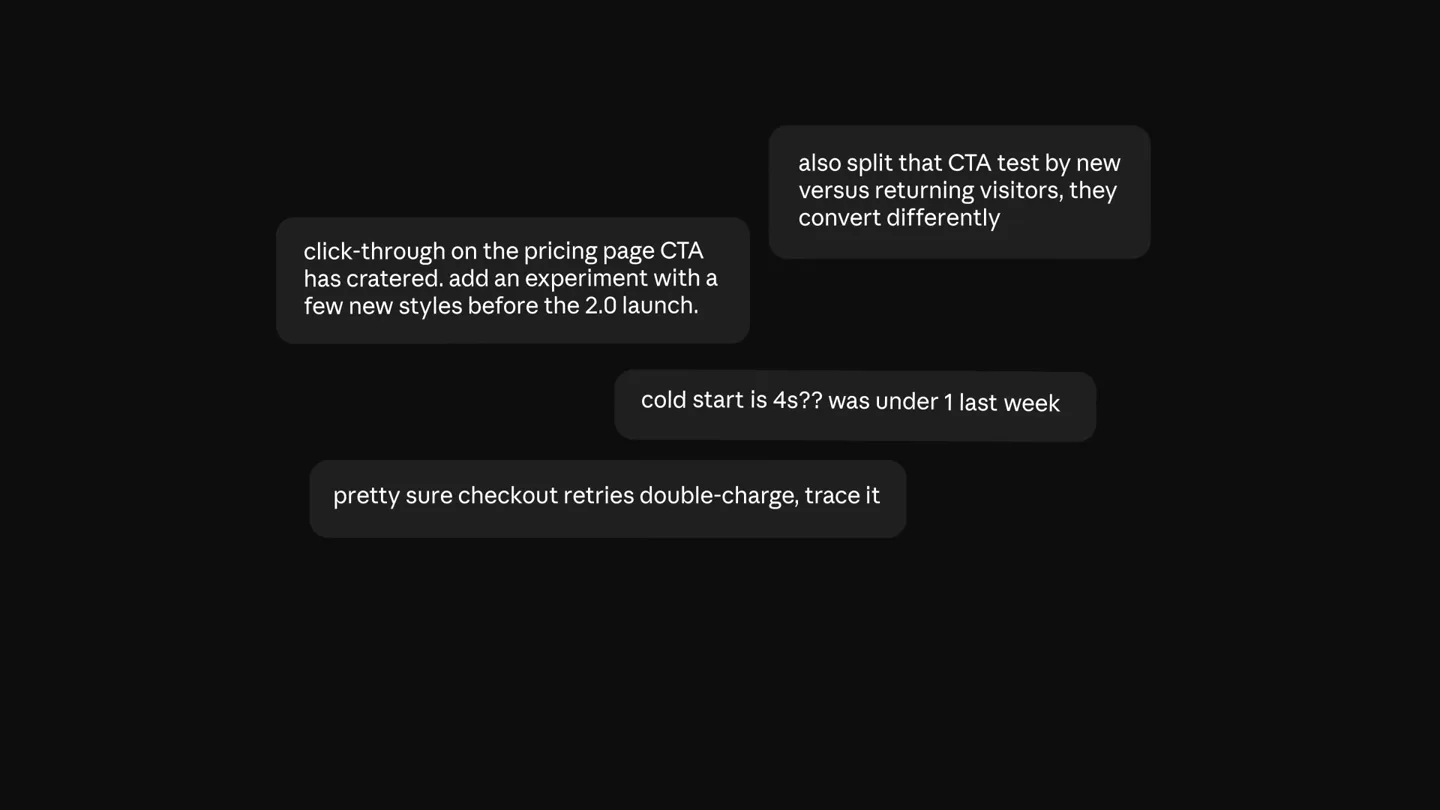
“(No spoken dialogue — A 'whoosh' sound effect introduces a dark screen with floating text bubbles, followed by a 'thump' sound as the main title appears.)”
- On screen
- click-through on the pricing page CTA has cratered. add an experiment with a few new styles before the 2.0 launch. also split that CTA test by new versus returning visitors, they convert differently cold start is 4s?? was under 1 last week pretty sure checkout retries double-charge, trace it Start your next big project with one little conversation
- Camera
- Static shot on a dark background, then a quick cut to a centered text overlay.
- Motion
- Text bubbles animate in with a subtle bounce, followed by a hard cut to a bold, centered headline with a slight scale-in.
Product Reveal
Introducing Claude's Interface
“(No spoken dialogue — A 'click' sound effect accompanies the UI reveal. A prominent riser builds from 0:15 to 0:19, culminating in a sub-bass drop at 0:19.)”
- On screen
- New Projects New Artifacts Routines Customize Routines > 2.0 audit Overview Threads Library Routines + Add view Welcome back, Casey. Nothing is waiting on you. Working 1 Find what to simplify in acme/storefront Reading the codebase Hi Casey, welcome to your new project. I coordinate the work here: ask for whatever you need, and I'll either answer you directly or start threads to work on things in parallel. Bring everything here as it comes up. I'll keep an eye on what's running and post updates when something finishes or needs you. You can also ask me to change my instructions, add repositories, or send you scheduled updates. To see where the engineering and design can be simplified, I'm reading through the acme/storefront codebase. Find what to simplify in acme/storefront try a few CTA styles for the pricing page. current one's dead pretty sure checkout retries double-charge, trace it sandbox the webhook handler against stripe test mode cold start is 4s?? was under 1 last week draft the 2.0 changelog from whatever's mergd Claude is working... 2s Ask Claude a question or start a task... Fable 5.1 High Claude is working...
- Camera
- Zoom-in on a UI element, then a slow pan across the application interface, followed by a quick cut to an abstract loading screen.
- Motion
- Smooth UI navigation with cursor interaction, text input animation, and a transition to a generative particle field with a 'working' indicator.
Feature Teaser
Parallel Task Execution Visualization
“(No spoken dialogue — The sub-bass drop at 0:19 marks a scene change. Various electronic 'blips' and 'bloops' accompany on-screen actions. A significant riser occurs from 0:35 to 0:37, followed by a sub-bass impact at 0:37.)”
- On screen
- [x] parse messages [~] interpret 01 [ ] spawn sessions 5 intents 01 design experiment exploration · generate variants, setup experiment 02 perf regression · bisect deploys, profile 03 payments · read-only, trace the retry path // ^ same session · then run the handler against stripe test events // draft changelog 2.0 once merged [~] spawn sessions 3 sessions *01 //cta runs on: local uses: skills, preview, tools *02 //perf runs on: remote uses: memory, tools *03 //checkout runs on: remote uses: mcp+creds, sandbox, tools CTA styles for the pricing page: try a few, the current one's dead. Try new CTA styles on pricing page Staging 4 CTA variants on a branch Checkout retries may double-charge, and the webhook handler needs a Stripe test-mode sandbox: trace and harden both. Harden checkout: retry trace + Stripe webhook sandbox Reading the checkout flow and retry handling Cold start is 4s, was under 1s last week. Fix 4s cold start regression Measuring current cold start Look in the Overview panel for three new threads: checkout retries + Stripe webhook (combined), CTA styles, and perf regression. Don't worry about the 2.0 changelog. I'll draft it here once the merged work is in. Claude is working 42s Ask Claude a question or start a task... Fable 5.1 High
- Camera
- Static view of a terminal-like interface, then a zoom-out to reveal a node-graph, followed by a return to the application UI.
- Motion
- Text appears with a typewriter effect, lines animate to connect nodes, and UI elements highlight and expand to show task progress.
Feature Teaser
Iterative Development & Collaboration
“(No spoken dialogue — Electronic 'blips' and 'bloops' continue. The audio maintains a modern, dynamic feel.)”
- On screen
- Overview Threads Library Routines + Add view Welcome back, Casey. Nothing is waiting on you. Waiting on you 1 Needs your eye: pick a CTA variant Blocked Pick a variant: A (Ink), B (Glow), or C (Card) Ready for review 2 Fix 4s cold start regression PR #6 mergeable; no CI/reviews; awaiting Casey's review Harden checkout: retry trace + Stripe webhook sandbox PR #4 mergeable; 11/11 signed test-mode deliveries p... Three CTA variants are staged on claude/pricing-cta-variants with screenshots in the comparison page above. Needs your eye. Which one? A · Ink (recommended): near-black pill like the home hero button, price set right in serif, flips terracotta on hover. B · Glow: stays terracotta, soft halo, price in a chip with an arrow. C · Card: full purchase block with big price, trust copy and the Ink button. Heaviest. Preview any of them live with ?cta=ink|glow|card on the pricing page. Once you pick, I'll make it the default and open the PR. Claude is working 29s claude/pricing-cta-variants Create PR A · Ink: bold and attention-grabbing. B · Glow: soft and consistent in color. C · Card: most information-forward. D · Outline (your request): hairline border, tracked caps, terracotta sweep fill on hover. Quietest. Preview them all with ?cta=ink|glow|card|outline on the pricing page. Let me know your favorite and I'll open the PR. Built option D and verified in browser Casey's review and selection Apply the selected style to the pricing page and open a PR i like D, Welcome back, Casey. Nothing is waiting on you. Ready for review 3 PR #9 open: Outline CTA PR #9 open & mergeable; awaiting review Harden checkout: retry trace + Stripe webhook s... PR #4 mergeable; 11/11 signed test-mode deliveries p... Fix 4s cold start regression PR #6 mergeable; no CI/reviews; awaiting Casey's review
- Camera
- Close-up on UI elements, then a series of quick cuts between different sections of the application, simulating user interaction.
- Motion
- Cursor interaction, text input, checklist animations, and smooth transitions between different UI states, emphasizing responsiveness and progress.
Call to Action
Final Reveal & Branding
“(No spoken dialogue — A final, extended riser and sweep lead into a conclusive sub-bass drop and fade-out from 1:10 to 1:17.)”
- On screen
- (No on-screen text)
- Camera
- Zoom-out from a complex node graph, then a quick cut to a centered logo reveal.
- Motion
- Generative node graph animation with lines connecting and expanding, followed by a hard cut to a clean logo reveal with a subtle glow effect.
Motion design primitives
Synthesizable in Remotion · key components of the anthropic-claude-code-agent-launch template.
GenerativeNodeGraph
Abstract node graph with lines connecting and animating, appearing to 'grow' and 'process' information. Nodes are simple squares or circles, and lines are dashed or solid, dynamically drawing themselves.
+ Code construction recipe
Use Remotion's `<AbsoluteFill>` and `<Sequence>` components. Implement SVG paths for lines, animating `stroke-dasharray` and `stroke-dashoffset` to create drawing effects. Nodes can be rendered as `<Rect>` or `<Circle>` components, with `spring()` for subtle position and scale animations. Use `interpolate()` for opacity changes based on time.
DynamicTextBubbles
Text content appears within rounded rectangular bubbles that subtly animate into view, often with a slight bounce or fade. The text itself can have a typewriter effect or appear instantly.
+ Code construction recipe
Create a `<Bubble>` component using `<AbsoluteFill>` and `<Rect>` for the background. Animate `transform: translateY` and `opacity` using `spring()` for the entrance. Text can be rendered with `<Text>` and `splitChars()` or `splitWords()` to animate individual characters or words with `delay()` and `interpolate()` for a typewriter effect.
InteractiveUIPanels
Simulated user interface elements (panels, lists, text fields) that animate smoothly, responding to a virtual cursor. Elements highlight, expand, and text appears as if being typed or generated.
+ Code construction recipe
Utilize `<AbsoluteFill>` for the overall UI layout. Individual UI components (e.g., `<Panel>`, `<ListItem>`, `<InputField>`) can be custom Remotion components. Animate `width`, `height`, `opacity`, and `transform` properties using `spring()` for smooth transitions. Cursor movement can be animated with `interpolate()` for `left` and `top` properties. Text input can use `splitChars()` with `delay()` for a typing effect.
Style DNA & aesthetic system
Visual aesthetic
Typography
Motion
Special effects
Pacing & rhythm
Conceptual story rhythm
- 1
The Problem & Promise
Purpose. Establish the pain points of complex project management and introduce the core value proposition of simplified, conversational AI.
Execution. Floating text bubbles representing scattered tasks, followed by a bold, concise headline promising a solution.
- 2
Product Immersion
Purpose. Showcase the Claude Code interface and demonstrate the initial interaction, setting the stage for its capabilities.
Execution. Detailed UI walkthrough with cursor interactions, text input, and a transition to an abstract 'working' state.
- 3
Deep Dive into Parallelism
Purpose. Illustrate Claude's ability to break down and execute tasks in parallel, highlighting its autonomous and intelligent workflow.
Execution. Terminal-like visualizations, generative node graphs, and UI updates showing multiple tasks progressing simultaneously.
- 4
Seamless Collaboration & Resolution
Purpose. Demonstrate how Claude integrates into a developer's workflow, facilitating review, iteration, and task completion.
Execution. UI interactions showing task completion, pull request creation, and user feedback loops, culminating in a final brand reveal.





