
Claude Hand Control Device (by 0xMarioNawfal) · Launch Video Breakdown: Hook, Pacing & Motion Design
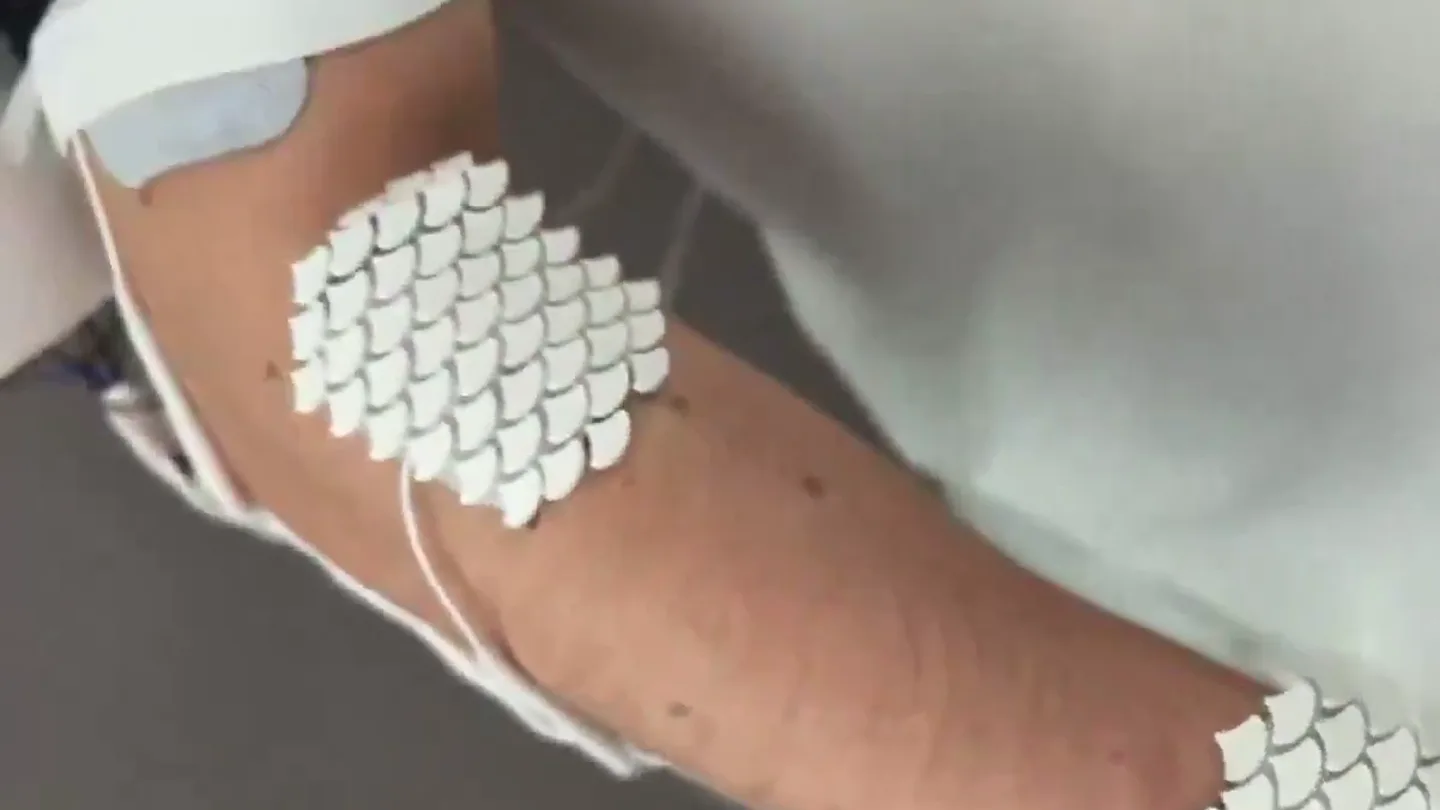
MIT STUDENTS BUILT A DEVICE THAT LETS CLAUDE CONTROL YOUR HAND THROUGH ELECTRIC PULSES. YOU SPEAK A TASK AND YOUR FINGERS MOVE. It can play piano, draw what you describe and mix a drink. Six people…
Scene-by-scene timeline & spoken transcript
The Hook
AI-Controlled Hand Introduction
“Hello AI. AI moves wrist to say hello. How does it feel to have a body? AI moves fingers for “OK” gesture.”
- On screen
- Hello AI AI moves wrist to say hello AI moves fingers for “OK” gesture
- Camera
- Close-up on hand with device, then medium shot of presenter interacting with hand, then close-up on hand again. Static shots.
- Motion
- Direct demonstration, subtle on-screen text overlays for context.
Problem Agitation
Defining Human Operator
“(No spoken dialogue — A sustained sub-bass drone with subtle synth pads creates a mysterious atmosphere.)”
- On screen
- Human Operator is a human augmentation tool that allows AI to briefly take control of your body to help you learn or do things you cannot do.
- Camera
- Static shot of text on a black background.
- Motion
- Text reveal with a subtle fade-in, emphasizing key product definition.
Product Reveal
Real-World Skill Transfer Demonstrations
“(No spoken dialogue — High-energy riser and sweep at 0:17, followed by a sub-bass drop/impact at 0:18. The sustained sub-bass drone continues.)”
- On screen
- Re-enactment Imagined future use case
- Camera
- Various close-up and medium shots of hands playing piano, drawing, and mixing a drink. Dynamic cuts between actions.
- Motion
- Fast-paced montage of capabilities, using quick cuts and close-ups to highlight precision and versatility. Subtle motion blur on hand movements.
Feature Teaser
AI Bartender & Future Vision
“Can you make me a cocktail? Hey AI, can you make me a rum and coke?”
- On screen
- Imagined future use case
- Camera
- Medium shots of the presenter interacting with another person, then close-ups of the hand mixing a drink. Static and panning shots.
- Motion
- Narrative demonstration of a future use case, combining dialogue with practical application. Subtle riser around 0:28.
Call to Action
Product Name Reveal
“(No spoken dialogue — The sub-bass drone fades out.)”
- On screen
- human operator
- Camera
- Static shot of text on a black background.
- Motion
- Simple text reveal, clean and direct, serving as a brand identifier.
Motion design primitives
Synthesizable in Remotion · key components of the haptic-glove-precision-trainer template.
AugmentedHandOverlay
A close-up shot of a hand wearing a white, scale-like device, with subtle on-screen text appearing and disappearing to provide context for the AI's actions.
+ Code construction recipe
Use `AbsoluteFill` for video, `Sequence` for timed text overlays. Text elements should use `spring` for a subtle fade-in/fade-out and `translateY` for a slight upward motion.
DynamicCapabilityMontage
Rapid cuts between different close-up demonstrations of the AI-controlled hand performing various tasks (playing piano, drawing, mixing drinks), often with a subtle motion blur on the moving elements.
+ Code construction recipe
Employ `Series` for sequential video clips. Apply `interpolate` for `opacity` and `scale` on transitions between clips for quick, impactful cuts. Consider a `Shader` for a subtle motion blur effect on fast-moving objects within the video frames.
ContextualTextReveal
Full-screen text appears on a black background, defining the product or setting the scene, with a clean, direct presentation.
+ Code construction recipe
Utilize `AbsoluteFill` with a black background. Text components should use `spring` for a smooth `opacity` and `scale` animation, ensuring readability and impact. No complex camera movements.
Style DNA & aesthetic system
Visual aesthetic
Typography
Motion
Special effects
Pacing & rhythm
Conceptual story rhythm
- 1
The AI Introduction
Purpose. Immediately hook the viewer by showcasing the core interaction between human and AI-controlled hand, establishing the product's unique premise.
Execution. Close-ups of the device on the hand, direct dialogue with the AI, and on-screen text explaining the AI's responses.
- 2
Defining the Technology
Purpose. Provide a concise, clear explanation of what 'Human Operator' is and its purpose, bridging the initial hook to the subsequent demonstrations.
Execution. Full-screen text on a black background, presenting the product's definition.
- 3
Demonstrating Capabilities
Purpose. Showcase the versatility and practical applications of the technology through a series of diverse, real-world tasks.
Execution. Fast-cut montage of the hand playing piano, drawing, and preparing a drink, using close-ups and dynamic camera angles.
- 4
Future Vision & Call to Action
Purpose. Illustrate a potential future use case to inspire imagination and conclude with the product's name for brand recall.
Execution. Narrative scene of the AI mixing a cocktail, followed by a final full-screen text reveal of 'human operator'.





