CozyBlanket · Launch Video Breakdown: Hook, Pacing & Motion Design
Mesh optimization and AI-assisted retopology.
Scene-by-scene timeline & spoken transcript
The Hook
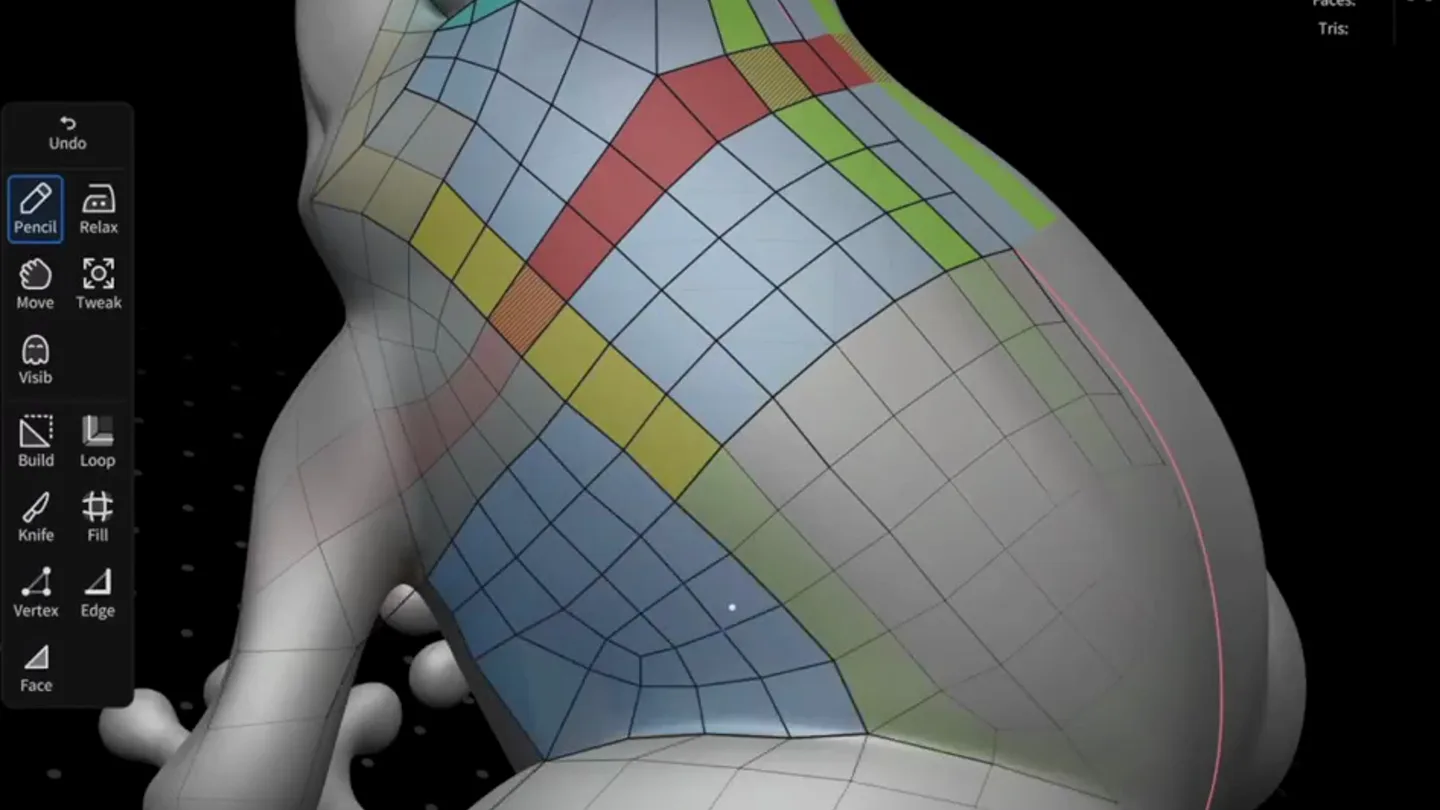
Precision Retopology in Action
“(No spoken dialogue — The track begins with a sustained, evolving pad sound, creating an atmospheric and slightly mysterious tone. At 0:07, a subtle, high-frequency riser begins, building tension. This culminates in a significant sub-bass drop/impact at 0:10.)”
- On screen
- Retopo, Unwrap, Bake, Verts: 97, Edges: 170, Faces: 74, Tris: 148, Undo, Redo, Pencil, Relax, Move, Tweak, Visib, Build, Loop, Knife, Fill, Vertex, Edge, Face, Prediction uses 1 guides, Clear Guides, Verts: 146, Edges: 260, Faces: 115, Tris: 230, Verts: 176, Edges: 320, Faces: 145, Tris: 290, Verts: 109, Edges: 189, Faces: 80, Tris: 160, Operation, Insert, Dissolve, Edge Slide, Radius, Insert Multiple, Extend Boundary, Tag, 0.20, Verts: 145, Edges: 251, Faces: 106, Tris: 212, Verts: 170, Edges: 310, Faces: 141, Tris: 282, Verts: 138, Edges: 250, Faces: 113, Tris: 226, Verts: 162, Edges: 290, Faces: 135, Tris: 270
- Camera
- Close-up on a 3D model (frog) with a grid overlay. The camera subtly pans and rotates to follow the retopology process.
- Motion
- Dynamic UI interaction with real-time mesh manipulation. Lines and polygons animate into existence, demonstrating the software's precision and responsiveness.
Problem Agitation
Automated UV Unwrapping & Optimization
“(No spoken dialogue — A rhythmic, pulsing synth bass line and a driving, arpeggiated synth melody begin. A high-energy sweep effect is prominent at 0:20.)”
- On screen
- Retopo, Unwrap, Bake, Verts: 2,822/23,183, Edges: 7,760/65,390, Faces: 4,941/42,350, Tris: 4,941/42,350, Undo, Pencil, Relax, Move, Tweak, Visib, Island, Vertex, Transf, Pack Islands, Packing Islands, Round 7 / 8, attempt 2 / 4, island 118 / 1132, Cancel, Verts: 97, Edges: 170, Faces: 74, Tris: 148, Selection Mode, Single Face, Subdivide, Poke, Triangulate, Clone, Delete, Accumulate, OFF, Select All, Invert Selection, Clear, Mesh Clone, Write to Mesh, Flip X, Verts: 159, Edges: 352, Faces: 194, Tris: 388, Verts: 236, Edges: 556, Faces: 322, Tris: 644, Verts: 7,492/23,175, Edges: 20,811/65,390, Faces: 13,382/42,350, Tris: 13,382/42,350, Distribute UV Islands, Mode, Grid, Array, Keep Scale, ON, Keep Rotation, OFF, Apply
- Camera
- Transitions between a close-up on the 3D model and a top-down view of the UV editor. The camera zooms and pans to highlight the 'packing islands' process.
- Motion
- Rapid cuts and UI element animations. UV islands dynamically arrange themselves, demonstrating the efficiency of the unwrapping algorithm. Mesh cloning and distribution are shown with clear visual feedback.
Product Reveal
AI-Assisted Workflow Acceleration
“(No spoken dialogue — A more intense, layered section with additional percussive synth elements. Another impactful sub-bass drop occurs at 0:30.)”
- On screen
- Retopo, Unwrap, Bake, Verts: 7,492/23,175, Edges: 20,811/65,390, Faces: 13,382/42,350, Tris: 13,382/42,350, Undo, Pencil, Relax, Move, Tweak, Visib, Island, Vertex, Transf, Distribute UV Islands, Mode, Grid, Array, Keep Scale, ON, Keep Rotation, OFF, Apply, Verts: 2,822/23,183, Edges: 7,760/65,390, Faces: 4,941/42,350, Tris: 4,941/42,350, Pack Islands, Packing Islands, Round 7 / 8, attempt 2 / 4, island 118 / 1132, Cancel, Verts: 176, Edges: 320, Faces: 145, Tris: 290, Prediction uses 1 guides, Clear Guides, Verts: 109, Edges: 189, Faces: 80, Tris: 160, Operation, Insert, Dissolve, Edge Slide, Radius, Insert Multiple, Extend Boundary, Tag, 0.20, Verts: 145, Edges: 251, Faces: 106, Tris: 212, Verts: 170, Edges: 310, Faces: 141, Tris: 282, Verts: 138, Edges: 250, Faces: 113, Tris: 226, Verts: 162, Edges: 290, Faces: 135, Tris: 270
- Camera
- Dynamic camera movements, including quick zooms and pans, showcasing various UI elements and their real-time effects on the 3D model and UV layout.
- Motion
- Fast-paced editing with animated UI elements, highlighting the speed and efficiency of AI-assisted features. Grid and array distribution of UV islands are shown with smooth, precise movements.
Feature Teaser
Seamless Mesh Optimization
“(No spoken dialogue — A slightly more subdued but still rhythmic phase. A final, powerful sub-bass impact and sustained synth chord are heard at 0:40.)”
- On screen
- Retopo, Unwrap, Bake, Verts: 97, Edges: 170, Faces: 74, Tris: 148, Undo, Redo, Pencil, Relax, Move, Tweak, Visib, Build, Loop, Knife, Fill, Vertex, Edge, Face, Prediction uses 1 guides, Clear Guides, Verts: 146, Edges: 260, Faces: 115, Tris: 230, Verts: 176, Edges: 320, Faces: 145, Tris: 290, Verts: 109, Edges: 189, Faces: 80, Tris: 160, Operation, Insert, Dissolve, Edge Slide, Radius, Insert Multiple, Extend Boundary, Tag, 0.20, Verts: 145, Edges: 251, Faces: 106, Tris: 212, Verts: 170, Edges: 310, Faces: 141, Tris: 282, Verts: 138, Edges: 250, Faces: 113, Tris: 226, Verts: 162, Edges: 290, Faces: 135, Tris: 270
- Camera
- The camera continues to follow the mesh manipulation, focusing on the smooth transitions and precise adjustments made by the software.
- Motion
- Fluid animations of mesh lines and polygons, demonstrating the software's ability to create clean, optimized topology. UI elements appear and disappear with subtle fades and slides.
Call to Action
CozyBlanket: Your Retopology Solution
“(No spoken dialogue — A gradual decay of the ambient pads and a final, resonant synth tone at 0:50.)”
- On screen
- (No on-screen text)
- Camera
- The camera pulls back to reveal the full 3D model, now perfectly retopologized and unwrapped. A final, elegant rotation showcases the finished product.
- Motion
- Smooth, cinematic camera movements. The final shot emphasizes the aesthetic quality and technical perfection achieved with CozyBlanket.
Motion design primitives
Synthesizable in Remotion · key components of the cozyblanket-tech-launch template.
DynamicMeshOverlay
A grid-like mesh overlay dynamically appears and conforms to a 3D model, with individual polygons highlighting and lines animating to show real-time manipulation. UI elements like 'Pencil' or 'Loop' are interactively highlighted.
+ Code construction recipe
Utilize Remotion's `Canvas` component for rendering the 3D model and mesh. Implement `interpolate` for animating polygon opacity and line drawing. Use `spring` for UI button highlights and selection feedback. SVG filters can be used for subtle glow effects on active mesh elements.
UVIslandPacker
Disorganized UV islands rapidly re-arrange and scale themselves into an optimized, tightly packed layout within a grid. Text overlays show real-time progress of 'Packing Islands'.
+ Code construction recipe
Employ Remotion's `Sequence` and `AbsoluteFill` for scene management. Use `interpolate` with custom easing functions (e.g., `easeOutCubic`) for the position and scale animation of individual UV island SVG shapes. Text elements for progress updates should use `spring` for a subtle bounce effect on number changes.
InteractiveToolFeedback
On-screen UI elements (e.g., 'Pencil', 'Loop', 'Face') are highlighted with a subtle glow or color change upon interaction, while corresponding actions (e.g., drawing a guide line, selecting a face) are visually represented on the 3D model.
+ Code construction recipe
Implement `spring` animations for button background colors and text opacity changes. Guide lines on the 3D model can be rendered using `Canvas` paths with `interpolate` for drawing them over time. Tooltips or temporary text (e.g., 'Prediction uses 1 guides') should fade in/out using `interpolate` on opacity.
Style DNA & aesthetic system
Visual aesthetic
Typography
Motion
Special effects
Pacing & rhythm
Conceptual story rhythm
- 1
The Precision Introduction
Purpose. Immediately hook the viewer by demonstrating the software's core capability: precise, intuitive mesh retopology.
Execution. Close-up shots of a 3D model, with guide lines and polygons animating into place, showcasing the 'Pencil' tool and real-time mesh adjustments.
- 2
The Efficiency Showcase
Purpose. Highlight the software's automated and intelligent features, specifically UV unwrapping and packing, to solve complex problems quickly.
Execution. Rapid transitions to the UV editor, showing chaotic UV islands instantly organizing themselves into an optimized layout, emphasizing speed and AI assistance.
- 3
The Workflow Acceleration
Purpose. Demonstrate how various tools and operations seamlessly integrate to accelerate the entire 3D modeling workflow.
Execution. A montage of different UI interactions – mesh cloning, face selection, loop insertion – all executed with fluid animations and immediate visual feedback.
- 4
The Polished Result
Purpose. Conclude by presenting the final, high-quality output achievable with the software, reinforcing its value proposition.
Execution. A smooth, cinematic camera pull-back and rotation of the perfectly retopologized and unwrapped 3D model, showcasing the aesthetic and technical excellence.