
Decisions API public beta · Launch Video Breakdown: Hook, Pacing & Motion Design
Let your app choose the right model, tool, or action in near real-time with Decisions API, now available to all developers in public beta. The Decisions API makes decisions up to 10x faster than GPT-
Scene-by-scene timeline & spoken transcript
The Hook
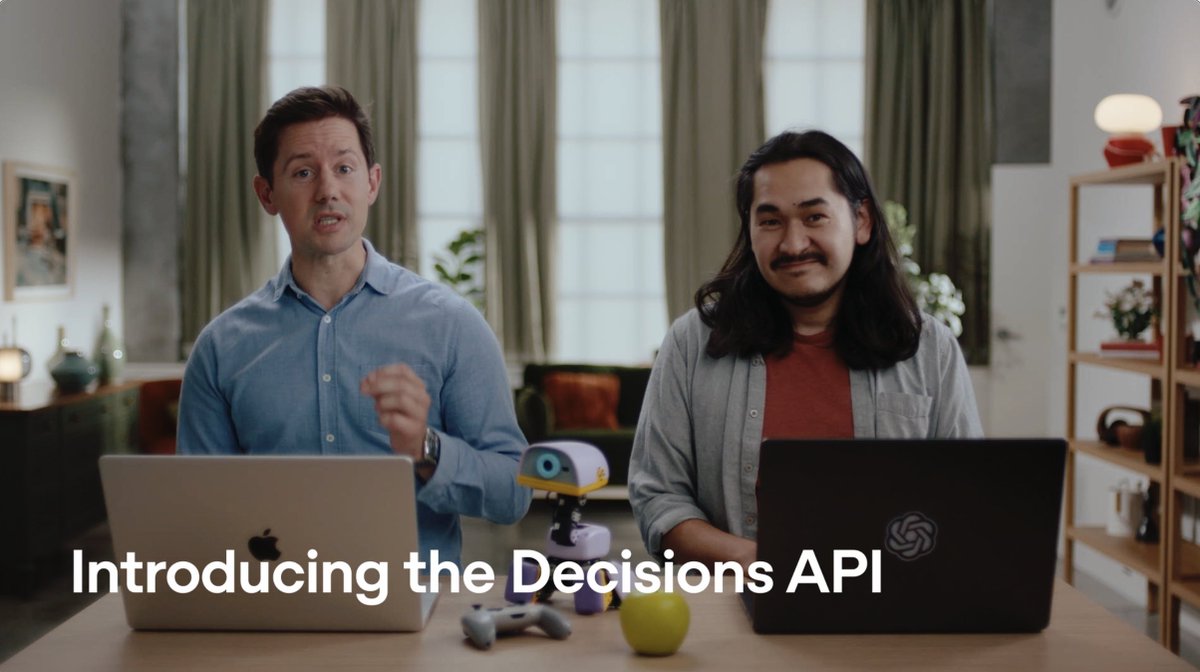
Introducing Decisions API
“Let your app choose the right model, tool, or action in near real-time with Decisions API, now available to all developers in public beta.”
- On screen
- Introducing the Decisions API
- Camera
- Medium shot of two presenters behind laptops, with a slight zoom in on the main speaker. The camera then cuts to a close-up of a browser window.
- Motion
- Direct address, on-screen text reveal, UI element animation (typing/filling data).
Product Reveal
Real-time Decision Making
“The Decisions API makes decisions up to 10x faster than GPT-4. This allows models to respond quickly and accurately, making your applications feel more responsive and intelligent.”
- On screen
- Inbound sales, Maya Patel Brightside Studio, Getting our team set up, Daniel Kim Northstar Software, Company-wide rollout, Alex Morgan, A question about upgrading, Lead details, Company type, Team size, Buying stage, Requirements, Timeline, Requested next step, Brightside Studio, Agency, 2-10 people, Ready to buy, Not specified, This month, Product demo, Alex Morgan, Independent, 1 person, Exploring, Not specified, Not specified, Plan comparison, 81 ms API processing 6 decisions Draft ready, Vision driving, Speed, 1x, 2x, 4x, 8x, Model input, Lane choice, 1, 2, 3, 98 ms API processing, Response, 332 ms API processing
- Camera
- Close-up on a browser window demonstrating UI interactions. The camera pans and zooms to highlight specific data points and then transitions to a different application interface.
- Motion
- UI animation, data visualization, speed ramp (simulated 1x, 2x, 4x, 8x speed options), dynamic text updates.
Feature Teaser
Controlling Animated Characters
“It can even be used to control animated characters, allowing for dynamic and interactive experiences.”
- On screen
- Pond, Microphone muted, End conversation, Unmute, Connected, Mute
- Camera
- Close-up on a browser window showing an animated frog character. The camera remains static, focusing on the character's reactions and UI elements.
- Motion
- Character animation, UI state changes (mute/unmute, connected status), expressive character reactions.
Problem Agitation
The Power of Real-time AI
“This is just the beginning of what's possible with the Decisions API. We're excited to see what you build.”
- On screen
- (No on-screen text)
- Camera
- Medium shot of the two presenters, similar to the opening. The camera holds steady.
- Motion
- Direct address, enthusiastic facial expressions.
Call to Action
Join the Public Beta
“(No spoken dialogue — ambient electronic score with pizzicato synths, sub-bass, and 808-like percussion continues, leading to a final impact sound.)”
- On screen
- (No on-screen text)
- Camera
- The camera remains on the two presenters, who smile and nod, concluding the video.
- Motion
- Subtle facial expressions, concluding shot.
Motion design primitives
Synthesizable in Remotion · key components of the ai-product-launch-ui-demo template.
DynamicUIDataFill
Text fields and data points within a UI rapidly populate and update, simulating real-time data processing and decision-making. Elements like checkboxes or radio buttons also animate to reflect selections.
+ Code construction recipe
Utilize Remotion's `interpolate` and `spring` functions for text opacity and position animations. Implement `Sequence` and `Series` for staggered reveals of data points. Use SVG path animations for progress bars or loading indicators.
InteractiveCharacterResponse
An animated character reacts dynamically to user input or system changes, expressed through changes in facial expression, eye movement, or subtle body language. UI elements like buttons also change state.
+ Code construction recipe
Employ Lottie animations or SVG morphing for character expressions, triggered by `useCurrentFrame` and `spring` for smooth transitions. Use `AbsoluteFill` and `Layer` for UI button state changes with `interpolate` for color and scale.
SpeedRampSimulation
A visual demonstration of processing speed, where an animation or simulation accelerates through distinct speed settings (e.g., 1x, 2x, 4x, 8x), clearly showing the impact of increased velocity on task completion.
+ Code construction recipe
Control animation playback speed using `useVideoConfig().fps` and `useCurrentFrame` to scale frame progression. Overlay speed indicators with `AbsoluteFill` and `Text` components, animating their visibility and value with `interpolate`.
Style DNA & aesthetic system
Visual aesthetic
Typography
Motion
Special effects
Pacing & rhythm
Conceptual story rhythm
- 1
The Vision & The Team
Purpose. Introduce the product and the key individuals behind it, establishing credibility and excitement.
Execution. Two founders directly address the camera, with the product name prominently displayed, followed by a quick cut to a UI demonstration.
- 2
Problem & Solution in Action
Purpose. Demonstrate the core problem the API solves (slow decision-making) and showcase its speed and efficiency through practical examples.
Execution. Rapid-fire UI animations showing data processing, lead qualification, and a driving simulation with speed comparisons.
- 3
Versatility & Delight
Purpose. Highlight the API's broader applications beyond core business functions, emphasizing its potential for creative and interactive uses.
Execution. An animated frog character reacting in real-time to demonstrate API control over dynamic experiences.
- 4
Future & Invitation
Purpose. Inspire viewers about the future possibilities and invite them to participate in the product's journey.
Execution. Return to the founders expressing enthusiasm, followed by a clear call to action (implied by the beta launch).





