drift · Launch Video Breakdown: Hook, Pacing & Motion Design
Drift v1.0.24 is live! for robotics engineers tired of re-explaining their project to agents every command. Shipped: 🧠 Project context - drop a DRIFT.md or SKILLS.md, it's used on every step 🤖 MuJoCo + Gazebo, end-to-end - URDF, MJCF, plugins, launch, debug, run, train ⚙️ https://t.co/5v64kLnHmq
Scene-by-scene timeline & spoken transcript
The Hook
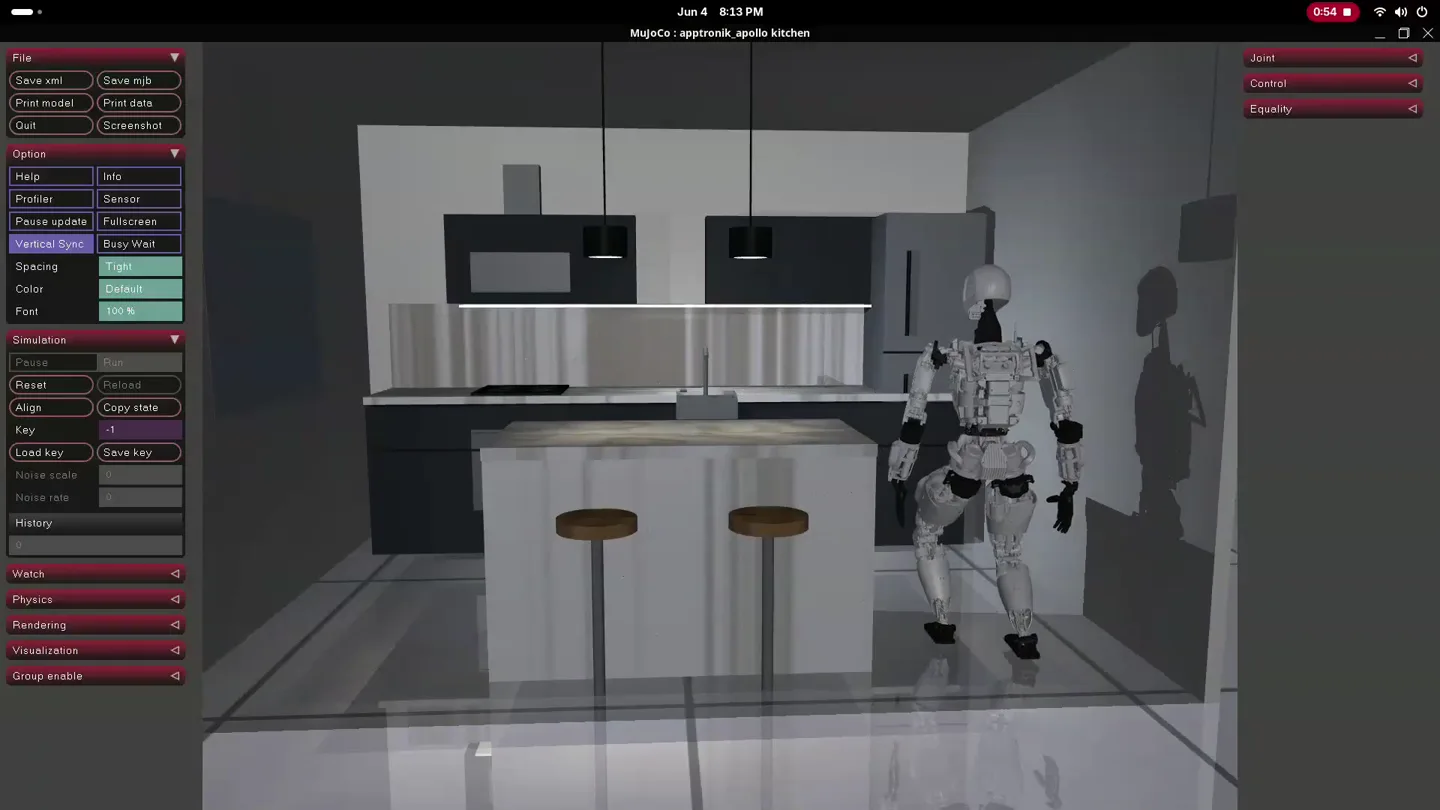
Simulated Robot in Kitchen Environment
“(No spoken dialogue — A prominent riser builds from 0:00 to 0:01, followed by a sub-bass drop/impact at 0:01, setting a high-energy tone.)”
- On screen
- File Save xml Save mjb Print model Print data Quit Screenshot Option Help Info Profiler Sensor Pause update Fullscreen Vertical Sync Busy Wait Spacing Tight Color Default Font 100 % Simulation Pause Run Reset Reload Copy state Key -1 Load key Save key Noise scale Noise rate History Watch Physics Rendering Visualization Group enable Jun 4 8:13 PM MuJoCo :: vpgtronik_apollo_kitchen Joint Control Equality
- Camera
- Static wide shot of a simulated robot in a kitchen environment, with a UI overlay. A subtle camera shake occurs at 0:01.
- Motion
- UI overlay, simulated 3D robot animation, subtle camera shake on beat drop.
Problem Agitation
Industrial Robot Arm Simulation
“(No spoken dialogue — The driving electronic beat continues with pizzicato synths. A riser builds from 0:09 to 0:10, leading to a sub-bass drop/impact at 0:10.)”
- On screen
- (No on-screen text)
- Camera
- Static wide shot of a simulated industrial robot arm performing a task in a warehouse-like environment. A subtle camera shake occurs at 0:10.
- Motion
- Simulated 3D robot animation, subtle camera shake on beat drop, quick scene cut.
Product Reveal
Dual Robot Arm Manipulation
“(No spoken dialogue — The electronic beat maintains its energy.)”
- On screen
- Save xml Print model Quit Option Help Profiler Pause update Vertical Sync Spacing Color Font Simulation Pause Reset Key Load key Noise scale Noise rate History Watch Physics Rendering Visualization Group enable Screenshot Print data Info Sensor Fullscreen Busy Wait Tight Default 100 % Run Reload Copy state -1 Save key
- Camera
- Static wide shot of two simulated robot arms manipulating colorful objects on a table, with a UI overlay.
- Motion
- UI overlay, simulated 3D robot animation.
Feature Teaser
Real-World Quadruped Robot
“(No spoken dialogue — A riser builds from 0:19 to 0:20, culminating in a sub-bass drop/impact at 0:20.)”
- On screen
- MUJOCO: wing_toun_tes
- Camera
- Dynamic close-up shots of a real-world quadruped robot moving across a carpeted floor. Camera pans and tracks the robot.
- Motion
- Real-world footage, dynamic camera movement, subtle camera shake on beat drop, quick scene cut.
Call to Action
Drift Terminal Interface
“(No spoken dialogue — A final sub-bass drop/impact at 0:20 marks the transition to the terminal interface.)”
- On screen
- </> drift nikhil@ubuntu-dev:~/drift-tests/100526/$ drift <"'> Drift AI Copilot for robotics simulations Try asking: 'create a mobile robot with lidar and camera' 'launch my manipulator in Gazebo' 'setup a pick-and-place simulation' /help /ps /version /clear ESC to pause • Twice ⏎ to execute /home/nikhil/drift-tests/100526/1 Welcome back, Nikhil Kumar! drift>
- Camera
- Static shot of a terminal interface, with text appearing dynamically.
- Motion
- Dynamic text reveal, terminal UI animation.
Motion design primitives
Synthesizable in Remotion · key components of the tech-launch-fast-cut-terminal template.
SimulatedRobotShake
A 3D simulated robot performs an action within a virtual environment, accompanied by a subtle, impactful camera shake synchronized with a strong audio beat.
+ Code construction recipe
Use a 3D model component for the robot and environment. Implement a `spring()` animation for camera position/rotation with a high damping ratio and low stiffness, triggered precisely on audio beat drops. Overlay UI elements as static React components.
RealWorldRobotTrack
Real-world footage of a robot is presented with dynamic camera movements, including pans and tracking shots, emphasizing the robot's physical capabilities.
+ Code construction recipe
Utilize video assets for the real-world footage. Apply `interpolate()` for camera position and zoom to create smooth tracking and panning effects. Consider subtle `spring()` animations for quick, impactful camera movements on scene transitions or key actions.
TerminalTextReveal
A terminal interface displays text dynamically, simulating typing or command output, with a clean, monospace aesthetic.
+ Code construction recipe
Render text within a `Code` or `Text` component. Use `sequence()` and `delay()` with `interpolate()` on `opacity` and `clipPath` to reveal text character by character or line by line, mimicking a typing effect. Ensure a monospace font is used for authenticity.
Style DNA & aesthetic system
Visual aesthetic
Typography
Motion
Special effects
Pacing & rhythm
Conceptual story rhythm
- 1
Simulated Precision
Purpose. To establish the product's capability in complex robotics simulations and its technical depth.
Execution. Showcasing various simulated robot tasks in different environments (kitchen, warehouse) with UI overlays, emphasizing control and detailed interaction.
- 2
Real-World Application
Purpose. To bridge the gap between simulation and practical hardware, demonstrating tangible results.
Execution. Transitioning to real-world footage of a quadruped robot, highlighting its movement and physical presence.
- 3
The AI Copilot
Purpose. To introduce the core product as an intelligent assistant for robotics engineers.
Execution. Revealing the 'Drift' terminal interface, showcasing its AI copilot functionality through example commands and a welcoming message.
- 4
Empowering Engineers
Purpose. To position Drift as a solution that simplifies complex robotics tasks for its target audience.
Execution. The terminal interface explicitly stating 'AI Copilot for robotics simulations' and providing clear examples of how it can be used, directly addressing the pain point of 're-explaining their project to agents every command'.