Driftguard (by modyfikatorcasper) · Launch Video Breakdown: Hook, Pacing & Motion Design
AFTER 20 YEARS, THE IMPOSSIBLE HAS BECOME A REALITY! The @driftguardapp team has discovered a calibration method hidden by Sony in the DualShock 3 that has remained unknown since 2006! Breaking thi…
Scene-by-scene timeline & spoken transcript
The Hook
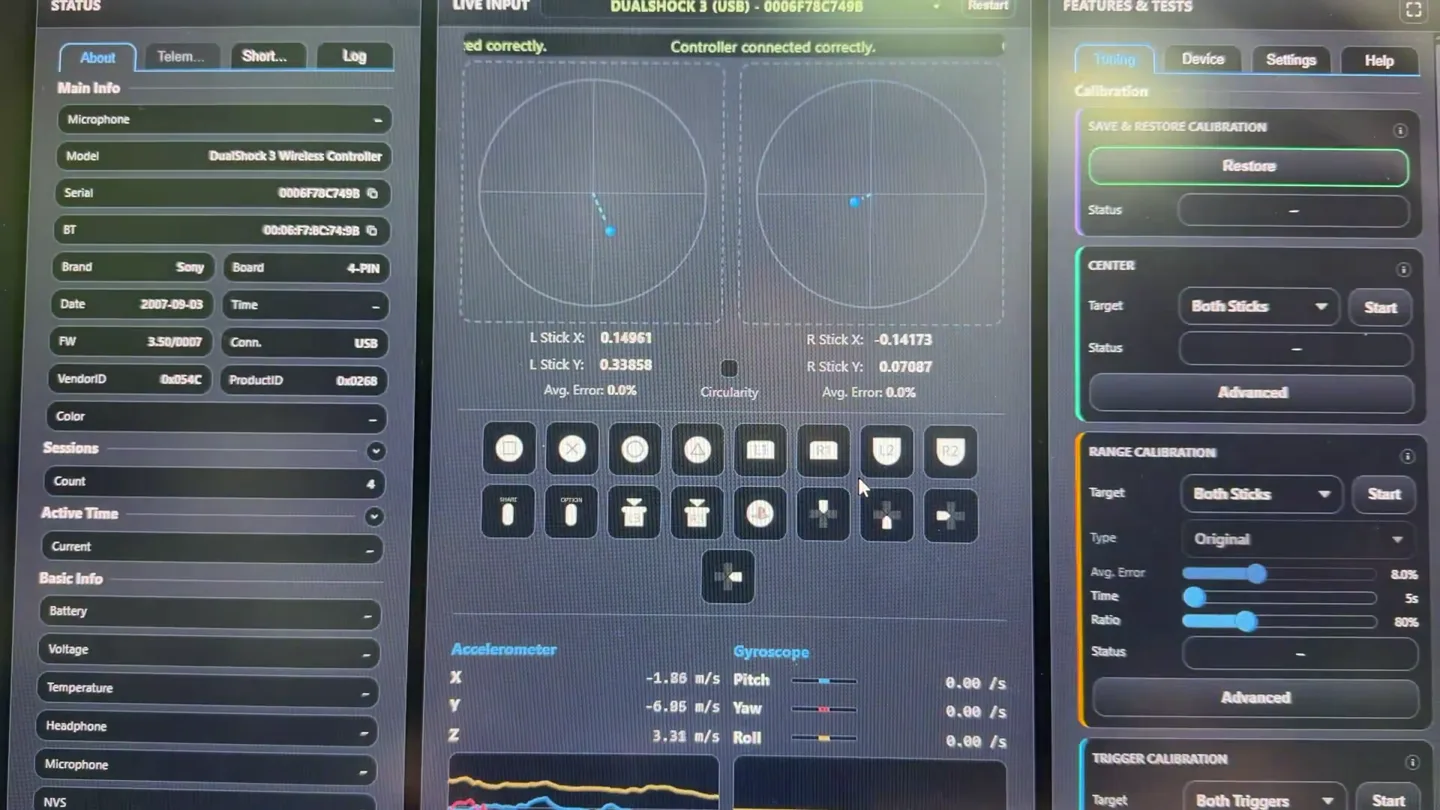
Unveiling the Calibration Interface
“(No spoken dialogue — The audio features a consistent, rhythmic ticking sound, reminiscent of a clock or a mechanical device, which serves as the primary percussive element. This is accompanied by subtle, evolving synth pads that create an atmospheric backdrop.)”
- On screen
- STATUS About Telem... Short... Log Main Info Microphone Model DualShock 3 Wireless Controller Serial 0006F7BC749B BT 0006F7BC749B Brand Sony Board 4-PIN Date 2007-09-03 Time FW 3.50.0007 Conn. USB VendorID 0x054C ProductID 0x0268 Color Sessions Count 4 Active Time Basic Info Battery Voltage Temperature Headphone Microphone NVS LIVE INPUT DUALSHOCK 3 (USB) - 0006F7BC749B Restart ntroller connected correctly. Controller connected correctly. L Stick X: 0.14173 L Stick Y: 0.33071 Avg. Error: 0.0% Circularity R Stick X: -0.14173 R Stick Y: 0.07087 Avg. Error: 0.0% FEATURES & TESTS Calibratio SAVE & RESTORE CALIBRATION Restore Status CENTER Both Sticks Start Target Status Advanced RANGE CALIBRATION Target Both Sticks Start Original Avg. Error 0.0% Time 5s Ratio 80% Status Advanced TRIGGER CALIBRATION get Both Triggers Start Accelerometer X -0.76 m/s Pitch 0.00 /s Y -5.97 m/s Yaw 0.00 /s Z .95 m/s Roll 0.00 /s
- Camera
- Static, slightly high-angle shot of a computer monitor displaying a detailed calibration interface for a DualShock 3 controller.
- Motion
- Subtle UI element highlighting and data visualization updates, indicating live input changes.
Product Reveal
Physical Controller Interaction
“(No spoken dialogue — The audio features a consistent, rhythmic ticking sound, reminiscent of a clock or a mechanical device, which serves as the primary percussive element. This is accompanied by subtle, evolving synth pads that create an atmospheric backdrop.)”
- On screen
- SONY SELECT START
- Camera
- A hand enters the frame, holding a blue DualShock 3 controller, partially obscuring the screen. The camera remains static.
- Motion
- Real-world object introduction, creating a tangible connection to the digital interface. The controller is brought into focus.
Feature Teaser
Initiating Calibration
“(No spoken dialogue — The audio features a consistent, rhythmic ticking sound, reminiscent of a clock or a mechanical device, which serves as the primary percussive element. This is accompanied by subtle, evolving synth pads that create an atmospheric backdrop.)”
- On screen
- Sampling Center
- Camera
- The hand holding the controller remains steady, with the focus shifting slightly to the 'Sampling Center' text on the screen.
- Motion
- UI element interaction, with a visual highlight on the 'Sampling Center' text, indicating an action being performed.
Call to Action
Calibration Success & Final State
“(No spoken dialogue — The audio features a consistent, rhythmic ticking sound, reminiscent of a clock or a mechanical device, which serves as the primary percussive element. This is accompanied by subtle, evolving synth pads that create an atmospheric backdrop.)”
- On screen
- Finished
- Camera
- The hand slightly adjusts the controller, revealing the 'Finished' status on the screen, then the hand begins to move out of frame.
- Motion
- Subtle hand movement and UI status update, confirming the completion of the calibration process.
Motion design primitives
Synthesizable in Remotion · key components of the technical-calibration-demo template.
LiveInputDataViz
Displays real-time numerical and graphical data updates within a structured UI, showing stick positions and error rates. The data points subtly animate to reflect changes.
+ Code construction recipe
Utilize Remotion's `interpolate` for smooth number transitions and `spring` for subtle data point movements on a canvas or SVG graph. Implement `useCurrentFrame` to drive updates.
InteractiveUIHighlight
Highlights specific UI elements (e.g., buttons, text fields) with a subtle glow or color change upon interaction, indicating user input or system status.
+ Code construction recipe
Apply CSS `filter: drop-shadow()` or `box-shadow` with `transition` for glow effects. Use `interpolateColor` for smooth color changes on button states, triggered by `Sequence` and `AbsoluteFill`.
PhysicalProductOverlay
A real-world product (e.g., a controller) is introduced into the foreground, partially obscuring a digital interface, creating a sense of tangible interaction.
+ Code construction recipe
Layer a video or image sequence of the physical product over the UI screen composition. Use `AbsoluteFill` and `z-index` for layering, with `spring` for the entrance animation of the product.
Style DNA & aesthetic system
Visual aesthetic
Typography
Motion
Special effects
Pacing & rhythm
Conceptual story rhythm
- 1
Problem/Opportunity Setup
Purpose. Establish the context of controller calibration and the need for a solution.
Execution. Displaying the detailed, complex calibration software interface, hinting at the technical challenge.
- 2
Solution Introduction
Purpose. Introduce the physical product and the software's role in solving the problem.
Execution. Bringing the DualShock 3 controller into frame, connecting it to the on-screen software.
- 3
Demonstration of Efficacy
Purpose. Show the product in action, performing its core function.
Execution. Interacting with the software to initiate and complete the calibration process, showing 'Sampling Center' and 'Finished' states.
- 4
Resolution/Benefit
Purpose. Conclude with the successful outcome of using the product.
Execution. The final calibrated state of the controller reflected in the UI, confirming the 'impossible' has become a reality.