
ego · Launch Video Breakdown: Hook, Pacing & Motion Design
ego changelog gives every product update a proper reveal.
Scene-by-scene timeline & spoken transcript
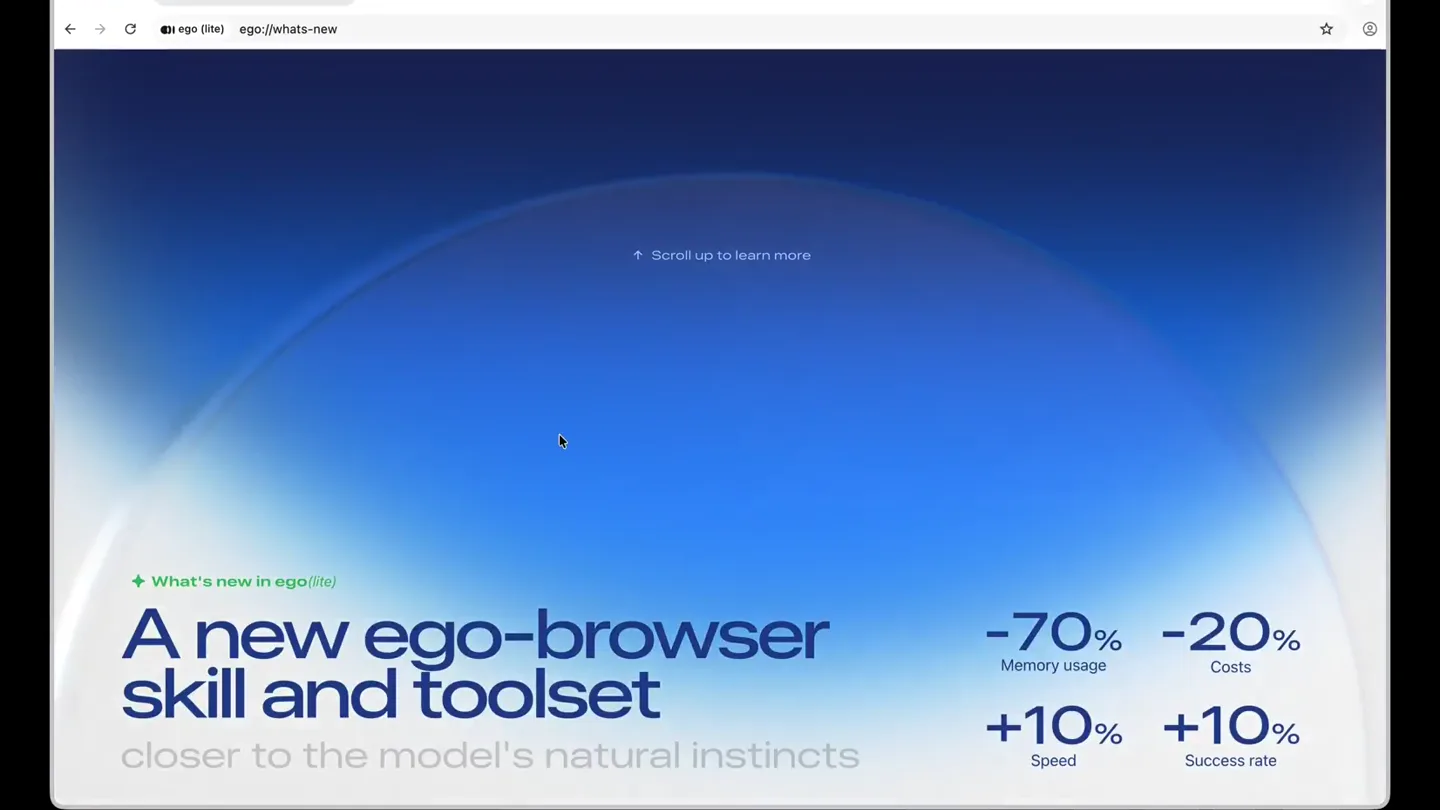
The Hook
Performance Metrics Reveal
“(No spoken dialogue — A subtle sub-bass drone begins, followed by a high-frequency synth riser building tension, culminating in a 'whoosh' sound effect and percussive impact.)”
- On screen
- What's new in ego(lite) A new ego-browser skill and toolset closer to the model's natural instincts -70% Memory usage -20% Costs +10% Speed +10% Success rate ↑ Scroll up to learn more
- Camera
- Static wide shot of a browser window, with a subtle upward scroll animation revealing content.
- Motion
- Smooth vertical scroll with text and numerical data animating into view, emphasizing key performance improvements.
Problem Agitation
Deep Dive into Changes & Fixes
“(No spoken dialogue — A low-frequency sub-bass drop follows the initial impact. A new synth riser begins, leading into a more prominent sub-bass impact.)”
- On screen
- What's new in ego(lite) skill and toolset Memory usage Costs Speed Success rate What we changed Much of what people love about ego(lite) comes from programmatic tool-calls — the model completes multi-step operations in code, letting agents control the browser faster and at lower cost. Building on that, in this release redesigns our code tools and coding style around the model's natural instincts, delivering four improvements at once: +10% speed, -20% cost, +10% success rate, and -70% memory usage. Also in this release: the much-requested ability for agents to control Spaces under different profiles, a keyboard shortcut for switching Spaces, and vertical tabs. What may break, and how to fix it Scripts, workflows, or site-specific knowledge built on earlier versions of ego(lite) may stop working. The new Skill guides your agent to repair them automatically against a migration reference — when it goes well you'll barely notice, though results depend on the model's capability. If something can't be repaired, have your agent discard the old script and regenerate it on the new ego(lite).
- Camera
- Continuous upward scroll within the browser window, revealing detailed paragraphs of text.
- Motion
- Extended vertical scroll animation, revealing dense blocks of explanatory text with subtle fade-ins for new sections.
Product Reveal
Shortcut Feature Demonstration
“(No spoken dialogue — A final, more intense synth riser starts, culminating in a powerful sub-bass drop and impact.)”
- On screen
- What's new in ego(lite) One more thing... Switch Spaces with shortcuts Press ⌥ S (Option + S) to switch between Spaces instantly.
- Camera
- Zoom-in and pan down to reveal a laptop keyboard, with a highlighted 'Option + S' keypress, while a browser window above cycles through different 'Spaces'.
- Motion
- Dynamic camera movement combined with UI interaction animation, showcasing a specific feature with visual cues for keyboard input and screen changes.
Call to Action
Return to Core Value Proposition
“(No spoken dialogue — The powerful sub-bass drop and impact from the previous scene fades out.)”
- On screen
- What's new in ego(lite) A new ego-browser skill and toolset closer to the model's natural instincts -70% Memory usage -20% Costs +10% Speed +10% Success rate ↑ Scroll up to learn more
- Camera
- Reverse zoom-out and pan up, returning to the initial wide shot of the browser window with performance metrics.
- Motion
- Smooth reverse animation of the previous camera movement, bringing the viewer back to the product's core benefits and initial visual state.
Motion design primitives
Synthesizable in Remotion · key components of the syntaxflow-ide-launch template.
BrowserScrollReveal
A simulated browser window performs a smooth, continuous vertical scroll, revealing new content sections and text blocks with subtle fade-in effects.
+ Code construction recipe
Utilize Remotion's <AbsoluteFill> for the browser frame. Implement a <Sequence> for the scrollable content, using `interpolate` for the `translateY` property based on frame number, combined with `spring` for smooth easing. Opacity transitions for new text can be handled with `interpolate` on `opacity`.
MetricHighlightFade
Key performance metrics (e.g., -70%, +10%) animate into view with a quick fade and slight scale, drawing attention to their values.
+ Code construction recipe
Wrap each metric text in a component that uses `spring` for `opacity` and `scale` properties. Stagger the animation start times for each metric using `delay` within a <Sequence> or by calculating `startFrame` for each.
KeyboardInteractionZoom
The camera dynamically zooms and pans to highlight a specific keyboard keypress, while a related UI element (e.g., browser window) simultaneously updates its content.
+ Code construction recipe
Employ `interpolate` for `scale` and `translate` properties of the main scene container to simulate camera movement. Use conditional rendering or `opacity` interpolation for the keyboard key highlight and for swapping content within the browser window, synchronized with the camera animation.
Style DNA & aesthetic system
Visual aesthetic
Typography
Motion
Special effects
Pacing & rhythm
Conceptual story rhythm
- 1
The Performance Promise
Purpose. Immediately hook the viewer by showcasing tangible benefits and improvements.
Execution. Initial browser view with prominent performance metrics (-70% memory, +10% speed) animating into focus.
- 2
The Deep Dive
Purpose. Provide detailed context and address potential concerns or changes for existing users.
Execution. Continuous scroll revealing extensive text blocks explaining 'What we changed' and 'What may break, and how to fix it'.
- 3
The Feature Spotlight
Purpose. Demonstrate a key new feature with direct, actionable visual proof.
Execution. Camera zooms to a keyboard, highlighting a shortcut (Option + S) while the browser UI dynamically switches 'Spaces'.
- 4
The Reinforcement
Purpose. Reiterate the core value proposition and leave the viewer with the initial strong impression.
Execution. Returns to the initial browser view with performance metrics, reinforcing the product's benefits.
Remix in Animatiq Studio
Master remix prompt · agent-ready
Sample remix
Objective
Launch a new AI-powered code refactoring tool, 'SyntaxFlow', highlighting its speed and accuracy.How the recipe adapts
The BrowserScrollReveal primitive adapts to an IDE/code editor window, scrolling through code and release notes. MetricHighlightFade will emphasize '90% faster refactoring' and '50% fewer bugs'. KeyboardInteractionZoom will demonstrate a 'Cmd+R' shortcut, showing a code block transforming instantly, rather than switching browser spaces.Remix blueprint · syntaxflow-ide-launch
Scene durations (4 scenes, 14.3s)
Key Remotion components
Related Creative Tools Product Launches
Explore all Creative Tools launches →
A vibe design partner with an AI-native canvas for turning ideas into UI.

We heard you wanted to use Codex rate limit resets on your own time. Starting today, we’re rolling out the ability to save rate limit resets to use later. We’re starting Go, Plus, Pro, and Business

We just launched something the VFX community has been waiting for. OpenArt VFX lets you apply real visual effects to footage you already have. It lets you mask any region of your video and replace it with AI-generated content that matches the scene's lighting and physics. https://t.co/dnQjrZCWC4