Freebeat · Launch Video Breakdown: Hook, Pacing & Motion Design
Freebeat Lyrics Video turns lyrics into part of the scene instead of basic subtitles for music videos.
Scene-by-scene timeline & spoken transcript
The Hook
Dynamic Lyrics Integration
“(No spoken dialogue — Driving electronic rhythm with a playful, energetic beat.)”
- On screen
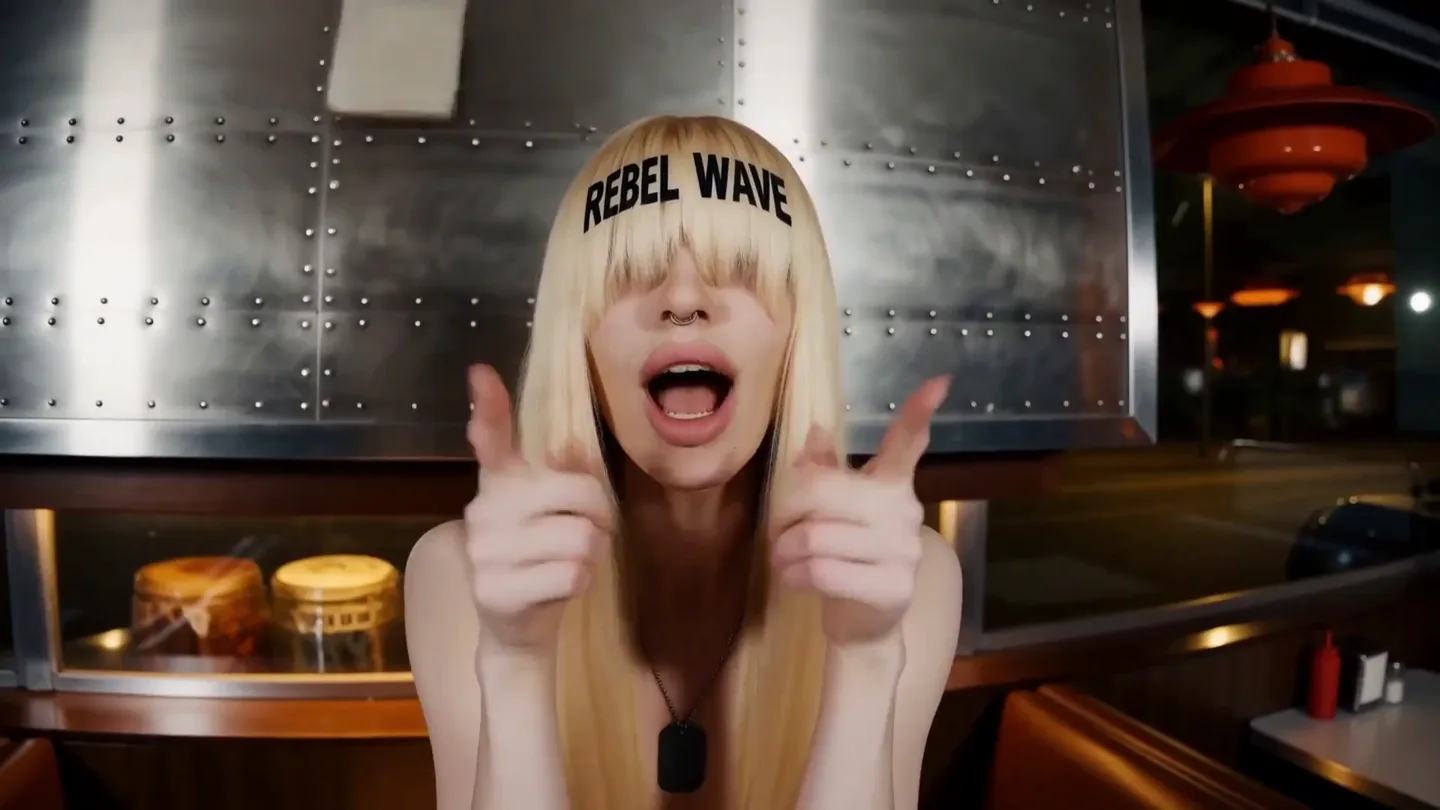
- WHAT YO, WANN, REBEL WAVE, ZIG, Lyrics Vid
- Camera
- Medium shots of a performer in a diner, then a quick zoom-in, followed by a wide shot of animated text.
- Motion
- Kinetic typography, text appearing and disappearing in sync with the beat, rapid scene cuts, and a ransom-note style text animation.
Product Reveal
Interactive Music Video Creation
“(No spoken dialogue — Upbeat electronic music continues, with subtle ambient sound design.)”
- On screen
- (No on-screen text)
- Camera
- Various medium to wide shots of performers in different stylized environments (mall, arcade), with dynamic camera movements following their actions.
- Motion
- Seamless transitions between scenes, animated UI elements (cursor, arrows), and text appearing as part of the environment or as a floating overlay.
Feature Teaser
Immersive Lyric Visuals
“(No spoken dialogue — The electronic beat maintains its driving energy, with additional percussive elements.)”
- On screen
- 빛나, 불태워라, 거울아 거울아, SH, STRUT, DOUGH
- Camera
- Close-up to medium shots of performers, with the camera often panning or tracking their movements. Dynamic shifts in perspective.
- Motion
- Large, bold typography integrated directly into the scene, often with 3D depth or a cartoonish outline. Text appears and scales rapidly, sometimes with a 'pop' effect. Mirror reflections are used to display text.
Call to Action
Creative Expression Unleashed
“(No spoken dialogue — The electronic music builds in intensity, culminating in a final flourish.)”
- On screen
- FREEBEAT, Lyrics Video, turns lyrics into part of the scene instead of basic subtitles for music videos.
- Camera
- A mix of dynamic close-ups, medium shots, and wider establishing shots, showcasing various performers and environments. The camera often moves with the action.
- Motion
- Fast-paced editing, text appearing with a 'bounce' or 'pop' animation, often with a thick outline and shadow. Text interacts with the environment, sometimes appearing behind or in front of subjects. Final scene features a clear product name and tagline reveal with a smooth, impactful animation.
Motion design primitives
Synthesizable in Remotion · key components of the freebeat-lyrics-video-style template.
KineticSceneText
Text elements appear and disappear rapidly, often with a slight scale or position shift, perfectly synchronized with the music's beat and the performer's actions. They can be integrated into the scene or float as overlays.
+ Code construction recipe
Utilize Remotion's `spring` or `interpolate` functions for scale and opacity, triggered by `AbsoluteFill` and `Sequence` components. Use `measureText` for precise positioning and `Text` components with custom fonts. Apply `dropShadow` and `outline` CSS properties for visual style.
PopOut3DText
Large, bold, and often 3D-rendered text elements emerge from the background or scale up dramatically, featuring thick outlines and shadows, creating a cartoonish or impactful visual effect.
+ Code construction recipe
Implement `Text` components with `transform: scale()` and `transform: translateZ()` for 3D effect. Use multiple `Text` layers with different colors and offsets to simulate outlines and shadows. Animate `scale` and `opacity` with `spring` for a bouncy, impactful entrance. Consider `SVG filters` for more complex outline effects.
RansomNoteReveal
Individual letters or words, each with a unique font, color, and rotation, assemble dynamically to form a complete word or phrase, mimicking a cut-and-paste aesthetic.
+ Code construction recipe
Create an array of `Character` components, each rendering a single letter. Assign random `fontFamily`, `color`, `rotate`, and `scale` values. Animate `opacity` and `position` for each character using `Sequence` and `spring` with staggered delays to create the assembling effect.
Style DNA & aesthetic system
Visual aesthetic
Typography
Motion
Special effects
Pacing & rhythm
Conceptual story rhythm
- 1
Energetic Introduction
Purpose. Immediately grab attention and introduce the core concept of dynamic lyrics.
Execution. Rapid cuts, a performer interacting with animated text, and a quick reveal of the 'Lyrics Vid' title in a ransom-note style.
- 2
Product in Action Montage
Purpose. Showcase the product's versatility and fun factor through diverse scenarios.
Execution. Montage of performers in various vibrant settings, with lyrics seamlessly integrated into the scene, demonstrating different visual styles.
- 3
Feature Highlight & Impact
Purpose. Emphasize the unique way lyrics become part of the scene, not just subtitles.
Execution. Close-ups of performers with large, bold, 3D-like text appearing and interacting with the environment, highlighting the immersive experience.
- 4
Brand Reinforcement & CTA
Purpose. Conclude with a strong brand message and a clear call to action.
Execution. Final sequence of dynamic shots, culminating in the Freebeat logo and tagline, reinforcing the product's value proposition.