
Gemini 3 8 Live (by Google) · Launch Video Breakdown: Hook, Pacing & Motion Design
Gemini 3.8 Live and 3.8 Live Extended Thinking are Google's most advanced audio models, built for speaking, collaborating, and executing tasks in a more natural conversation.
Scene-by-scene timeline & spoken transcript
The Hook
AI Mode Activation
“(No spoken dialogue — low-key ambient electronic score with a steady sub-bass line)”
- On screen
- Google + Search AI Mode San Francisco 72° Air quality · 49 Good Searches following
- Camera
- Static overhead shot of a smartphone screen, then a subtle zoom into the 'AI Mode' button.
- Motion
- UI element highlight with subtle scaling and color shift.
Problem Agitation
Real-time Visual Problem Solving
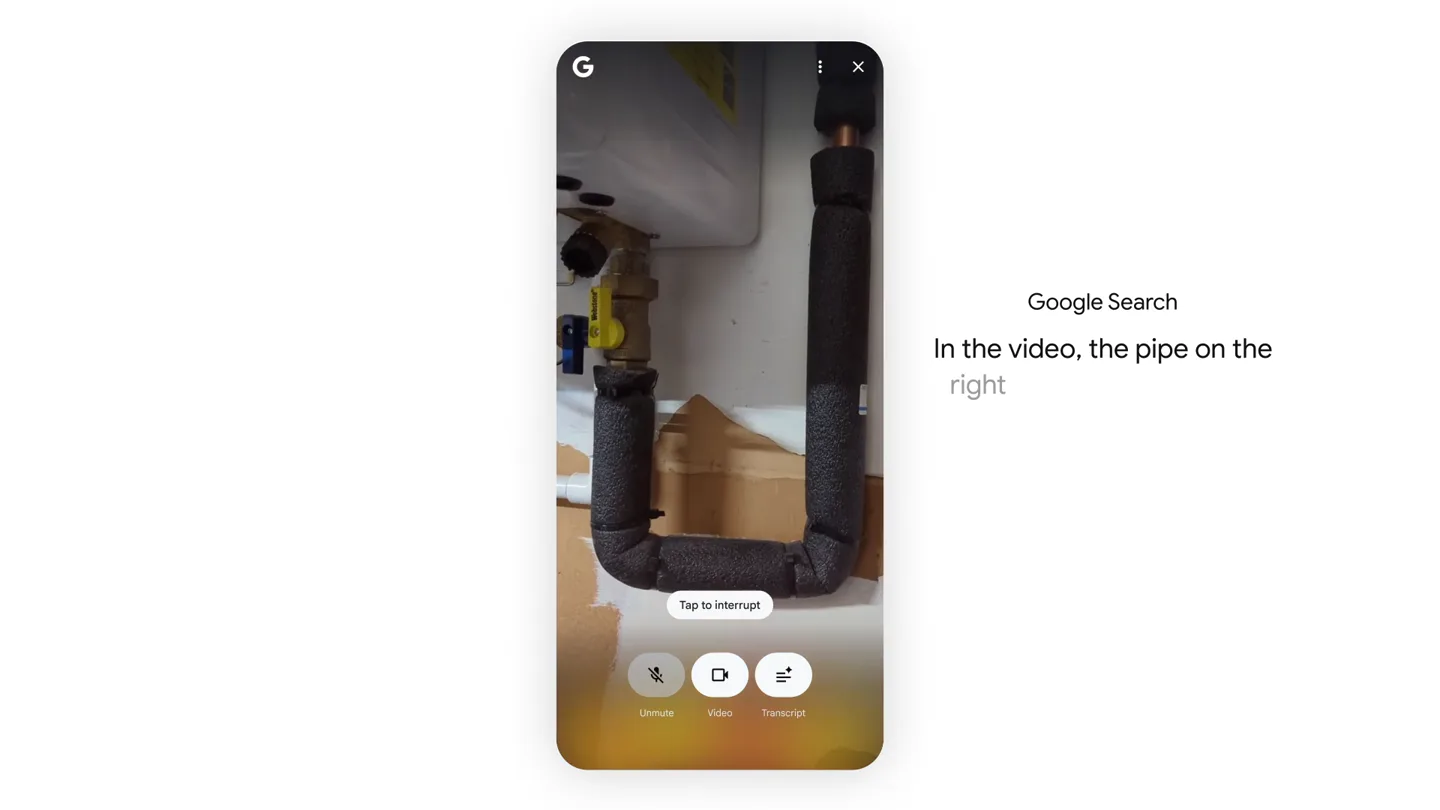
“User: I'm looking to install an automatic water shutoff valve and need... Which one of... Google Search: The cold water line is typically the... In the video, the pipe on the right side leading into the heater seems to have a valve with a blue handle, User: Got it. Looks like... Google Search: Based on what you're showing, measuring a bit shy of 1 inch in outside diameter, it's highly likely you have a standard nominal 3/4-inch copper pipe. That's because copper pipe sizes are based on their nominal or so the actual outside measurement is always slightly larger. User: Help me find some videos to see if I can... Google Search: Of course. I can help you... Keep in mind that it often involves cutting into a main water line and can require specialized tools or... When you're ready,”
- On screen
- User I'm looking to install an automatic water shutoff valve and need Sequences shortened and results for illustrative purposes throughout. Screen images simulated. User Which one of Google Search The cold water line is typically the Tap to interrupt Google Search In the video, the Tap to interrupt Google Search In the video, the pipe on the right side leading into the heater seems to have a valve with a blue handle, User Got it. User Looks like Google Search Based Tap to interrupt Google Search Based on what you're showing, measuring a bit shy of 1 inch in outside diameter, Tap to interrupt Google Search it's highly likely you have a standard nominal 3/4-inch copper pipe. Tap to interrupt Google Search That's because copper pipe sizes are based on their nominal or Tap to interrupt Google Search so the actual outside measurement is always slightly larger. User Help me find some videos to see if I can Google Search Of course. I can help you Tap to interrupt Google Search Keep in mind that it often Tap to interrupt Water shut off valve #plumbing #diy YouTube How shu Google Search Keep in mind that it often involves cutting into a main water line and can require specialized tools or Tap to interrupt Google Search When you're ready, Water shut off valve #plumbing #diy YouTube How shu
- Camera
- Static shot of a smartphone displaying a live video feed of plumbing, with text dialogue appearing dynamically on the left. The camera occasionally zooms slightly into the phone screen to highlight details.
- Motion
- Dynamic text reveal, UI element animation (buttons, search results), and subtle camera push-ins to emphasize screen content.
Product Reveal
Gemini Audio Branding
“(No spoken dialogue — low-key ambient electronic score with a steady sub-bass line)”
- On screen
- Gemini Audio
- Camera
- Static shot of the Gemini Audio logo centered on a gradient background.
- Motion
- Simple fade-in and hold for brand identity.
Motion design primitives
Synthesizable in Remotion · key components of the gemini-audio-ui-showcase template.
UIDialogueReveal
Text dialogue appears dynamically on screen, simulating a real-time conversation. Each line of dialogue fades or slides in sequentially.
+ Code construction recipe
Use Remotion's <Sequence> and <AbsoluteFill> components. Animate text opacity and translateY using `interpolate` with `spring` for a natural, conversational feel. Manage timing with `delay` and `duration` props on sequences.
InteractiveUIHighlight
Specific UI elements on a simulated smartphone screen are highlighted through subtle scaling, color changes, or glowing effects.
+ Code construction recipe
Apply `spring` animations to `scale` and `backgroundColor` properties of target UI elements. Use SVG filters for glow effects or `box-shadow` with animated opacity for a soft highlight.
DynamicSearchResultCard
Search result cards or video thumbnails slide up from the bottom of the screen, revealing relevant content.
+ Code construction recipe
Animate the `translateY` property of card components using `interpolate` with an `easeOut` curve. Stagger the animation for multiple cards using `delay` based on their index.
Style DNA & aesthetic system
Visual aesthetic
Typography
Motion
Special effects
Pacing & rhythm
Conceptual story rhythm
- 1
The Setup
Purpose. Introduce the user's problem and the AI's initial engagement.
Execution. Show the user activating 'AI Mode' and initiating a visual query.
- 2
Intelligent Analysis
Purpose. Demonstrate the AI's ability to understand and interpret visual information.
Execution. AI identifies plumbing components and provides technical specifications based on live video.
- 3
Proactive Assistance
Purpose. Highlight the AI's capability to offer solutions and safety advice.
Execution. AI suggests installation videos and warns about specialized tools/risks.
- 4
Brand Reinforcement
Purpose. Conclude with clear product branding.
Execution. Reveal the 'Gemini Audio' logo on a clean, gradient background.





