
Google Gemini Desktop App (by 🚨 AI News | TestingCatalog) · Launch Video Breakdown: Hook, Pacing & Motion Design
GOOGLE : Gemini desktop app will get Gemini Live, Gemini Spark, Gemini Omni, and a new "Stream to Cursor" feature. What we know so far - "Stream to Cursor" feature will allow Gemini to have somethi…
Scene-by-scene timeline & spoken transcript
The Hook
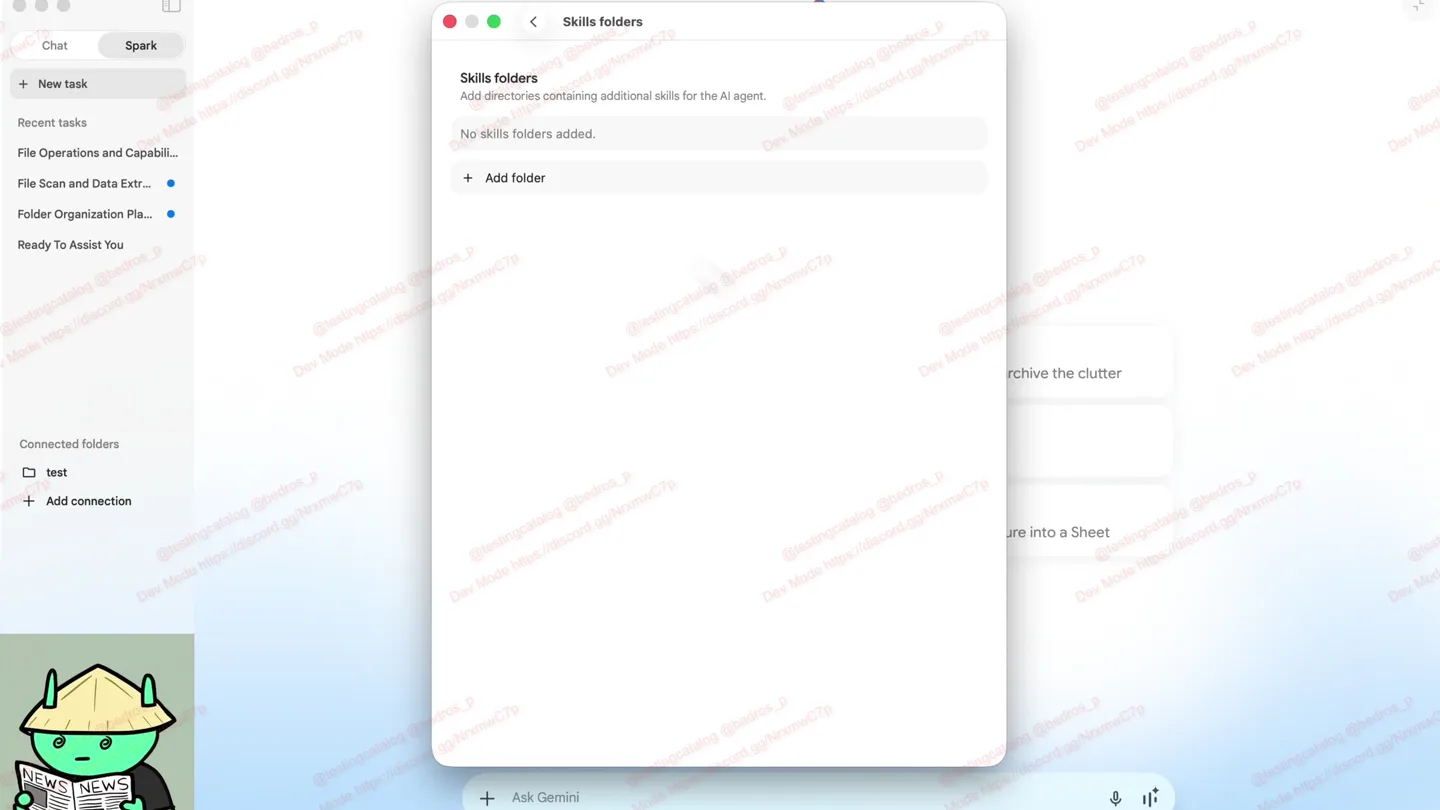
Gemini Desktop App Settings & Features
“(No spoken dialogue — The audio features a consistent, driving electronic beat with a subtle, high-frequency riser at [00:02], and a distinct sub-bass drop/impact at [00:04].)”
- On screen
- Chat, Spark, Settings, Connected apps, Manage, Appearance, Show in menu bar, Open at login, If turned off, shortcuts won't work until you open the app after login., Chat, Mini chat keyboard shortcut, Space, Full chat keyboard shortcut, Long press for stream to cursor, Hold fn, Stream to cursor shortcut, Double-tap fn, Position on screen, Bottom, Reset mini chat to new chat, After 10 minutes, Open new chats in, Mini chat, Skills folders, Manage, Speech, + Ask Gemini, Organise my connected folders, Find unorganised files in my connected folders, group by type or context and archive the clutter, Close the loop on my last meeting, Grab latest Meet transcript or Doc and draft a follow-up email, Convert my files to a sheet, Scan items in my connected folder (like invoices or reports), extract and structure into a Sheet, What are you working on?
- Camera
- Static overhead shot of a desktop application interface, focusing on settings and initial prompt options.
- Motion
- Subtle UI element transitions, such as a toggle switch animation and menu expansions, indicating interactive features.
Product Reveal
Gemini's File Management & Code Analysis
“(No spoken dialogue — A quick sweep at [00:05] and another sub-bass impact at [00:15] punctuate the scene.)”
- On screen
- list down files in the folder - clarify what you can do with them, Thinking it through, I've identified an ambiguity and am requesting further details for precise action., Listing directory, I'm now investigating recent activity and user-specified locations to list files, seeking specific files., Google Drive, Finding by name, I've confirmed this is the primary directory housing the files from the metadata spreadsheet., Viewing file, I've identified the purpose of each file, noting their roles in simulations and confirmations., Show all, Agent is working..., Progress, listing files and describing capabilities, Files, https://docs.google.com/spreadsheets/d/..., Local Files Metadata Tracker, Here are the files in your folder, located at /Users/alexey.shabanov/TCworkspace/ test:, File List and Descriptions, 1. game-of-life.html (12 KB), Description: A Conway's Game of Life simulation styled in a dark, futuristic cyberpunk theme with glowing neon visual effects. It is a standalone client-side file that runs in any web browser., 2. map.html (10 KB), Description: An interactive 3D simulation of continental drift from the Pangea, 3. sample.txt (150 B), 4. space-invaders.html (34 KB), Description: A classic Space Invaders arcade game implementation rendered with a futuristic cyberpunk theme, featuring levels and a score tracker., 6. space-invaders2.html (23 KB), Description: Cyber Invaders – Neon Assault, an updated version of the Space Invaders game featuring vibrant neon visual effects, custom power-up bonuses, progressive difficulty levels, and audio synthesis using the Web Audio API., 7. svg.html (6 KB), Description: A high-quality scalable vector illustration of a cyberpunk robot, containing detailed layered SVG shapes embedded directly within an HTML wrapper., 8. test_minimax_intl.py (3 KB), Description: A Python validation utility used to test API keys and model responses against the MiniMax international chat completions endpoint., These files are also tracked in your Google Drive spreadsheet: Local Files Metadata Tracker., What I Can Do With These Files, As your local agent, I have several integrated tools that allow me to manage, edit, and run operations on these files. Here is what I can do:, 1. Analyze and Explain the Code, Read & Deconstruct: I can read the source code of any file and provide line-by-line explanations of how the algorithms in the Game of Life rules, Three.js 3D rendering, or Web Audio API configurations are implemented., Identify Bugs: If a feature isn't working as expected in the games or the Python tester, I can parse the code to debug issues., 2. Edit and Enhance File Content, Feature Addition: I can add new features (e.g., adding score savers or pause buttons to the Space Invaders games, or implementing new presets in the Game of Life)., Code Optimization: I can refactor code to make animations run smoother or make the code structure cleaner., Styling Improvements: I can change visual styling, adjusting CSS and HTML canvases to alter color palettes or layouts., 3. Run and Execute Python Scripts, Chat, Spark, New task, Recent tasks, File Management and Code..., File Operations and Ca..., File Scan and Data Extr..., Folder Organization Pla..., Ready To Assist You, Connected folders, text, + Add connection, + Ask Gemini
- Camera
- The camera remains static, showcasing the Gemini desktop app's detailed output as it processes and analyzes files.
- Motion
- Rapid text generation and scrolling within the application interface, simulating real-time AI processing and output.
Feature Teaser
Gemini's Interactive Chat & Permissions
“(No spoken dialogue — A high-frequency sweep at [00:17] and a series of quick, percussive electronic hits from [00:18] to [00:20] accompany the visual changes.)”
- On screen
- Chat, Spark, Q Search, New chat, My stuff, Notebooks, + New notebook, Next-Gen AI Features..., Test, The TestingCatalog Pro..., Cutting-Edge AI Featur..., All notebooks, Chats, Video Generation in Pro..., Create images of a jung..., HTML landing page res..., AI News Roundup, Cyberpunk Hacker Rob..., Ready For Your Input, Xbox Controller SVG Genera..., Connected folders, text, + Add connection, Hi Alexey, What's on your mind?, Files, Drive, Photos, NotebookLM, Share window, Create image, Create video, Create music, More tools, Flash, Ask Gemini, Gemini 3, 3.1 Flash-Lite, Fastest answers, 3 Flash, All-around help, 3.1 Pro, Advanced maths and code, Thinking level, Standard, Extended, Complex problem solving, Allow system permissions, Allow Gemini to access system information to enable Stream To Cursor. Once you allow access in system settings, return to this app to continue your setup. You can manage your permissions at any time., [REQUIRED] Screen and system audio, Gemini uses Screen recording access for sharing window features., Turn on in Settings, [REQUIRED] Accessibility permissions, Gemini uses Accessibility access to find information when you share your screen., Complete, [REQUIRED] Microphone permission, Gemini uses microphone access to enable voice features., No, thanks, Finish
- Camera
- Static view of the Gemini interface, highlighting interactive elements like chat prompts, file menus, and permission requests.
- Motion
- Pop-up menus and modal windows appearing with smooth, quick transitions, demonstrating user interaction and system integration.
Call to Action
AI News & Agent Capabilities Showcase
“(No spoken dialogue — A subtle riser at [00:24], a sub-bass impact at [00:27], and a final sub-bass impact at [00:34] mark key moments in the audio.)”
- On screen
- TestingCatalog.com, AI NEWS, ChatGPT, Gemini, Perplexity, Claude, Grok, Copilot, Mistral, More, Subscribe, New task, Customize, Schedules, Skills, FEATURED STORY, Google prepares Gemini Spark AI Agent ahead of I/O launch, Google is testing "Gemini Spark BETA" in the Gemini web app, hinting at an always-on AI agent for inbox triage and automated online workflows and unsubscribe from emails you don't want, 14 May 2026 - 2 min read, Read post, Get meeting briefs, Receive concise overviews and relevant docs before important meetings or appointments, Track projects that matter, Turn goals into milestones and tasks, while managing your timelines., What can I get done for you today?, Thinking, Meta prepares Hatch Agent under waitlist and social media skills, Meta is advancing its autonomous agent, Hatch, with early code signaling tasks like image creation and research, launching soon under a waitlist, 7 May 2026 - 2 min read, Learn and grow, Analyze for me, Create image, Create video, Explain a diagram, Describe what's happening in an image, Debug my code, What shall we think through?, Camera, Share window, Share screen, Opus 4.7 Adaptive, Ask Gemini, Pro, Anthropic is working on Orbit, its upcoming proactive assistant, Anthropic is preparing to launch Orbit, a proactive briefing tool for Claude Cowork, offering insights from Gmail, Slack, GitHub, Figma, and more... this morning., 4 May 2026 - 2 min read, Follow up on the launch review thread, @testingcatalog, From Gmail, The latest thread asks for confirmation on the launch date and owner. No reply appears in the recent activity., Several messages mention an unresolved decision., Flash, Gemini 3, 3.1 Flash-Lite, Fastest answers, 3 Flash, All-around help, 3.1 Pro, Advanced maths and code, Thinking level, Extended, Complex problem solving
- Camera
- Dynamic camera movements, including quick zooms and pans across a browser interface, highlighting various AI news articles and interactive elements.
- Motion
- Fast-paced cuts and rapid UI element interactions, such as dropdowns and text input, creating a sense of urgency and comprehensive AI capabilities.
Motion design primitives
Synthesizable in Remotion · key components of the ai-agent-ui-showcase template.
UIDialogPop
A modal dialog or dropdown menu appears quickly from a user interaction point, expanding with a subtle bounce or spring effect.
+ Code construction recipe
Use `spring()` for `scale` and `opacity` properties. Position dynamically based on the trigger element. Implement `z-index` for layering.
RealtimeTextGeneration
Text appears character by character or line by line, simulating an AI agent typing or generating responses in real-time.
+ Code construction recipe
Animate `text-content` or `children` of a `Text` component using `interpolate()` with `step` easing for character reveal. Combine with a blinking cursor animation.
DynamicBrowserZoom
The camera quickly zooms into specific areas of a browser window or desktop application, drawing attention to key features or text.
+ Code construction recipe
Animate `scale` and `position` of the main content container using `spring()` or `ease-in-out` interpolation. Ensure text remains legible during zoom.
Style DNA & aesthetic system
Visual aesthetic
Typography
Motion
Special effects
Pacing & rhythm
Conceptual story rhythm
- 1
Initial Setup & Customization
Purpose. Introduces the product's interface and highlights user-configurable settings, establishing ease of use and personalization.
Execution. Static shots of the Gemini desktop app's settings panel, showcasing toggles and input fields with subtle UI animations.
- 2
Core AI Functionality Showcase
Purpose. Demonstrates the product's primary capabilities, such as file analysis and intelligent response generation.
Execution. Rapid text generation and scrolling within the app, simulating real-time AI processing of complex tasks and displaying detailed outputs.
- 3
Interactive Features & Integration
Purpose. Highlights advanced interactive features and system-level integrations, emphasizing the product's versatility.
Execution. Pop-up menus, dropdowns, and permission requests appearing with smooth transitions, showing user interaction and system access.
- 4
Broader AI Ecosystem & News
Purpose. Positions the product within the larger AI landscape, showcasing its relevance and the ongoing innovation in the field.
Execution. Dynamic camera movements across a browser interface, featuring various AI news articles and interactive elements, creating a sense of a vibrant, evolving ecosystem.





