
Gpt 5 5 Codex (by Chris) · Launch Video Breakdown: Hook, Pacing & Motion Design
I literally just watched GPT-5.5 via codex beat an Amazon customer associate in real time. I asked it to get me a refund, and I watched it navigate the settings, cancel the subscription, then it we…
Scene-by-scene timeline & spoken transcript
The Hook
AI Agent Initiates Refund Process
“(No spoken dialogue — Ambient electronic score with pizzicato synths and evolving pads. A significant riser builds at [00:09].)”
- On screen
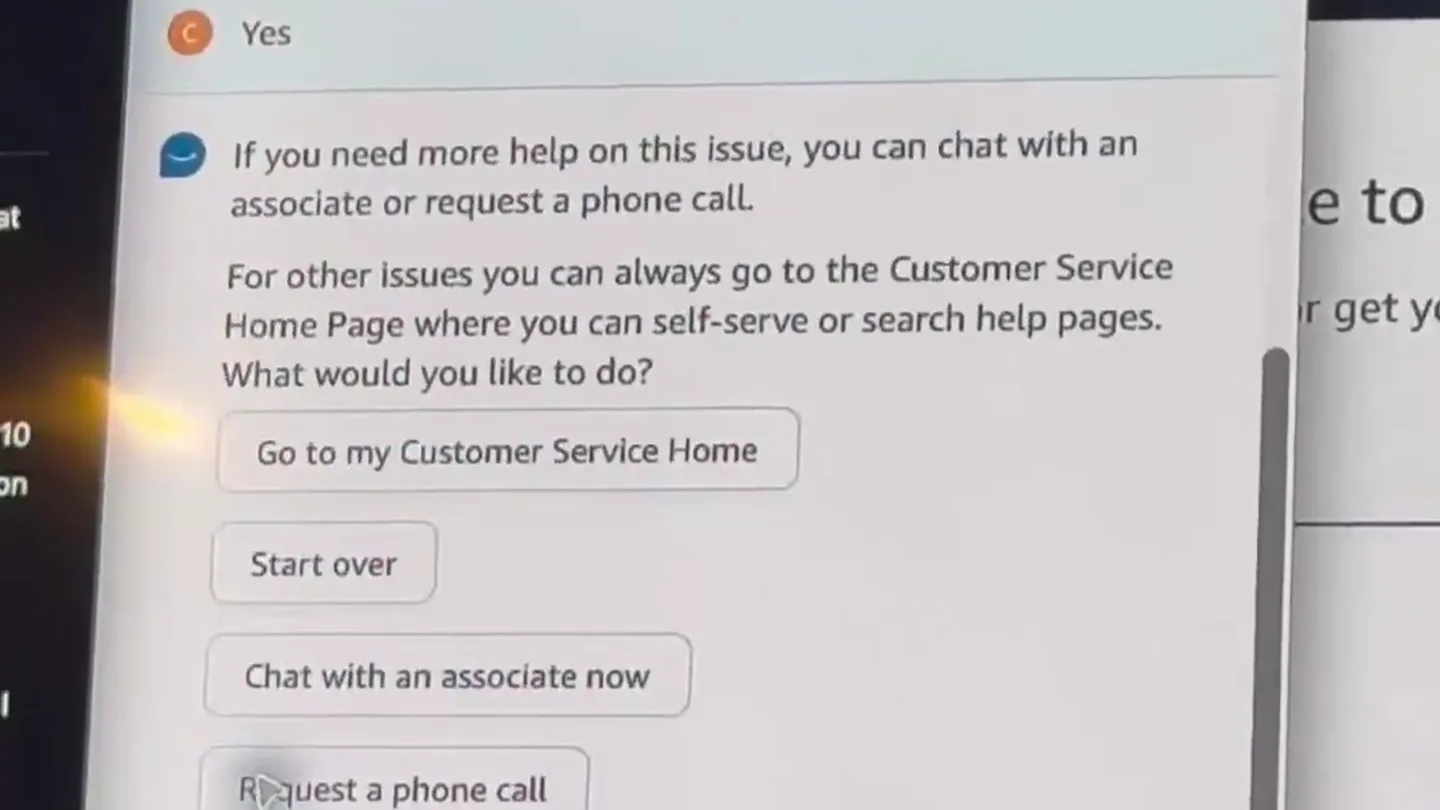
- I canceled my Prime membership and I want a refund for the Prime membership charge from April 10, 2026. The charge was $15.89. OK, if you recently canceled, you should see a refund for any remaining benefits in 3-5 business days. If you didn't cancel, we can take you to the Prime page where you can check your cancellation options. OK, check my options Do you have any questions about this? Yes No, I'm all set If you need more help on this issue, you can chat with an associate or request a phone call. For other issues you can always go to the Customer Service Home Page where you can self-serve or search help pages. What would you like to do? Chat with an associate now If you have details you think would help the associate, type them here. While chatting, if you do not respond within 2 minutes, the chat may be transferred to a different associate. An associate will join the chat. Depending on availability, this may take a little while. We appreciate your patience. End this chat Send a message Elmunda has joined the chat Hi I'm Elmunda from Amazon Customer Service,How can I help you today? Hi, I canceled Prime today. Please confirm whether the April 10, 2026 Prime membership charge can be refunded and process the refund if possibl? Your prime is still active Yes, it is still active because the cancellation is set for May 10. I want to end the Prime membership now and receive any refund available for the unused portion of the April 10 charge. Oh I see Please allow me a moment Let me check this for you Alright I will process refund manually for you One moment please Thank you for waiting Refund issued successfully. Thank you. Please let me know once the refund has been processed and the amount/timeline. An amount of $15.89 will be refunded to your Visa within 5-7 business days. Is there anything else I can help with? Thank you. Can you also confirm the Prime membership is canceled and there will be no future Prime charges? Yes prime membership will end on May 10, 2026 No more future charges End this chat? Yes, end this chat No, stay in chat Customer Feedback Your feedback is helping us build Earth's most customer-centric company. Did I solve your problem? Yes No
- Camera
- Close-up, slightly angled shot of a computer screen displaying a customer service chat interface. The camera remains static, focusing on the chat window.
- Motion
- Real-time screen recording of an AI agent interacting with a customer service chat. Text appears as if being typed and sent, simulating a live conversation.
Problem Agitation
AI Agent Navigates Complexities
“(No spoken dialogue — Sub-bass drop/impact at [00:10] follows the riser. Ambient electronic score continues with sweeps and whooshes. Another riser builds at [00:20].)”
- On screen
- I canceled my Prime membership and I want a refund for the Prime membership charge from April 10, 2026. The charge was $15.89. OK, if you recently canceled, you should see a refund for any remaining benefits in 3-5 business days. If you didn't cancel, we can take you to the Prime page where you can check your cancellation options. OK, check my options Do you have any questions about this? Yes No, I'm all set If you need more help on this issue, you can chat with an associate or request a phone call. For other issues you can always go to the Customer Service Home Page where you can self-serve or search help pages. What would you like to do? Chat with an associate now If you have details you think would help the associate, type them here. While chatting, if you do not respond within 2 minutes, the chat may be transferred to a different associate. An associate will join the chat. Depending on availability, this may take a little while. We appreciate your patience. End this chat Send a message Elmunda has joined the chat Hi I'm Elmunda from Amazon Customer Service,How can I help you today? Hi, I canceled Prime today. Please confirm whether the April 10, 2026 Prime membership charge can be refunded and process the refund if possibl? Your prime is still active Yes, it is still active because the cancellation is set for May 10. I want to end the Prime membership now and receive any refund available for the unused portion of the April 10 charge. Oh I see Please allow me a moment Let me check this for you Alright I will process refund manually for you One moment please Thank you for waiting Refund issued successfully. Thank you. Please let me know once the refund has been processed and the amount/timeline. An amount of $15.89 will be refunded to your Visa within 5-7 business days. Is there anything else I can help with? Thank you. Can you also confirm the Prime membership is canceled and there will be no future Prime charges? Yes prime membership will end on May 10, 2026 No more future charges End this chat? Yes, end this chat No, stay in chat Customer Feedback Your feedback is helping us build Earth's most customer-centric company. Did I solve your problem? Yes No
- Camera
- The camera maintains a static, slightly angled close-up on the chat window. The focus remains on the unfolding conversation.
- Motion
- Continued real-time screen recording, showcasing the AI agent's responses and the customer service representative's replies. Typing indicators and message bubbles animate naturally.
Product Reveal
Refund Successfully Processed
“(No spoken dialogue — Sub-bass impact at [00:21] follows the riser. The ambient electronic score continues, building energy with sweeps and whooshes. A final build-up with a riser occurs at [00:30].)”
- On screen
- I canceled my Prime membership and I want a refund for the Prime membership charge from April 10, 2026. The charge was $15.89. OK, if you recently canceled, you should see a refund for any remaining benefits in 3-5 business days. If you didn't cancel, we can take you to the Prime page where you can check your cancellation options. OK, check my options Do you have any questions about this? Yes No, I'm all set If you need more help on this issue, you can chat with an associate or request a phone call. For other issues you can always go to the Customer Service Home Page where you can self-serve or search help pages. What would you like to do? Chat with an associate now If you have details you think would help the associate, type them here. While chatting, if you do not respond within 2 minutes, the chat may be transferred to a different associate. An associate will join the chat. Depending on availability, this may take a little while. We appreciate your patience. End this chat Send a message Elmunda has joined the chat Hi I'm Elmunda from Amazon Customer Service,How can I help you today? Hi, I canceled Prime today. Please confirm whether the April 10, 2026 Prime membership charge can be refunded and process the refund if possibl? Your prime is still active Yes, it is still active because the cancellation is set for May 10. I want to end the Prime membership now and receive any refund available for the unused portion of the April 10 charge. Oh I see Please allow me a moment Let me check this for you Alright I will process refund manually for you One moment please Thank you for waiting Refund issued successfully. Thank you. Please let me know once the refund has been processed and the amount/timeline. An amount of $15.89 will be refunded to your Visa within 5-7 business days. Is there anything else I can help with? Thank you. Can you also confirm the Prime membership is canceled and there will be no future Prime charges? Yes prime membership will end on May 10, 2026 No more future charges End this chat? Yes, end this chat No, stay in chat Customer Feedback Your feedback is helping us build Earth's most customer-centric company. Did I solve your problem? Yes No
- Camera
- The camera remains static, maintaining the close-up on the chat interface. The focus is entirely on the text-based interaction.
- Motion
- Real-time screen recording continues, showing the successful resolution of the refund request and the agent's confirmation. The chat flow is presented as a seamless, efficient process.
Call to Action
Confirming Cancellation & Feedback
“(No spoken dialogue — Powerful sub-bass drop/impact at [00:31] follows the final build-up. The ambient electronic score maintains its driving, energetic feel with consistent 120 BPM, sweeps, and whooshes.”
- On screen
- I canceled my Prime membership and I want a refund for the Prime membership charge from April 10, 2026. The charge was $15.89. OK, if you recently canceled, you should see a refund for any remaining benefits in 3-5 business days. If you didn't cancel, we can take you to the Prime page where you can check your cancellation options. OK, check my options Do you have any questions about this? Yes No, I'm all set If you need more help on this issue, you can chat with an associate or request a phone call. For other issues you can always go to the Customer Service Home Page where you can self-serve or search help pages. What would you like to do? Chat with an associate now If you have details you think would help the associate, type them here. While chatting, if you do not respond within 2 minutes, the chat may be transferred to a different associate. An associate will join the chat. Depending on availability, this may take a little while. We appreciate your patience. End this chat Send a message Elmunda has joined the chat Hi I'm Elmunda from Amazon Customer Service,How can I help you today? Hi, I canceled Prime today. Please confirm whether the April 10, 2026 Prime membership charge can be refunded and process the refund if possibl? Your prime is still active Yes, it is still active because the cancellation is set for May 10. I want to end the Prime membership now and receive any refund available for the unused portion of the April 10 charge. Oh I see Please allow me a moment Let me check this for you Alright I will process refund manually for you One moment please Thank you for waiting Refund issued successfully. Thank you. Please let me know once the refund has been processed and the amount/timeline. An amount of $15.89 will be refunded to your Visa within 5-7 business days. Is there anything else I can help with? Thank you. Can you also confirm the Prime membership is canceled and there will be no future Prime charges? Yes prime membership will end on May 10, 2026 No more future charges End this chat? Yes, end this chat No, stay in chat Customer Feedback Your feedback is helping us build Earth's most customer-centric company. Did I solve your problem? Yes No
- Camera
- The camera remains static, focused on the chat window. The final frames show the feedback prompt, maintaining the direct, unadorned view of the screen.
- Motion
- The screen recording concludes with the AI agent confirming the cancellation and the user being prompted for feedback. The entire interaction is presented as a seamless, efficient process.
Motion design primitives
Synthesizable in Remotion · key components of the ai-agent-chat-showcase template.
RealtimeChatSimulator
Simulates a live chat conversation with messages appearing as if typed and sent in real-time. Includes typing indicators and message bubble animations.
+ Code construction recipe
Utilize Remotion's `Sequence` and `AbsoluteFill` components. Implement `spring` for message bubble entry and `interpolate` for text typing effects. Use `useState` to manage chat state and `useEffect` to trigger new messages based on a timeline.
DynamicScreenHighlight
Subtle, glowing highlights appear around interactive elements or key text as the AI agent 'navigates' the interface, drawing attention to specific actions.
+ Code construction recipe
Employ `AbsoluteFill` with `BoxShadow` or `RadialGradient` for the glow effect. Animate `opacity` and `scale` using `spring` or `interpolate` to create a soft, pulsing highlight. Position dynamically over relevant UI elements.
SubBassImpactTransition
A visual 'impact' or subtle screen shake synchronized with a powerful sub-bass audio drop, enhancing moments of resolution or significant action.
+ Code construction recipe
Use `spring` for a subtle `translateY` or `rotate` on the main content container, synchronized with audio cues. Combine with a brief `opacity` flash or `blur` effect using `interpolate` for added visual punch.
Style DNA & aesthetic system
Visual aesthetic
Typography
Motion
Special effects
Pacing & rhythm
Conceptual story rhythm
- 1
The Setup
Purpose. Introduce the problem: a common customer service issue (refund request) and the initial AI interaction.
Execution. Static close-up on the chat interface, showing the user's initial request and the AI's first responses.
- 2
The Challenge
Purpose. Highlight the complexity of the problem, demonstrating the AI's ability to navigate nuanced situations.
Execution. Continued static close-up, showing the back-and-forth as the AI clarifies the issue and the human agent responds.
- 3
The Resolution
Purpose. Showcase the AI's effectiveness by successfully resolving the complex issue.
Execution. The chat interface displays the successful refund processing and confirmation, with subtle visual impacts synchronized with audio.
- 4
The Confirmation
Purpose. Reinforce the AI's thoroughness and prompt for user feedback, completing the interaction loop.
Execution. The chat concludes with final confirmations and a feedback prompt, maintaining the direct screen view.





