
Heynoahai (by Ashish Toshniwal) · Launch Video Breakdown: Hook, Pacing & Motion Design
Introducing the world's first SMS/Voice executive AI assistant @HeyNoahAI, designed for very busy people who deeply care about their professional relationships. Noah waitlists 7 out of 10 people, d…
Scene-by-scene timeline & spoken transcript
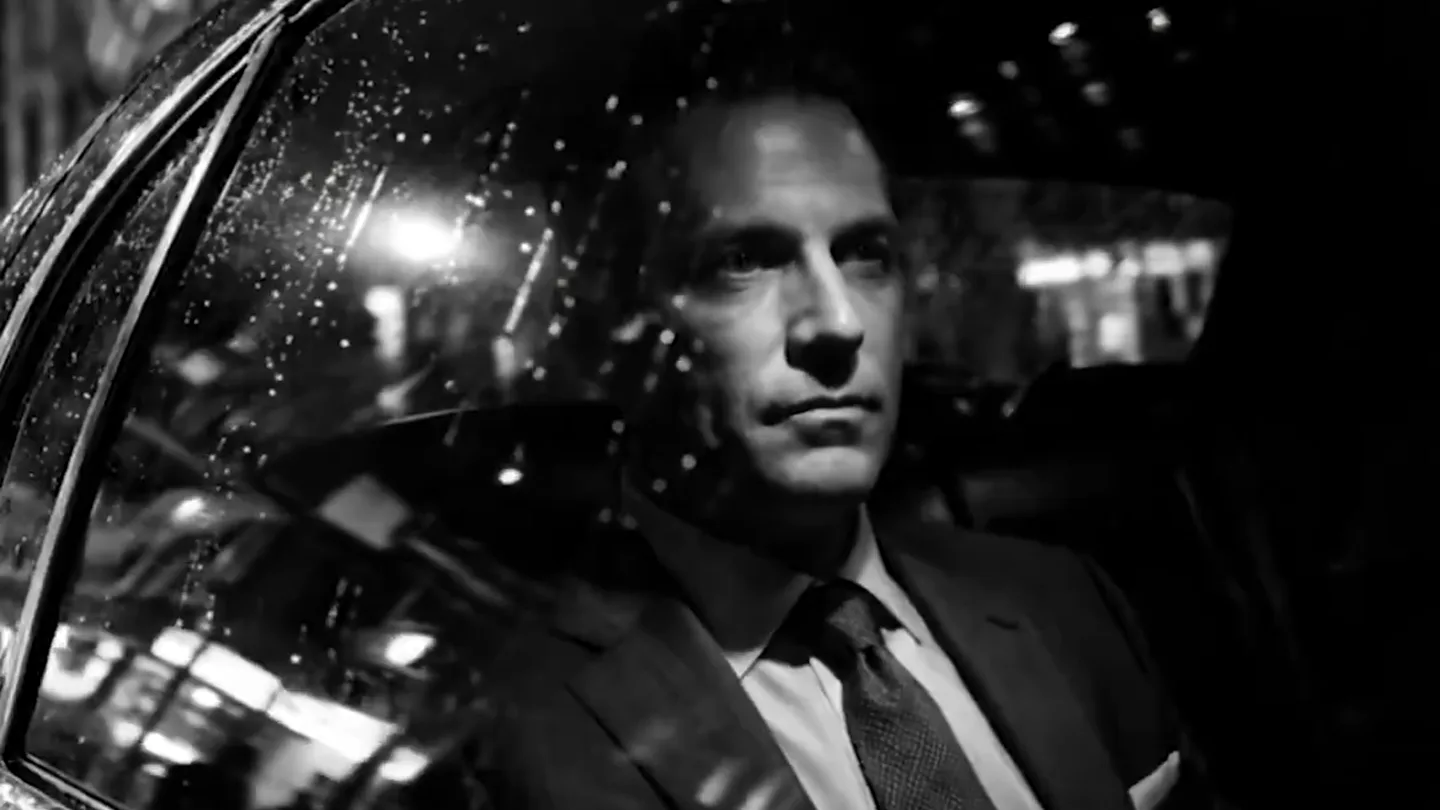
The Hook
Executive AI Assistant Introduction
“Client is about to run into escalation. Can I send the email to Emily? Great.”
- On screen
- heynoah.io Client is about to run into escalation. noc Can I send the email to Emily? noah Great.
- Camera
- Close-up on a man in a car, then a quick zoom into his face, followed by a static shot of a voice waveform.
- Motion
- Rapid cuts, subtle camera shake, and a glowing audio waveform animation.
Problem Agitation
Founder's Vision & Problem Statement
“After building a $100 million revenue company, I have realized that executive leverage comes from three things: being thoughtful and proactive with your own team, communicates with you directly, and your team. It understands what's happening. collect signals proactively and then asks a simple question. You say yes, and that's when the magic happens. exclusively for executives.”
- On screen
- heynoah.io Ashish Toshniwal Founder | heynoah.io After building a $100 million revenue company, I have realized that executive leverage comes from three things. being thoughtful and proactive with your own team, Noah Meeting with Scott. He's looking for AI automation. Noah Wife, Katie. His daughter, Sarah, just got into Stanford. communicates with you directly, and your team. 11:30 Hey Noah, set up a meeting with the client. Add the growth team. Read 11:30am 11:30 On it. As per standing instructions, prioritize clients over 1:1s. Meeting booked. It understands what's happening. Exec Hey Noah, take care of the follow ups from the Design Meeting on Friday. Noah Pulled your meeting notes. Next steps drafted and sent to John and Katy. collect signals proactively and then asks a simple question. You say yes, and that's when the magic happens. Great idea. exclusively for executives.
- Camera
- Alternating between medium close-up of the founder speaking and over-the-shoulder shots of executives interacting with the AI on their phones.
- Motion
- Smooth transitions between founder monologue and product demonstration, with text overlays mimicking chat interfaces.
Product Reveal
Noah AI Capabilities Showcase
“(No spoken dialogue — High-energy audio transition with riser, sweep, and sub-bass drop.)”
- On screen
- The only AI assistant optimized for trust
- Camera
- Static shot of text on a black background.
- Motion
- Text animation with a subtle glow and fade-in effect.
Feature Teaser
Security and Compliance
“(No spoken dialogue — High-energy audio transition with riser, sweep, and sub-bass drop.)”
- On screen
- heynoah.io pending certification AICPA SOC HIPAA
- Camera
- Static shot of text and logos on a black background.
- Motion
- Logos and text fade in with a clean, professional animation.
Call to Action
Join the Waitlist
“(No spoken dialogue — High-energy audio transition with riser, sweep, and sub-bass drop, leading into a sustained modern synth track.)”
- On screen
- (No on-screen text)
- Camera
- Various shots of executives in professional settings, intercut with abstract AI-themed graphics.
- Motion
- Fast-paced montage of aspirational executive imagery and abstract data visualizations, culminating in a call to action.
Motion design primitives
Synthesizable in Remotion · key components of the executive-ai-launch-template template.
ExecutiveDialogueOverlay
A black and white live-action shot of an executive is overlaid with a chat bubble containing AI dialogue. The chat bubble appears from the bottom of the screen and fades in.
+ Code construction recipe
Use a <Sequence> component for the live-action video. Overlay a <AbsoluteFill> with a <spring()> animated <div /> for the chat bubble, controlling its 'bottom' and 'opacity' properties. Text content is rendered inside.
FounderMonologueCut
The founder speaks directly to the camera in a black and white, well-lit studio setting. Text captions appear dynamically below him, synchronized with his speech.
+ Code construction recipe
Implement a <Sequence> for the founder's video. Use <AbsoluteFill> with <Text> components for captions, animating their 'opacity' and 'y' position using <interpolate()> based on audio timestamps.
AbstractWaveformReveal
A glowing, organic waveform animates horizontally across a black background, representing AI voice interaction. It pulses and shifts in response to audio cues.
+ Code construction recipe
Utilize a <Canvas> or <SVG> component. Draw the waveform using <Path> elements, animating their 'd' attribute (path data) and 'stroke' properties. Apply a <filter> for the glow effect and use <spring()> for subtle pulsing.
Style DNA & aesthetic system
Visual aesthetic
Typography
Motion
Special effects
Pacing & rhythm
Conceptual story rhythm
- 1
The Executive's Dilemma
Purpose. Establish the target audience and their pain points, immediately hooking the viewer with relatable professional challenges.
Execution. Opening with a high-stakes scenario featuring a busy executive, using black and white cinematography to convey seriousness and focus.
- 2
Founder's Authority & Solution
Purpose. Introduce the founder as a credible expert and present the core problem that Noah AI solves.
Execution. Intercutting founder monologue with illustrative scenarios of executives struggling with communication and follow-ups, using chat overlays to demonstrate AI interaction.
- 3
AI in Action
Purpose. Showcase Noah AI's capabilities through practical, real-world examples.
Execution. Dynamic sequences of executives using Noah AI on their phones, with animated chat bubbles and seamless task completion, highlighting the AI's proactive nature.
- 4
Trust & Call to Action
Purpose. Reinforce the product's reliability and guide the viewer towards engagement.
Execution. Visuals emphasizing security and compliance, followed by a clear, concise call to action to join the waitlist, using abstract motion graphics to symbolize advanced technology.





