
Higgsfield · Launch Video Breakdown: Hook, Pacing & Motion Design
Choose from 20+ animation styles or upload your own reference.
Scene-by-scene timeline & spoken transcript
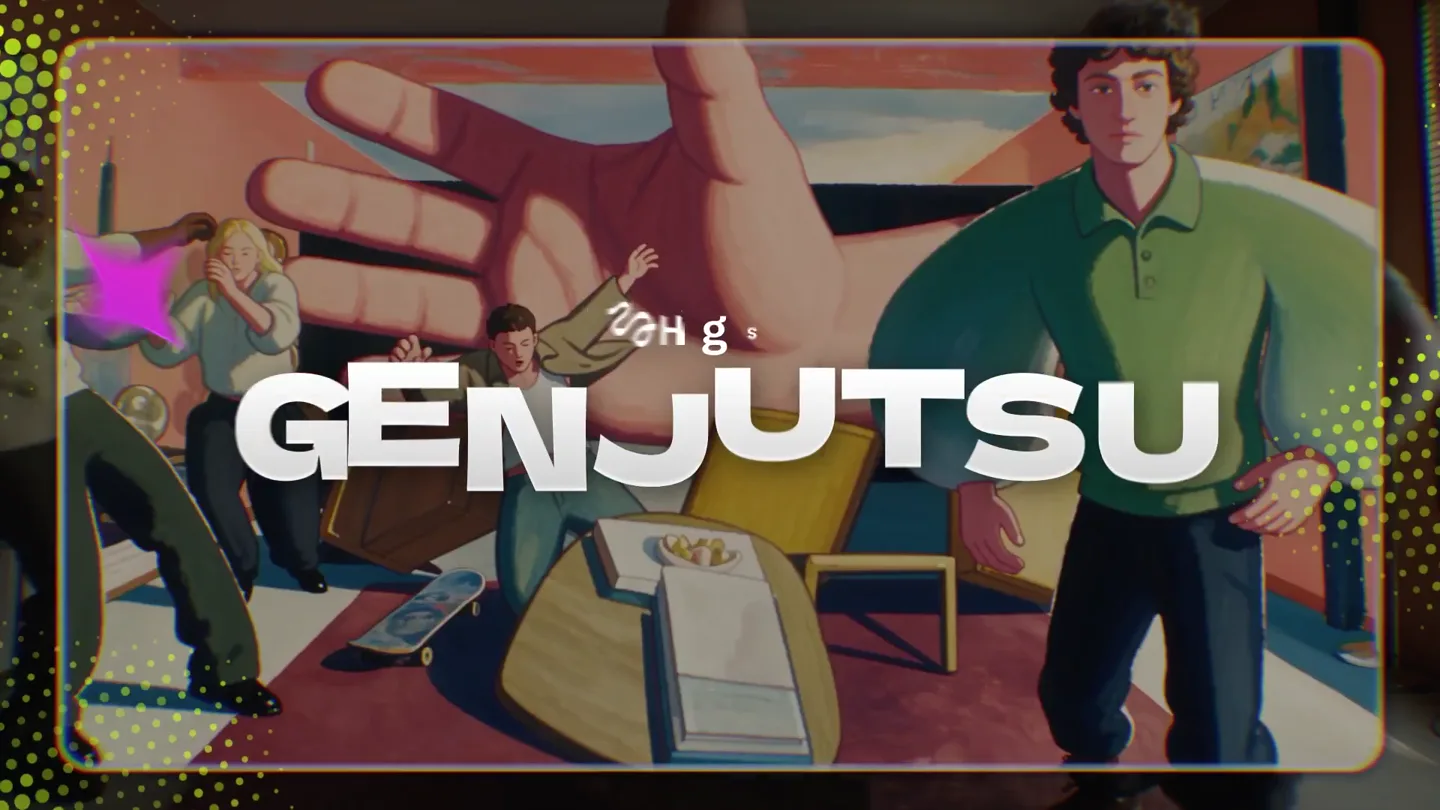
The Hook
AI Restyle Introduction
“What? Too fast! Pull up to the spot. Whole crew on deck.”
- On screen
- GENJUTSU RESTYLE Higgsfield
- Camera
- Dynamic camera movements, including quick zooms and pans, create a sense of urgency and transformation. The perspective shifts rapidly, often from a low angle looking up.
- Motion
- Split-screen transitions, glitch effects, and animated text overlays introduce the product's core capability: AI-powered visual restyling. The initial scene uses a multi-panel layout with rounded corners, then collapses into a full-screen animated title.
Product Reveal
Real-time Style Transfer Demonstration
“(No spoken dialogue — The driving trap beat continues with high-energy risers and sweeps, emphasizing the rapid visual transformations.)”
- On screen
- GENJUTSU RESTYLE AVAILABLE VIA API UPLOAD YOUR REFERENCE OR USE TEMPLATES
- Camera
- The camera remains static, focusing on a split-screen comparison. The left side shows the original footage, while the right side displays the AI-restyled version.
- Motion
- A prominent vertical split-screen wipe effect reveals the 'before and after' of the AI restyling. The animation style on the right side changes dynamically, showcasing different artistic interpretations of the original footage.
Feature Teaser
Effortless Creative Control
“(No spoken dialogue — The intense and dynamic trap beat continues, punctuated by impactful sub-bass drops during scene changes.)”
- On screen
- INPUT GENJUTSU ONE CLICK. CREATE IN STYLE
- Camera
- The camera moves fluidly, often circling or panning across a scene, highlighting multiple subjects simultaneously. It transitions from a split-screen to a multi-panel layout.
- Motion
- Multi-panel layouts with rounded corners animate in and out, showcasing various subjects being restyled. Text overlays appear with a subtle glitch or pixelation effect, reinforcing the digital transformation theme.
Feature Teaser
Diverse Style Library Showcase
“(No spoken dialogue — The driving trap beat maintains its rhythmic propulsion, with electronic sound design elements emphasizing transitions.)”
- On screen
- 20+ MORE STYLES
- Camera
- The camera often uses a static or slow-panning shot, focusing on the split-screen comparison. Some scenes feature a dynamic, low-angle perspective.
- Motion
- Rapid-fire split-screen reveals demonstrate a wide array of animation styles. The diagonal wipe transition is consistently used, creating a clear distinction between the original and the AI-generated output. Visual effects like color shifts and subtle distortions are applied to the 'after' side.
Call to Action
Access and Availability
“(No spoken dialogue — The music fades out with a final sub-bass drop, leaving a clear, concise message.)”
- On screen
- GENJUTSU RESTYLE IS AVAILABLE ON HIGGSFIELD.AI AND VIA API PRODUCT ENDPOINT
- Camera
- Static, centered text on a clean background.
- Motion
- Simple, clean text animation with a subtle fade-in, providing clear instructions for accessing the product.
Motion design primitives
Synthesizable in Remotion · key components of the ai-style-transfer-fast-cut template.
DiagonalWipeSplit
A diagonal line rapidly sweeps across the screen, revealing a transformed version of the original footage on one side while the other side remains unchanged. This creates a dynamic 'before and after' comparison.
+ Code construction recipe
Implement using a Remotion <AbsoluteFill> with two child components for 'before' and 'after' content. Use `interpolate` for the `clipPath` property of the 'after' component, animating a diagonal SVG path from 0% to 100% across the frame. Apply a `spring` animation for a snappy, energetic reveal.
RoundedPanelReveal
Multiple video panels with rounded corners animate onto the screen, often from off-screen or scaling up, to showcase different aspects or examples simultaneously. They can overlap or arrange in a grid.
+ Code construction recipe
Utilize Remotion's `Sequence` and `AbsoluteFill` components. Each panel is a `Video` or `Img` component wrapped in a `View` with `borderRadius`. Animate `x`, `y`, `scale`, and `opacity` properties using `spring` or `interpolate` with an `easeOutCubic` curve for smooth, staggered entry and exit.
GlitchTextOverlay
Text appears on screen with a brief, digital glitch or pixelation effect before settling into its final, crisp form. This effect emphasizes a digital or AI-driven transformation.
+ Code construction recipe
Create a `Text` component. Apply a series of `CSS filters` (e.g., `hue-rotate`, `saturate`, `contrast`) and `transform` properties (e.g., `translateX`, `skewX`) that rapidly change and then resolve. Use `interpolate` with `steps` or a custom easing function to simulate the erratic glitch behavior over a very short duration, combined with a `noise` or `scanline` SVG filter for visual distortion.
Style DNA & aesthetic system
Visual aesthetic
Typography
Motion
Special effects
Pacing & rhythm
Conceptual story rhythm
- 1
The Digital Disruption
Purpose. Immediately grab attention and introduce the concept of visual transformation through AI.
Execution. Rapid cuts, glitch effects, and a multi-panel layout that quickly collapses into a bold, animated title card.
- 2
Seamless Style Application
Purpose. Demonstrate the core functionality: applying diverse styles to live footage.
Execution. Consistent use of diagonal split-screen wipes to show 'before' and 'after' comparisons across various scenarios.
- 3
Creative Empowerment
Purpose. Highlight the ease of use and the creative possibilities offered by the tool.
Execution. Multi-panel arrangements and dynamic camera work showcasing different subjects being restyled with simple on-screen text like 'ONE CLICK. CREATE IN STYLE'.
- 4
Infinite Possibilities
Purpose. Emphasize the breadth of available styles and encourage exploration.
Execution. A montage of quick split-screen examples, each featuring a unique and distinct animation style, reinforcing '20+ MORE STYLES'.





