
Higgsfield Mcp Claude Connector (by Higgsfield AI 🧩) · Launch Video Breakdown: Hook, Pacing & Motion Design
Higgsfield MCP now connects to Claude! The first way to generate visuals on Claude, powered by Seedance 2.0, GPT Images 2.0, Marketing Studio and Cinema Studio. Research on Claude. Polish your prom…
Scene-by-scene timeline & spoken transcript
The Hook
Unexpected Visual Hook & AI Integration Tease
“(No spoken dialogue — High-energy riser and sub-bass drop, followed by an electronic sweep.)”
- On screen
- (No on-screen text)
- Camera
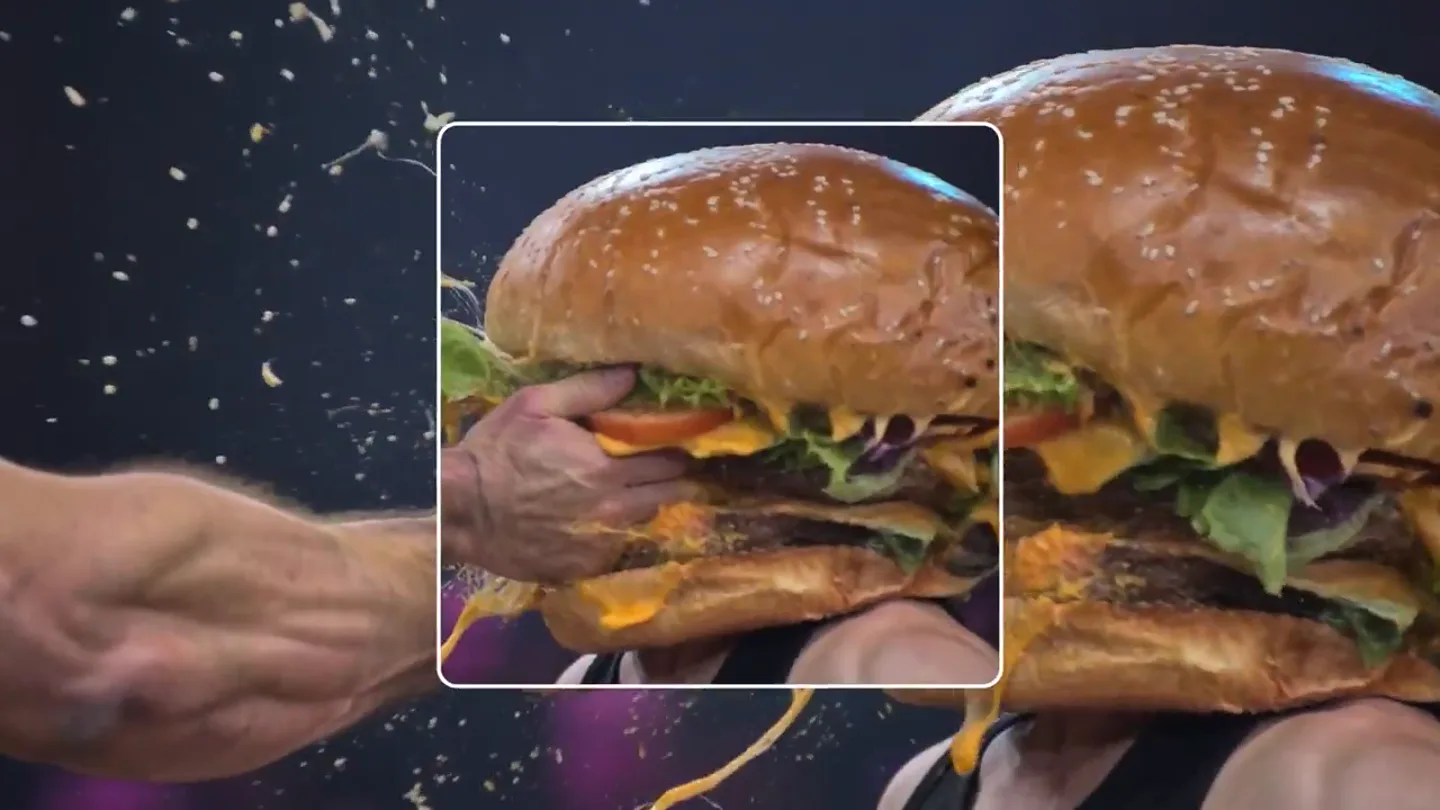
- Rapid cuts between a wide shot of a slap championship and a close-up of a burger being smashed, then a static shot of the Claude AI interface.
- Motion
- Fast-paced montage, visual juxtaposition, quick scene transitions.
Problem Agitation
AI Prompting & Processing
“(No spoken dialogue — Driving electronic beat with pizzicato synths.)”
- On screen
- Claude Opus 4.7 Make a full marketing campaign for this burger using Higgsfield Helping...
- Camera
- Static shot of the Claude AI interface, with a mouse cursor interacting with the input field and a 'Helping...' screen.
- Motion
- Text typing animation, cursor interaction, simple fade transition.
Product Reveal
Comprehensive Marketing Asset Generation
“Good? Look at the menu.”
- On screen
- Burger Queen BOLD. ROYAL FLAVOR. EST. 2025 MADE LIKE ROYALTY Brandbook TV Spot Hyper Motion Here is your UGC Content: #burgerqueen UGC Burgers Queen Classic Crispy Chicken Royale Loaded Fries Queen Shake Download Menu TIMLESS TASTE, DONE RIGHT. Crave Mockups Photoshoot Web Landing BURGER QUEEN Grilled to perfection. Built with real ingredients. Made for those who don't settle for average taste. Order Now View Menu
- Camera
- Series of static shots showcasing various marketing assets (brand book, TV spot, UGC, menu, mockups, photoshoot, web landing page) within a rounded-rectangle frame, with a small thumbnail of the original burger image in the top left.
- Motion
- Slide-in transitions for new content, subtle scaling of the main content frame, mouse cursor interaction on the web landing page.
Call to Action
Availability and Call to Action
“(No spoken dialogue — Impactful sub-bass drop, then driving electronic beat fades out.)”
- On screen
- Available now at Higgsfield.ai/mcp
- Camera
- Static shot with text appearing and fading in.
- Motion
- Text fade-in, simple static display.
Motion design primitives
Synthesizable in Remotion · key components of the ai-marketing-generator-showcase template.
ContentFrameSlide
A primary content frame (e.g., an image, video, or UI screenshot) slides into view from the right or left, often accompanied by a smaller, persistent thumbnail in the corner.
+ Code construction recipe
Utilize Remotion's 'spring' or 'interpolate' functions for x-axis translation. The main content frame should have a 'borderRadius' property. The small thumbnail can be a fixed 'AbsoluteFill' child with a 'scale' and 'translate' transform.
TypingCursorAnimation
Text appears character by character as if being typed, with a blinking cursor at the end of the input field.
+ Code construction recipe
Implement with Remotion's 'Sequence' and 'spring' for character opacity and scale. The blinking cursor can be a simple 'Opacity' animation toggling between 0 and 1 on a loop, or a 'blink' CSS animation.
InteractiveUIHighlight
A mouse cursor animates to specific UI elements (buttons, menu items) and triggers a subtle hover or click state, indicating user interaction.
+ Code construction recipe
Use 'interpolate' for cursor position (x, y coordinates) over time. UI elements can have 'scale' or 'opacity' changes on 'hover' or 'click' events, simulated by 'spring' animations triggered at specific frames.
Style DNA & aesthetic system
Visual aesthetic
Typography
Motion
Special effects
Pacing & rhythm
Conceptual story rhythm
- 1
The Disruptive Intro
Purpose. Grab attention immediately with unexpected, high-energy visuals and sound, then quickly pivot to the core problem/solution.
Execution. Rapid-fire cuts of a slap fight and a burger smash, followed by the Claude AI interface appearing with a prompt.
- 2
AI in Action
Purpose. Demonstrate the product's core functionality: taking a simple input and processing it.
Execution. A mouse cursor typing a prompt into Claude, followed by a 'Helping...' screen, visually representing the AI at work.
- 3
The Output Showcase
Purpose. Overwhelm the viewer with the breadth and quality of the AI-generated marketing assets.
Execution. A montage of various marketing materials (brand books, TV spots, UGC, menus, mockups, web pages) sliding into view, each presented within a clean UI frame.
- 4
The Call to Action
Purpose. Clearly instruct the viewer on how to access the product.
Execution. A simple, clean screen displaying the product's availability and URL, with a final impactful sound design element.





