
Horwitzben 2047293550342152680 (by Ben Horwitz) · Launch Video Breakdown: Hook, Pacing & Motion Design
I made the anti-Grammarly. Mess up your emails with AI.
Scene-by-scene timeline & spoken transcript
The Hook
The Mundane Email
“(No spoken dialogue — A consistent, driving electronic rhythm with a prominent sub-bass pulse begins.)”
- On screen
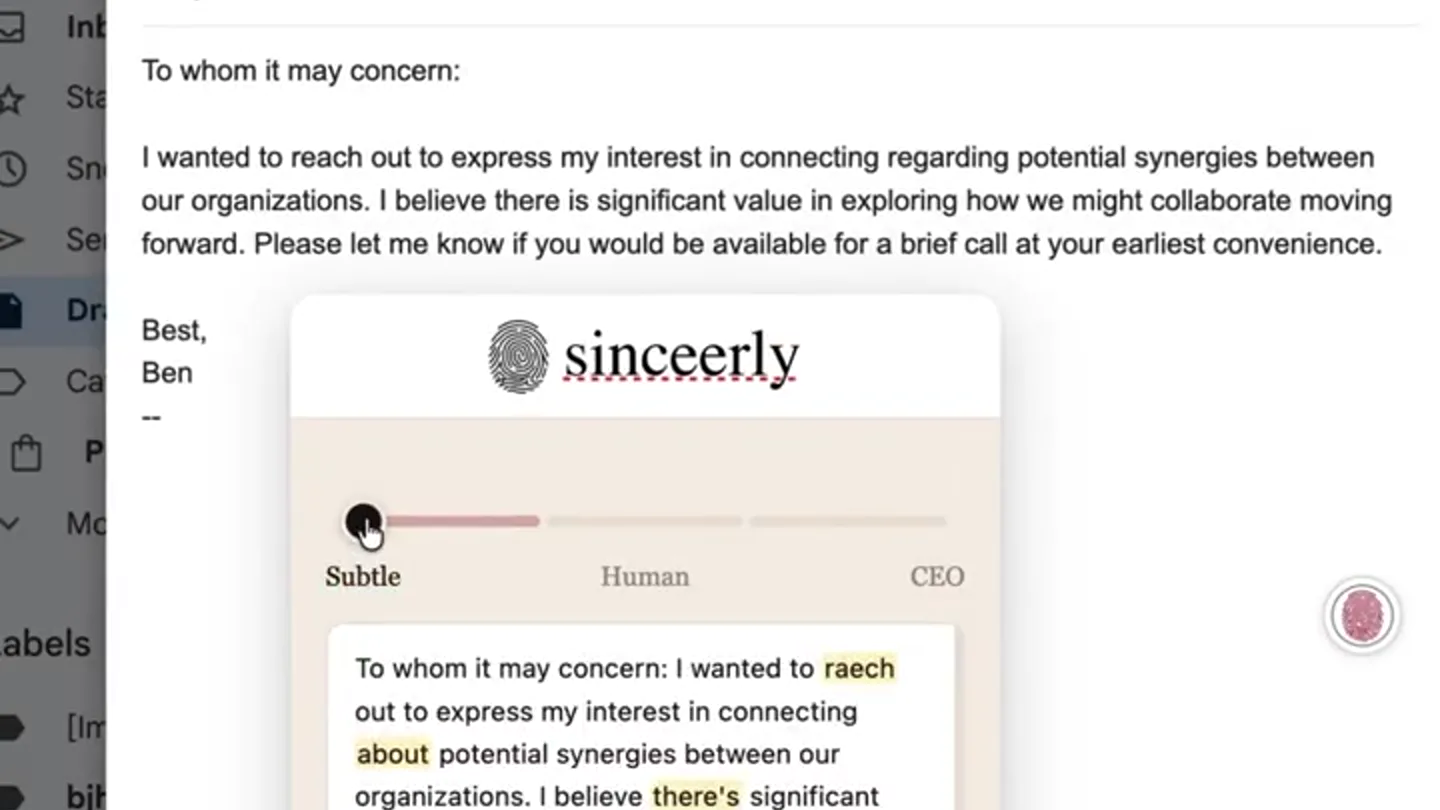
- To whom it may concern: I wanted to reach out to express my interest in connecting regarding potential synergies between our organizations. I believe there is significant value in exploring how we might collaborate moving forward. Please let me know if you would be available for a brief call at your earliest convenience. Best, Ben
- Camera
- Static, full-screen view of a Gmail 'New Message' window.
- Motion
- Subtle cursor hover animation over a fingerprint icon.
Problem Agitation
Introducing the 'Humanize' AI
“(No spoken dialogue — The electronic rhythm continues steadily.)”
- On screen
- sincerely humanize
- Camera
- Static, full-screen view of a Gmail 'New Message' window.
- Motion
- A modal window with the 'sincerely' logo and a 'humanize' button animates in from the bottom-right, expanding to reveal its content.
Product Reveal
AI-Powered Email Transformation
“(No spoken dialogue — The electronic rhythm maintains its steady beat.)”
- On screen
- sincerely Subtle Human CEO To whom it may concern: I wanted to raech out about potential synergies between our organizations. I believe there's significant value in exploring how we might collaborate moving forward. Please let me know if you'd be available for a brief call at your earliest convenience. Best, Ben Replace in email Discard
- Camera
- Static, full-screen view of a Gmail 'New Message' window.
- Motion
- The modal expands to reveal a slider with 'Subtle', 'Human', 'CEO' options. Text within the modal dynamically changes and highlights as the slider is dragged, demonstrating real-time AI rewriting. The slider knob moves with a smooth, interpolated ease.
Feature Teaser
Instant Email Replacement
“(No spoken dialogue — The electronic rhythm continues, building subtle anticipation.)”
- On screen
- wanted to reach out about potential collaboration between our organizations. I see real value in exploring this further. Are you available for a quick call? Ben
- Camera
- Static, full-screen view of a Gmail 'New Message' window.
- Motion
- The 'Replace in email' button is clicked, and the modal smoothly collapses and disappears, instantly replacing the original email text with the AI-generated version.
Call to Action
Brand Reveal: Sincerely
“(No spoken dialogue — The electronic rhythm concludes with a final, resonant sub-bass pulse.)”
- On screen
- sincerely
- Camera
- Zoom-in on the 'sincerely' logo, which then becomes full-screen.
- Motion
- A rapid zoom transition from the email interface to a clean, white background revealing the 'sincerely' logo with a subtle red dashed underline animation, emphasizing the 'anti-Grammarly' concept.
Motion design primitives
Synthesizable in Remotion · key components of the ai-document-simplifier-launch template.
ModalRevealExpand
A UI modal animates into view from a specific screen corner, expanding its dimensions and revealing internal content progressively. It then collapses and disappears upon user interaction.
+ Code construction recipe
Use `spring` for position and scale, `interpolate` for opacity. Manage content visibility with conditional rendering or `opacity` transitions. Implement `useCurrentFrame` and `continueRender` for precise timing.
SliderTextMorph
A horizontal slider allows users to scrub through different text variations, with highlighted words dynamically changing and animating in place as the slider moves.
+ Code construction recipe
Utilize `interpolate` to map slider position to text content and highlight states. Implement character-level text diffing and `opacity`/`transform` animations for word transitions. Consider `react-spring` for fluid slider knob movement.
LogoZoomReveal
A rapid, high-impact zoom transition from a detailed UI element to a full-screen, clean logo reveal, often accompanied by a subtle brand-specific animation.
+ Code construction recipe
Employ `interpolate` for `scale` and `position` to create the zoom effect. Use `AbsoluteFill` for the final logo state. Animate specific logo elements (e.g., underline) with `spring` or `keyframes`.
Style DNA & aesthetic system
Visual aesthetic
Typography
Motion
Special effects
Pacing & rhythm
Conceptual story rhythm
- 1
The Pain Point
Purpose. Establish the common problem of overly formal or generic email communication.
Execution. Display a typical, bland corporate email in a familiar Gmail interface.
- 2
The Solution Introduction
Purpose. Introduce the AI tool as the answer to the problem.
Execution. A modal appears, offering to 'humanize' the email.
- 3
The Transformation
Purpose. Demonstrate the product's core functionality and impact.
Execution. The slider interaction dynamically rewrites the email, highlighting changes in real-time.
- 4
The Brand Promise
Purpose. Conclude with the brand identity and the product's unique value proposition.
Execution. The AI-rewritten email is applied, followed by a clean, impactful logo reveal.





