Imperfect Launch (by Y Combinator) · Launch Video Breakdown: Hook, Pacing & Motion Design
Imperfect (@imperfectco_) is an AI fitness coach that's personalized based on your health data. It adapts your training, recovery, and nutrition each day to how your body is actually responding. Congrats on the launch, and welcome back @matin (W11)! https://www.ycombinator.com/launches/QG0-imperfect-training-that-adapts-to-real-life
Scene-by-scene timeline & spoken transcript
The Hook
The Imperfect Athlete's Struggle
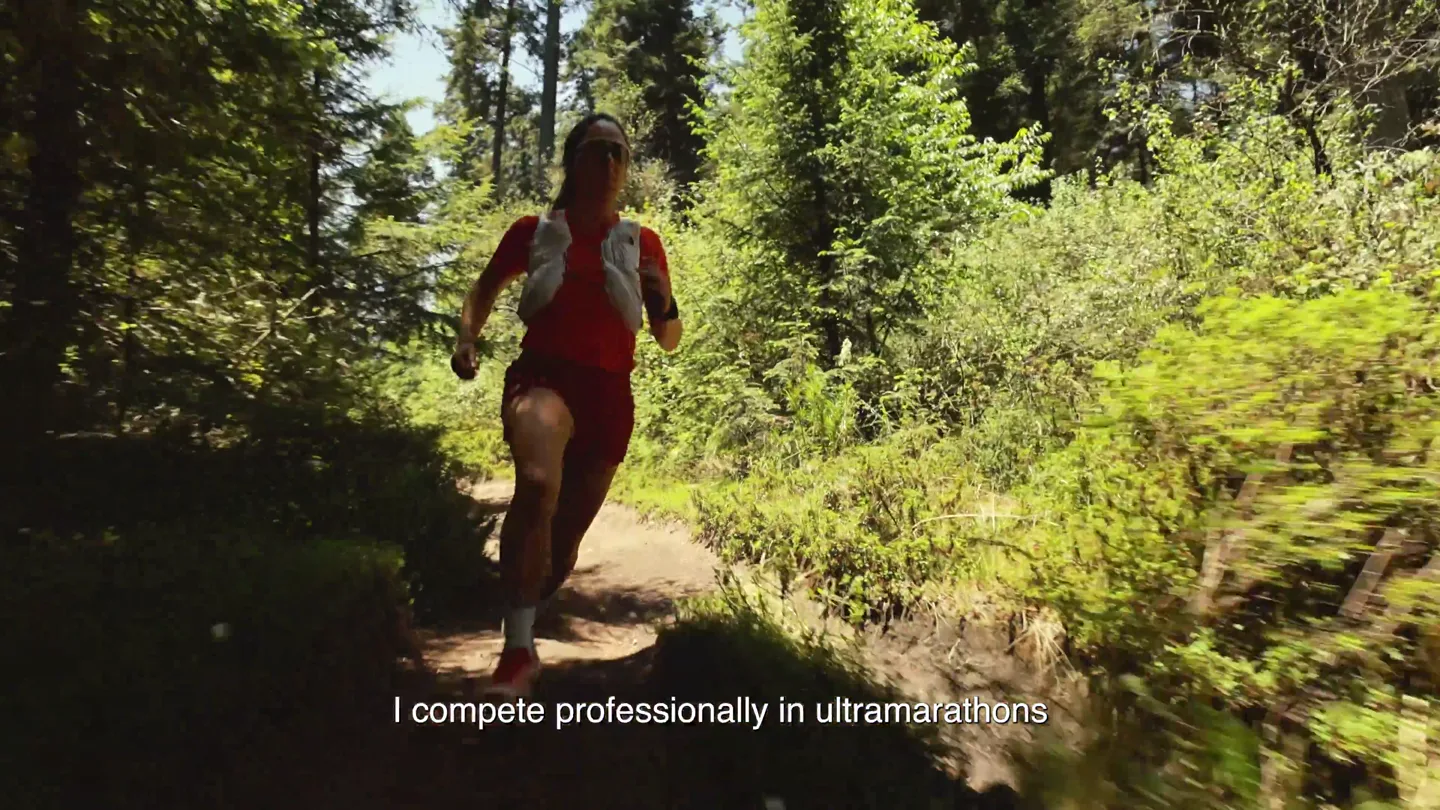
“I compete professionally in ultramarathons and triathlons internationally. Training for each race starts with a perfect plan, but my life's not perfect. I need the plan to adapt to me without me needing to manually enter my information.”
- On screen
- (No on-screen text)
- Camera
- Dynamic tracking shots of the athlete running through a forest, intercut with a close-up of her face and a shot of her in a kitchen. The camera often moves with a handheld, energetic feel.
- Motion
- Fast cuts, quick zooms, and motion blur to convey speed and the demanding nature of the athlete's life. The initial shots use a wide lens to capture the environment.
Problem Agitation
Data-Driven Adaptation
“It checks my data from my watch to know how I train and sleep. It checks the weather and air quality around me. It considers my health and most importantly, my Cleopatra.”
- On screen
- Same Same intensity, smarter dose. Saw your late start. Dinner at 5 pm. Trimmed today's Trail Easy Easy trail run This morning · 60 min Power- hike the steeps, 1 gel at the 30 min r 9:41 < Live! (adapted by Imperfect) M T W T F S Q Take the summit, Karla? Day 14, ovulation phase. Body can take more today. The climb's yours if you want it. My plan Patterns Discover Trail Easy trail run This morning 60 min Power- hike the steeps, 1 gel at the 30 min run, steady water Trail 754o 1dhte Eat less via the ma Lactose intolera reduce your dose Insights Today is call 6 am Late run at 4pm. Your run a bet morning
- Camera
- Medium shots of the athlete interacting with her phone in a forest setting, followed by a close-up of the phone screen. The camera remains relatively stable during phone interaction.
- Motion
- On-screen UI elements animate in with a subtle bounce and fade. Text appears dynamically within the app interface, simulating real-time data updates. A sub-bass drop/impact marks the transition to this segment.
Product Reveal
Life-Adaptive Training
“If I travel, it suggests places to train. If I have a late night, it dials back tomorrow's session to prioritize my recovery. For all the beautiful imperfections life plans for us.”
- On screen
- (No on-screen text)
- Camera
- Dynamic tracking shots of the athlete running through a forest, similar to the hook, but with more varied angles and perspectives, including a low-angle shot looking up at her.
- Motion
- Continued use of fast cuts and motion blur to maintain energy. The camera movement is fluid, emphasizing the athlete's continuous motion and the product's seamless integration into her life. A high-energy audio transition and sub-bass drop mark this section.
Call to Action
Imperfect: The Solution
“(No spoken dialogue — The audio features a consistent, driving electronic beat with pizzicato synths, sub-bass, and 808-style percussion. High-energy audio transitions and risers occur at [00:31] and [00:40], each followed by a sub-bass drop/impact.)”
- On screen
- Imperfect
- Camera
- A wide shot of the athlete overlooking a city from a mountain, followed by a slow zoom out to reveal the product name. The camera is static for the final branding shot.
- Motion
- A smooth, slow zoom out on the final shot, allowing the product name to appear prominently. The overall pacing slows down to emphasize the brand reveal. The product name 'Imperfect' appears with a subtle, elegant animation.
Motion design primitives
Synthesizable in Remotion · key components of the adaptive-finance-flow template.
DynamicTrailRunner
A fast-paced sequence of an athlete running through a natural environment, characterized by quick cuts and a sense of forward momentum. The camera often tracks the runner or uses wide-angle shots to capture the surroundings.
+ Code construction recipe
Utilize `Sequence` for rapid scene changes. Implement `AbsoluteFill` with video assets. Apply `interpolate` for subtle camera zooms and pans. Use `spring` for quick, energetic transitions between clips, and `motionBlur` effect on fast-moving elements or during cuts.
AdaptiveUIDisplay
On-screen mobile UI elements appear and update dynamically, showcasing data and personalized recommendations. Text and graphical elements animate in with a clean, modern aesthetic.
+ Code construction recipe
Employ `AbsoluteFill` for the phone screen overlay. Use `spring` for the entrance animation of UI cards and text, giving a slight bounce. `interpolate` for opacity and scale changes. Text elements can use `Typewriter` effect for dynamic reveal. SVG paths for subtle background waves or data visualizations.
BrandRevealZoom
A wide, scenic shot slowly zooms out, revealing the product logo or name with a clean, elegant text animation. The background remains natural and expansive.
+ Code construction recipe
Use a static video or image for the background. Apply `interpolate` for a slow, controlled `scale` transformation on the background video to simulate a zoom out. The brand text should `spring` into view with a slight delay and a subtle `opacity` and `translateY` animation.
Style DNA & aesthetic system
Visual aesthetic
Typography
Motion
Special effects
Pacing & rhythm
Conceptual story rhythm
- 1
The Athlete's Reality
Purpose. Introduce the protagonist and establish the core problem: the conflict between a demanding training schedule and an unpredictable life.
Execution. Fast-paced, handheld footage of the athlete running, intercut with intimate shots of her daily life, conveying both her dedication and the challenges she faces.
- 2
The Data Solution
Purpose. Introduce the product's core mechanism: how it uses data from various sources to understand and adapt to the user's needs.
Execution. Clear, animated UI overlays on top of real-world footage, demonstrating the app's interface and its ability to process personal and environmental data.
- 3
Seamless Integration
Purpose. Showcase the product's benefits in action, illustrating how it seamlessly adjusts training, recovery, and nutrition to real-life events.
Execution. More dynamic running footage, interspersed with visual cues or subtle text overlays that imply the plan's adaptation (e.g., 'travel suggestions,' 'recovery prioritized').
- 4
The Imperfect Promise
Purpose. Conclude with the brand's core message: embracing life's imperfections through adaptive technology, and a clear brand reveal.
Execution. A wide, aspirational shot of the athlete overlooking a landscape, culminating in the elegant reveal of the 'Imperfect' logo, reinforcing the brand's philosophy.