
Krea · Launch Video Breakdown: Hook, Pacing & Motion Design
Krea Agent now has a video editor for generated clips: arrange scenes, extend shots, and add audio in one place.
Scene-by-scene timeline & spoken transcript
The Hook
Cinematic AI Generation Tease
“(No spoken dialogue — ambient visual with subtle UI clicks)”
- On screen
- now, the video should have different camera angles, some orbiting, wide lens and extreme close up shots to parts of the car and the character. Show more Worked for 10m 35s 2 references particles floating don't look realistic, they look frozen. Create anything...
- Camera
- Dynamic cuts between a dark, foggy car scene and close-ups of a glowing star emblem and a person's face in a helmet.
- Motion
- Rapid cuts, quick zooms, and subtle camera shakes to create a sense of mystery and action.
Product Reveal
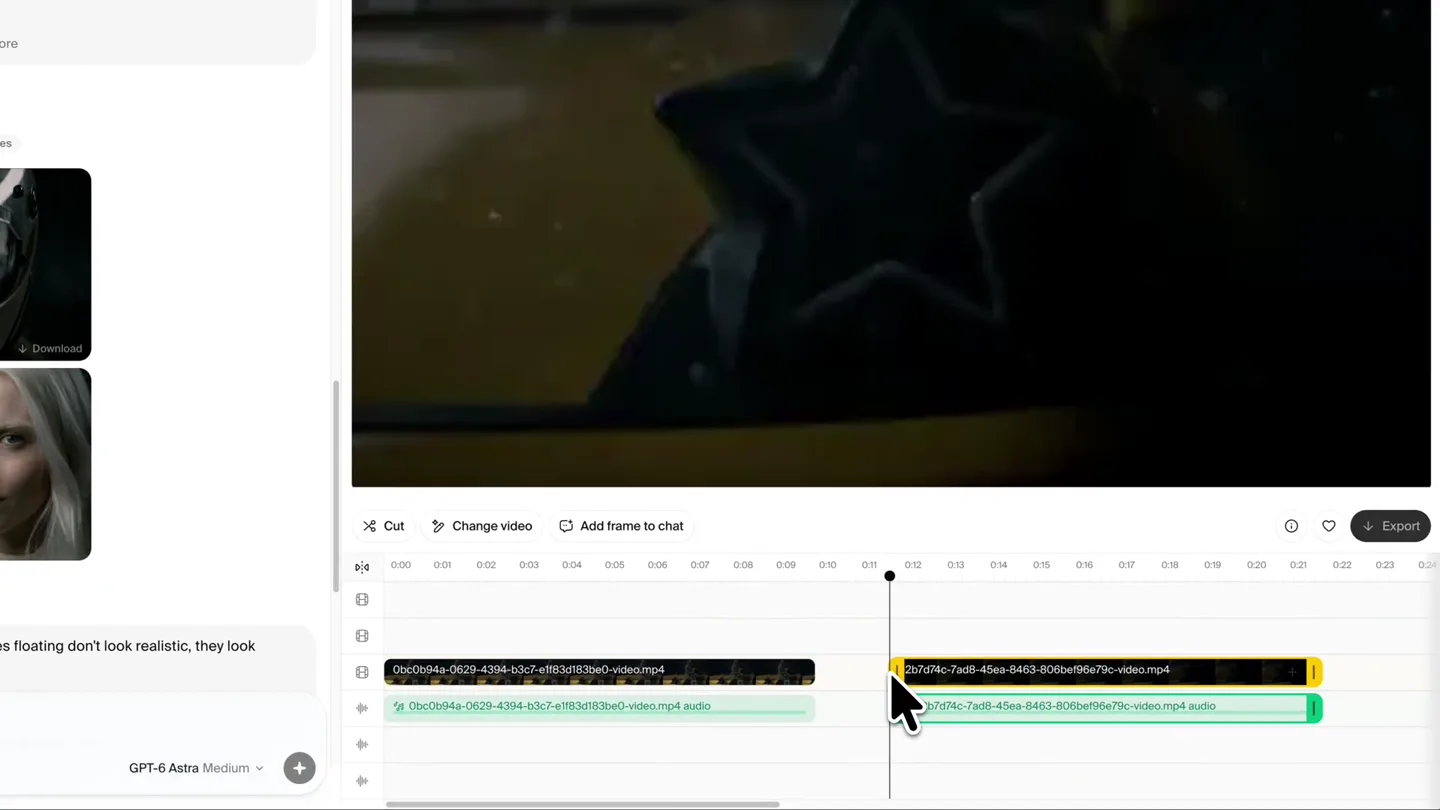
Interactive Video Editing Interface
“(No spoken dialogue — ambient visual with UI clicks and drag sounds)”
- On screen
- Cut Change video Add frame to chat Export 0:00 0:01 0:02 0:03 0:04 0:05 0:06 0:07 0:08 0:09 0:10 0:11 0:12 0:13 0:14 0:15 0:16 0:17 0:18 0:19 0:20 0:21 0:22 0:23 0:24 Worked for 10m 35s 2 references particles floating don't look realistic, they look frozen. Drop images here GPT-6 Astra Medium this is great now, the video should have different camera angles, some orbiting, wide lens and extreme close up shots to parts of the car and the character. Show more
- Camera
- Static overhead shot of a video editing timeline, with a mouse cursor interacting with video clips.
- Motion
- UI animation, drag-and-drop interactions, and timeline scrubbing to demonstrate editing capabilities.
Feature Teaser
AI-Powered Scene Extension
“(No spoken dialogue — ambient visual with UI typing and loading sounds)”
- On screen
- Cut Change video Add frame to chat Export Extend Video What happens next? (optional) 0:00 0:01 0:02 0:03 0:04 0:05 0:06 0:07 0:08 0:09 0:10 0:11 0:12 0:13 0:14 0:15 0:16 0:17 0:18 0:19 0:20 0:21 0:22 0:23 0:24 Create a scene of the car racing and drifting with the same cinematic style Seedance 2.5 1080p 4% 92%
- Camera
- Static shot of the UI, focusing on text input and a progress bar, then a full-screen preview of the generated video.
- Motion
- Text typing animation, progress bar fill, and a seamless transition to a full-screen video playback.
Call to Action
Dynamic Generated Content Showcase
“(No spoken dialogue — ambient visual with UI clicks)”
- On screen
- Cut Change video Add frame to chat Export 0:00 0:01 0:02 0:03 0:04 0:05 0:06 0:07 0:08 0:09 0:10 0:11 0:12 0:13 0:14 0:15 0:16 0:17 0:18 0:19 0:20 0:21 0:22 0:23 this is great now, the video should have different camera angles, some orbiting, wide lens and extreme close up shots to parts of the car and the character. Show more Worked for 10m 35s 2 references particles floating don't look realistic, they look frozen. Create anything...
- Camera
- Rapid cuts between various cinematic shots of a yellow sports car drifting and a close-up of the driver's face.
- Motion
- Fast-paced editing, dynamic camera angles (low-angle, tracking, close-up), and motion blur to emphasize speed and action.
Motion design primitives
Synthesizable in Remotion · key components of the cinematic-ai-editor-showcase template.
DynamicSceneCut
Quick, impactful transitions between distinct visual scenes, often with a slight camera adjustment or zoom on the incoming shot.
+ Code construction recipe
Utilize Remotion's <Sequence> component with precise 'from' and 'durationInFrames' props. Implement a 'spring()' interpolation for camera position/zoom changes on scene entry, ensuring a snappy, responsive feel.
UIInteractionHighlight
A mouse cursor animates to specific UI elements, performing actions like clicking, dragging, and typing, with visual feedback on the UI.
+ Code construction recipe
Overlay an SVG cursor animation on top of the UI video. Use 'interpolate()' for cursor path and 'spring()' for click/drag animations. UI elements can react with 'scale' or 'opacity' changes on interaction, driven by 'useCurrentFrame()' and 'durationInFrames'.
CinematicParticleDrift
Atmospheric particles (rain, dust, smoke) drift across the screen, enhancing the mood and depth of the scene, often with subtle motion blur.
+ Code construction recipe
Employ a <Canvas> component or a series of layered <Img> elements with alpha channels for particles. Animate 'transform' (translate, scale) and 'opacity' using 'interpolate()' with easing functions like 'easeOutCubic'. Apply a 'blur()' CSS filter or a custom WebGL shader for motion blur.
Style DNA & aesthetic system
Visual aesthetic
Typography
Motion
Special effects
Pacing & rhythm
Conceptual story rhythm
- 1
The Enigmatic Tease
Purpose. Hook the viewer with high-quality, mysterious generated content, showcasing the product's output before revealing the tool.
Execution. Rapid cuts of a dark, atmospheric car scene and intriguing character close-ups, creating suspense.
- 2
The Empowering Interface
Purpose. Introduce the intuitive editing environment, demonstrating how users control the creative process.
Execution. Clean UI shots with a mouse cursor performing drag-and-drop, timeline adjustments, and text input, highlighting ease of use.
- 3
The Instant Creation
Purpose. Showcase the core value proposition: generating new, complex scenes with simple commands.
Execution. Typing a prompt, a progress bar filling, and then an immediate transition to the newly generated cinematic footage.
- 4
The Creative Unleashed
Purpose. Reinforce the product's capability by presenting a montage of diverse, high-fidelity generated content.
Execution. A rapid-fire sequence of dynamic car shots, showcasing different angles, movements, and atmospheric effects, all generated by the tool.
Remix in Animatiq Studio
Master remix prompt · agent-ready
Sample remix
Objective
Generate a cinematic fly-through of a futuristic skyscraper.How the recipe adapts
The initial hook would feature rapid cuts of a sleek, dark skyscraper emerging from a foggy cityscape, with glowing windows and a subtle architectural blueprint icon. The UI section would show a user typing 'Generate a cinematic fly-through of a futuristic skyscraper at dusk with volumetric lighting' into a prompt, then dragging and extending the generated clip on a timeline. The final showcase would be a montage of dynamic camera movements around and through the generated skyscraper, highlighting its intricate details and dramatic lighting, all with the same fast-paced, high-impact editing.Remix blueprint · cinematic-ai-editor-showcase
Scene durations (4 scenes, 27.6s)
Key Remotion components
Related Creative Tools Product Launches
Explore all Creative Tools launches →
A vibe design partner with an AI-native canvas for turning ideas into UI.

We heard you wanted to use Codex rate limit resets on your own time. Starting today, we’re rolling out the ability to save rate limit resets to use later. We’re starting Go, Plus, Pro, and Business
We just launched something the VFX community has been waiting for. OpenArt VFX lets you apply real visual effects to footage you already have. It lets you mask any region of your video and replace it with AI-generated content that matches the scene's lighting and physics. https://t.co/dnQjrZCWC4