Language Learning App Unnamed (by Om Patel) · Launch Video Breakdown: Hook, Pacing & Motion Design
THIS DAD VIBE CODED A LANGUAGE LEARNING APP FOR HIS DAUGHTER THAT LETS KIDS POINT THEIR CAMERA AT ANYTHING AND LEARN THE WORD he made it so his daughter could point her phone at anything around her…
Scene-by-scene timeline & spoken transcript
The Hook
Real-time Object Recognition & Learning
“(No spoken dialogue — The track begins with a sustained, evolving pad sound, creating an atmospheric and slightly tense mood. At 0:05, a subtle high-frequency riser begins, building in intensity. This culminates in a significant sub-bass drop/impact at 0:07.)”
- On screen
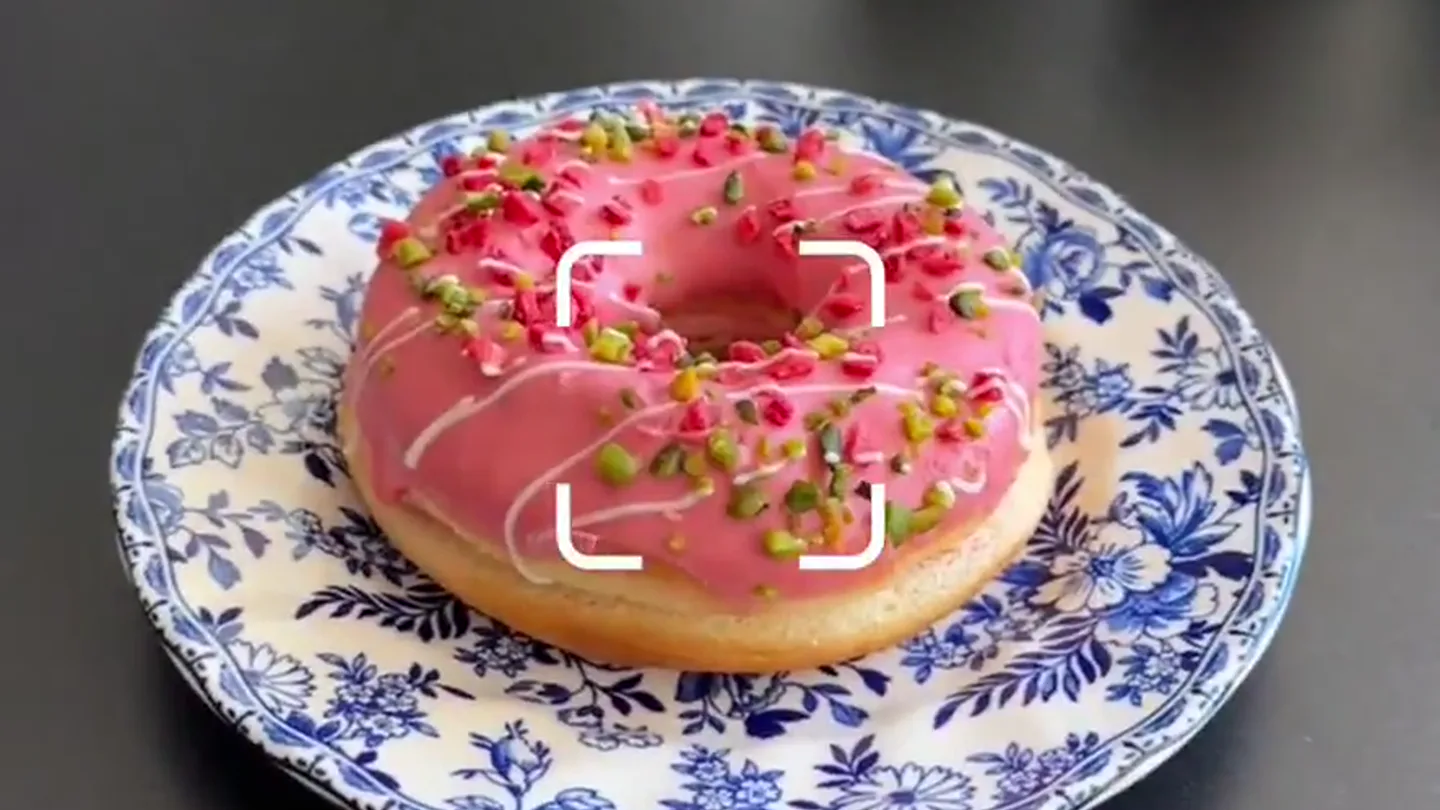
- 09:41 Feb 23 Please place the object within the frame
- Camera
- Static overhead shot of a donut on a plate, then a slight zoom out to reveal the surrounding environment.
- Motion
- UI overlay with dynamic bounding box, object detection highlight, and quick transition to a processed image.
Product Reveal
Instant Word Learning & History
“(No spoken dialogue — A rhythmic, pulsing synth bass line and a driving electronic drum beat begin. A new melodic synth layer is introduced around 0:10. Another high-energy riser starts at 0:14.)”
- On screen
- 09:41 Feb 23 DONUT 甜甜圈 Not what you expected? Tap to adjust 1 Words Feb 21 8 Words Forest Iced tea 9:41 5月 07 1単語 Bread 5月 06 5単語 Clip Tape 5月 07 オブジェクトをフレーム内に配置してください
- Camera
- Static shot of the app interface, scrolling vertically to reveal past learned words. Then, a new object (sandwich) is introduced with a static overhead shot.
- Motion
- Smooth vertical scroll animation, object identification with glowing highlight, and text reveal with audio pronunciation icon. Quick cuts between UI states.
Feature Teaser
Multi-language Support & Diverse Objects
“(No spoken dialogue — A more pronounced sub-bass impact and a slight tempo increase at 0:16. The music continues with a more complex arrangement of synth melodies and rhythmic elements, maintaining a high-energy feel.)”
- On screen
- 9:41 5月 07 Toast トースト 期待通りではありませんか?タップして調整 2単語 Bread 5月 06 5単語 Clip Tape 5월 07 프레임 안에 물체를 배치해주세요 Cup 컵
- Camera
- Static shot of the app interface, showing the identified sandwich, then a new object (cup) is introduced with a static overhead shot.
- Motion
- Object identification with glowing highlight and text reveal in multiple languages. Seamless transition between object scanning and history view.
Call to Action
Expand Your Vocabulary
“(No spoken dialogue — The music continues with a high-energy feel. A final, powerful sub-bass impact occurs at 0:24, followed by a quick fade out.)”
- On screen
- 9:41 5월 07 Toast Cream bread 5개의 단어 Clip Tape 09:41 May 07 5 Words Monstera Tape Binder clip Switch Credential case Apr 26 4 Words Apr 24 1 Words Chopstick s Apr 22 5 Words Hot American Mochi ice cream Apr 21 4 Words Apr 20 2 Words Golden cudgel Roller skates Apr 19 34 Words Palm tree Barrier post
- Camera
- Vertical scrolling through the app's history of learned words, showcasing a wide variety of objects and languages.
- Motion
- Rapid, continuous vertical scroll, highlighting the breadth of the app's learning capabilities. Each item pops into view with a subtle scale and fade.
Motion design primitives
Synthesizable in Remotion · key components of the ai-plant-identifier-launch template.
ObjectScanHighlight
A bounding box animates around an object, followed by a subtle glow effect and a text overlay revealing the object's name and translation.
+ Code construction recipe
Use `interpolate` for bounding box expansion and opacity. Implement a `spring` animation for the glow effect. Text reveal uses `opacity` and `translateY` with a slight delay.
WordCardScroll
Individual word cards, each containing an image and text, scroll smoothly into view from the bottom, stacking chronologically.
+ Code construction recipe
Utilize `ScrollView` with `FlatList` for efficient rendering. Each card animates in using `translateY` and `opacity` with a `stagger` effect for a cascading entrance.
DynamicUIFeedback
UI elements like checkmarks and buttons provide immediate visual feedback with subtle scale and color changes upon interaction or state change.
+ Code construction recipe
Apply `scale` and `backgroundColor` transitions using `spring` animations for button presses. Use `opacity` and `scale` for checkmark confirmation.
Style DNA & aesthetic system
Visual aesthetic
Typography
Motion
Special effects
Pacing & rhythm
Conceptual story rhythm
- 1
The Instant Scan
Purpose. Immediately demonstrates the core value proposition: effortless object recognition.
Execution. A real-world object is placed in frame, the app quickly identifies it with a bounding box and visual feedback.
- 2
The Learning Reveal
Purpose. Shows the immediate learning outcome and multi-language support.
Execution. The identified object's name appears with translation and audio pronunciation, then transitions to a history view.
- 3
The Feature Showcase
Purpose. Highlights the app's versatility across different objects and languages.
Execution. Rapid succession of different objects being scanned and identified, demonstrating the breadth of the app's capabilities.
- 4
The Expanding Knowledge
Purpose. Emphasizes the cumulative learning experience and long-term value.
Execution. A fast scroll through a rich history of learned words, showcasing the user's growing vocabulary.