
MausBot · Launch Video Breakdown: Hook, Pacing & Motion Design
MausBot is open-source, always-on agents powered by your existing AI subscriptions, with their own computers and iOS and Android apps, running locally or in the cloud.
Scene-by-scene timeline & spoken transcript
The Hook
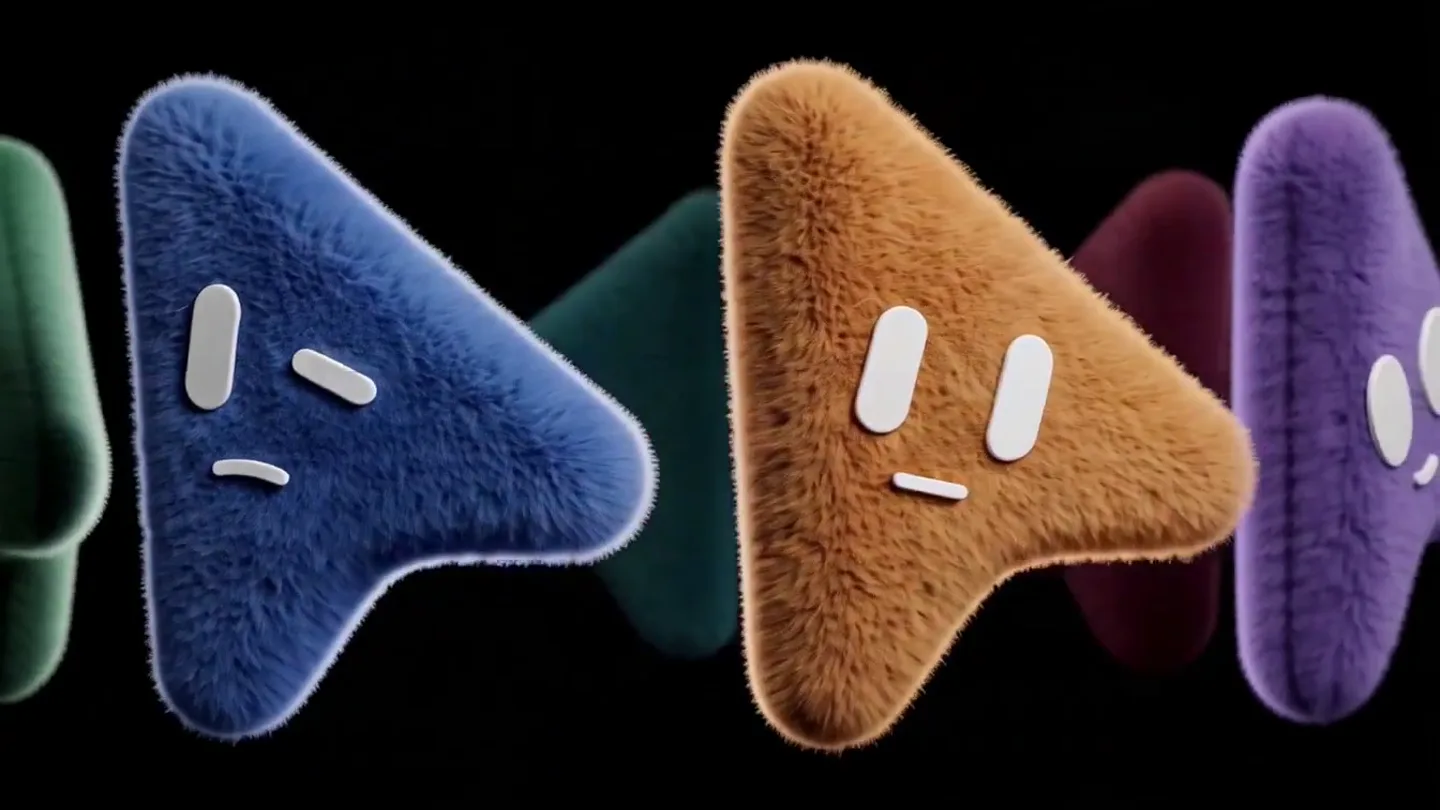
Furry Cursor Carousel Intro
“(No spoken dialogue — The audio features a slow, evolving ambient electronic score with prominent orchestral synth pads and strings, creating a calm and atmospheric mood.)”
- On screen
- (No on-screen text)
- Camera
- The camera starts with a close-up on a green furry cursor, then pulls back to reveal a line of similar cursors in various colors, moving in a carousel-like fashion.
- Motion
- 3D character animation with fur simulation, depth of field, and a continuous horizontal camera pan.
Product Reveal
Emotional Cursor Parade
“(No spoken dialogue — The ambient electronic score continues, maintaining a calm and atmospheric tone.)”
- On screen
- (No on-screen text)
- Camera
- The camera continues its horizontal pan, focusing on individual furry cursors as they pass, each displaying a different facial expression.
- Motion
- Continuous horizontal tracking shot, character expression animation, and subtle lighting changes to highlight each cursor.
Feature Teaser
Diverse Agent Personalities
“(No spoken dialogue — The ambient electronic score evolves with orchestral synth elements, maintaining its calm and atmospheric quality.)”
- On screen
- (No on-screen text)
- Camera
- The horizontal pan persists, showcasing more unique furry cursors with distinct colors and expressions, emphasizing variety.
- Motion
- Seamless looping horizontal camera movement, character design variations, and soft, diffused lighting.
Call to Action
MausBot Agent Lineup
“(No spoken dialogue — The ambient electronic score gently fades out, concluding the atmospheric soundscape.)”
- On screen
- (No on-screen text)
- Camera
- The camera completes its horizontal sweep, revealing the full spectrum of furry cursors, implying a diverse range of agents.
- Motion
- Final segment of the continuous horizontal pan, showcasing the breadth of character designs, with a subtle slowdown.
Motion design primitives
Synthesizable in Remotion · key components of the furry-agent-carousel-launch template.
FurryCursorCarousel
Multiple 3D furry cursor-like characters with distinct colors and facial expressions move horizontally across the screen in a continuous loop, creating a carousel effect.
+ Code construction recipe
Utilize Remotion's `Sequence` and `AbsoluteFill` components. Implement 3D models for the cursors with a fur shader (potentially using WebGL or a custom Canvas component). Animate the `translateX` property of each cursor using `interpolate` with a `loop` option and a `linear` easing function to create the continuous horizontal movement. Vary `scale` and `opacity` based on `distanceFromCenter` for depth of field.
EmotionalAgentExpressions
The furry cursor characters subtly change their facial expressions (eyes and mouth) as they move into focus, conveying different moods or states.
+ Code construction recipe
For each cursor 3D model, define multiple blend shapes or texture variations for eyes and mouth. Use `interpolate` on a `progress` value (derived from the cursor's `translateX` position) to smoothly transition between these expression states as the cursor approaches and recedes from the camera's central focus. Apply a `spring` animation for a more organic feel to the expression changes.
SoftDepthOfFieldPan
A continuous horizontal camera pan across a line of objects, where objects in the foreground are sharp and in focus, while those in the background are softly blurred.
+ Code construction recipe
Implement a `Camera` component with a `perspective` projection. Animate the camera's `position.x` to create the pan. Apply a `blur` filter to objects based on their `z-depth` or `distanceFromCamera` using `interpolate`. Use a `cubic-bezier` easing for the camera pan to ensure smooth, consistent motion.
Style DNA & aesthetic system
Visual aesthetic
Typography
Motion
Special effects
Pacing & rhythm
Conceptual story rhythm
- 1
Introduction to the Agents
Purpose. To introduce the core visual metaphor of MausBot as diverse, characterful agents.
Execution. A close-up on a single furry cursor, then a reveal of multiple cursors in a line, establishing their presence and variety.
- 2
Showcasing Personality
Purpose. To convey that these agents possess distinct 'personalities' or functions through their expressions.
Execution. The continuous pan highlights individual cursors, each with a unique facial expression, suggesting emotional range or specialized roles.
- 3
Diversity and Scale
Purpose. To emphasize the breadth and potential of the MausBot ecosystem.
Execution. More cursors of different colors and expressions are revealed, reinforcing the idea of a diverse and extensive collection of agents.
- 4
Brand Reinforcement
Purpose. To leave a lasting impression of MausBot's unique and approachable identity.
Execution. The final sweep showcases the full spectrum of agents, solidifying the brand's visual language and the concept of 'always-on' companions.





