Microduck (by Hugging Face / Pollen Robotics) · Launch Video Breakdown: Hook, Pacing & Motion Design
Hugging Face and Pollen Robotics unveil Microduck, a 25 cm open-source biped with 15 actuators, onboard sensors, and ready-to-run RL policies for under $400.
Scene-by-scene timeline & spoken transcript
The Hook
Microduck's Playful Introduction
“(No spoken dialogue — Aggressive, distorted electric guitars and driving drums introduce the scene, with a pulsating sub-bass establishing a dynamic rhythm.)”
- On screen
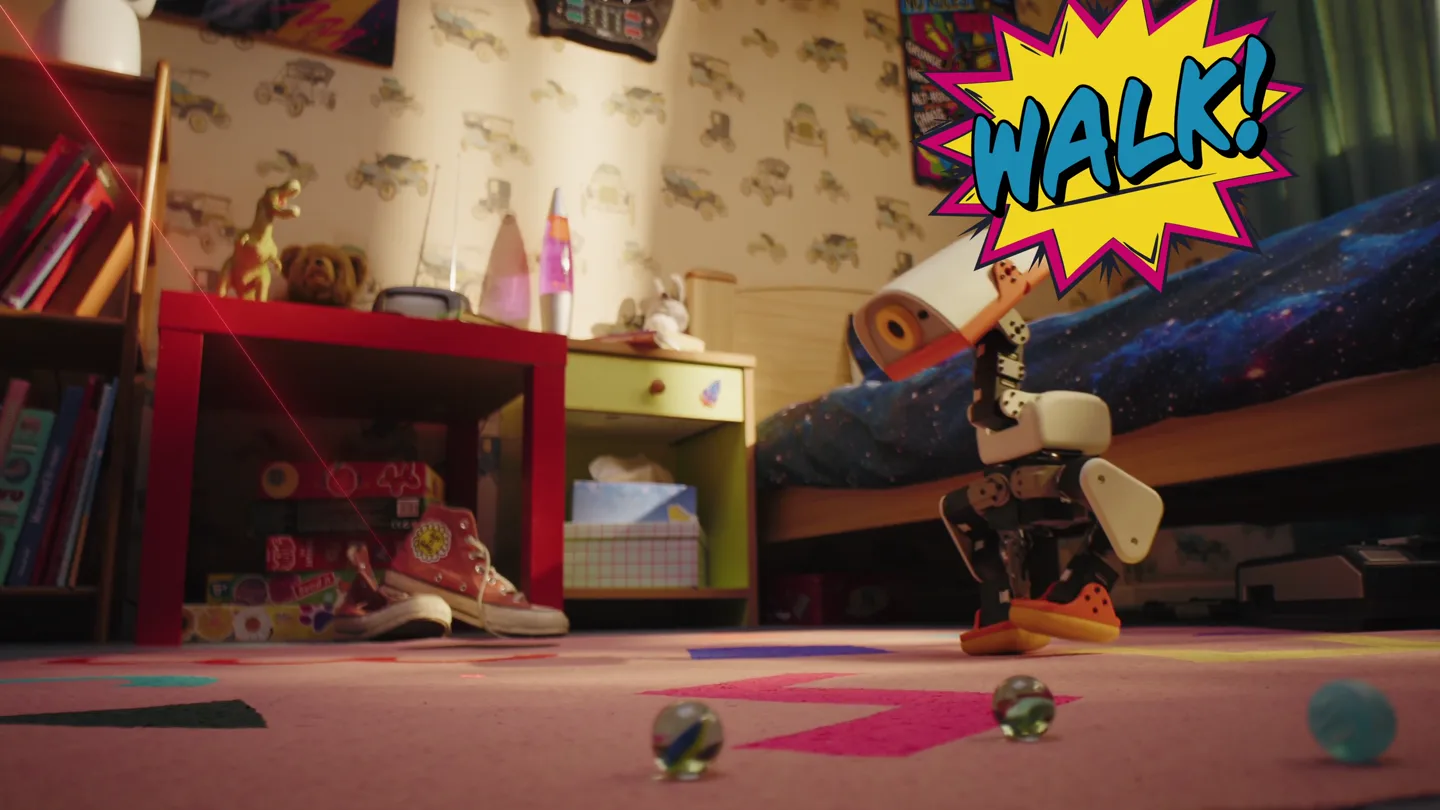
- WALK! GET UP! TRAIN! GRAB!
- Camera
- Low-angle shots of the robot in a child's room, dynamic close-ups, and a medium shot of a person interacting with the robot at a desk. Camera pans and tilts follow the robot's actions.
- Motion
- Fast cuts, comic book style text overlays with impact animations (zoom, shake), and a handheld camera feel. The robot's movements are animated with a slightly exaggerated, playful quality.
Product Reveal
Action-Packed Feature Showcase
“(No spoken dialogue — The aggressive guitar riff continues, punctuated by sharp drum hits. High-energy audio transitions, including a riser and sweep, lead into a sub-bass drop/impact at 0:11.)”
- On screen
- BAM! VS PLAY! KICK! RIDE!
- Camera
- Close-ups on the robot's features (camera eye), medium shots of people interacting, and dynamic low-angle shots of multiple robots in an outdoor setting. Camera follows the action with quick pans and tilts.
- Motion
- Rapid scene changes, comic book style text overlays with explosive animations, and a focus on demonstrating the robot's capabilities through various actions (kicking, riding). The motion is energetic and impactful.
Feature Teaser
Microduck Lineup & Call to Action
“(No spoken dialogue — The music maintains its high energy, with a final powerful sub-bass drop/impact at 0:18, signaling a concluding statement.)”
- On screen
- MICRO MICRODUCK Prototype shown. Final product may differ. pollen-robotics.com/microduck
- Camera
- Static wide shot of four Microduck robots lined up outdoors, followed by a slight zoom out to reveal the full product name and URL.
- Motion
- Text reveal animation (MICRO then DUCK), with a subtle glitch effect. The overall presentation is bold and direct, emphasizing the product name and availability.
Call to Action
Brand Collaboration Reveal
“(No spoken dialogue — The music fades out with a final, sustained distorted guitar chord and drum hit.)”
- On screen
- HUGGING FACE X POLLEN ROBOTICS
- Camera
- Static shot of the company logos and text on a black background.
- Motion
- Simple fade-in animation for the logos and text, providing a clean and clear brand attribution.
Motion design primitives
Synthesizable in Remotion · key components of the comic-tech-launch template.
ComicBurstText
A bold, outlined text element appears with a starburst shape background, often accompanied by a quick zoom-in and slight shake, mimicking comic book sound effects.
+ Code construction recipe
Utilize a `Sequence` component for timing. Text can be rendered with `Text` and styled with `CSS` for outline and shadow. The starburst background can be an `SVG` path or a series of rotated `div` elements. Animate `scale` and `rotate` properties with `spring` for the burst, and `translateX`/`translateY` with `keyframes` for a subtle shake effect on the text.
DynamicProductFocus
Rapid cuts between close-ups and medium shots of the product, often with a slight handheld camera feel, emphasizing different features or actions.
+ Code construction recipe
Implement `AbsoluteFill` for video segments. Use `interpolate` for subtle `translateX`/`translateY` and `rotate` values on the main video container to simulate handheld camera shake. Fast `durationInFrames` for each `Sequence` segment to achieve quick cuts.
GlitchTextReveal
Text appears with a fragmented, digital glitch effect, often revealing letter by letter or word by word, adding a tech-forward, edgy feel.
+ Code construction recipe
Use `Text` component with `CSS` `filter: url(#glitch-filter)` where the SVG filter defines `feDisplacementMap` and `feTurbulence` for the glitch. Animate the `amplitude` or `frequency` of the turbulence filter over time using `interpolate` to control the intensity of the glitch effect during the reveal.
Style DNA & aesthetic system
Visual aesthetic
Typography
Motion
Special effects
Pacing & rhythm
Conceptual story rhythm
- 1
Playful Introduction
Purpose. Immediately hook the viewer with the robot's personality and capabilities in a relatable, everyday setting.
Execution. Quick cuts of the robot performing simple actions in a child's room, enhanced with comic book text overlays.
- 2
Feature Demonstration
Purpose. Showcase the robot's advanced features and versatility through various interactive scenarios.
Execution. Dynamic shots of the robot being trained, customized, and engaging in playful 'battles' and activities outdoors.
- 3
Product Identity & Call to Action
Purpose. Solidify the product's brand and direct viewers to learn more.
Execution. A lineup of multiple robots, revealing the product name with a glitch effect, followed by the website URL and brand collaboration.
- 4
Brand Endorsement
Purpose. Reinforce credibility and highlight the partnership behind the innovation.
Execution. Clean display of Hugging Face and Pollen Robotics logos.