
Mousse · Launch Video Breakdown: Hook, Pacing & Motion Design
Mousse is a free open-source agent that spawns multiple parallel subagents to finish large coding and swarm tasks.
Scene-by-scene timeline & spoken transcript
The Hook
Brand Introduction & Value Proposition
“(No spoken dialogue — Upbeat electronic score with synth bassline and crisp electronic drums.)”
- On screen
- mousse ORCHESTRATE CODING AGENTS
- Camera
- Static shot, then subtle zoom out to reveal full logo and tagline.
- Motion
- Logo reveal with subtle glow and text fade-in, followed by a slight camera pull-back.
Problem Agitation
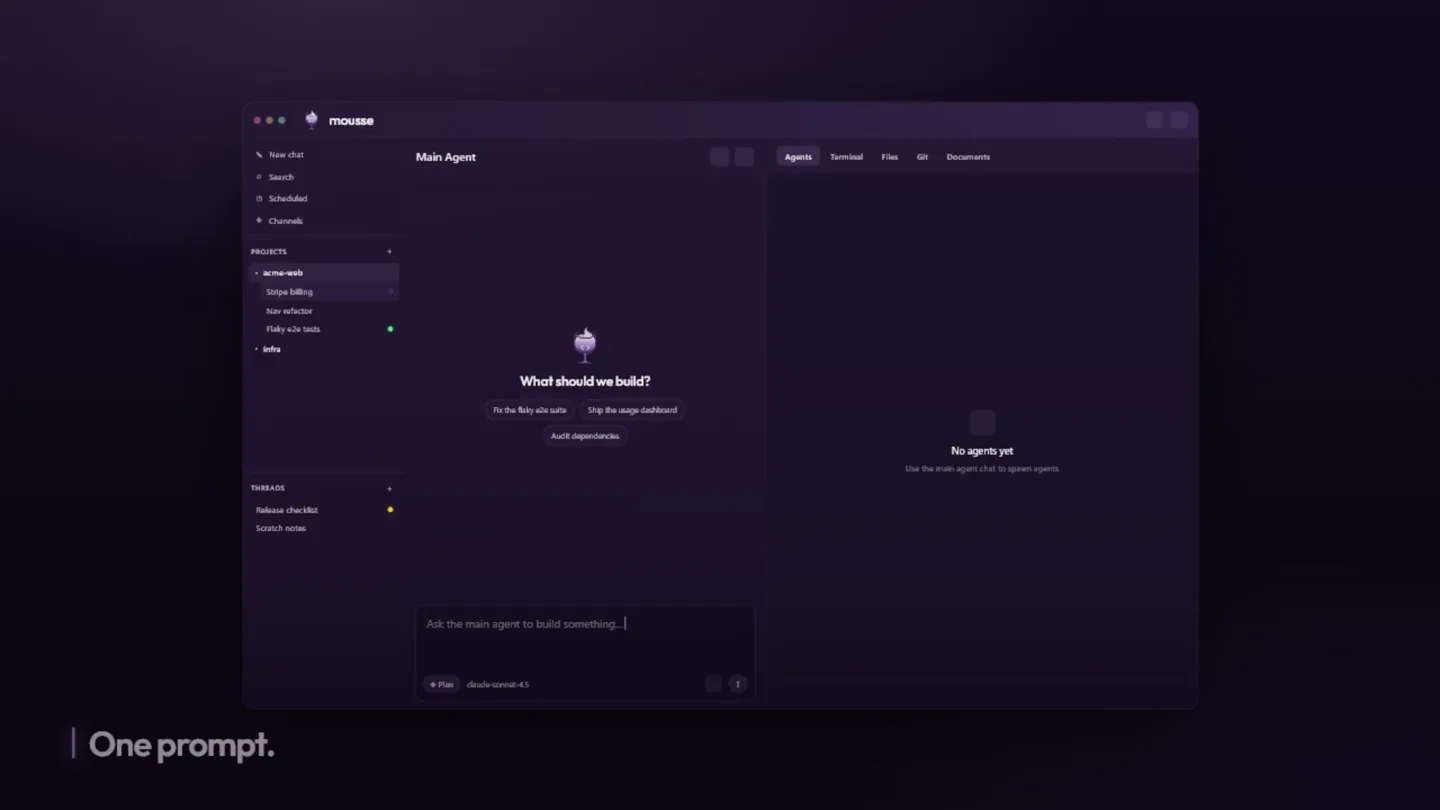
Single Prompt to Multi-Agent Planning
“(No spoken dialogue — Electronic score maintains driving rhythm, building anticipation.)”
- On screen
- mousse Main Agent What should we build? Fix the flaky e2e suite Ship the usage dashboard Audit dependencies Ask the main agent to build something... Plan claude-sonnet-4.5 One prompt. No tickets. No hand-offs. Plan mode drafts the work. You approve it. one click • zero babysitting
- Camera
- Initial wide shot of UI, then subtle camera push-ins and pans to highlight specific UI elements.
- Motion
- UI element highlighting with text typing animation, dynamic content population, and subtle camera movements to guide attention. Text overlays animate in with a quick fade and slide.
Product Reveal
Parallel Agent Execution & Live Progress
“(No spoken dialogue — High-energy audio transition with riser and sweep effect at 0:08, culminating in a sub-bass drop/impact at 0:09. Score becomes more intense.)”
- On screen
- mousse Main Agent Agents Terminal Files Git Documents claude-code a12f9b02 opencode c52a8e77 mousse fans it out. claude-code • codex • opencode Each in its own git worktree. Three worktrees. Zero collisions. Live progress on every task. tests running • files written • nothing to watch
- Camera
- Dynamic camera pull-back and rotation to reveal multiple terminal windows, followed by subtle pans and zooms to show progress within each window.
- Motion
- 3D arrangement of UI elements, with individual terminal windows animating into view and displaying live code execution/progress bars. Text overlays animate in with a quick fade and slide. High-energy transition with a 'fan out' effect.
Feature Teaser
Seamless Merging & Remote Management
“(No spoken dialogue — Another high-energy audio transition with riser and sweep effect at 0:16, sub-bass drop/impact at 0:17. Score maintains energetic feel.)”
- On screen
- One clean merge. A week of work, before lunch. +1,284 -212 18 files completed 3 worktrees — main — no conflicts Nightly dependency audit Audit dependencies for CVEs, open a PR for every safe bump. Answer it from your phone. Or let it run at 3am. scheduled jobs • telegram • discord
- Camera
- Camera pulls back to reveal a branching diagram, then pans and zooms to highlight mobile integration and scheduling features.
- Motion
- Abstract data visualization with animated lines connecting nodes, representing code merges. UI elements for mobile and scheduling animate in, demonstrating connectivity and automation.
Call to Action
Final Brand Statement & Reinforcement
“(No spoken dialogue — Electronic score builds to a final impactful chord.)”
- On screen
- mousse Ship a week's work before lunch. one main agent • many coding agents • your machine
- Camera
- Camera zooms out to a full-screen logo and tagline, similar to the opening.
- Motion
- Logo and tagline reveal with a subtle glow and text fade-in, reinforcing the core message. The final frame fades to black.
Motion design primitives
Synthesizable in Remotion · key components of the ai-agent-orchestration-template template.
DynamicUITypewriter
Text appears as if being typed in a terminal or input field, often followed by dynamic content populating other UI elements. This creates a sense of live interaction and progress.
+ Code construction recipe
Utilize Remotion's `Sequence` and `spring` for character-by-character text reveal. Combine with `interpolate` for opacity and position changes of subsequent UI elements based on text completion. Use `measureText` for accurate text layout.
MultiTerminalFanOut
A central UI element 'fans out' into multiple, independently animated terminal windows, each showing distinct progress. This visually represents parallel processing and distributed tasks.
+ Code construction recipe
Implement a parent `AbsoluteFill` for the main UI. For each terminal, use `spring` for initial position and rotation from a central point. Manage individual terminal content with nested `Sequence` components, animating progress bars and text updates using `interpolate` and `delay`.
AbstractMergeFlow
Abstract lines and nodes animate to represent complex processes like code merging, showing multiple inputs converging into a single output. This simplifies complex technical concepts into an easily digestible visual.
+ Code construction recipe
Employ SVG paths for the lines, animating `stroke-dasharray` and `stroke-dashoffset` to create a 'drawing' effect. Use `spring` for node position and scale. Connect nodes with `interpolate` for line segment visibility and curvature, potentially using `d` attribute animation for Bezier curves.
Style DNA & aesthetic system
Visual aesthetic
Typography
Motion
Special effects
Pacing & rhythm
Conceptual story rhythm
- 1
The Vision
Purpose. Introduce the product and its core promise: orchestrating coding agents.
Execution. Logo reveal with tagline, establishing brand identity and high-level value.
- 2
The Workflow
Purpose. Demonstrate the product's intuitive input and intelligent planning capabilities.
Execution. UI walkthrough showing a single prompt leading to a detailed, approved plan.
- 3
The Power
Purpose. Showcase the product's ability to parallelize tasks and manage complex projects efficiently.
Execution. Dynamic reveal of multiple agents working in parallel, with live progress updates and a clean merge.
- 4
The Freedom
Purpose. Highlight the product's flexibility and automation features, freeing users from constant oversight.
Execution. Visuals of remote management via phone and scheduled tasks, emphasizing autonomy.





