
OpenSea · Launch Video Breakdown: Hook, Pacing & Motion Design
OpenSea data now powers Perplexity Computer: tokens, collectibles, and NFTs across 25+ chains, available today in Perplexity Connectors.
Scene-by-scene timeline & spoken transcript
The Hook
AI Agent Introduction & Initial Query
“(No spoken dialogue — Ethereal synth pad and high-pitched melody create an ambient, slightly melancholic atmosphere.)”
- On screen
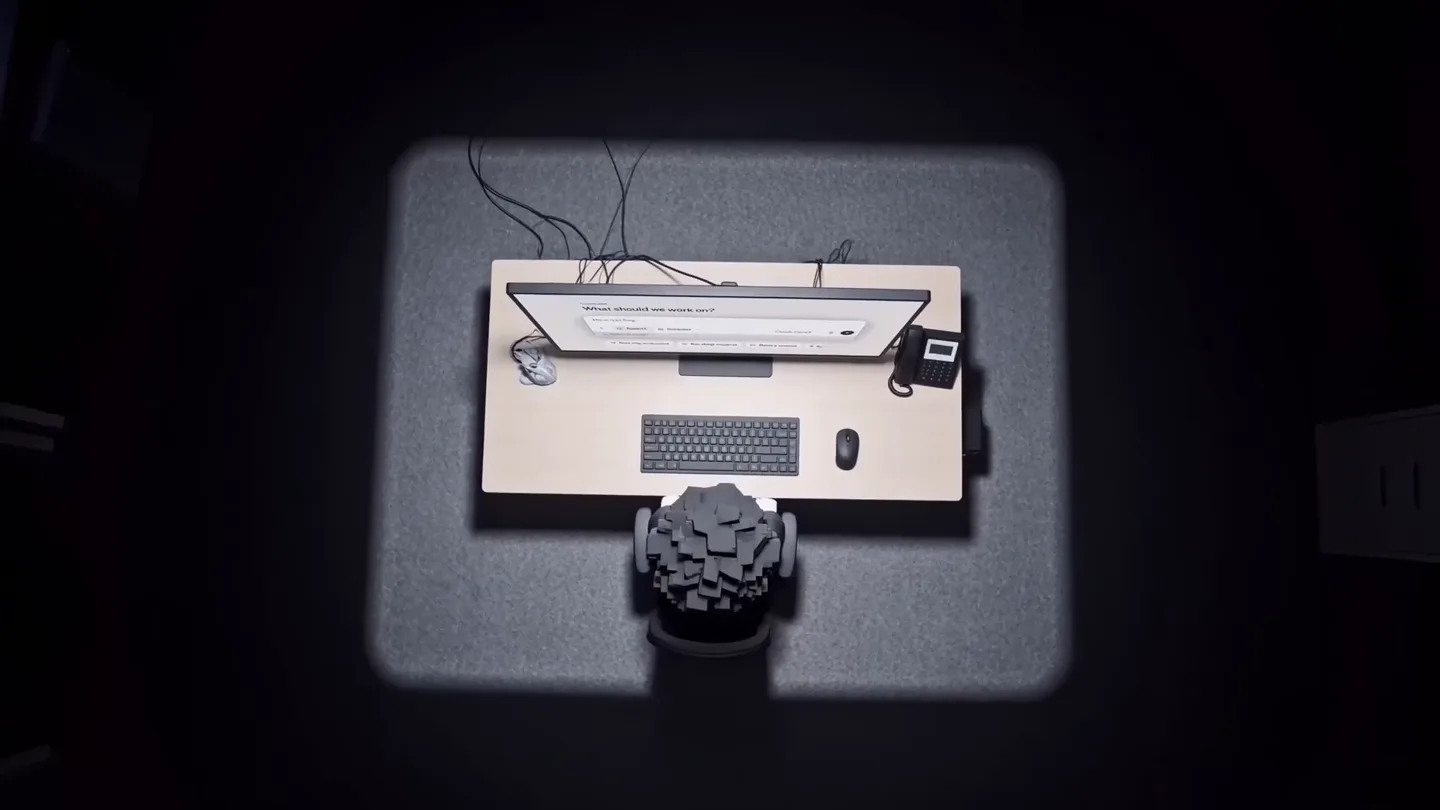
- Computer What should we work on? What are some trending tokens right now? Search Computer Claude Opus 5 Work in a project Scale my outbound Run deep research Build a website Build Completed 4 steps Trending tokens on OpenSea Live from OpenSea's trending score algorithm (24h data): Token Chain Price 24h change 24h volume Squid (QUID) Base $0.1027 -1.5% $35.0M Cash Cat (CASHCAT) Robinhood $0.1311 +36.6% $18.9M frong (FRONG) Robinhood $0.0078 -17.2% $12.2M FROGE Robinhood $0.0017 +171,508% $5.7M The Black Bull (ANSEM) Solana $0.1747 +0.3% $4.6M STONK Solana $0.0056 +63.7% $3.9M Catecoin (CATE) Solana $0.0215 +10.9% $3.1M RISE Token Polygon $0.0063 +16.0% $1.6M Meowshi (MEOWSHI) Robinhood $0.00065 +233.1% $1.6M Staked Long/luc (SLGNG) Polygon $1.32 -5.6% $1.2M Cash Cat (CASHCAT) Solana $0.1290 +35.4% $1.2M The Sisypuss (SISYPUSS) Solana $0.00061 +28.8% $1.1M fih Solana $0.0088 -7.5% $1.0M Hooksfur (HOOKR) Robinhood $0.00017 +2,621% $0.36M
- Camera
- Starts with a wide shot of a dark office, slowly zooms into a pixelated character at a desk, then cuts to an overhead shot, and finally a close-up on the character's face before transitioning to a UI screen.
- Motion
- Slow zoom, quick cuts, UI animation with text typing and data population, character reveal.
Product Reveal
AI Agent Embodiment & Data Interaction
“(No spoken dialogue — Subtle sub-bass drop introduces a rhythmic element, building energy.)”
- On screen
- (No on-screen text)
- Camera
- Dynamic camera movements around the office, tracking the animated bull and cat characters as they appear and interact with the environment and screens.
- Motion
- 3D character animation, particle effects (green glow), dynamic camera pans and tilts, character transformation.
Feature Teaser
Advanced Query & Data Retrieval
“(No spoken dialogue — High-energy riser and sweep transition into a driving electronic beat with prominent sub-bass and crisp percussion.)”
- On screen
- Computer What should we work on? Who are the top five most active Ansem traders on Opensea? Search Computer Claude Opus 5 Work in a project Scale my outbound Run deep research Build a website Build # Wallet Swaps Approx. USD Buy/Sell Vanue 1 AjiEXcFpxW7...ty4GbetE 11 $803 4 buy / 7 sall Meteora, Pump.iun 2 9A1bEZTmbc...f21X6f9 8 $698 0/8 Meteora 3 79WiYaoUgD...rSwkfRW 7 $1,119 0/7 Fomo 4 80qQUAt9ng...eEvsSs 6 $5,085 0/6 Meteora 5 SPHm2cYU8D...oGVeag 4 $960 0/4 Meteora
- Camera
- Close-up on the UI as text is typed, then a quick cut to the bull character typing, followed by a close-up on the data table.
- Motion
- UI text typing animation, quick cuts, data table population, character interaction with UI.
Feature Teaser
Playful Interaction & Comparative Analysis
“(No spoken dialogue — The driving electronic beat continues with a repeating synth motif.)”
- On screen
- Is there any token cuter Is there any token cuter than CashCat on Opensea? CashCat Token on OpenSea Is there any token cuter than CashCat on Opensea? Completed 5 steps Tough competition — CashCat is currently sitting at #1 on OpenSea's trending list at about $0.114, up ~24% on the day with roughly $55M in 24h volume, so it's winning on charisma and momentum both. Cuteness challengers on the trending board CASHKITTEN (Robinhood chain) — literally a smaller, kittener CashCat. Up ~409% in 24h at $0.00014. Arguably the only token with a legitimate cuteness claim over the original, on the grounds that kittens beat cats. Catecoin (CATE) on Solana — $0.032, up ~113%, ~$31M market cap. Another cat, less cash. Unicorn Pegasus (UNIPEG) — a unicorn crossed with a pegasus is objectively adorable, though it's down ~21% today. Squid (QUID) on Base — $0.099, ~$99M market cap. Cephalopods are cute in a wobbly way. The Sisypuss (SISYPUSS) — a cat pushing a boulder for eternity. Cute, but sad. Shibainu (WOOF) — dog contingent, if you're open to crossing the aisle. Verdict: CASHKITTEN is the closest thing to a cuteness upgrade, but CashCat still holds the crown on the strength of actually being the most-traded token on the platform right now.
- Camera
- Close-up on the cat's paws typing on a keyboard, then a cut to the detailed UI response, followed by a shot of the cat looking at the screen, and finally a wide shot of both characters.
- Motion
- Character animation, UI text typing, detailed data display, quick cuts, character reaction shots.
Call to Action
Brand Logo Reveal
“(No spoken dialogue — The electronic beat fades out.)”
- On screen
- (No on-screen text)
- Camera
- Quick fade to black, then a reveal of the OpenSea logo.
- Motion
- Fade transition, logo animation.
Motion design primitives
Synthesizable in Remotion · key components of the ai-agent-logistics-flow template.
PixelatedCharacterReveal
A 3D character, initially a blocky, pixelated figure, is revealed through a slow zoom and then transforms into a more detailed, animated form (e.g., a bull or cat) with glowing accents.
+ Code construction recipe
Use Remotion's `Sequence` and `AbsoluteFill` for scene management. Implement 3D models with `ThreeCanvas` and `useCurrentFrame` for animation. Animate `scale` and `position` for zoom/movement. Use `Shader` components for pixelation and glowing effects, interpolating between pixelated and smooth models.
DynamicUITypingAndDataPopulate
Text dynamically types into a search bar, followed by a rapid, animated population of data tables or detailed text responses, often accompanied by quick cuts.
+ Code construction recipe
Utilize `spring` or `interpolate` for smooth text typing animations (character by character or word by word). For data tables, animate `opacity` and `y-position` for rows to slide in, or use `Sequence` with `delay` for staggered reveals. Implement `measureText` for accurate text layout.
GlowAccentCharacterInteraction
Animated 3D characters (like the bull or cat) interact with the UI, featuring glowing lines or accents that highlight their actions or features, often with dynamic camera work.
+ Code construction recipe
Integrate 3D character models within `ThreeCanvas`. Apply `Shader` effects for glowing lines and emissive materials on specific parts of the model. Animate character `position`, `rotation`, and `morphTargets` for interaction. Use `Camera` components for dynamic framing and movement, linking camera position to character actions.
Style DNA & aesthetic system
Visual aesthetic
Typography
Motion
Special effects
Pacing & rhythm
Conceptual story rhythm
- 1
The Setup
Purpose. Introduce the AI agent concept and its ability to process complex queries.
Execution. Dark office scene, pixelated character reveal, initial UI query and data display.
- 2
Agent Embodiment
Purpose. Visually represent the AI agents as distinct, interactive characters.
Execution. Transformation of pixelated character into a glowing bull and a cat, interacting with the digital interface.
- 3
Problem Solving in Action
Purpose. Demonstrate the AI's capability to perform detailed analysis and retrieve specific data.
Execution. Bull character typing, complex query input, and rapid display of detailed trading data.
- 4
Playful Intelligence
Purpose. Showcase the AI's versatility and ability to handle nuanced, even whimsical, requests.
Execution. Cat character typing a playful query, followed by a detailed, comparative analysis of 'cuteness' in tokens.





