
Orthogonal · Launch Video Breakdown: Hook, Pacing & Motion Design
Ask for a pipeline before bed and wake up to verified leads, cited sources, and the first replies.
Scene-by-scene timeline & spoken transcript
The Hook
The AI Agent Dream
“Build me a pipeline of every Series A AI startup that's hiring. Make no mistakes.”
- On screen
- OpenAI dots x Orthogonal Always-on agents Build me a pipeline of every Se Build me a pipeline of every Series A AI startup that's hiring. Make no mista
- Camera
- Static wide shot of a person at a desk, then a quick cut to a full-screen text bubble.
- Motion
- Text typing animation, quick scene cut, and a subtle zoom on the text bubble.
Problem Agitation
The Agent Workflow Unveiled
“(No spoken dialogue — Driving beat with pulsating synth bass and arpeggiated melodies.)”
- On screen
- Build me a pipeline of every Series A AI startup that's hiring. Make no mistakes. Search • Searching On it. Scanning every AI startup that raised a Series A in the last 12 months... Jobs • Reading Pulling open roles from every careers page and job board... Enrich • Finding people Finding the hiring manager and head of talent at each one... Verify • Checking Verifying every email before anything Message your dots... Scout Watch the news Writer Draft the outreach Senior ML Engineer Fernlight · Remote · US $190K – $240K Full-time Posted 2 days ago Train and ship the models behind the product, from data to deployment. Fantastic Jobs · careers page 214 applicants Reading 3,705 job posts Fantastic Jobs Here's what I found.
- Camera
- Top-down perspective on a digital interface, then a dynamic 3D rotation of stacked UI cards.
- Motion
- Sequential text reveal, UI element pop-ins, 3D card stack rotation with depth of field, and rapid content transitions.
Product Reveal
Data Synthesis & Verification
“(No spoken dialogue — High-energy audio transition with riser and sub-bass drop, followed by intense synth arrangement.)”
- On screen
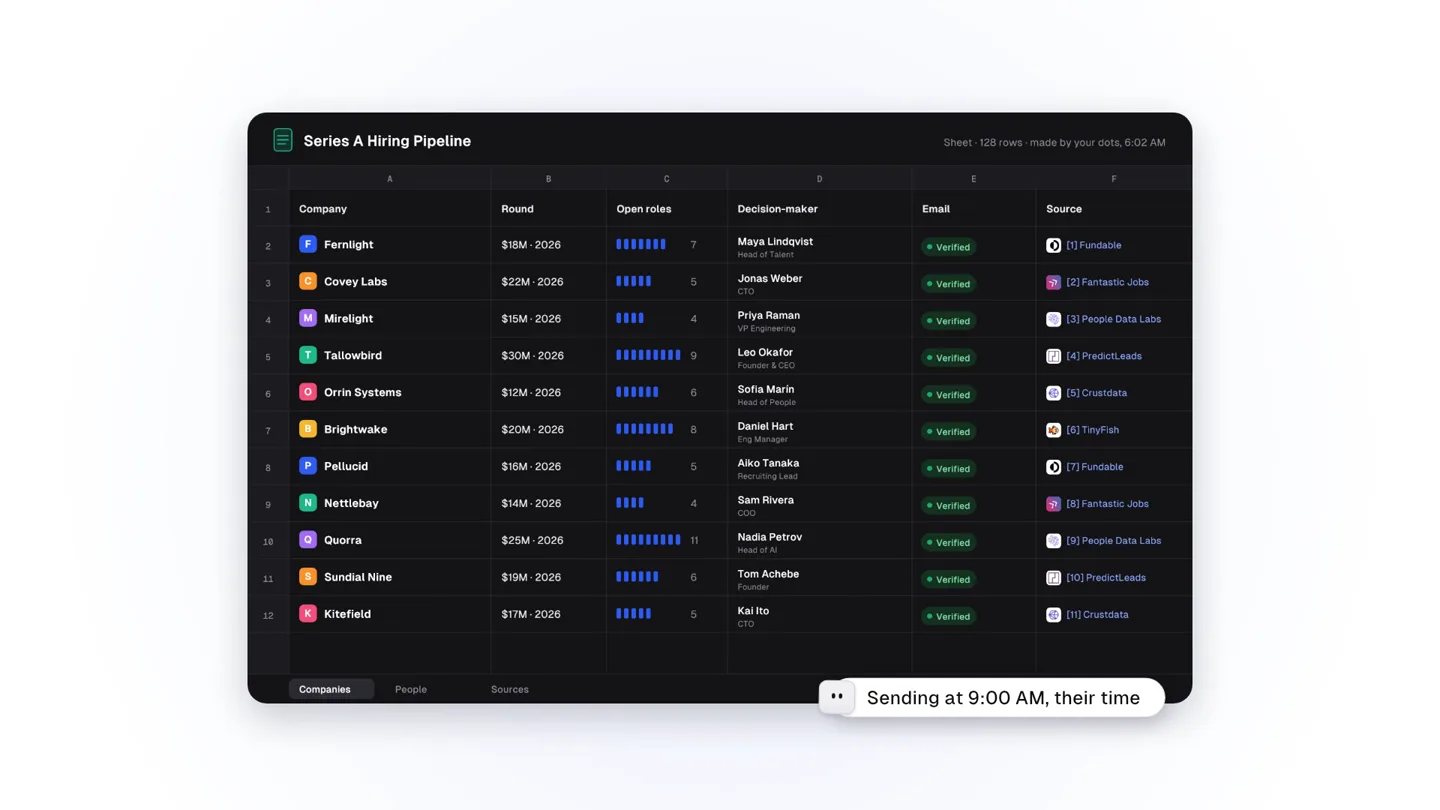
- Hunter Email Verifier · via Orthogonal 964 valid · 77 removed leo@tallowbird.com Valid hello@orrin.systems Accept all sofia@orrin.systems Valid daniel@brightwake.co Valid aiko@pellucid.ai Valid sam.rivera@nettlebay.com Valid jobs@quorra.ai nadia@quorra.ai tom@sundialnine.com oos@kitefield.dev Verifying 1,362 emails Hunter 128 startups are hiring now. Here's your edge. 4,212 startups screened 128 intros drafted 3,812 job posts read 1,294 emails verified 128 decision-makers found Every source cited
- Camera
- Zoom into a data grid, then a dynamic 3D rotation of multiple data-rich UI panels.
- Motion
- Grid layout animation, data point counters, 3D UI stack rotation with parallax, and rapid information display.
Call to Action
The Outcome: Verified Leads
“Morning. Replies are coming in.”
- On screen
- Writer • Working Writing 128 intros. TinyFish for a real reason to reach out. Hunter for the right inbox. AgentMail to send each one. Morning. Replies are coming in. Leo Okafor Tallowbird Re: Congrats on the Series A We just opened 4 roles. This week opens. • Replied 11m ago Aiko Tanaka Pellucid Re: Congrats on the Series A Happy to chat. Tuesday 2pm? • Replied 20m ago Tom Achebe Sundial Nine Re: Congrats on the Series A Love this. Let's do it. • Replied 29m ago Omar Haddad Fernlight Re: Congrats on the Series A Forwarded to our CTO, she's keen. • Replied 38m ago Maya Lindqvist Fernlight Re: Congrats on the Series A Perfect timing — we're hiring 3 ML engineers. Thursday? • Replied 2m ago Sofia Marin Orrin Systems Re: Congrats on the Series A Looping in our recruiting lead. • Replied 14m ago Sam Rivera Nettlebay Re: Congrats on the Series A This is exactly what we need right now. • Replied 23m ago Kai Ito Larkspur AI Re: Congrats on the Series A Yes — what does onboarding look like? • Replied 32m ago Lena Novak Covey Labs Re: Congrats on the Series A Good timing. Grab 20 minutes? • Replied 41m ago Jonas Weber Covey Labs Re: Congrats on the Series A Yes, let's talk. Sending a calendar link. • Replied 3m ago Daniel Hart Brightwake Re: Congrats on the Series A Great timing, we closed the round last month. • Replied 17m ago Nadia Petrov Quorra Re: Congrats on the Series A Send over some times? • Replied 26m ago Eva Brandt Kitefield Re: Congrats on the Series A Can we talk tomorrow morning? • Replied 35m ago Ravi Menon Mirelight Re: Congrats on the Series A Yes please. Friday? • Replied 44m ago Priya Raman Mirelight Re: Congrats on the Series A Interesting. Can we share how it works? • Replied 8m ago OpenAI dots x Orthogonal Always-on agents Every tool your dots need. orthogonal.com
- Camera
- Static shot of a person smiling at a laptop, then a grid of email replies, concluding with a brand logo reveal.
- Motion
- Text reveal with associated app icons, quick cut to live-action, grid pop-in animation, and a final logo fade-in with supporting text.
Motion design primitives
Synthesizable in Remotion · key components of the ai-agent-data-flow-launch template.
AgentWorkflowReveal
A sequence of text lines appears, each associated with a distinct 'dot' icon, describing a step in an automated process. Each line animates in with a subtle fade and slide from the left.
+ Code construction recipe
Use `Sequence` and `spring` for staggered text reveals. Each text line and its corresponding icon should be a `AbsoluteFill` child, animating `opacity` and `translateX` from -20px to 0px. Utilize `interpolate` for precise timing based on the `frame` prop.
StackedCardCarousel
Multiple UI cards, rich with data, are stacked and rotate dynamically in 3D space, revealing different facets of information. A depth-of-field effect blurs cards not in focus.
+ Code construction recipe
Implement a `PerspectiveCamera` and `Canvas` for 3D transformations. Each card is a `AbsoluteFill` with `transform: rotateY()` and `translateZ()`. Use `interpolate` on `frame` to control rotation and `blur` CSS filter for depth of field. `spring` can be used for smooth transitions between card states.
DataGridPopIn
A grid of information cards (e.g., job postings, email replies) animates into view, often with a slight delay per row/column, creating a cascading effect.
+ Code construction recipe
Render a `Grid` component where each cell contains a data card. Use `Sequence` and `delay` for staggered `opacity` and `scale` animations on individual grid items. `spring` with a low damping ratio can give a satisfying 'pop' effect.
Style DNA & aesthetic system
Visual aesthetic
Typography
Motion
Special effects
Pacing & rhythm
Conceptual story rhythm
- 1
The User's Wish
Purpose. Establish the user's complex need and the product's immediate, intelligent response.
Execution. Live-action shot of a user typing a complex query, transitioning to a clean UI showing the query being processed.
- 2
Behind the Scenes Automation
Purpose. Illustrate the multi-agent AI workflow that fulfills the user's request, emphasizing thoroughness.
Execution. Animated UI showing different 'dots' (agents) performing tasks like searching, reading, enriching, and verifying, with data flowing between them.
- 3
The Data Deluge & Refinement
Purpose. Showcase the vast amount of data processed and how it's distilled into actionable, verified insights.
Execution. Dynamic 3D stacks of data cards, grids of job postings, and email verification processes, highlighting key metrics and successful outcomes.
- 4
The Satisfied Outcome
Purpose. Demonstrate the tangible, positive results for the user, reinforcing the product's value.
Execution. Live-action shot of a happy user, followed by a grid of positive email replies, and a final brand reveal.





