Raycast V2 (by Thomas Paul Mann) · Launch Video Breakdown: Hook, Pacing & Motion Design
One app, two platforms, four programming languages. The things that look the simplest are often the hardest to build. @raycast is one of them. Here's a technical deep dive on how we built v2 http:/…
Scene-by-scene timeline & spoken transcript
The Hook
Dual Platform Reveal
“(No spoken dialogue — A sustained, evolving pad sound with a low-frequency rumble establishes an ambient, slightly mysterious tone.)”
- On screen
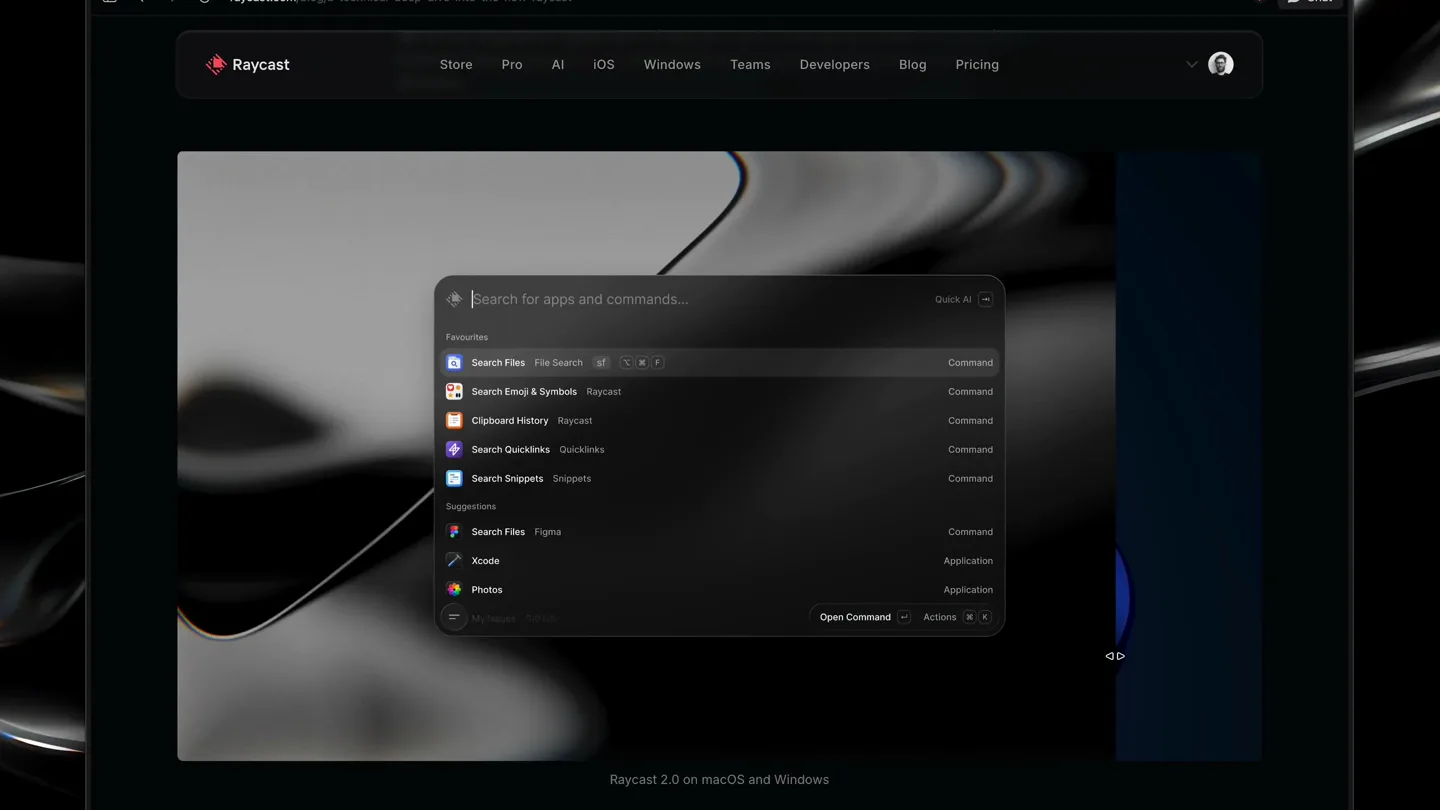
- raycast.com/blog/technical-deep-dive-into-the-new-raycast Chat Raycast Store Pro AI iOS Windows Teams Developers Blog Pricing Search for apps and commands... Quick AI Favourites Search Files File Search Command Search Emoji & Symbols Raycast Command Clipboard History Raycast Command Search Quicklinks Quicklinks Command Search Snippets Snippets Command Suggestions Search Files Figma Application Xcode Application Photos Application Open Command Actions Raycast 2.0 on macOS and Windows
- Camera
- Static, centered view of a browser window displaying the Raycast app interface. The background features a subtle, abstract 3D render.
- Motion
- A split-screen wipe transition reveals a new background image, indicating platform duality. UI elements within the Raycast app remain static.
Product Reveal
Dynamic Platform Shift
“(No spoken dialogue — A high-energy riser/sweep effect builds anticipation, culminating in a sharp, percussive impact or 'whoosh' sound.)”
- On screen
- raycast.com/blog/technical-deep-dive-into-the-new-raycast Chat Raycast Store Pro AI iOS Windows Teams Developers Blog Pricing Search for apps and commands... Quick AI Favourites Search Files File Search Command Search Emoji & Symbols Raycast Command Clipboard History Raycast Command Search Quicklinks Quicklinks Command Search Snippets Snippets Command Suggestions Search Files Figma Application Xcode Application Photos Application Open Command Actions Raycast 2.0 on macOS and Windows
- Camera
- Static, centered view of the browser window. The focus is on the background transition.
- Motion
- A rapid, horizontal wipe transition across the background, synchronized with the audio impact, visually represents a platform switch or update. The Raycast UI remains consistent.
Feature Teaser
Cross-Platform Consistency
“(No spoken dialogue — A brief, resonant decay follows the percussive impact, maintaining the ambient pad sound.)”
- On screen
- raycast.com/blog/technical-deep-dive-into-the-new-raycast Chat Raycast Store Pro AI iOS Windows Teams Developers Blog Pricing Search for apps and commands... Quick AI Favourites Search Files File Search Command Search Emoji & Symbols Raycast Command Clipboard History Raycast Command Search Quicklinks Quicklinks Command Search Snippets Snippets Command Suggestions Search Files Figma Application Xcode Application Photos Application Open Command Actions Raycast 2.0 on macOS and Windows
- Camera
- Static, centered view. The browser window and Raycast UI are the primary focus.
- Motion
- The background settles into its new state, showcasing the seamless integration of the Raycast application across different visual environments, implying multi-platform support.
Motion design primitives
Synthesizable in Remotion · key components of the platform-split-reveal template.
PlatformSplitWipe
A background image is horizontally split and wiped to reveal an alternate background, creating a dynamic transition that signifies a change in platform or environment while foreground elements remain static.
+ Code construction recipe
Utilize Remotion's <AbsoluteFill> for background layers. Implement a <Sequence> with two background images. Animate the 'clipPath' or 'transform' property of an overlaying div with a linear interpolation (e.g., `interpolate(frame, [0, 30], ['inset(0 50% 0 0)', 'inset(0 0 0 0)'])`) to create the wipe effect. Synchronize with audio cues.
StaticUIOverlay
A detailed application UI (like the Raycast command palette) remains perfectly still and centered, acting as a stable anchor while the background behind it animates.
+ Code construction recipe
Render the UI as a static image or a fixed React component within a <AbsoluteFill> or positioned container. Ensure its `z-index` is higher than the background elements. No animation properties should be applied to this component directly, maintaining its immobility.
AmbientAbstractBackground
A subtly animated, abstract 3D rendered background with soft lighting and flowing, organic shapes provides a sophisticated and modern aesthetic.
+ Code construction recipe
Pre-render a short loop of a 3D animation (e.g., using Blender or Cinema 4D) as a video file. Integrate this video into Remotion using the <Video> component, setting it to loop. Apply subtle CSS filters like `blur()` or `opacity` if needed, or use a shader component for real-time generative backgrounds.
Style DNA & aesthetic system
Visual aesthetic
Typography
Motion
Special effects
Pacing & rhythm
Conceptual story rhythm
- 1
Initial Platform Context
Purpose. Establishes the product's presence on one platform and its core functionality.
Execution. Raycast UI displayed against a macOS-like abstract background, with 'Raycast 2.0 on macOS and Windows' text.
- 2
The Transition
Purpose. Highlights the seamless shift or expansion to another platform.
Execution. A rapid horizontal wipe transforms the background from macOS to a Windows-like abstract design, synchronized with a sound design riser.
- 3
New Platform Confirmation
Purpose. Confirms the product's consistent experience across the newly revealed platform.
Execution. The Raycast UI remains identical, now against the Windows-like background, reinforcing cross-platform consistency.
- 4
Underlying Message
Purpose. Subtly communicates the technical achievement of multi-platform support.
Execution. The unchanging UI over the changing backgrounds visually demonstrates the 'one app, two platforms' tagline without explicit text.