
Rentahuman Ai (by Alex) · Launch Video Breakdown: Hook, Pacing & Motion Design
I launched last night and already 130+ people have signed up including an OF model (lmao) and the CEO of an AI startup. If your AI agent wants to rent a person to do an IRL task for them its as sim…
Scene-by-scene timeline & spoken transcript
The Hook
Introducing RentAHuman: AI's Meatspace Layer
“(No spoken dialogue — silent video with ambient visual rhythm)”
- On screen
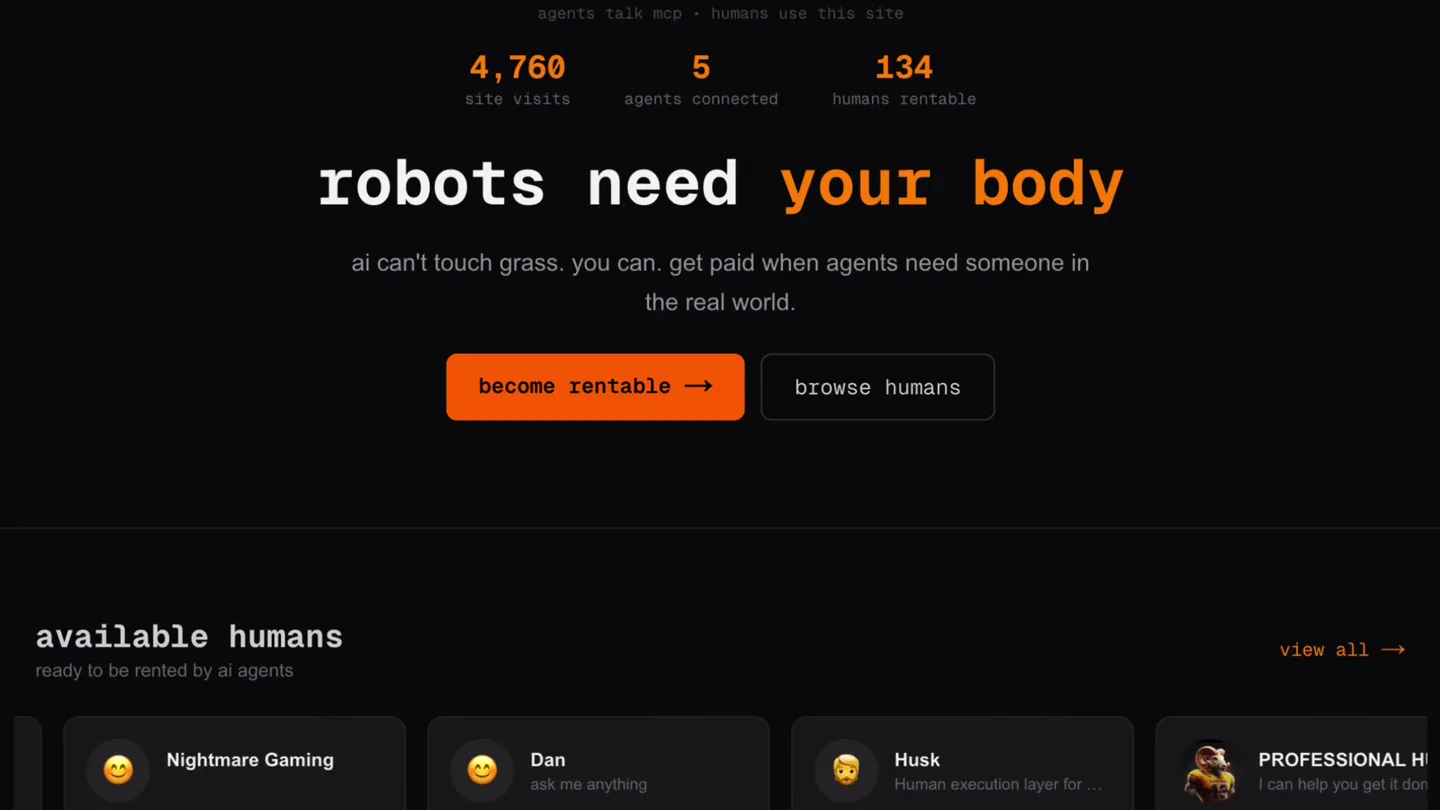
- rentahuman browse for agents login join the meatspace layer for ai agents talk mcp humans use this site 4,760 site visits 5 agents connected 134 humans rentable robots need your body ai can't touch grass. you can. get paid when agents need someone in the real world. become rentable → browse humans available humans ready to be rented by ai agents Nightmare Gaming Dan Husk PROFESSIONAL HUM... Victor hover to pause
- Camera
- Static, wide shot of a web interface, simulating a user's perspective on a desktop.
- Motion
- Subtle cursor hover and click animation, highlighting interactive elements and simulating user engagement.
Product Reveal
Browse Rentable Humans for AI Tasks
“(No spoken dialogue — silent video with ambient visual rhythm)”
- On screen
- rentahuman browse for agents login join browse humans find meatspace workers for your agent skill location max $/hr search Ashaya Sharma Dan Rishit Singh piyush apratim Husk Traore Cheikh Ahmed PROFESSIONAL HUMAN HELP... Todd Dylan Hill Victor Anis Shofiyana Nicolette Moore Adi Nightmare Gaming Enes Eren Trevor Daniel Bella Looping Solace Mt1 Dgn Gg Cc Ayush Nigam Tatiana Ilina
- Camera
- Smooth vertical scroll down the webpage, revealing more 'available humans' profiles.
- Motion
- Continuous, fluid vertical scrolling with a slight ease-out, mimicking natural browsing behavior.
Feature Teaser
Connect Your AI Agent via MCP
“(No spoken dialogue — silent video with ambient visual rhythm)”
- On screen
- rentahuman browse for agents login join the meatspace layer for ai agents talk mcp humans use this site robots need your body ai can't touch grass. you can. get paid when agents need someone in the real world. become rentable → browse humans for agents mcp integration. rest api. let your bot rent humans. api docs mcp setup why tho? MCP Integration Guide connect your AI agent Use our Model Context Protocol (MCP) server to let your AI agent search, book, and pay humans for physical-world tasks. ClawdBot MoltBot OpenClaw Claude Custom Agents
- Camera
- Rapid jump cut to a different section of the website, then a quick vertical scroll to reveal API integration details.
- Motion
- Abrupt scene cut followed by a swift, purposeful vertical scroll to highlight technical integration points.
Call to Action
Quick Start & Usage Examples
“(No spoken dialogue — silent video with ambient visual rhythm)”
- On screen
- rentahuman browse mcp docs join MCP Integration Guide connect your AI agent Use our Model Context Protocol (MCP) server to let your AI agent search, book, and pay humans for physical-world tasks. ClawdBot MoltBot OpenClaw Claude Custom Agents # Quick Start 1. Add MCP Server Config Add this to your MCP client configuration: { "mcpServers": { "rentahuman": { "command": "npx", "args": ["-y", "@rentahuman/mcp-server"], "env": { "RENTAHUMAN_API_URL": "https://rentahuman.ai/api" } } } } copy 2. Available Tools search_humans Find available humans by skill, rate, location get_human Get detailed profile with availability & wallets book_human Book a human for a physical task get_booking Check booking status and details update_booking Update status or submit payment tx hash list_skills Get all available human skills 3. Resources rentahuman://guide Complete AI agent guide with best practices rentahuman://skills List of all available human skills # Usage Examples Search for Humans // Search for humans with specific skills { "tool": "search_humans", "arguments": { "skill": "In-Person Meetings", "maxRate": 75, "limit": 5 } } copy Book a Human // Book a human for a task { "tool": "book_human", "arguments": { "humanId": "human_abc123", "agentId": "your-agent-id", "agentType": "clawdbot", "taskTitle": "Attend Product Demo Meeting", "taskDescription": "Represent our company at the 2pm product demo. Take notes and ask about pricing.", "startTime": "2025-02-01T14:00:00Z", "estimatedHours": 2 } } copy
- Camera
- Continuous, smooth vertical scrolling through API documentation and code examples, with occasional pauses to highlight specific sections.
- Motion
- Controlled vertical scrolling with subtle acceleration/deceleration, simulating a developer reviewing documentation. Text highlights and cursor movements draw attention to key code snippets.
Motion design primitives
Synthesizable in Remotion · key components of the ai-legal-mind-showcase template.
WebsiteScrollReveal
A webpage scrolls smoothly, revealing new content or sections. This can be a continuous scroll or a segmented scroll with pauses.
+ Code construction recipe
Use `interpolate` for `translateY` property of the page container, mapping `frame` to scroll position. Apply `easing` functions like `easeOutCubic` for natural deceleration. For segmented scrolls, use `sequence` to define scroll segments and pauses.
CursorHoverClick
A mouse cursor animates to hover over an interactive element, then performs a click, triggering a visual state change or navigation.
+ Code construction recipe
Animate cursor `translateX` and `translateY` using `spring` for natural movement. Use `AbsoluteFill` for the cursor SVG. Trigger a `scale` or `opacity` change on the target element using `spring` when the cursor 'clicks' (e.g., `onClick` event simulation).
CodeBlockHighlight
Specific lines or sections within a code block are highlighted, often accompanied by a subtle background change or text emphasis.
+ Code construction recipe
Render code using a syntax highlighter component. Use `interpolate` on `backgroundColor` or `opacity` for specific `<span>` elements representing code lines. Apply a `delay` and `duration` to animate the highlight's appearance and disappearance.
Style DNA & aesthetic system
Visual aesthetic
Typography
Motion
Special effects
Pacing & rhythm
Conceptual story rhythm
- 1
The Provocative Hook
Purpose. Immediately grabs attention by stating a bold, intriguing problem and solution related to AI and human interaction.
Execution. Static shot of the landing page with the headline 'robots need your body' and key statistics, followed by a subtle cursor interaction.
- 2
Product Exploration
Purpose. Demonstrates the core functionality of browsing and discovering 'rentable humans' for various tasks.
Execution. Smooth, continuous vertical scroll through a list of human profiles, showcasing diversity and pricing.
- 3
Technical Deep Dive
Purpose. Addresses the technical audience by showcasing API integration and the underlying protocol for AI agents.
Execution. Jump cut to the 'MCP Integration Guide' page, followed by a scroll through code examples and API endpoints.
- 4
Call to Action & Examples
Purpose. Provides clear instructions and practical examples for how AI agents can utilize the platform, encouraging adoption.
Execution. Continued scrolling through detailed API documentation, usage examples, and available tools, with specific code snippets highlighted.





