
Shipsales · Launch Video Breakdown: Hook, Pacing & Motion Design
Shipsales is an autonomous sales agent for developers who can build but not sell: paste a link and it finds buyers, pitches, and follows up.
Scene-by-scene timeline & spoken transcript
The Hook
Autonomous Sales Agent Introduction
“(No spoken dialogue — ambient visual with UI interactions)”
- On screen
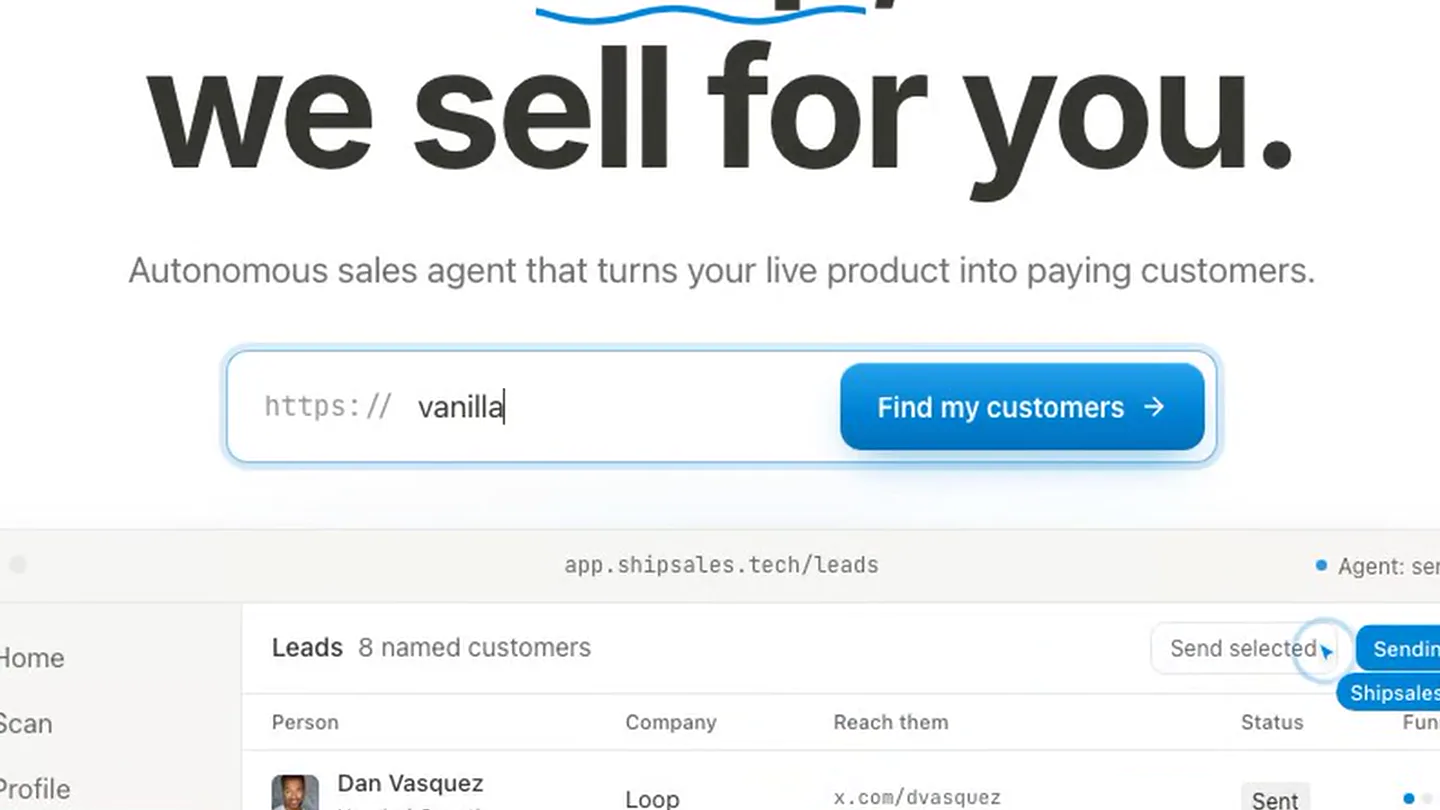
- Shipsales Company Request a demo Log in Get Shipsales free You ship, and we sell for you. Autonomous sales agent that turns your live product into paying customers. https://yourproduct.com Find my customers → app.shipsales.tech/leads Agent: reviewing customers Home Leads 8 named customers Send selected Send all Scan Person Company Reach them Status Funnel Profile Dan Vasquez Loop Shipsales Agent x.com/dvasquez New Customers Sarah Okafor Northwind sarah@northwind.com New Messages In ilack Notion HubSpot Stripe Attio Pipedrive LinkedIn Reddit Google Calendar
- Camera
- Static screen capture, then subtle zoom out to reveal more UI elements.
- Motion
- UI element reveal, text input simulation, status updates via color changes and text overlays.
Problem Agitation
AI Agent's Deep Dive
“(No spoken dialogue — ambient visual with page-reading simulation)”
- On screen
- Shipsales vanillameet.com Setting sail Shipsales vanillameet.com Reading the homepage Free video meetings with AI notes, in the browser. homepage Shipsales vanillameet.com Reading the pricing page Free to talk. Metered only when you build on the API. homepage pricing page Shipsales vanillameet.com Reading the developers page REST API for video, voice, chat and livestream sessions. homepage pricing page developers page Shipsales vanillameet.com Reading the teams page Shared workspace, searchable history, tasks from every call. homepage pricing page developers page teams page Shipsales vanillameet.com Reading the changelog page Structured notes and participant tasks shipped last month. pricing page developers page teams page changelog page Shipsales vanillameet.com Making sense of it all 5 pages, one picture of your business. Shipsales vanillameet.com
- Camera
- Static, centered view with elements appearing and disappearing around the center.
- Motion
- Sequential card reveals, subtle scaling and fading of text and cards, 'wave' animation at the bottom.
Product Reveal
Customer Discovery & Pitch Generation
“(No spoken dialogue — ambient visual with counting and card reveals)”
- On screen
- Shipsales vanillameet.com 2 customers found so far Ann Stanley Founder & CEO, Northwind Publicly complained about note taking eating her week. Shipsales vanillameet.com 2 customers found so far Attila Keskin Founder & CEO, DesignScene Hiring a coordinator whose duties are the manual version of this. Shipsales vanillameet.com 3 customers found so far Kathy Mrozek President, Windmill Strategy Just shipped a client portal and posted about handoff friction. Shipsales vanillameet.com 2/3 pitches written so far, one for every customer
- Camera
- Static, centered view with elements appearing and disappearing.
- Motion
- Counting animation, sequential card reveals with subtle bounce, progress bar-like text update.
Call to Action
Meet Your First Customers & Dashboard CTA
“(No spoken dialogue — ambient visual with final customer list and CTA)”
- On screen
- Shipsales vanillameet.com Meet your first customers. Each one comes with a pitch already written. More are aboard, and the agent can keep hunting for as many as you need. Shipsales vanillameet.com Meet your first customers. Each one comes with a pitch already written. Ann Stanley Founder & CEO, Northwind hot Attila Keskin Founder & CEO, DesignScene About to pay a salary for work the product does. See evidence Kathy Mrozek President, Windmill Strategy More are aboard, and the agent can keep hunting for as many as you need. Open the dashboard →
- Camera
- Static, centered view with elements appearing and settling.
- Motion
- Sequential card reveals, button animation with hover state, subtle background wave motion.
Motion design primitives
Synthesizable in Remotion · key components of the shipsales-ai-agent-launch template.
UIStatusUpdate
Simulates real-time UI interactions like text input, button clicks, and status changes within a web application interface. Elements like text fields, buttons, and data tables update dynamically.
+ Code construction recipe
Use `interpolate` for text typing effects and button state changes (color, text). Employ `spring` for subtle bounces on new UI element reveals. Utilize `Sequence` for precise timing of multiple UI actions.
SequentialCardReveal
Cards or content blocks appear one after another, often with a slight delay and a subtle scaling or fading animation, creating a sense of progression or discovery.
+ Code construction recipe
Implement with `spring` for a gentle pop-in effect on `opacity` and `scale`. Use `delay` prop within `Sequence` or `AbsoluteFill` to stagger the appearance of each card.
OceanicWaveBackground
A stylized, layered background of blue hues with subtle, continuous wave-like motion, featuring a small sailboat icon that occasionally bobs or moves slightly.
+ Code construction recipe
Construct with multiple `AbsoluteFill` layers, each with a slightly different blue color and a `transform: translateY` animated with `loop` and `spring` to simulate wave motion. The sailboat can have a subtle `rotate` and `translateY` animation.
Style DNA & aesthetic system
Visual aesthetic
Typography
Motion
Special effects
Pacing & rhythm
Conceptual story rhythm
- 1
The Promise
Purpose. Immediately establishes the core value proposition: 'You ship, and we sell for you.'
Execution. Direct screen capture of the product's landing page, highlighting the input field and the 'Find my customers' button, followed by a quick UI flow demonstrating lead generation.
- 2
The Journey
Purpose. Illustrates the AI agent's process of understanding the product by 'reading' various web pages.
Execution. Abstract blue background with a sailboat, and animated cards representing different web pages (homepage, pricing, developers, teams, changelog) appearing sequentially, then consolidating.
- 3
The Results
Purpose. Showcases the tangible outcome: identified customers and generated pitches.
Execution. Counting animation for 'customers found so far,' followed by individual customer profiles appearing with their specific pain points, and a 'pitches written' counter.
- 4
The Invitation
Purpose. Encourages the viewer to engage with the product by revealing the full customer list and a clear call to action.
Execution. A final screen displaying a list of potential customers with their details and a prominent 'Open the dashboard' button.





