
Slack · Launch Video Breakdown: Hook, Pacing & Motion Design
Write, review, and ship code with your team and AI agents.
Scene-by-scene timeline & spoken transcript
The Hook
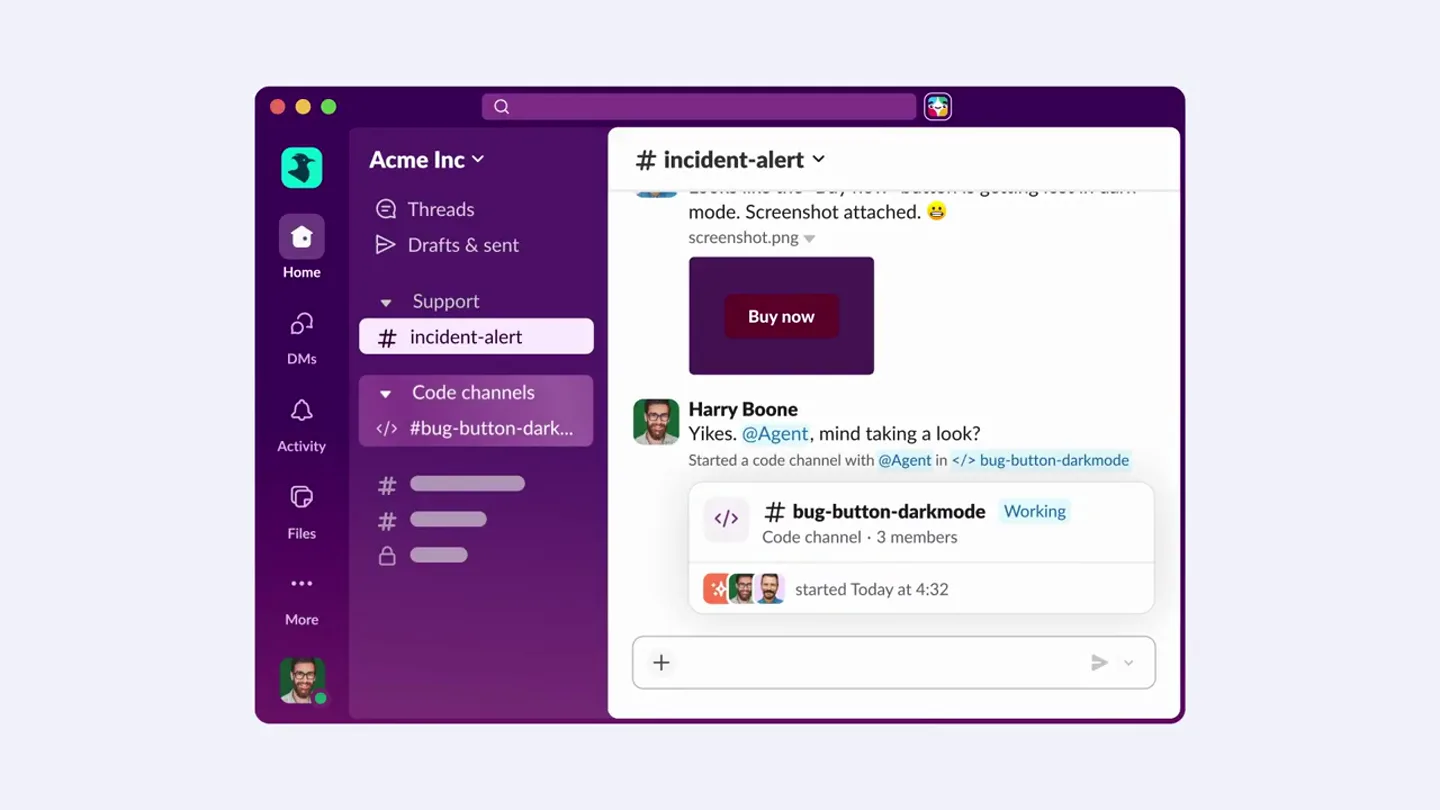
Problem Identification & Agent Assignment
“(No spoken dialogue — ambient UI sounds, subtle clicks, and soft typing noises.)”
- On screen
- Acme Inc Threads Drafts & sent Support # incident-alert Code channels </> #bug-button-darkmode Home DMs Activity Files More # incident-alert mode. Screenshot attached. screenshot.png Buy now Harry Boone Yikes. @Agent, mind taking a look? Started a code channel with @Agent in </> bug-button-darkmode </> # bug-button-darkmode Working Code channel - 3 members started Today at 4:32
- Camera
- Static overhead shot of the Slack interface, focusing on a specific channel.
- Motion
- Subtle UI highlights and text appearing as if typed, indicating user interaction and agent notification.
Product Reveal
AI Agent Analysis & Solution Discovery
“(No spoken dialogue — ambient UI sounds, subtle clicks, and soft typing noises.)”
- On screen
- Acme Inc Threads Drafts & sent Support # incident-alert Code channels </> #bug-button-darkmode Home DMs Activity Files More # bug-button-darkmode Artifacts 2 Agent APP Thinking Checking the best fix for dark mode. Searched Codebase 3 results found Read 2 files BuyNowButton.tsx styles.css Done Found the issue: text color is too light. What color should we use instead? Harry Boone @Zoe Maxwell, what color should we use? Zoe Maxwell was added to #bug-button-darkmode. Zoe Maxwell Let's keep the pink and switch the text to #1A1A1A. Agent APP Done! I made the change and wrote a summary in a canvas. Should I push the PR? Fix: Button Dark Mode Canvas
- Camera
- Static overhead shot, with the focus shifting to the agent's activity feed.
- Motion
- Progressive text reveal, simulating real-time AI processing and output. Smooth transitions between agent actions.
Feature Teaser
Solution Implementation & Verification
“(No spoken dialogue — ambient UI sounds, subtle clicks, and soft typing noises.)”
- On screen
- Acme Inc Threads Drafts & sent Support # incident-alert Code channels </> #bug-button-darkmode Home DMs Activity Files More # incident-alert Looks like the "Buy now" button is getting lost in dark mode. Screenshot attached screenshot-button.png Buy now Harry Boone Yikes. @Agent, mind taking a look? Started a code channel with @Agent in </> bug-button-darkmode </> # bug-button-darkmode Done Code channel - 4 members started Today at 4:32 No more hiding. The "Buy now" button is visible in dark mode again. Agent APP The fix is in! I also documented what changed in this canvas: Fix: Button Dark Mode Canvas
- Camera
- Static overhead shot, returning to the original problem context.
- Motion
- Cross-fade or quick cut to show the 'before' state, then a smooth reveal of the 'after' state with the fix applied. Text updates dynamically.
Call to Action
Resolution & Team Confirmation
“(No spoken dialogue — ambient UI sounds, subtle clicks, and soft typing noises.)”
- On screen
- Acme Inc Threads Drafts & sent Support # incident-alert Code channels </> #bug-button-darkmode Home DMs Activity Files More # incident-alert </> # bug-button-darkmode Done Code channel - 4 members No more hiding. The "Buy now" button is visible in dark mode again. started Today at 4:32 Agent APP The fix is in! I also documented what changed in this canvas: Fix: Button Dark Mode Canvas Harry Boone Perfect. I'll let the team know now!
- Camera
- Static overhead shot, with a final visual confirmation.
- Motion
- A prominent checkmark animation appears, signifying completion and success. Final text confirmation from a team member.
Motion design primitives
Synthesizable in Remotion · key components of the ai-workflow-showcase template.
DynamicTextReveal
Text appears character by character or line by line, simulating typing or real-time data generation, often with a subtle cursor animation.
+ Code construction recipe
Use `interpolate` with `spring` for character opacity and position. Implement a `Sequence` component to stagger text reveals. For cursor, use a blinking `AbsoluteFill` with `opacity` animation.
UIPanelTransition
Seamless transitions between different states or views within a user interface, often involving elements sliding, fading, or expanding.
+ Code construction recipe
Employ `AbsoluteFill` components with `translateX` or `scale` properties animated using `spring` for smooth sliding or expanding effects. Use `opacity` for fading elements in and out.
StatusIndicatorPulse
Small icons or elements (like a checkmark or loading spinner) animate with a subtle pulse or pop to draw attention to a status change or completion.
+ Code construction recipe
Animate `scale` and `opacity` of an SVG icon using `spring` with high damping for a quick, satisfying bounce. For a pulse, use a `loop` animation on `scale` with a subtle `ease-in-out` curve.
Style DNA & aesthetic system
Visual aesthetic
Typography
Motion
Special effects
Pacing & rhythm
Conceptual story rhythm
- 1
Problem Introduction
Purpose. Establish a common developer pain point (bug in dark mode) within the Slack environment.
Execution. Show a Slack channel with a user reporting a bug and tagging an AI agent.
- 2
AI Agent in Action
Purpose. Demonstrate the AI agent's capability to diagnose and propose a solution.
Execution. Transition to the agent's activity feed, showing its thought process, code search, and proposed fix.
- 3
Collaborative Resolution
Purpose. Highlight the seamless integration of AI with human collaboration for problem-solving.
Execution. Show human team members interacting with the agent's findings, making decisions, and the agent confirming the fix.
- 4
Solution Confirmation
Purpose. Visually confirm the bug fix and the efficiency of the new workflow.
Execution. Return to the original Slack channel, showing the 'Buy now' button correctly displayed in dark mode, with a final checkmark animation.





