Telos · Launch Video Breakdown: Hook, Pacing & Motion Design
AI agents pay APIs per request in USDC.e on Telos EVM. No checkout, no TLOS. The facilitator covers settlement gas.
Scene-by-scene timeline & spoken transcript
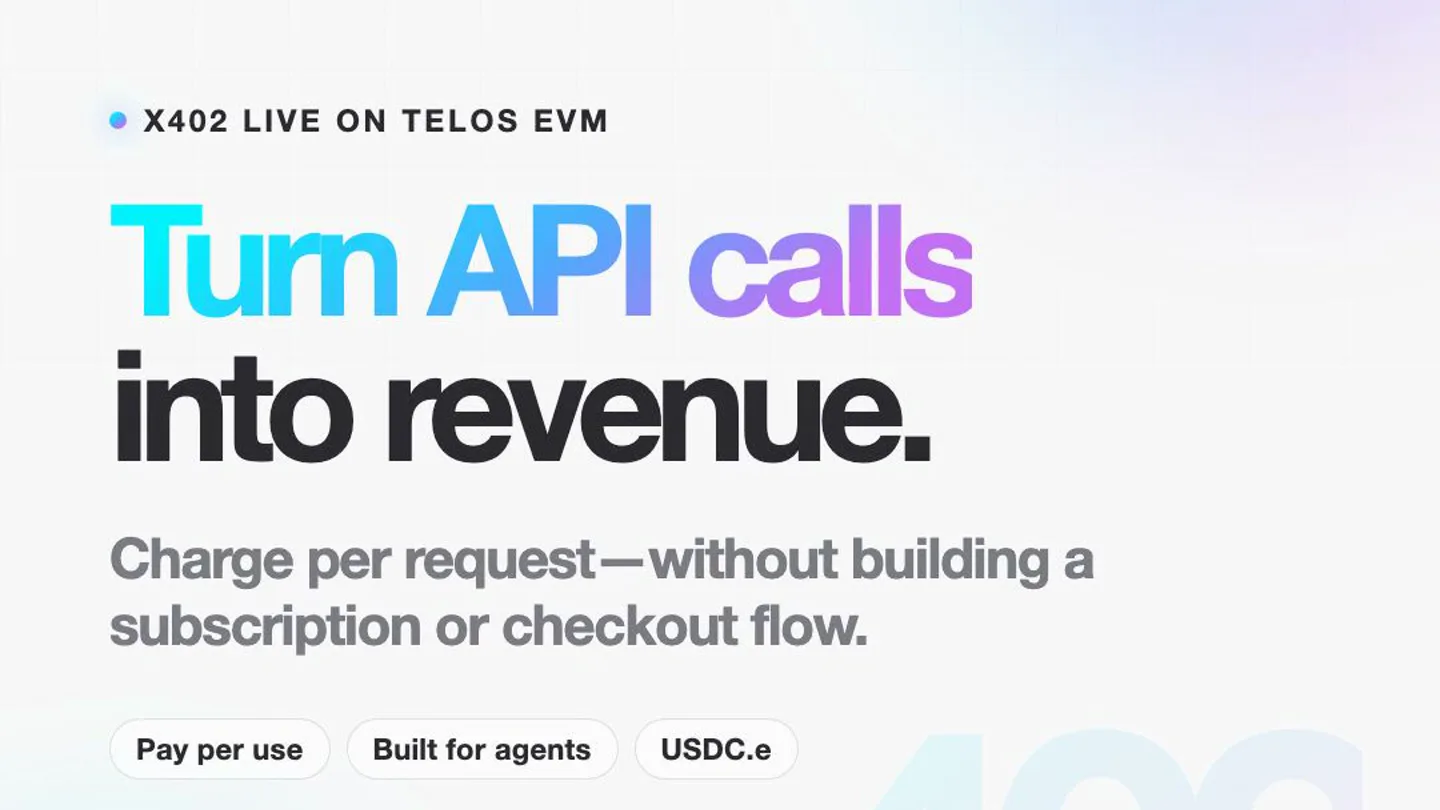
The Hook
Monetize APIs with AI Agents
“(No spoken dialogue — High-energy riser/sweep from [00:00] to [00:02], significant sub-bass drop/impact at [00:02].)”
- On screen
- telos MAINNET RELEASE · 01/04 • X402 LIVE ON TELOS EVM Turn API calls into revenue. Charge per request—without building a subscription or checkout flow. Pay per use Built for agents USDC.e 402
- Camera
- Static, centered framing on a digital interface.
- Motion
- Text reveals with a subtle gradient wipe, followed by a staggered reveal of feature tags and a large background number.
Product Reveal
Machines Pay within HTTP Flow
“(No spoken dialogue — Riser/sweep from [00:07] to [00:09], sub-bass drop/impact at [00:09].)”
- On screen
- telos WHY IT MATTERS · 02/04 Machines can pay within the HTTP flow. x402.telos.net/weather DISCOVER PRICE GET /weather → 402 + price PAY EXACT USAGE 0.001 USDC.e • one time USE THE SERVICE 200 OK • protected JSON
- Camera
- Static, centered framing on a digital terminal interface.
- Motion
- Staggered text reveal within a terminal window, simulating a command-line interaction or API call sequence.
Feature Teaser
Streamlined Billing, More Useful APIs
“(No spoken dialogue — Riser/sweep from [00:14] to [00:16], sub-bass drop/impact at [00:16].)”
- On screen
- telos WHO BENEFITS · 03/04 Less billing. More useful APIs. Developers monetize each call. Agents pay only when they need a response. DEVELOPER Monetize endpoint AGENT Pay per call FACILITATOR Sponsor gas buyer gas: 0 TLOS USDC.e pay per use Telos EVM settlement
- Camera
- Static, centered framing on a flowchart-like diagram.
- Motion
- Sequential reveal of interconnected cards, illustrating a workflow or benefit chain, with bullet points appearing below.
Call to Action
Build Paid APIs Now
“(No spoken dialogue — Riser/sweep from [00:21] to [00:23], sub-bass drop/impact at [00:23].)”
- On screen
- telos LIVE DEMO · 04/04 • LIVE MAINNET DEMO • 0.001 USDC.E / REQUEST Build paid APIs. x402.telos.net/demo Build with x402 docs.telos.net/build/x402 Give agents services they can discover, buy, and use on demand. Pay per request Telos EVM Buyer gas: 0 TLOS
- Camera
- Static, centered framing on a call-to-action screen.
- Motion
- Text reveals, followed by a URL bar and supporting text, then a final set of feature tags appearing.
Motion design primitives
Synthesizable in Remotion · key components of the gradient-tech-launch template.
GradientTextWipe
Text appears with a horizontal wipe effect, revealing characters from left to right, often with a subtle color gradient applied to the revealing edge.
+ Code construction recipe
Use Remotion's <AbsoluteFill> and <Sequence> components. Animate the 'clipPath' or 'maskImage' CSS property with a linear gradient, interpolating its position over time. Apply a 'spring' animation for a smooth, slightly elastic reveal.
StaggeredTerminalReveal
Lines of text or UI elements within a terminal-like interface appear sequentially, simulating a rapid typing or command output effect.
+ Code construction recipe
Render each line of text or UI element as a separate <Sequence> component. Offset the 'from' prop of each <Sequence> by a small duration (e.g., 5-10 frames) to create the staggered effect. Use 'interpolate' for opacity and 'translateY' for a subtle slide-up.
ConnectedCardFlow
Cards or information blocks appear one after another, often connected by lines, illustrating a process or relationship, with supporting text appearing below.
+ Code construction recipe
Each card and connecting line is a <Sequence>. Animate 'opacity' and 'scale' for the cards, and 'strokeDashoffset' for the connecting lines to draw them in. Stagger the 'from' prop of each <Sequence> to create the sequential flow. Use 'spring' for card entry and 'interpolate' for line drawing.
Style DNA & aesthetic system
Visual aesthetic
Typography
Motion
Special effects
Pacing & rhythm
Conceptual story rhythm
- 1
The Problem & Solution Hook
Purpose. Immediately grab attention by stating a common developer problem (API monetization) and introducing Telos's unique solution.
Execution. Rapid text reveals with gradient highlights, quickly establishing the core value proposition against a clean, modern UI.
- 2
Technical Deep Dive
Purpose. Explain the core technological innovation (machines paying within HTTP flow) with a clear, step-by-step visual demonstration.
Execution. A simulated terminal interface with staggered text reveals, illustrating the API interaction process in a digestible format.
- 3
Benefit & Ecosystem
Purpose. Detail who benefits from the solution and how the different components (developer, agent, facilitator) interact.
Execution. A clean, interconnected flowchart of roles and benefits, with elements appearing sequentially to build understanding.
- 4
Call to Action
Purpose. Direct viewers on how to get started and reiterate the key benefits.
Execution. A clear, concise screen with a prominent call to action URL, supported by reinforcing feature tags.