
Three Js Water Pro (by Dan Greenheck) · Launch Video Breakdown: Hook, Pacing & Motion Design
Three.js Water Pro is making Subnautica in the browser a real possibility. Rewrote the lighting model so light reflecting off the ocean floor is now refracted and attenuated based on real-world phy…
Scene-by-scene timeline & spoken transcript
The Hook
Interactive Water Simulation Showcase
“(No spoken dialogue — The audio begins with a low, sustained drone and subtle, shimmering synth pads, creating an atmospheric and expansive feel.)”
- On screen
- Three.js Water Pro v2.0.0
- Camera
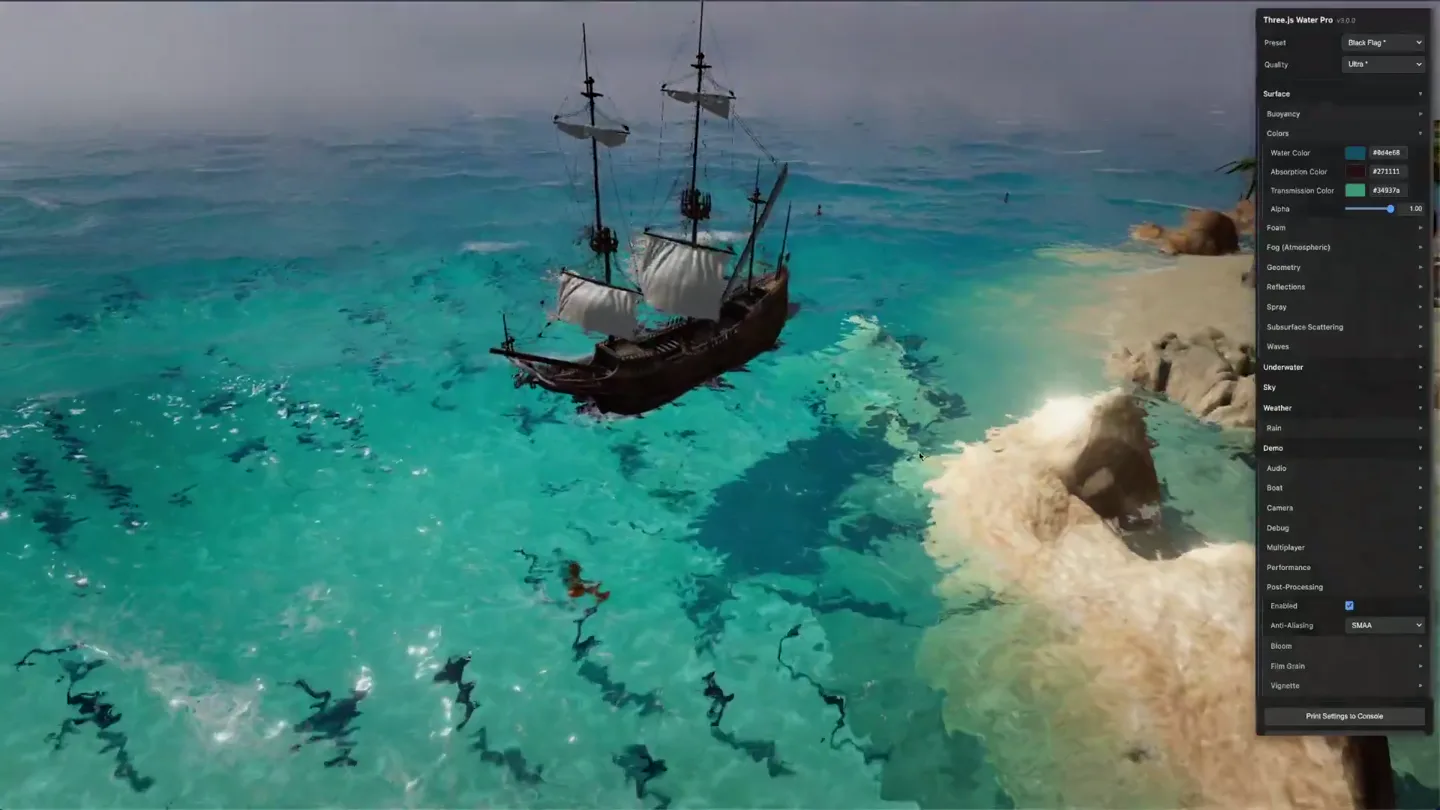
- High-angle, slightly tilted aerial view of a pirate ship in clear, shallow water near a sandy island. The camera slowly pans right, revealing more of the coastline.
- Motion
- Smooth, continuous camera pan with interactive UI elements being manipulated in real-time, demonstrating the product's configurability.
Product Reveal
Dynamic Water Physics & Underwater Refraction
“(No spoken dialogue — The ambient drone and synth pads continue, maintaining an expansive atmosphere.)”
- On screen
- Three.js Water Pro v2.0.0
- Camera
- The camera smoothly transitions from an aerial view to a lower, eye-level perspective, then dips below the water surface, showcasing underwater environments and light refraction. It then rises above water again, panning across the ocean.
- Motion
- Fluid camera transitions between above and below water, emphasizing the realistic water surface and underwater visual fidelity. Dynamic light reflections and refractions are highlighted.
Feature Teaser
Advanced Underwater Lighting Model
“(No spoken dialogue — A distinct underwater gurgling sound effect is introduced, accompanied by a deep, resonant sub-bass pulse, suggesting a transition or reveal. This underwater sound continues.)”
- On screen
- (No on-screen text)
- Camera
- The camera is positioned underwater, slowly moving forward and panning, revealing the ocean floor and the interaction of light with submerged objects. It then rises to the surface, showing waves.
- Motion
- Slow, deliberate underwater camera movement with emphasis on volumetric lighting, caustics, and the attenuation of light, demonstrating the rewritten lighting model.
Product Reveal
Comprehensive Water Environment Showcase
“(No spoken dialogue — The underwater sound fades out, returning to the initial ambient drone and synth pads, maintaining a minimalist, atmospheric texture.)”
- On screen
- (No on-screen text)
- Camera
- The camera continues to explore various perspectives, including close-ups of waves, wide shots of the ocean with distant horizons, and dynamic movements around the island, showcasing the water's interaction with different elements.
- Motion
- A series of dynamic camera movements and cuts, highlighting the versatility and realism of the water simulation across different environmental conditions and perspectives, from calm shores to open seas.
Motion design primitives
Synthesizable in Remotion · key components of the realistic-3d-environment-showcase template.
DynamicWaterSurface
The water surface exhibits realistic wave patterns, reflections, and refractions, dynamically responding to light and camera perspective. It seamlessly transitions between calm and turbulent states.
+ Code construction recipe
Utilize WebGL shaders for real-time water rendering, incorporating noise textures for wave displacement, Fresnel effects for reflections, and a custom refraction shader for underwater distortion. Interpolate wave parameters (amplitude, frequency) to transition between states.
SubsurfaceLightAttenuation
Light penetrating the water is visibly attenuated and refracted, creating realistic caustics on the ocean floor and volumetric light rays. Objects underwater appear appropriately lit and colored based on depth.
+ Code construction recipe
Implement a custom fragment shader for underwater rendering that calculates light absorption and scattering based on depth and water color. Use a post-processing effect for volumetric light shafts and a texture-based caustics projection on the seabed.
SeamlessCameraTransition
The camera smoothly transitions between aerial, surface, and underwater perspectives without abrupt cuts, creating a continuous and immersive viewing experience.
+ Code construction recipe
Animate camera position and rotation using a smooth easing function (e.g., easeInOutQuad) over a defined duration. For the underwater transition, blend between an above-water and underwater post-processing stack (e.g., fog, color grading, distortion) using an interpolated alpha value.
Style DNA & aesthetic system
Visual aesthetic
Typography
Motion
Special effects
Pacing & rhythm
Conceptual story rhythm
- 1
Initial Immersion
Purpose. To immediately captivate the viewer with the product's visual fidelity and interactive capabilities.
Execution. Opening with a high-angle view of a beautiful water scene, demonstrating real-time UI manipulation of water properties.
- 2
Depth & Detail Reveal
Purpose. To showcase the advanced physics and visual complexity of the water simulation, particularly its underwater capabilities.
Execution. Smooth camera dives from above to below the water surface, highlighting light refraction, caustics, and underwater environments.
- 3
Environmental Interaction
Purpose. To demonstrate how the water interacts realistically with various elements like shorelines, boats, and distant horizons.
Execution. Camera movements that pan along coastlines, show waves breaking, and reveal the water's behavior in open sea conditions.
- 4
Comprehensive Showcase
Purpose. To provide a holistic view of the product's capabilities across different scenarios and perspectives.
Execution. A montage of diverse camera angles and movements, emphasizing the product's versatility and realism in various marine settings.





