
Together Qwen3 8 (by Together AI) · Launch Video Breakdown: Hook, Pacing & Motion Design
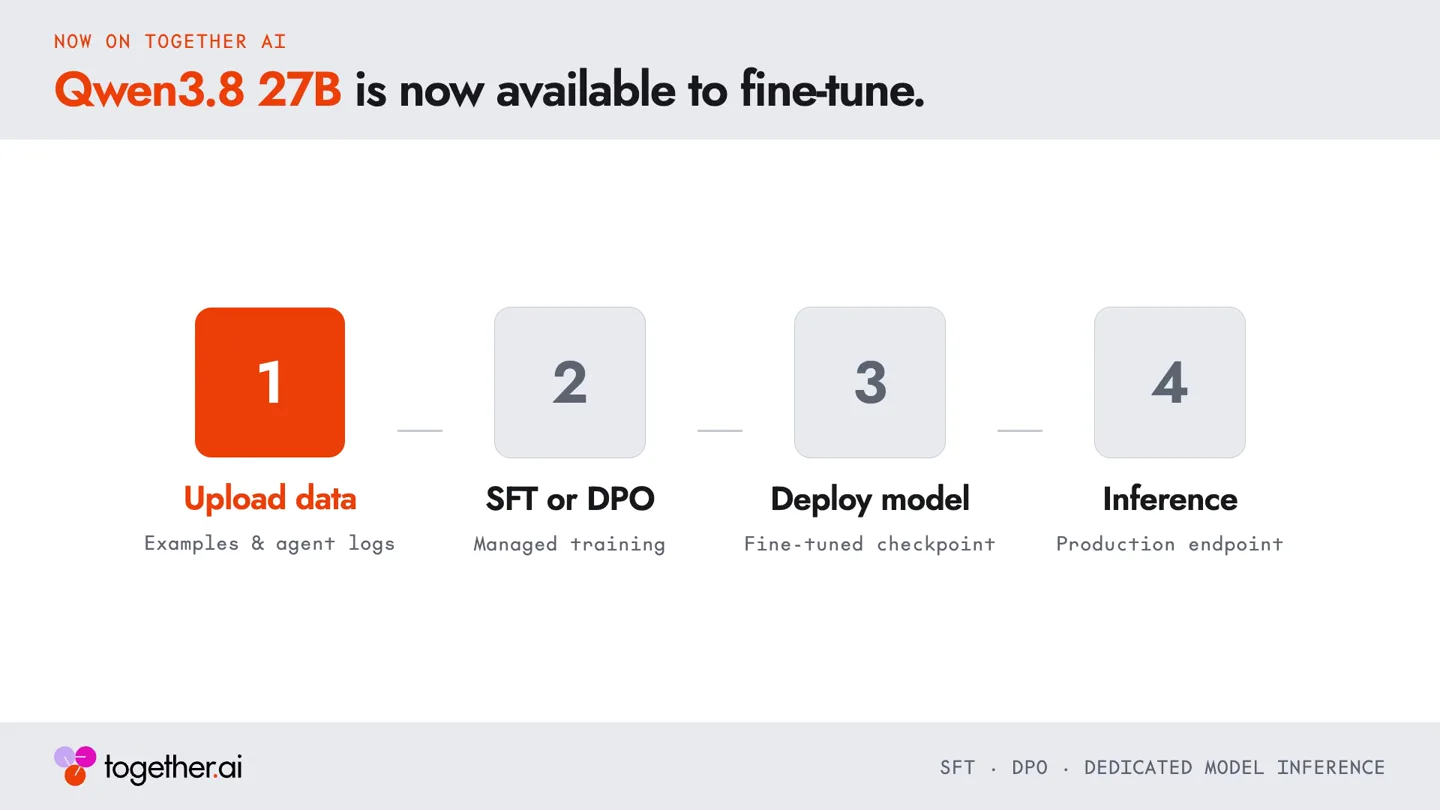
Qwen3.8 27B is live on Together AI for fine-tuning and dedicated model inference — train on your data and serve on dedicated infrastructure without stitching stacks.
Scene-by-scene timeline & spoken transcript
The Hook
Qwen3.8 27B Launch Announcement
“(No spoken dialogue — silent video with a 110 BPM ambient rhythm implied by visual pacing.)”
- On screen
- NOW ON TOGETHER AI Qwen3.8 27B is now available to fine-tune. 1 Upload data Examples & agent logs 2 SFT or DPO Managed training 3 Deploy model Fine-tuned checkpoint 4 Inference Production endpoint togetherai SFT . DPO . DEDICATED MODEL INFERENCE
- Camera
- Static, wide shot of the entire process diagram.
- Motion
- Subtle, sequential highlight animation on the first step of a four-step process.
Feature Teaser
Managed Training Highlight
“(No spoken dialogue — silent video with a 110 BPM ambient rhythm implied by visual pacing.)”
- On screen
- NOW ON TOGETHER AI Qwen3.8 27B is now available to fine-tune. 1 Upload data Examples & agent logs 2 SFT or DPO Managed training 3 Deploy model Fine-tuned checkpoint 4 Inference Production endpoint togetherai SFT . DPO . DEDICATED MODEL INFERENCE
- Camera
- Static, wide shot.
- Motion
- Sequential highlight animation transitions to the second step, emphasizing 'SFT or DPO'.
Feature Teaser
Model Deployment Highlight
“(No spoken dialogue — silent video with a 110 BPM ambient rhythm implied by visual pacing.)”
- On screen
- NOW ON TOGETHER AI Qwen3.8 27B is now available to fine-tune. 1 Upload data Examples & agent logs 2 SFT or DPO Managed training 3 Deploy model Fine-tuned checkpoint 4 Inference Production endpoint togetherai SFT . DPO . DEDICATED MODEL INFERENCE
- Camera
- Static, wide shot.
- Motion
- Sequential highlight animation transitions to the third step, focusing on 'Deploy model'.
Product Reveal
Inference Endpoint Highlight
“(No spoken dialogue — silent video with a 110 BPM ambient rhythm implied by visual pacing.)”
- On screen
- NOW ON TOGETHER AI Qwen3.8 27B is now available to fine-tune. 1 Upload data Examples & agent logs 2 SFT or DPO Managed training 3 Deploy model Fine-tuned checkpoint 4 Inference Production endpoint togetherai SFT . DPO . DEDICATED MODEL INFERENCE
- Camera
- Static, wide shot.
- Motion
- Sequential highlight animation transitions to the fourth and final step, emphasizing 'Inference'.
Motion design primitives
Synthesizable in Remotion · key components of the sequential-process-highlight template.
SequentialHighlight
A series of numbered steps are presented, and each step's container sequentially changes color to indicate focus, then reverts as the next step is highlighted.
+ Code construction recipe
Use Remotion's 'Sequence' component for timing each highlight. Animate the 'backgroundColor' property of a 'div' or 'Rect' component using 'interpolate' with 'spring' or 'ease-in-out' curves for smooth transitions between a neutral and an accent color. Manage state to track the currently active step.
FadeInText
Text elements appear on screen with a subtle, quick fade-in effect, enhancing readability without being distracting.
+ Code construction recipe
Apply 'interpolate' to the 'opacity' property of 'Text' components, transitioning from 0 to 1 over a short duration (e.g., 10-15 frames) with an 'ease-in' curve. Stagger the start times for different text blocks using 'Sequence' or 'delay' props.
StaticDiagramPresentation
A complex, multi-step diagram remains static on screen while specific elements within it are dynamically highlighted to guide the viewer's attention.
+ Code construction recipe
Render the entire diagram as a static SVG or image layer. Overlay interactive elements (e.g., 'Rect' components) with dynamic 'backgroundColor' or 'borderColor' properties controlled by 'interpolate' based on the current scene's progress. Ensure all elements are precisely positioned.
Style DNA & aesthetic system
Visual aesthetic
Typography
Motion
Special effects
Pacing & rhythm
Conceptual story rhythm
- 1
Introduction of Offering
Purpose. Announce the new model and its availability for fine-tuning.
Execution. Static title text 'Qwen3.8 27B is now available to fine-tune.' at the top.
- 2
Process Step 1: Data Upload
Purpose. Show the initial step of the fine-tuning workflow.
Execution. The 'Upload data' box (step 1) is highlighted in orange.
- 3
Process Steps 2 & 3: Training & Deployment
Purpose. Illustrate the core managed training and model deployment phases.
Execution. Sequential highlights on 'SFT or DPO' (step 2) then 'Deploy model' (step 3).
- 4
Process Step 4: Inference
Purpose. Conclude with the final outcome: production inference.
Execution. The 'Inference' box (step 4) is highlighted in orange, completing the workflow.





