
Trackmylogs Launches An Ai Assistant For Car Owners (by Vadym Petryshyn) · Launch Video Breakdown: Hook, Pacing & Motion Design
🚘 I just launched my app for drivers https://t.co/WjflLfyvv2 It’s an AI Assistant for Car Owners that helps you: - Manage service history - Chat with owner’s manuals & documents - Diagnose and solve car issues via AI chat - Cost tracking This isn’t a typical SaaS you https://t.co/ChiNqLqhhY
Scene-by-scene timeline & spoken transcript
The Hook
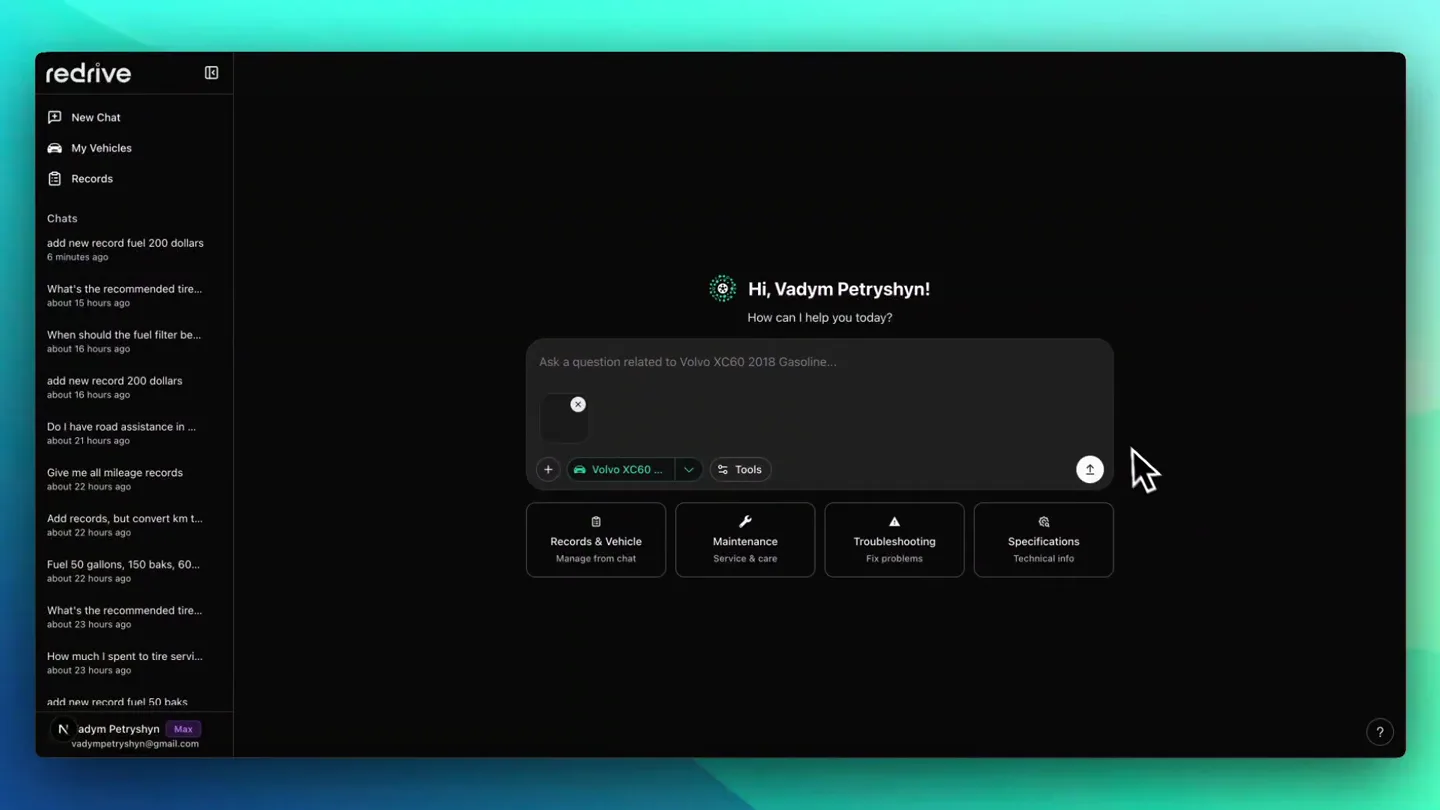
AI-Powered Service History Management
“(No spoken dialogue — ambient UI clicks and typing sounds)”
- On screen
- redrive View Chat My Vehicles Records Chats add new record fuel 200 dollars 6 minutes ago What's the recommended tire... about 10 hours ago When should the fuel filter be... about 16 hours ago add new record 200 dollars about 18 hours ago Do I have road assistance in ... about 21 hours ago Give me all mileage records about 22 hours ago Add records, but convert km t... about 22 hours ago Fuel 50 gallons, 160 bahts, 60... about 22 hours ago How much I spent to tire servi... about 23 hours ago add new record fuel 50 bahts N Vadym Petryshyn Max vadympetryshyn@gmail.com Hi, Vadym Petryshyn! How can I help you today? Ask a question related to Volvo XC60 2018 Gasoline... Volvo XC60... Tools Records & Vehicle Manage from chat Maintenance Service & care Troubleshooting Fix problems Specifications Technical info redrive can make mistakes. Check important info Share Manufacturer AUTO HUB Oil Name MOTUL Oil W 20 Odometer Date of Oil Change 51254 01.11.2025 Filter Changed: Air Oil Cabin Next Change (mi) Next Later Than/Date 57166 01.11.2026 Service Station Stamp Generating answer... Oil Change Service Record Created Volvo XC60 2018 Gasoline - Service recorded from the Auto Hub oil change tag. New Records: Scheduled Maintenance Oil Change - Motul 0W-20 @ ... Date: 12/01/2025 Mileage: 51,254 mi Details: Motul 0W-20 oil, Air/Oil/Cabin filters replaced (Fuel filter not changed) Next Service: 57,166 mi or 12/01/2026 1 attachment linked (service tag image) Mileage record: Oil Change Mileage 51254 mi (my/records/add?fuelId=e1cc8fee-cd8b- 4e29-9fec-602112934 redrive My Vehicles Records Statistics Vehicle Documents Notifications Reminders Subscription Upgrade Plan Usage Billing Profile Settings My Vehicles Volvo XC60 2018 VIN 1HGCL...A004352 Plate Number ABC-1234 Insurance Policy SF-2024-007656 Dealer NJ Volvo Dealer Added documents (4) redrive Records For Volvo XC60 2018 Volvo XC60 2018 All Period Record Types Labels Apply Filters Total Records: 97 Total Spent: $ 17 108.05 Oil Change Mileage 51254 mi Mileage record Dec 1, 2025 01:00 AM 51 254 mi Oil Change - Motul 0W-20 @ Auto Hub Scheduled Maintenance Dec 1, 2025 01:00 AM 51 254 mi 57 166 mi / Dec 1, 2026 Detail Package Car Wash Oct 25, 2025 12:00 PM $ 180.00 ChargePoint Work Charging Oct 18, 2025 12:00 PM 28 800 mi $ 12.50 Costco Gas Fuel Sep 18, 2025 01:00 PM 41 200 mi $ 64.80 N vadym petryshyn Max vadympetryshyn@gmail.com redrive Oil Change - Motul 0W-20 @ Auto Hub Volvo XC60 2018 Scheduled Maintenance Date: Dec 1, 2025 01:00 AM Mileage: 51 254 mi Next Check/Change Mileage 57 166 mi or Date Dec 1, 2026 Attachments (1) Record Information Created: 12/26/2025 Last Updated: 12/26/2025 N Share
- Camera
- Static screen capture with cursor interaction, simulating user input and system responses.
- Motion
- UI element reveals, text typing simulation, modal pop-ups, and smooth scrolling, all driven by cursor interaction.
Feature Teaser
AI Chat with Owner's Manuals & Documents
“(No spoken dialogue — ambient UI clicks and typing sounds)”
- On screen
- redrive View Chat My Vehicles Records Chats When should the fuel filter be... 1 minute ago No name 2 minutes ago add new record fuel 200 dollars 12 minutes ago When should the fuel filter be... about 16 hours ago add new record 200 dollars about 18 hours ago Do I have road assistance in ... about 21 hours ago Give me all mileage records about 22 hours ago Add records, but convert km t... about 22 hours ago Fuel 50 gallons, 160 bahts, 60... about 22 hours ago How much I spent to tire servi... about 23 hours ago add new record fuel 50 bahts N vadym petryshyn Max vadympetryshyn@gmail.com Share When should the fuel filter be replaced? Redrive Fuel Filter Maintenance for Volvo XC60 2018 Gasoline No mandatory replacement interval is specified in the maintenance schedule. Check for leakage and damage every 40,000 miles (64,000 km), specifically at: Miles Km Operation 40,000 64,000 Check fuel lines & filter 80,000 128,000 Check fuel lines & filter 120,000 192,000 Check fuel lines & filter Note: The fuel filter is typically integrated in the tank (lifetime design). Replace only if damaged or clogged (e.g., poor performance, leaks). See full details in 2018 NON-HYBRID WTY MANUAL-MAINT CHARTS.pdf on 1 (179/2018_Non-hybrid_Wty_Manual-Maint_Charts.pdf). If you're experiencing issues, log a service record or check your current mileage! Ask a question related to Volvo XC60 2018 Gasoline... Volvo XC60... Tools Redrive can make mistakes. Check important info View document pages Pages: 1 SERVICE AND MAINTENANCE Maintenance Service Operations The following table applies to all non-hybrid models Service operation Schedule of services All Non-hybrid Mod- els miles x 1000 km x 1000 10 16 20 32 30 48 40 64 50 80 60 96 70 112 80 128 90 144 100 160 110 176 120 192 224 240 Engine Engine oil and filter, replace X X X X X X X X X X X X Engine/Transmission/Timing gear check for leaks* X X X X X X X X X X X X Service Reminder Indicator (SRI), reset X X X X X X X X X X X X Fuel lines and fuel filter, check for leakage and damage X X X X X X X X X X X X Engine Air cleaner (ACL), clean the air cleaner housing/replace filter (engines A2/ AD10/26/40/49/59/99, 4-cylinder) X X X X X X X X X X X X Spark plugs, replace (engines A2/ AD10/26/40/49/59/99, 4-cylinder) X X X X X X X X X X X X Engine coolant check & adjust antifreeze rating & anti-corrosion agent X X X X X X X X X X X X Zoom in
- Camera
- Static screen capture with cursor interaction, demonstrating document search and retrieval.
- Motion
- Smooth transitions between chat interface and document viewer, with zoom and scroll animations.
Feature Teaser
Cost Tracking & Financial Insights
“(No spoken dialogue — ambient UI clicks and typing sounds)”
- On screen
- redrive View Chat My Vehicles Records Chats When should the fuel filter be... 4 minutes ago No name 5 minutes ago add new record fuel 200 dollars 12 minutes ago When should the fuel filter be... about 16 hours ago add new record 200 dollars about 18 hours ago Do I have road assistance in ... about 21 hours ago Give me all mileage records about 22 hours ago Add records, but convert km t... about 22 hours ago Fuel 50 gallons, 160 bahts, 60... about 22 hours ago How much I spent to tire servi... about 23 hours ago add new record fuel 50 bahts N vadym petryshyn Max vadympetryshyn@gmail.com Share How much did I spend on fuel this year for current car? Analyzing statistics Ask a question related to Volvo XC60 2018 Gasoline... Volvo XC60... Tools Redrive can make mistakes. Check important info Redrive Fuel Spending for Volvo XC60 2018 Gasoline in 2025 (01/01/2025 - 12/26/2025) Total Spent: $392.40 USD Number of Records: 4 Average Daily Cost: $0.81 USD Average Monthly Cost: $24.72 USD This covers all fuel expenses for your current vehicle this year. If you need a detailed break- down, let me know! redrive My Vehicles Records Statistics Vehicle Documents Notifications Reminders Subscription Upgrade Plan Usage Billing Profile Settings Statistics Vehicles (All) All Period Record Types Labels Apply Filters Total Spent ($) $ 17 845.55 Period Covered 3 years, 11 months, 21 days Avg. Daily Cost ($) $ 12.30 Avg. Monthly Cost ($) $ 374.38 Records with Expenses 84 Spending by Type Insurance: $ 6 500.00 Scheduled Maintenance: $ 4 544.00 Tire Service: $ 1 020.00 Registration/Tax: $ 1 205.00 Fuel: $ 1 050.00 Repair: $ 850.00 Parking: $ 640.00 Car Wash: $ 510.00 Diagnostic: $ 265.00 Inspection: $ 265.00 Tolls: $ 203.65 Charging: $ 192.80 redrive Statistics Volvo XC60 2018 This Year Record Types Labels Apply Filters Search record types... Running Costs Charging Car Wash Fuel Tolls Tickets Registration/Tax Parking Avg. Daily Cost ($) $ 12.30 Avg. Monthly Cost ($) $ 374.38 Records with Expenses 84 Spending by Type Insurance: $ 6 500.00 Scheduled Maintenance: $ 4 544.00 Tire Service: $ 1 020.00 Registration/Tax: $ 1 205.00 Fuel: $ 1 050.00 Repair: $ 850.00 Parking: $ 640.00 Car Wash: $ 510.00 Diagnostic: $ 265.00 Inspection: $ 265.00 Tolls: $ 203.65 Charging: $ 192.80 redrive Statistics Volvo XC60 2018 This Year Fuel Labels Apply Filters Total Spent ($) $ 292.40 Period Covered 11 months, 26 days Avg. Daily Cost ($) $ 0.81 Avg. Monthly Cost ($) $ 24.72 Records with Expenses 4 Spending by Type Fuel: $ 292.40 100.0%
- Camera
- Static screen capture with cursor interaction, showcasing data visualization and filtering.
- Motion
- Dynamic chart updates, filter animations, and smooth transitions between data views.
Motion design primitives
Synthesizable in Remotion · key components of the dark-mode-ai-assistant-demo template.
CursorDrivenUIReveal
UI elements and text appear or expand in response to a visible cursor's movement and clicks, simulating real-time user interaction.
+ Code construction recipe
Utilize `interpolate` for opacity and scale changes on UI components, triggered by `useCurrentFrame()` and `delayRender()` based on cursor path keyframes. Implement `spring` for button presses and menu expansions.
DynamicContentPopulate
Text fields populate with generated content, lists expand, and data visualizations update dynamically, mimicking AI processing and data retrieval.
+ Code construction recipe
Employ `Sequence` and `Series` for sequential text typing effects using `typewriter` animation. Data visualizations (e.g., pie charts) can use `interpolate` on SVG `stroke-dasharray` or `transform` properties for growth animations.
ModalDocumentOverlay
A document viewer or detailed record modal slides in from the side or fades in, overlaying the main interface, with interactive elements like zoom and scroll.
+ Code construction recipe
Implement a `Slide` or `Fade` transition for the modal component. Inside the modal, use `interpolate` for zoom (scale) and `transform` (translate) for scrolling, controlled by simulated user input.
Style DNA & aesthetic system
Visual aesthetic
Typography
Motion
Special effects
Pacing & rhythm
Conceptual story rhythm
- 1
Problem/Solution Introduction
Purpose. Introduce the core problem of car ownership management and immediately present the AI assistant as the solution.
Execution. Opening with a direct demonstration of the AI managing service history via chat, showing quick, accurate data entry and retrieval.
- 2
Deep Dive into Features
Purpose. Showcase specific, high-value features in detail, demonstrating their practical application.
Execution. Sequential demonstrations of chatting with owner's manuals, diagnosing issues, and detailed cost tracking with interactive charts.
- 3
Efficiency and Ease
Purpose. Highlight how the product simplifies complex tasks and saves time for car owners.
Execution. Smooth, uninterrupted UI flows showing quick navigation, data filtering, and instant AI responses, minimizing user effort.
- 4
Comprehensive Control
Purpose. Convey that the app provides a complete, centralized solution for all car-related needs.
Execution. Transitioning between different modules (records, documents, statistics) to illustrate the breadth of functionality within a single platform.





