
Welikehq Launches Social Listening (by Evie | JE Labs 🦾) · Launch Video Breakdown: Hook, Pacing & Motion Design
Following KOL Pricer, our tweet pricing tool that hit 140K+ impressions, our team just launched our second super practical AI marketing tool: Social Listening! Enter the X account of any product you're tracking, and within 30 seconds you'll get a full breakdown of what real X https://t.co/AAdVqU5kBZ
Scene-by-scene timeline & spoken transcript
The Hook
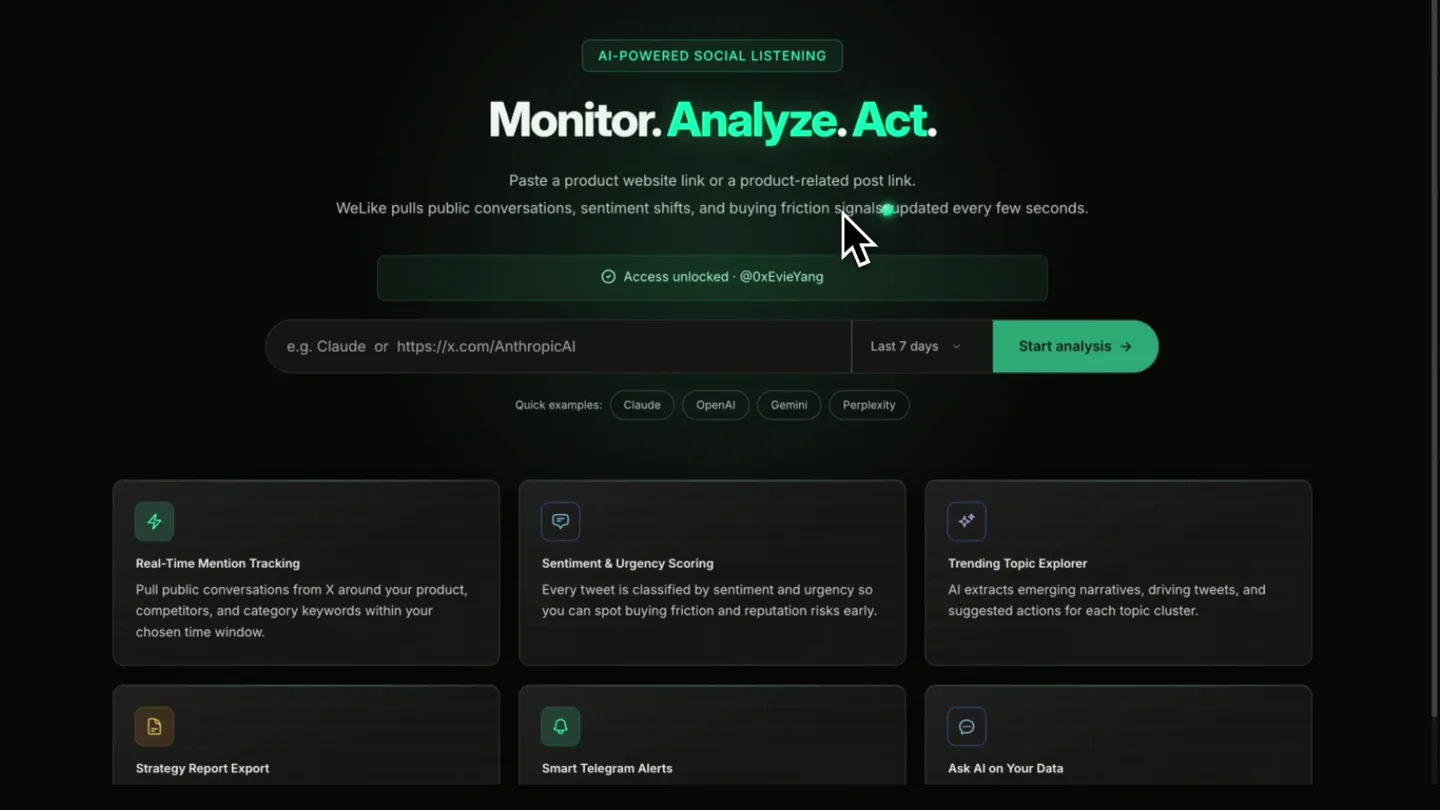
Introducing Social Listening: Monitor, Analyze, Act
“You know this feeling, trying to figure out what's going on, but by the time you do, it's already gone. DeepSeek V4 just dropped. What's the performance? We Like Social Listening is an AI-powered social listening tool that helps you monitor, analyze, and act on real-time user feedback.”
- On screen
- WeLike Real user feedback, in real time "Social Listening" AI Tool Social Listening Analyze Smart Alerts AI-POWERED SOCIAL LISTENING Monitor. Analyze. Act. Paste a product website link or a product-related post link. WeLike pulls public conversations, sentiment shifts, and buying friction signals, updated every few seconds. Access unlocked - @0xEvieYang e.g. Claude or https://x.com/AnthropicAI Last 7 days Start analysis → Quick examples Claude OpenAl Gemini Perplexity Real-Time Mention Tracking Pull public conversations from X around your product, competitors, and category keywords within your chosen time window. Sentiment & Urgency Scoring Every tweet is classified by sentiment and urgency so you can spot buying friction and reputation risks early. Trending Topic Explorer Al extracts emerging narratives, driving tweets, and suggested actions for each topic cluster. Strategy Report Export Smart Telegram Alerts Ask Al on Your Data Sentiment | Heat | Trending Topics | Strategy Report | Smart Alert
- Camera
- Static wide shot of the product UI, with a picture-in-picture of the presenter in the bottom right. The camera occasionally zooms slightly into specific UI elements.
- Motion
- Picture-in-picture overlay, subtle UI highlights, and zoom-ins to guide attention. Text overlays introduce key features.
Problem Agitation
Instant Sentiment & Heat Analysis
“Type in DeepSeek. You instantly see the sentiment, the heat, and which key moments people are debating, like DeepSeek V4 Pro's permanent price cut.”
- On screen
- WeLike Real user feedback, in real time "Social Listening" AI Tool Social Listening Analyze Smart Alerts AI-POWERED SOCIAL LISTENING Monitor. Analyze. Act. Paste a product website link or a product-related post link. WeLike pulls public conversations, sentiment shifts, and buying friction signals, updated every few seconds. Access unlocked - @0xEvieYang e.g. Claude or https://x.com/AnthropicAI Last 7 days Reanalyze → Quick examples Claude OpenAl Gemini Perplexity TOTAL TWEETS 30 POSITIVE SHARE 80% NEGATIVE SHARE 3% NEUTRAL SHARE 17% HIGH URGENCY 1 Sentiment Categories Key voice Feature request Bug / Issue Competitor 67% 3% 3% 3% Heat & milestones Daily heat + Al-inferred milestones Tweets Engagement 2.5K 2.0K 1.5K 1.0K 500 0 2026-05-21 2026-05-22 2026-05-23 2026-05-24 2026-05-25 2026-05-26 2026-05-27 MILESTONES: 2026-05-22 Permanent pricing discount announcement DeepSeek V4 Pro price cut made permanent; $1 plan stretches to $40 monthly. 2026-05-23 Pricing strategy confirmed permanent Confirmation that 75% API price reduction is now permanent, elevating V4 Pro value proposition. 2026-05-25 Competitive pricing milestone reached V4 Pro confirmed at $0.87/million tokens; achieves Design Arena performance parity. Trending topics Click a topic for driving tweets & suggested actions Sentiment | Heat | Trending Topics | Strategy Report | Smart Alert @deepseek_ai WeLike Real user feedback, in real time "Social Listening" AI Tool Social Listening Analyze Smart Alerts AI-POWERED SOCIAL LISTENING Monitor. Analyze. Act. Paste a product website link or a product-related post link. WeLike pulls public conversations, sentiment shifts, and buying friction signals, updated every few seconds. Access unlocked - @0xEvieYang e.g. Claude or https://x.com/AnthropicAI Last 7 days Reanalyze → Quick examples Claude OpenAl Gemini Perplexity TOTAL TWEETS 30 POSITIVE SHARE 80% NEGATIVE SHARE 3% NEUTRAL SHARE 17% HIGH URGENCY 1 Sentiment Categories Key voice Feature request Bug / Issue Competitor 67% 3% 3% 3% Heat & milestones Daily heat + Al-inferred milestones Tweets Engagement 2.5K 2.0K 1.5K 1.0K 500 0 2026-05-21 2026-05-22 2026-05-23 2026-05-24 2026-05-25 2026-05-26 2026-05-27 MILESTONES: 2026-05-22 Permanent pricing discount announcement DeepSeek V4 Pro price cut made permanent; $1 plan stretches to $40 monthly. 2026-05-23 Pricing strategy confirmed permanent Confirmation that 75% API price reduction is now permanent, elevating V4 Pro value proposition. 2026-05-25 Competitive pricing milestone reached V4 Pro confirmed at $0.87/million tokens; achieves Design Arena performance parity. Trending topics Click a topic for driving tweets & suggested actions Sentiment | Heat | Trending Topics | Strategy Report | Smart Alert @deepseek_ai DeepSeek V4 Pro Permanent Price Cut Overall advice: Monitor competitor response to aggressive pricing strategy and assess market impact. @ArtificialAllys 50,588 followers Tweet Positive Low DeepSeek has made its temporary 75% price cut on the first-party V4 Pro API permanent, putting V4 Pro on the Pareto frontier... SUGGESTED ACTION: Amplify @MrMohamadAmin 49,686 followers Tweet Positive Low @deepseek_ai URG!! The $1 Go plan which stretches to $40 @CommandCodeAl for DSv4 Pro is now permanent. This is Al for everyone. SUGGESTED ACTION: Amplify Mid-follower user enthusiastically endorses permanent $1 plan for V4 Pro as 'Al for everyone'. DeepSeek Service Outage/Access Issues Overall advice: Investigate infrastructure stability and communicate service status to users @xiongchun007 23,098 followers Tweet Negative High DeepSeek 是在耍我吗?? @deepseek_ai 网页访问不了, API 也用不了! 还是我碰到的有史以来第一次访问不了。 SUGGESTED ACTION: Reply now User reports service outage: website inaccessible and API not responding, first-time occurrence Draft reply @tomomohun7 Tweet Neutral Low @deepseek_ai whats the story with the @OpenRouter providers? https://t.co/nsfy007bN SUGGESTED ACTION: Monitor User queries OpenRouter provider status for DeepSeek models Sentiment | Heat | Trending Topics | Strategy Report | Smart Alert
- Camera
- The camera pans and zooms across the UI, highlighting specific data points like sentiment percentages, heat maps, and trending topics. The presenter remains in the picture-in-picture.
- Motion
- Dynamic UI navigation with smooth camera movements. Interactive elements like graphs and text fields are emphasized through highlighting and subtle animations.
Product Reveal
Actionable Insights & AI-Powered Reports
“We Like tells you what action to take, and bring it straight into your meeting. So just ask the AI, you can actually use.”
- On screen
- WeLike Real user feedback, in real time "Social Listening" AI Tool Social Listening Strategy report Analyze Smart Alerts Markdown DOC PDF We Like Social Listening & Market Strategy Report Subject: @deepseek_ai 1. Social Listening Overview DeepSeek's social presence demonstrates exceptional market momentum with 80% positive sentiment across high-engagement discussions. The conversation is dominated by pricing disruption themes, particularly the permanent V4 Pro API price reduction. Discussion intensity remains high among open-source and Al practitioner communities, with influencers actively promoting DeepSeek's cost-effectiveness. Compared to competitors, DeepSeek's stance on pricing disruptions, developer tool integrations, and performance comparisons with industry leaders. 2. Positive Discussion & Brand Strengths Key Amplification Opportunities: Pricing Leadership: Users celebrate the permanent 75% price cut as "Al for everyone" - this democratization narrative resonates strongly Developer Ecosystem: Strong adoption in coding agents and developer tools, with influencers like @jahoonna actively promoting integrations Performance-to-Price Ratio: Users position DeepSeek as the "Pareto frontier" of intelligence, advocating optimal value proposition. Community Champions: High-follower accounts (@ArtificialAllys, @MrMohamadAwali) are organic advocates driving conversation volume Voices Worth Amplifying: @ArtificialAllys (50K followers) - technical analysis and industry positioning @MrMohamadAwali (50K followers) - cost-safety and democratization messaging Developer tool creators integrating DeepSeek APIs 3. Risks & Negative Signals Critical Infrastructure Concerns: Service Outage Reports: @xiongchun007's complaint about website and API accessibility represents a significant reliability risk. Single Point of Failure: This reported major outage suggests potential scaling challenges Urgency Classification: As a "Total" outage for this user, reliability organizations are high. Potential Crisis Indicators: Infrastructure stability concerns during peak adoption No visible official response to outage complaints Risk of negative sentiment shift if service reliability deteriorates 4. Deep-Dive on Hot Topics Ask Al Based on collected data Al YOU Summarize the 3 tweets worth replying to with first draft replies Priority Tweets Requiring Immediate Response 1. [Tweet 14] - Service Outage Report (HIGH URGENCY) User: @xiongchun007 Content: Reports DeepSeek website and API are completely inaccessible - first time experiencing this issue Sentiment: Negative Draft Reply: Hi @xiongchun007, we're aware of the access issues and our team is investigating immediately. We apologize for the inconvenience - this is not the experience we want for our users. We'll provide updates as soon as we have more information. Thank you for reporting this. 2. [Tweet 17] - Influential Positive Feedback (MEDIUM URGENCY) User: @tomomohun7 Content: "Thank you @tomomohun7! Your support means a lot to our team. We're committed to making advanced Al accessible to everyone. Looking forward to seeing what amazing innovations you create with DeepSeek V4 Pro!" Sentiment: Positive Draft Reply: e.g. Which negative thread is most urgent and how should we respond? Top 3 replies Feature themes Negative root cause x competitors Send → Sentiment | Heat | Trending Topics | Strategy Report | Smart Alert
- Camera
- The camera focuses on the 'Strategy Report' and 'Ask AI' sections, demonstrating the AI's ability to generate actionable insights and draft replies. The presenter remains visible.
- Motion
- Scrolling animations, text input simulations, and highlighting of AI-generated content. The UI elements animate to reveal new information dynamically.
Feature Teaser
Real-time Smart Alerts
“You want to track when something important happens. We Like Social Listening. Link's in the comments.”
- On screen
- WeLike Real user feedback, in real time "Social Listening" AI Tool Social Listening ACTIVE - listening @deepseek_ai Easy to create new mentions Pause WATCH TARGETS @deepseek_ai LAST RUN 2026-05-28 03:01:49 SCHEDULE FILTER RULES DIGEST Sentiment filter Negative Positive Neutral Off - one push per hit Urgency filter High Medium Low ALERT LANGUAGE English Save filters PUSH PREVIEW - FOLLOWS YOUR FILTERS @deepseek_ai New mention Negative High Sample User (@sample_user) - 1K followers @deepseek_ai is getting worse, please stop... View Sent History WeLike Real user feedback, in real time "Social Listening" AI Tool Social Listening WeLike Assistant Neutral Low urgency Monitor 2026-05-28, 11:22:06 GMT+8 Jiangban Qin (@qinjiangban) - 135 followers @aimac_dev @deepseek_ai Brief mention of DeepSeek.Al in a conversation Neutral sentiment, low urgency. https://x.com/qinjiangban/status/ 1805900000000000000 (formerly Twitter) Jiangban Qin (@qinjiangban) on X @aimac_dev @deepseek_ai 4:23 PM @deepseek_ai New mention Positive Low urgency Amplify Key voice National Business Daily (@NBDpress) - 39.3K followers DeepSeek's web chat and API services are now fully back online! Following the recent service outage (reported by @xiongchun007 on May 28), the official status page confirms everything is resolved as of 10:50 AM. Positive sentiment, low urgency, key voice: service restoration. High-follower account reports DeepSeek service restoration after morning outages, confirming full resolution. https://x.com/NBDpress/status/2059841385369567429 8:45 PM @deepseek_ai New mention Neutral Low urgency Monitor 2026-05-28, 11:36:43 GMT+8 Sentiment | Heat | Trending Topics | Strategy Report | Smart Alert WeLike Real user feedback, in real time "Social Listening" AI Tool Social Listening Every alert successfully sent to Telegram, newest first. Refresh 50 total Individual Yuri Winchester @YURIWinchest @aysha_fatima @Alibaba_Open @deepseek_ai "O que falta pra vocês é lançar um app como a Anthropic e a OpenAI fizeram. Assim competem de igual pra igual. Se cobrarem 20 dólares, o plano de vocês deveria oferecer a mesma quantidade de tokens que o plano de 200 deles." Neutral Low Feature request Open tweet Fatima Khabib @fatimakhabib Engagement 930 RT @quxiaoyin: Why is @deepseek_ai 100x cheaper than @AnthropicAI? China is vertically integrated to be cheap. + Cheap model, token-optimi... Neutral Low Competitor Open tweet Donald modi @donaldmodi_trump @sayushya @deepseek_ai @ClaudeAl Set-up Neutral Low Open tweet Katie Carr @katiecarr Engagement 5 RT @VegetaCrypto: Everything is available on the internet, n u have access to @grok @deepseek_ai @ClaudeAl @ChatGPTapp that can fetch the... Neutral Low Open tweet Djokovic Widowski @djokovicwidowski Sehabló permanent discount 75% dari @deepseek_ai, chatbot nya sering busy nih, padahal api nya gas terus tanpa kendala https://t.co/eOqjWCK9F Negative High Bug + comment Open tweet Sentiment | Heat | Trending Topics | Strategy Report | Smart Alert
- Camera
- The camera transitions to the 'Smart Alerts' section, showcasing how users can set up custom alerts and view a history of notifications. The presenter remains in the picture-in-picture.
- Motion
- UI element highlighting, simulated user interaction (typing, clicking), and smooth transitions between different alert views. The overall pacing remains consistent with the driving beat.
Motion design primitives
Synthesizable in Remotion · key components of the ai-social-listening-breakdown template.
PiPOverlayZoom
A picture-in-picture video feed of the presenter is overlaid on the main screen recording, maintaining a consistent position while the main content zooms and pans. The presenter's feed has a subtle, soft-edged border.
+ Code construction recipe
Use a <Video> component for the main screen recording and another <Video> component for the presenter. Position the presenter video using absolute CSS positioning (e.g., bottom: 20px, right: 20px) and apply a border-radius for the soft edges. Implement zoom and pan on the main video using `interpolate` for `scale` and `translateX/Y` properties based on the current frame.
DynamicUIHighlight
Key UI elements, text fields, and data points are dynamically highlighted with a glowing border or a subtle background color change, often accompanied by a simulated mouse cursor interaction.
+ Code construction recipe
For highlighting, use conditional rendering or `interpolate` to change `borderColor`, `backgroundColor`, or apply a `boxShadow` to target elements. Simulate mouse cursor movement using `interpolate` for `translateX/Y` of an SVG cursor icon. Text input can be animated using `typewriter` effect or `interpolate` for `opacity` and `scale` of individual characters.
DataGraphReveal
Charts and graphs, such as sentiment donuts or heat maps, animate into view with a drawing or filling effect, revealing data points progressively.
+ Code construction recipe
For donut charts, use SVG `stroke-dasharray` and `stroke-dashoffset` properties, interpolating the `stroke-dashoffset` to create a drawing effect. For bar or line graphs, animate the `height` or `stroke-dasharray` of the SVG paths/rects from zero to their final values using `spring` or `interpolate`.
Style DNA & aesthetic system
Visual aesthetic
Typography
Motion
Special effects
Pacing & rhythm
Conceptual story rhythm
- 1
The Pain Point
Purpose. Establish the common frustration of missing real-time market insights and the need for immediate data.
Execution. The presenter directly addresses the camera, conveying empathy, while the UI shows a static, unanalyzed state, hinting at the problem.
- 2
The Solution Unveiled
Purpose. Introduce 'Social Listening' as the direct answer to the pain point, showcasing its core capabilities.
Execution. The UI animates to reveal the initial analysis dashboard, with key metrics like sentiment and heat maps appearing dynamically, demonstrating instant value.
- 3
Deep Dive & Action
Purpose. Demonstrate the tool's depth, showing how it provides actionable insights and automates reporting.
Execution. The camera navigates through detailed trending topics, strategy reports, and AI-generated draft replies, illustrating the tool's comprehensive analytical power.
- 4
Continuous Monitoring & CTA
Purpose. Highlight the proactive nature of the tool with real-time alerts and provide a clear call to action.
Execution. The 'Smart Alerts' section is showcased, followed by a direct address from the presenter, inviting viewers to try the product, with a clear link provided.





