
Appshotr · Launch Video Breakdown: Hook, Pacing & Motion Design
Point Appshotr at your app and Claude generates a full App Store screenshot set with headlines, exported in Apple's sizes.
Scene-by-scene timeline & spoken transcript
The Hook
AI Icon Generation & Iteration
“(No spoken dialogue — The music features a bright, upbeat chiptune melody with a prominent synth lead, arpeggiated synth bass, and a simple drum machine beat. The sound design is consistent throughout, maintaining a retro, playful aesthetic.)”
- On screen
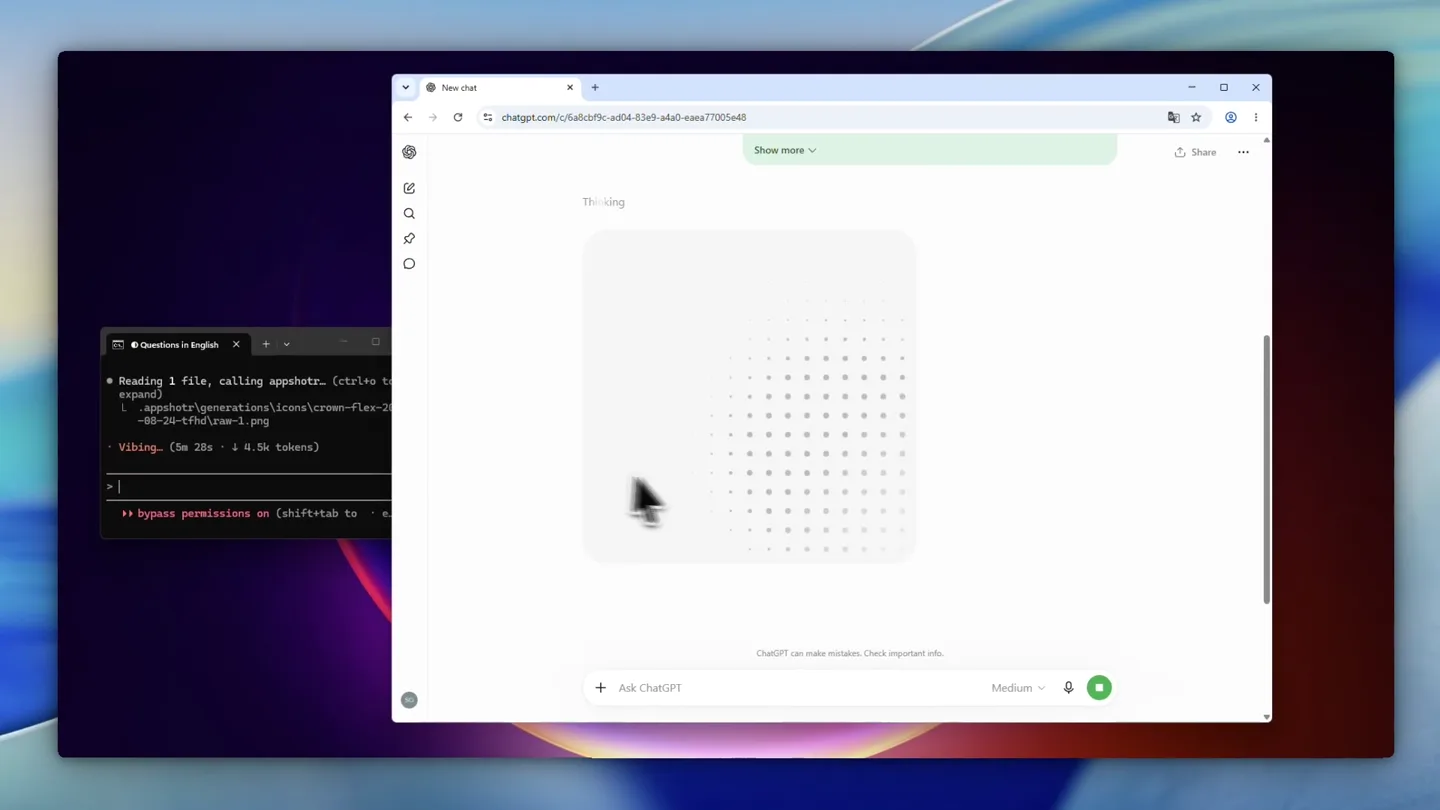
- Reading 1 file, calling appshotr.. (ctrl+o to expand) _appshotr\generations\icons\crown-flex-20 -08-24-tfhd\raw-1.png *Vibing.. (5m 27s ↓ 4.5K tokens) > >> bypass permissions on (shift+tab to e.
- Camera
- Static wide shot of a desktop environment, focusing on a terminal window and a ChatGPT browser tab.
- Motion
- Rapid image generation and display within the ChatGPT interface, simulating AI processing.
Problem Agitation
Iterative AI Icon Refinement
“(No spoken dialogue — The music features a bright, upbeat chiptune melody with a prominent synth lead, arpeggiated synth bass, and a simple drum machine beat. The sound design is consistent throughout, maintaining a retro, playful aesthetic.)”
- On screen
- to head with a rival and winning with your own body. Use an electric cobalt, sky blue, off-white color palette. The artwork must fill the entire square canvas edge to edge, no rounded corners, no border, no padding. No text, no letters, no words. Clean, premium and instantly readable at small sizes. The result must be a polished App Store app icon asset, not an illustration. Match the rendering style of the reference Show more v Stop answering Reading 1 file, calling appshotr.. (ctrl+o to expand) _appshotr\generations\icons\crown-flex-2026 -08-24-decl\raw-1.png *Vibing.. (5m 29s ↓ 4.5K tokens) > >> bypass permissions on (shift+tab to e. Analyzing ^ Python from PIL import Image
- Camera
- Static wide shot of a desktop environment, focusing on a terminal window and a ChatGPT browser tab.
- Motion
- Sequential display of AI-generated app icons, demonstrating rapid iteration and refinement based on prompts.
Product Reveal
Appshotr Output Showcase
“What the dog doing?”
- On screen
- Create 24/8.icon tales-sheet.png Edit 2508 x 642 1.7 MB 2 elementos 1 seleccionado 66 % Bash explorer *C:\Users\allen\De \data\_appshotr\la opened) *Vibing.. (1m 5s ↓ 9.3K >> bypass permissions on Running.. (4s) (ctrl+c to run in back ---]
- Camera
- Static wide shot of a desktop environment, showing a file explorer window displaying multiple generated app icons.
- Motion
- A quick cut reveals a grid of generated app icons, emphasizing the quantity and variety of output.
Feature Teaser
Dynamic App Icon Variations
“What the dog doing?”
- On screen
- Create 24/8.icon tales-sheet.png Edit 2508 x 642 1.7 MB 2 elementos 1 seleccionado 66 % Bash explorer *C:\Users\allen\De \data\_appshotr\la opened) *Vibing.. (1m 5s ↓ 9.3K >> bypass permissions on Running.. (4s) (ctrl+c to run in back ---]
- Camera
- Static wide shot of a desktop environment, showing a file explorer window displaying multiple generated app icons.
- Motion
- Subtle, rapid cycling through different app icon variations within the file explorer, highlighting the dynamic generation capabilities.
Motion design primitives
Synthesizable in Remotion · key components of the ai-desktop-workflow-showcase template.
AIGeneratedImageReveal
A placeholder grid of dots rapidly resolves into a fully rendered, detailed image, simulating an AI generation process.
+ Code construction recipe
Use a `Sequence` component to animate `opacity` and `scale` of a grid of small `Dot` components, then `interpolate` to `opacity: 0` as the final image `fadeIn`s. Utilize `spring` for a subtle bounce on the final image reveal.
TerminalTextTypewriter
Text appears character by character in a terminal window, mimicking live coding or command-line output.
+ Code construction recipe
Implement a `Typewriter` component that uses `useCurrentFrame` and `interpolate` to reveal text characters sequentially. Apply a subtle `blink` animation to the cursor using `opacity` and `loop`.
ImageGridCycle
A grid of images is displayed, with subtle, rapid shifts between different versions of the same image, creating a dynamic, iterative feel.
+ Code construction recipe
Use a `Loop` component with a `Sequence` of `Image` components. Each image in the sequence should have a short `durationInFrames` and a `CrossFade` transition for smooth, quick changes.
Style DNA & aesthetic system
Visual aesthetic
Typography
Motion
Special effects
Pacing & rhythm
Conceptual story rhythm
- 1
The AI Prompt
Purpose. Introduce the AI interaction and the initial input for image generation.
Execution. A terminal window showing commands and a ChatGPT interface with a text prompt.
- 2
Rapid Iteration
Purpose. Demonstrate the speed and variety of AI-generated outputs.
Execution. Quick succession of different app icons appearing and disappearing within the ChatGPT window.
- 3
The Output Gallery
Purpose. Showcase the final, organized results of the AI generation.
Execution. A file explorer window displaying a grid of multiple, distinct app icons.
- 4
Dynamic Refinement
Purpose. Emphasize the ability to generate variations and fine-tune outputs.
Execution. Subtle, rapid cycling through different versions of the app icons within the gallery view.




