
Appthetics Launch (by Aditya) · Launch Video Breakdown: Hook, Pacing & Motion Design
Finally launching https://t.co/r0s09HVZfS 🎉 No way I actually built this SaaS in a week! You can now vibe-design beautiful mobile app UIs and iterate on your ideas instantly. https://t.co/2Qo5sRxd28
Scene-by-scene timeline & spoken transcript
The Hook
Instant UI Generation
“(No spoken dialogue — ambient visual with subtle UI interaction sounds)”
- On screen
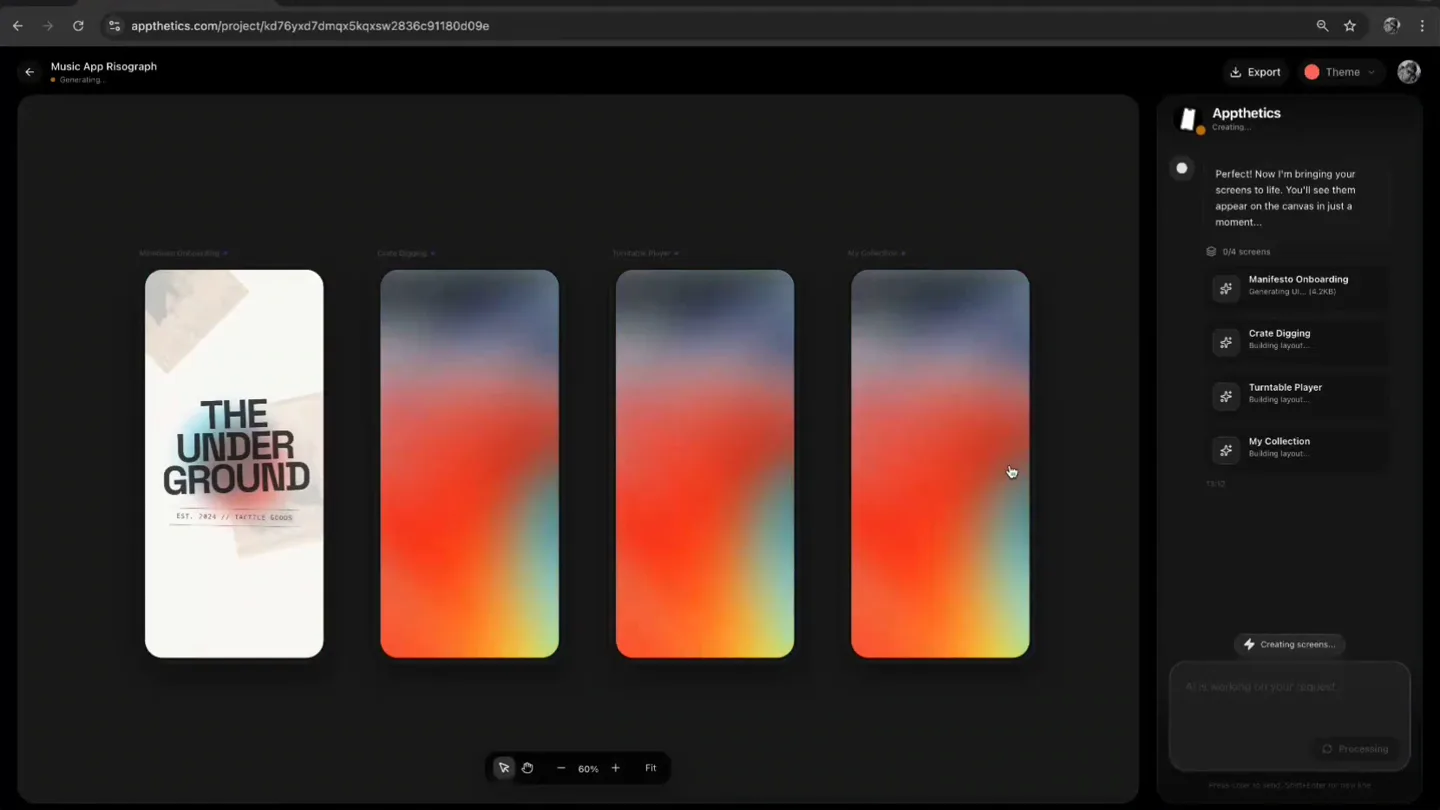
- Appthetics Music App Risograph Generating... Perfect! Now I'm bringing your screens to life. Don't like them? Hover on the canvas to just re-moment. QUICK SCREENS Manifesto Onboarding Generating (1/4, 12.0KB) Crate Digging Building layout... Turntable Player Building layout... My Collection Building layout... Creating screens... AI is working on your request... Processing THE UNDER GROUND EST. 2023 // TACTILE GOODS ENTER SHOP Chrome File Edit View History Bookmarks Profiles Tab Window Help Mon 2 Feb 1:13 PM Export Theme Appthetics Music 60% + Fit
- Camera
- Static, wide shot of a desktop application, focusing on the UI generation process.
- Motion
- Progressive content reveal within mobile app mockups, simulating AI generation.
Product Reveal
Dynamic Content Population
“(No spoken dialogue — ambient visual with subtle UI interaction sounds)”
- On screen
- Appthetics Music App Risograph Generating... Perfect! Now I'm bringing your screens to life. Don't like them? Hover on the canvas to just re-moment. QUICK SCREENS Manifesto Onboarding Generating (1/4, 12.0KB) Crate Digging Building layout... Turntable Player Building layout... My Collection Building layout... Creating screens... AI is working on your request... Processing THE UNDER GROUND EST. 2023 // TACTILE GOODS ENTER SHOP FRESH INK NEW ARRIVALS VIEW ALL GEOMETRY The Shapes URBAN DE Creative A STAFF PICKS SOFT PINK + ADD REDHEAD $24.00 + ADD NAUT $18.00 + ADD VIBE CHECK #newprojects #design #app Chrome File Edit View History Bookmarks Profiles Tab Window Help Mon 2 Feb 1:14 PM Export Theme Appthetics Music 60% + Fit
- Camera
- Static, wide shot, maintaining focus on the desktop application.
- Motion
- Sequential content loading and UI element population within the second mobile app mockup.
Feature Teaser
Interactive Player & Social Features
“(No spoken dialogue — ambient visual with subtle UI interaction sounds)”
- On screen
- Appthetics Music App Risograph Generating... Perfect! Now I'm bringing your screens to life. Don't like them? Hover on the canvas to just re-moment. QUICK SCREENS Manifesto Onboarding Generating (1/4, 12.0KB) Crate Digging Building layout... Turntable Player Building layout... My Collection Building layout... Creating screens... AI is working on your request... Processing THE UNDER GROUND EST. 2023 // TACTILE GOODS ENTER SHOP FRESH INK NEW ARRIVALS VIEW ALL GEOMETRY The Shapes URBAN DE Creative A STAFF PICKS SOFT PINK + ADD REDHEAD $24.00 + ADD NAUT $18.00 + ADD VIBE CHECK #newprojects #design #app NOW SPINNING - NOW SPINNING - NOW SPINNING Feel Good Inc. Gorillaz - Demon Days MY STACKS Chrome File Edit View History Bookmarks Profiles Tab Window Help Mon 2 Feb 1:15 PM Export Theme Appthetics Music 60% + Fit
- Camera
- Static, wide shot, observing the desktop application.
- Motion
- Animated progress bar, interactive buttons, and social sharing icons appearing within the third mobile app mockup.
Feature Teaser
Curated Collections & Iteration
“(No spoken dialogue — ambient visual with subtle UI interaction sounds)”
- On screen
- Appthetics Music App Risograph Generating... Perfect! Now I'm bringing your screens to life. Don't like them? Hover on the canvas to just re-moment. QUICK SCREENS Manifesto Onboarding Generating (1/4, 12.0KB) Crate Digging Building layout... Turntable Player Building layout... My Collection Building layout... Creating screens... AI is working on your request... Processing THE UNDER GROUND EST. 2023 // TACTILE GOODS ENTER SHOP FRESH INK NEW ARRIVALS VIEW ALL GEOMETRY The Shapes URBAN DE Creative A STAFF PICKS SOFT PINK + ADD REDHEAD $24.00 + ADD NAUT $18.00 + ADD VIBE CHECK #newprojects #design #app NOW SPINNING - NOW SPINNING - NOW SPINNING Feel Good Inc. Gorillaz - Demon Days MY STACKS EXPLORE TRENDS Curated Glittering Analog Dreams Blue Train Zine R04 Geometry Chrome File Edit View History Bookmarks Profiles Tab Window Help Mon 2 Feb 1:17 PM Export Theme Appthetics Music 60% + Fit
- Camera
- Static, wide shot, observing the desktop application.
- Motion
- Grid layout population with image and text content, demonstrating collection building and iteration.
Motion design primitives
Synthesizable in Remotion · key components of the ai-ui-generator-showcase template.
ProgressiveContentReveal
Content elements (text, images, UI components) fade in and slide up or down sequentially within a defined container, simulating a loading or generation process.
+ Code construction recipe
Use `Sequence` and `interpolate` with `spring` or `easeOutCubic` for opacity and translateY/translateY. Stagger `from` and `duration` properties for sequential reveals.
DynamicGradientBackground
Soft, blurred gradients with shifting colors animate subtly in the background of UI elements, suggesting a dynamic and customizable aesthetic.
+ Code construction recipe
Implement with `LinearGradient` or `RadialGradient` components. Animate `offset` or `color` properties using `interpolate` with `easeInOutSine` for smooth, continuous transitions.
InteractiveProgressBar
A horizontal bar fills from left to right, indicating progress, often accompanied by a subtle glow or pulse effect.
+ Code construction recipe
Create a `View` with a fixed width and a nested `View` for the progress. Animate the `width` of the inner view using `interpolate` from 0 to 100% with `linear` easing. Add a `BoxShadow` for the glow.
Style DNA & aesthetic system
Visual aesthetic
Typography
Motion
Special effects
Pacing & rhythm
Conceptual story rhythm
- 1
The Instant Creation
Purpose. Hook the viewer by demonstrating the core value proposition: rapid UI generation.
Execution. Initial blank mobile mockups quickly populate with diverse UI designs, showcasing speed and versatility.
- 2
The Iterative Design
Purpose. Showcase the flexibility and ease of iterating on designs and populating with real content.
Execution. Different mockups dynamically fill with varied content, from product listings to music players, highlighting customization.
- 3
The Feature Showcase
Purpose. Highlight key interactive features and content management capabilities.
Execution. Interactive elements like progress bars, buttons, and image grids animate to demonstrate functionality.
- 4
The Creative Freedom
Purpose. Convey the product's ability to empower users with creative control and diverse output.
Execution. The range of UI styles and content types across the mockups emphasizes the tool's broad applicability.




