beUI · Launch Video Breakdown: Hook, Pacing & Motion Design
beUI Pro ships 23 polished, customizable animated illustrations for feature cards, product sections, workflows, and UI states.
Scene-by-scene timeline & spoken transcript
The Hook
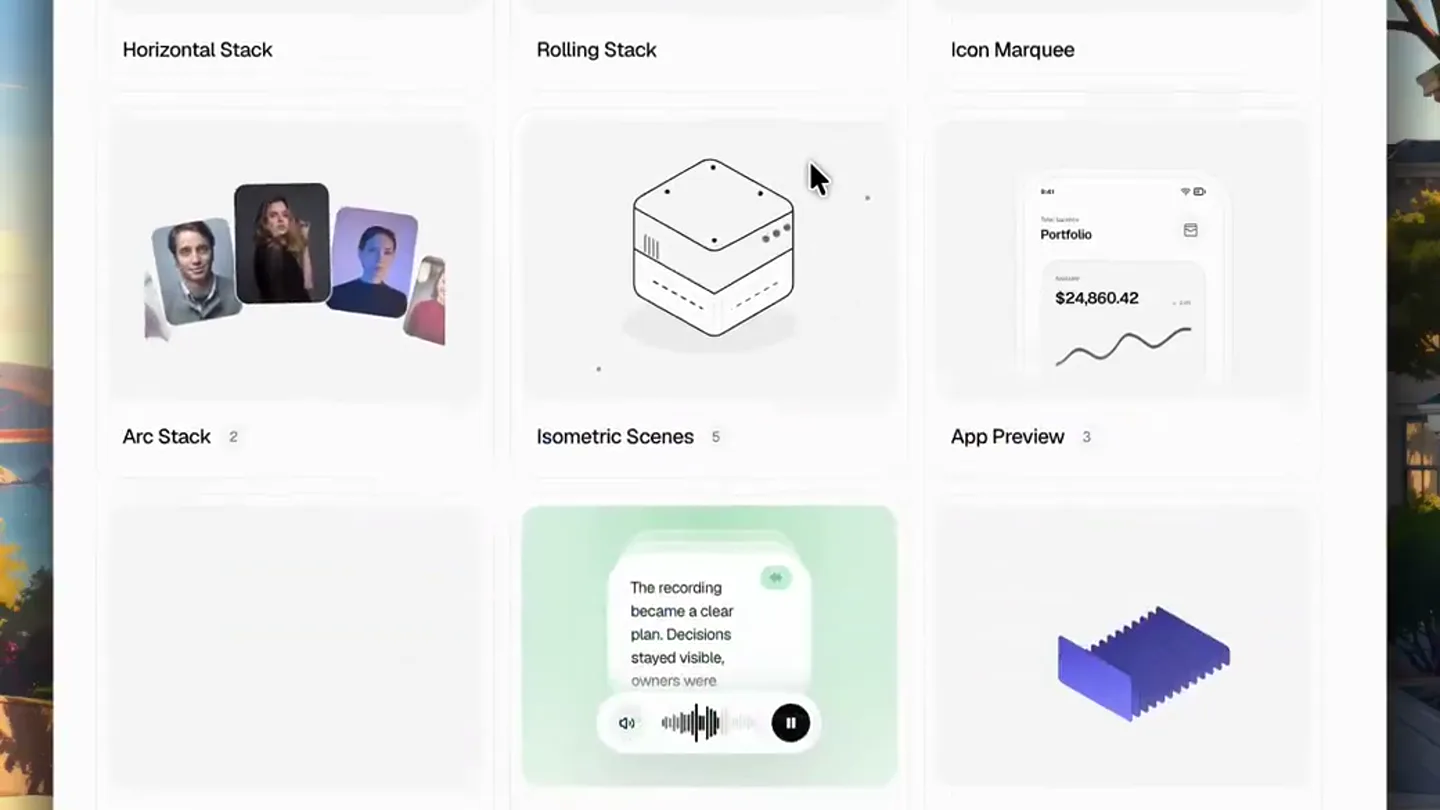
Showcasing the Illustration Library
“(No spoken dialogue — Mellow electronic score with arpeggiated guitar, synth pad, and subtle drum machine beat.)”
- On screen
- Animated illustrations 23 Small animated visuals made for feature cards, product sections, and empty states. Install the React source and adapt every detail. Copy prompt Horizontal Stack Rolling Stack Icon Marquee Arc Stack 2 Isometric Scenes 5 App Preview 3 Chat Exchange Voice Note Bar Wave
- Camera
- Static, wide shot of a web application interface, simulating a user browsing a library of animated illustrations.
- Motion
- Cursor interaction with hover states and subtle card animations, demonstrating the product's interactive nature.
Product Reveal
Deep Dive into 'Horizontal Stack'
“(No spoken dialogue — Mellow electronic score with arpeggiated guitar, synth pad, and subtle drum machine beat.)”
- On screen
- ← All illustrations Horizontal Stack A horizontal rolling stack that cycles icon-only cards through focus. Copy prompt copy page View as Markdown Use it in your project Install the source through your private beUI Pro registry, then customize the SVG, copy, theme tokens, and timing in your codebase. {} React and SVG source included Responsive and reduced-motion ready bun npm pnpm yarn $ bunx --bun shadcn add @beui-pro/illustration-horizontal-stack When to use it 01 Cycle through capabilities, tools, or categories in a wide visual area. 02 Highlight one icon while keeping the surrounding sequence visible. 03 Add a compact animated icon system to feature cards or product sections.
- Camera
- Zoom-in and pan to a specific illustration detail page, then scroll down to reveal implementation details.
- Motion
- Smooth UI transitions, content reveal on scroll, and code snippet highlighting, emphasizing ease of integration.
Feature Teaser
Exploring 'Arc Stack' and 'Connected Hub'
“(No spoken dialogue — Mellow electronic score with arpeggiated guitar, synth pad, and subtle drum machine beat.)”
- On screen
- ← All illustrations Arc Stack A semicircular stack that rolls images or connector cards through the center focus. Copy prompt Illustration 1 Illustration 2 bun npm pnpm yarn $ bunx --bun shadcn add @beui-pro/illustration-arc-stack bun npm pnpm yarn $ bunx --bun shadcn add @beui-pro/illustration-arc-stack- Connected Hub A compact collection of connected service hubs with editable integration nodes and animated signal paths. Copy prompt Illustration 1 Illustration 2 bun npm pnpm yarn $ bunx --bun shadcn add @beui-pro/illustration-connected- bun npm pnpm yarn $ bunx --bun shadcn add @beui-pro/illustration-connected-
- Camera
- Rapid navigation between different illustration detail pages, showcasing diverse animation types.
- Motion
- Quick cuts and focused zooms on key animated elements within each illustration, demonstrating variety and customizability.
Feature Teaser
Showcasing 'Live Presence'
“(No spoken dialogue — Mellow electronic score with arpeggiated guitar, synth pad, and subtle drum machine beat.)”
- On screen
- ← All illustrations Live Presence A collection of shared editing scenes with collaborator avatars, cursors, selections, and comments. Copy prompt Working draft Build the next version with shared context. Leave feedback in place and keep every change visible to the whole team. Illustration 1 Illustration 2 HOME PAGE HERO 3 editing Turn clear thinking into shared momentum. SAVE OFF bun npm pnpm yarn $ bunx --bun shadcn add @beui-pro/illustration-live-pres bun npm pnpm yarn $ bunx --bun shadcn add @beui-pro/illustration-live-pres Use the command beside each preview to install only that variant, then customize its copy, theme tokens, and timing. {} React and SVG source included Responsive and reduced-motion ready When to use it 01 Show multiplayer editing across documents, canvases, or shared workspaces. 02 Explain who is selecting, editing, or responding to shared content. 03 Add a generic real-time collaboration visual to a feature card or product section.
- Camera
- Focused view on the 'Live Presence' illustration, highlighting its interactive elements and use cases.
- Motion
- Animated cursors, avatar movements, and text highlights within the illustration, demonstrating real-time collaboration features.
Call to Action
Final Overview and Customization
“(No spoken dialogue — Mellow electronic score with arpeggiated guitar, synth pad, and subtle drum machine beat.)”
- On screen
- Animated illustrations 23 Small animated visuals made for feature cards, product sections, and empty states. Install the React source and adapt every detail. Copy prompt Copy page View as Markdown Horizontal Stack Rolling Stack Icon Marquee Arc Stack 2 Isometric Scenes 5 App Preview 3 Chat Exchange Voice Note Bar Wave Connected Hub 2 Search & Command File Flow Live Presence 2 Split Reveal
- Camera
- Return to the main library view, with a final cursor interaction demonstrating the 'Copy prompt' functionality.
- Motion
- Subtle UI animations, dropdown menu reveal, and a final cursor click, reinforcing the product's ease of use and accessibility.
Motion design primitives
Synthesizable in Remotion · key components of the beui-pro-showcase template.
InteractiveCardStack
A series of cards or icons arranged in a horizontal or arc-like stack, where hovering or clicking on one brings it into focus with a smooth scaling and position shift, while others recede slightly.
+ Code construction recipe
Use `interpolate` for scaling and `spring` for position changes. Implement `onMouseEnter` and `onMouseLeave` events to trigger animation states. Utilize `z-index` for layering and `transform` properties for visual depth.
DynamicCodeSnippetReveal
A code block that appears with a subtle fade-in and slide-up animation, featuring a tabbed interface for different package managers (bun, npm, pnpm, yarn) and a 'copy' button with a visual feedback animation.
+ Code construction recipe
Employ `interpolate` for opacity and `translateY` for the slide effect. Use `useState` to manage active tab and copy button states. SVG icons for copy functionality can be animated with `stroke-dashoffset` for a drawing effect.
RealtimeCollaborationOverlay
An illustration depicting a document or canvas with multiple animated cursors, user avatars, and highlighted text selections, simulating real-time collaborative editing.
+ Code construction recipe
Utilize `interpolate` for cursor movement paths and `spring` for avatar pop-in effects. SVG paths can be animated for selection highlights. Implement `loop` for continuous cursor motion and `sequence` for coordinated avatar entries.
Style DNA & aesthetic system
Visual aesthetic
Typography
Motion
Special effects
Pacing & rhythm
Conceptual story rhythm
- 1
Product Overview
Purpose. Introduce the breadth and variety of the animated illustration library.
Execution. A wide shot of the beUI Pro interface, showcasing multiple illustration categories and a cursor interacting with them.
- 2
Feature Deep Dive
Purpose. Demonstrate the customizability and ease of integration for individual illustrations.
Execution. Zooming into a specific illustration's detail page, revealing code snippets, usage guidelines, and interactive previews.
- 3
Use Case Showcase
Purpose. Highlight diverse applications and advanced features of the illustrations.
Execution. Rapid cuts between different complex illustrations like 'Arc Stack', 'Connected Hub', and 'Live Presence', showing their dynamic behaviors.
- 4
Empowerment & Call to Action
Purpose. Reinforce the value proposition and guide users to take the next step.
Execution. Returning to the main library view, emphasizing the 'Copy prompt' functionality and the overall accessibility of the tool.